
 Likes:
 Reply With Quote
because "Brexit"Originally Posted by deanossatnav

Joke!
so "UK/Ireland Oct-31-2018 Safety Camera, you have UK + Irlande its same for Canada or Usa, its inside same same kit "US+Canada_safetycam.gpi"
if you have inside this kit "UK/Ireland Oct-31-2018 Safety Camera"(UKIreland safetycam.gpi)
and after:
EX INSTALL:-----»
SD:\garmin\poi\UKIreland safetycam.gpi
and when your gps ask you: do you want put cyclop inside your gps, you say yes
If you prefer you can put directly inside your GPS, inside "POI" folder ex: your GPS:\Poi\UKIreland safetycam.gpi
you can remove this inside your poi folder any time, if you dont like !
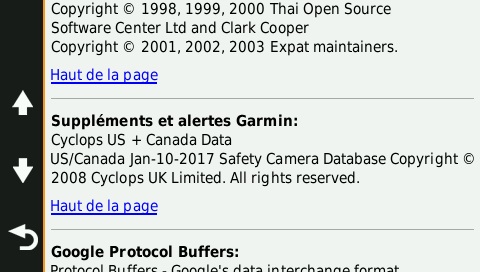
For check it if is inside your GPS:
- setup
- about
- scrool down
and old exemple (is mine):
Welcome guest, is this your first visit? Click the "Create Account" button now to join.


Results 221 to 230 of 406
Thread: Cyclop Safety Cameras for Garmin
-
30th July 2018, 12:08 AM #221Master


- Join Date
- Jun 2010
- Location
- Quebec/Canada
- Posts
- 144
- Rep Power
- 210
 SD:\garmin\poi\US+Canada_safetycam.gpi Originally Posted by pspman92
and when your gps ask you: do you want put cyclop inside your gps, you say yes
If you prefer you can put directly inside your GPS, inside "POI" folder ex: your GPS:\Poi\US+Canada_safetycam.gpi
you can remove this inside your poi folder any time, if you dont like !
-
26th November 2018, 12:03 AM #222Master
- Join Date
- Jun 2010
- Location
- Quebec/Canada
- Posts
- 144
- Rep Power
- 210
Last edited by quebec001; 26th November 2018 at 12:27 AM.
-
25th December 2018, 11:46 PM #223Master

- Join Date
- Sep 2010
- Location
- Europe
- Posts
- 2,005
- Rep Power
- 330
dēzl™ 780 LMT-D
When you update dēzl, the Garmin Express automatically downloads the POI points on device into the folder POI\ :Code:Please Login or Register to see the links
· Driver alerts for sharp curves, school zones, red light and speed camera warnings and more.
This is genuine and works on the device as it should.
Dēzl can not see the unlocked POI point and more because the device has built-in MSV (MSV = software protection).
You can find out more about this here.
Code:Please Login or Register to see the links
-
14th January 2019, 09:21 PM #224Junior Member
- Join Date
- Jul 2015
- Location
- Netherlands
- Posts
- 6
- Rep Power
- 0
Thank you very much for all the unlocked Cyclops files over the years!
I've tried to unlock the locked files for my zūmo 660 myself:
- loading files into Protected Garmin file toolkit_2254_x64 and pressing unlock button, creating new, _unlock files
- changing the FID's and creating a corresponding .unl in the Garmin POI folder using Jetmouse KeyGen_v1.5
- dragging the files over the decrypt in gpi_tool_v1.0 individually
However, I cannot see camera's this way. Is there a certain order in which to operate the Protected Garmin file toolkit_2254_x64? The readme file doesn't explain.
-
15th January 2019, 01:14 AM #225Important User


- Join Date
- Jul 2017
- Location
- CA
- Posts
- 1,466
- Rep Power
- 1060
Unlocking Cyclops GPI files using PGFT and other similar methods is fine for older devices. For newer devices they must be decrypted but that's optional for older devices without protected firmware. Your zumo 660 is an older device, so either of the methods you used should work. Have you also tried the "Unlock (FID 65535 ..etc)" button in PGFT because that should work for you without an UNL code. Also try the already decrypted ("unlocked") [Only registered and activated users can see links. ]. If nothing works then maybe you've not got the camera warnings enabled in your zumo's settings.... Something like: Tools>Settings>Proximity Points>Change and ensure the "Garmin Safety Cameras" entry is checked.
-
15th January 2019, 06:03 PM #226Junior Member
- Join Date
- Jul 2015
- Location
- Netherlands
- Posts
- 6
- Rep Power
- 0
Thanks for the quick response Butters, but I've also tried that. PGFT indeed says the files are unlocked but they don't work
 The unlocked files work fine as always, thanks Sue Davison!
  , I wonder what the difference is.
-
15th January 2019, 11:39 PM #227Important User
- Join Date
- Jul 2017
- Location
- CA
- Posts
- 1,466
- Rep Power
- 1060
Tried what? If you mean FID 65535 files they should work in your old device. Probably even the original file with FID 2496 and a properly *named* generated *.unl code should work in zumo 660 without using PGFT or anything else other than Jetmouse generator. Note that UNL and GPI files must share the same naming, e.g. SafetyCams.unl paired with SafetyCams.gpi.
There's a big difference between 'unlocking' with PGFT to FID 65535 and 'unlocking' with tools such as syzygy's gpi_tool. The latter actually decrypts the file. Confusingly such files are often also commonly referred to as simply 'Unlocked', rather than 'Decrypted' or 'Unencrypted' which are far more accurate terms than 'Unlocked' for them.The unlocked files work fine as always, thanks Sue Davison! , I wonder what the difference is.
The initial post gives this explanation:
Note there is a difference between 'unlocking' and 'decrypting' GPI files. Decrypted files will work with all devices capable of using Cyclops files. In modern MSV protected devices patching of the firmware may additionally be needed, more info in this post. Unlocked files generally work fine on older devices without modern firmware protection but may require FID to 700 or 900 change.
To unlock, use pietu's Patch Tool or marcocq's PGFT attached below.
To decrypt, use syzygy's Garmin GPI Tools v1.0. Sometimes decrypted files are often also loosely referred to as unlocked.Last edited by Butters; 16th January 2019 at 01:10 AM.
-
24th January 2019, 01:51 AM #228Member

- Join Date
- Oct 2008
- Location
- winnipeg Mb. Canada
- Age
- 40
- Posts
- 27
- Rep Power
- 0
anyone else having problems for some reason when i place the latest camera files for usa +canada they don't show up on the gps nuvi 265w and when i go for ride GPS won't show them i have deleted placed them on again and again same result.
-
24th January 2019, 12:22 PM #229Master

- Join Date
- Aug 2009
- Location
- Australia
- Posts
- 96
- Rep Power
- 74
They show up OK in my 3597. Yours could be a corrupt download, try downloading a fresh copy to be sure.
-
27th January 2019, 12:15 AM #230Member

- Join Date
- Jul 2011
- Location
- Denmark
- Posts
- 11
- Rep Power
- 0
I have the same problem on a Dezl 760. Doesn't show up and no warnings
Last edited by BalooDK; 27th January 2019 at 12:33 AM.
Dezl 760 LMT
Advertissements

Tags for this Thread

 Posting Permissions
Powered by vBulletin
Copyright © 2026 vBulletin Solutions, Inc. All rights reserved.
Copyright © 2026 vBulletin Solutions, Inc. All rights reserved.
All times are GMT +1. The time now is 10:20 AM.
Bookmarks