Welcome guest, is this your first visit? Click the "Create Account" button now to join.



 Likes:
Results 2,771 to 2,780 of 3978
-
2nd August 2020, 12:27 PM #2771Master


- Join Date
- Apr 2016
- Location
- Rio de Janeiro
- Posts
- 476
- Rep Power
- 762
-
2nd August 2020, 12:38 PM #2772Master
- Join Date
- Apr 2016
- Location
- Rio de Janeiro
- Posts
- 476
- Rep Power
- 762

-
2nd August 2020, 12:57 PM #2773Master

- Join Date
- Mar 2017
- Location
- Germany
- Posts
- 1,069
- Rep Power
- 912
we do not need to discuss - Pongo already has the Menu:
->Skin Settings ->Screen Display ->On Arrival at the Destination:
- Do Nothing
- Route Cancel/Back
- Warning
- Warning and Exit App---
ex calipoint say: my Knowledge of today is what I read yesterday 🧐😉
-
2nd August 2020, 01:23 PM #2774Master
- Join Date
- Apr 2016
- Location
- Rio de Janeiro
- Posts
- 476
- Rep Power
- 762
Every high-level discussion is always healthy.

This matter originated with what was written in this post [Only registered and activated users can see links. ]
The user was referring to ux button_delete_route.
These options described by you are activated by the ux reached_your_destination.zip.
That is, there are three ux (button_delete_route, button_deleteroutewp.zip and reached_your_destination.zip) that can serve the user each one in his own way.
And there is also the option of the command indicated in post #2815 for the sys.txt file.Last edited by jorgeultra; 2nd August 2020 at 02:07 PM.
-
3rd August 2020, 12:52 PM #2775Master


- Join Date
- Nov 2013
- Location
- somewhere in between
- Posts
- 84
- Rep Power
- 50
I did not see there was a possibility of a reverse route. Is there such an option?
-
3rd August 2020, 01:50 PM #2776Master
- Join Date
- Apr 2016
- Location
- Rio de Janeiro
- Posts
- 476
- Rep Power
- 762
What would be a reverse route?
Can you give an example please?
-
3rd August 2020, 03:43 PM #2777Master


- Join Date
- Jul 2017
- Location
- IL
- Posts
- 847
- Rep Power
- 307
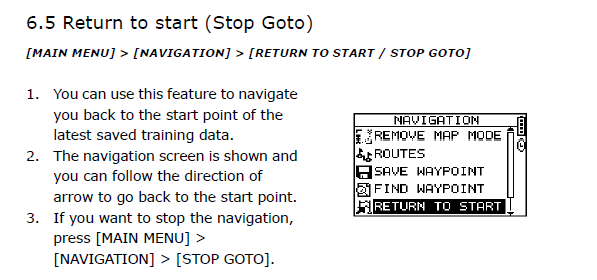
"RETURN TO START" as the feature in Outdoor GPS Wrist Device? Originally Posted by chopsticks

Spoiler: GH-625B GPS Wrist Device
Spoiler: Stop Goto
An interesting challenge and is an 'original idea' for those who know how (and want) to create a UX for PONGO or for PAL without skin.Last edited by kwbs; 3rd August 2020 at 05:44 PM.
-
3rd August 2020, 03:53 PM #2778Master
- Join Date
- Jan 2016
- Location
- Germany
- Posts
- 518
- Rep Power
- 894
Reverse route ......
What's the point?
I think Pongo skin has enough functions now
Sometimes it takes 10 minutes to find a setting ...
My Opinion: NonsenseLast edited by Golom; 3rd August 2020 at 04:11 PM.
-
3rd August 2020, 09:53 PM #2779Member
- Join Date
- Mar 2019
- Location
- Netherlands
- Posts
- 14
- Rep Power
- 0
Yes, there are enough functions already.
Save your location at the start.
Problem solved and no extra ux needed.Last edited by Suzuki Ignis; 4th August 2020 at 03:31 PM.
-
4th August 2020, 12:19 PM #2780Master
- Join Date
- Nov 2013
- Location
- somewhere in between
- Posts
- 84
- Rep Power
- 50
Why do you think it's nonsense? When I plan a multi-point route and want to go back the same way, I have to re-plan every time instead of just turning it back - in the opposite direction backwards. With Google Maps, this can be done with one click. I don't see what the problem would be here? Originally Posted by Golom

 Reply With Quote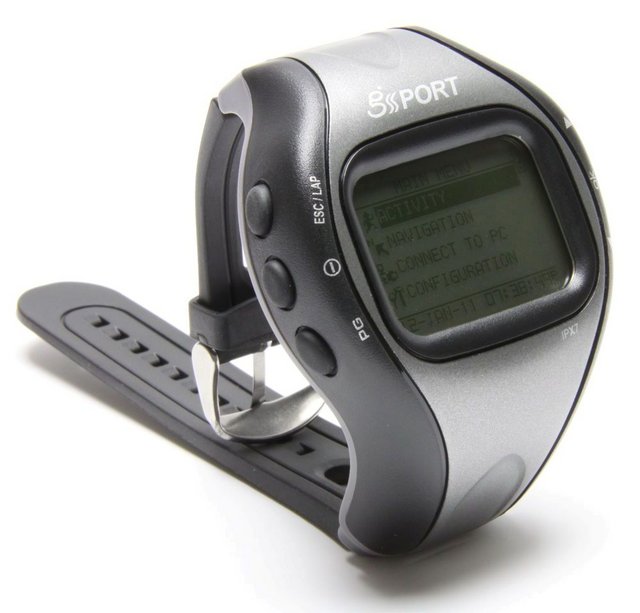


Bookmarks