
 Likes:
 Reply With Quote
Thanks Tonytone!Originally Posted by tonytone

I have not thought of this and it just looks as the most logical solution.
And the best part of it is that it works perfect.gif ":happydance:")
Welcome guest, is this your first visit? Click the "Create Account" button now to join.


Results 431 to 440 of 533
-
26th March 2013, 04:18 PM #431tonytoneGuest
 I don't have the Western Europe 2.2 ipa--I'm running Garmin USA 2.2 ipa... Originally Posted by trancespirit
To all of those who are asking me as to why features like Google and Weather don't work on their Garmin app, even after downloading and using my plist files--here is a very simple solution to determine if it's simply a matter of something else not completely due to some plist setting: Uninstall any and all Garmin apps from your (jailbroken) iPhone so that there are no traces of it on your iPhone, then (re)install a 2.2 version of the Garmin (non-legit) app, preferably Garmin USA 2.2; if your /etc/hosts file is completely virgin, then add just the following line (and nothing else):
127.0.0.1 gold.garmin.com
If the above line already exists (e.g., you've already messed with your /etc/hosts file), then make sure that it is the only line that has "garmin" in it--if there are any other lines that have "garmin", get rid of all of them.
After doing the previous step, then install just the gmapprom.img map appropriate for your region, along with any necessary SID files (if the app you downloaded doesn't contain any SID files, that is--they may have been stripped away so as to reduce the size of the app for download purposes); do not install any of my custom plist files.
Once you've done all of the above, fire up the Garmin app and see if the Google Local Search icon appears when you click on "Where To"--if it does, then go ahead and customize plist files as desired since now you have a starting point for troubleshooting in case the Google icon doesn't show up again after your plist customization. If OTOH there is no Google icon after you fire up the app for the first time, then I don't know what else to tell you. If your phone is jailbroken, then I have no idea what else you may have installed on your phone--whether it be an iTunes-store app or an app installed from Cydia or some other third-party source--that perhaps might be conflicting with the Garmin app somehow.
I will actually try this exercise myself on a jailbroken iPhone that has never had Garmin installed to see if my suggestion actually holds water, when I find some time to do so...
Also--through trial and error I have discovered that it's "silver.garmin.com" that cannot be blocked in order for Google/Traffic/Weather to work. In addition, I'm not sure what exactly causes the Google icon to appear--I (re)blocked silver.garmin.com in my /etc/hosts file, yet the icon still remains visible to select in "Where To"...however, as I expected any searches made within Google while silver.garmin.com is blocked will return no results. I can only suspect that once I unblocked silver, one of the plist files got updated automatically to reflect that I now have access to Google--hence why the Google icon still remains visible even after I reblocked silver.garmin.com in my /etc/hosts file. Please also keep in mind that the stuff in this paragraph applies only to version 2.2 and older since 2.3 and above does ALL checks through gold.garmin.com.Last edited by tonytone; 26th March 2013 at 05:01 PM.
-
26th March 2013, 04:59 PM #432Junior Member


- Join Date
- Jun 2010
- Location
- Bulgaria
- Posts
- 4
- Rep Power
- 0
-
26th March 2013, 07:21 PM #433Member
- Join Date
- Feb 2013
- Location
- frankfurt
- Age
- 52
- Posts
- 17
- Rep Power
- 0
Thanks for helping to all of us. It would be great if you post here your 2.3 or 2.2 IPA with all you customizations but without the Maps..
We all appreciate this..
Regards
Originally Posted by tonytone
-
26th March 2013, 08:31 PM #434tonytoneGuest
bent622--I don't believe I can post the 2.2 Garmin IPA file here in this thread/forum for obvious reasons; please PM me if you still need a copy; note--it is Garmin USA 2.2 w/ no maps; custom plist files can be downloaded in the link I provided elsewhere in this thread. Even with all that, I cannot guarantee that it'll work on an iPhone that doesn't have region/language set to US/English, and if you intend to use the app outside of the US/North America...for all I know, Garmin could be blocking connections to silver.garmin.com from certain IP addresses/subnets--e.g., ever try to go to a certain website, only to be greeted with a message stating that access to the site is not allowed for your country?
-
26th March 2013, 11:08 PM #435Member
- Join Date
- Mar 2013
- Location
- US
- Posts
- 15
- Rep Power
- 0
hello, Tony, i just followed the instructions...erase the app, and then clean install with only the gold garmin line in hosts.. opened the app and guess what? no google search... so I think it might be the 2.2 ipa i have, or I dont know, but I will just keep it like that. I am not going to bother anymore... it works fine and I can live without the google search and the weather on destination.... thanks anyways for all the help Originally Posted by tonytone
Last edited by Neil; 27th March 2013 at 04:35 AM. Reason: Reduce quote.
-
27th March 2013, 03:22 AM #436tonytoneGuest
Forgive me if I'm speaking the obvious, but I should preface what I'm about to say by stating that these instructions are meant for users who choose to run a non-legit version of the Garmin app, since if you bought the app through legitimate means, Garmin/Traffic/Weather would/should already be working by default without the need to hack /etc/hosts or install a firewall app.
OK I think I finally figured out how to get Google/Weather/Traffic to work; the following tutorial assumes you know how to edit files, copy them to your iPhone, and setting file permissions/ownership, using appropriate tools at your disposal. This tutorial is not going to show you how to use iFile or iExplorer, or how to jailbreak an iPhone--look elsewhere if you need help on those things.
If you're ready to have at it, then please perform the following in the exact order listed:
0) Make sure your iPhone is connected to the internet (either via Wifi or Cellular) before continuing
1) Install Garmin StreetPilot app version 2.2--not 2.0 or older, and not 2.3 or newer; please don't ask me where to download 2.2. Once you've installed Garmin 2.2 to your iPhone, it is important that you do not start up the app just yet!
2) Using iFile or other file editor, edit the /etc/hosts file and add only the following entry:
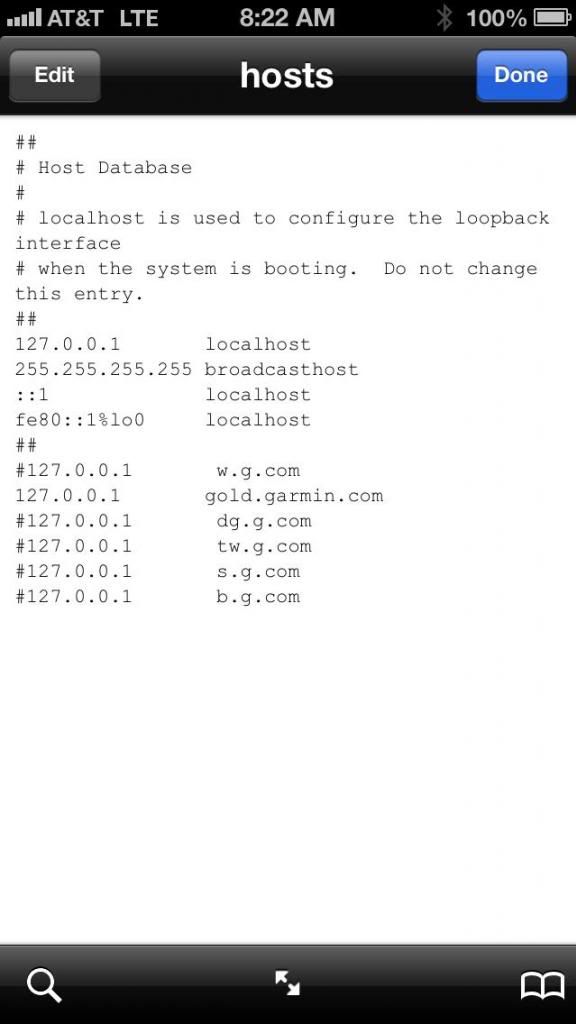
127.0.0.1 gold.garmin.com
Do not add a line in /etc/hosts that contains silver.garmin.com (get rid of it if already exists in your /etc/hosts file). If you're uncomfortable with messing with the /etc/hosts file, you can always install a firewall app from Cydia (Firewall IP is a good one to use) and follow the instructions for that app on how to block gold.garmin.com (but not silver.garmin.com).
Your /etc/hosts file should eventually look something like this (note the existence of the gold.garmin.com line but no other *.garmin.com lines, and you can ignore those other *.com entries as they are not important/relevant to this tutorial):
3) If the 2.2 IPA you installed didn't come with any maps, make sure you install at a minimum gmapbmap.img and gmaptz.img; you can also go ahead and install your desired gmapprom.img map file and any other map files (e.g., gmap3d.img for 3D Buildings and Landmarks, gmapdem.img for Panorama View 3D, JCV files for PhotoReal Junction View, and SID files for InstaSearch and Safety Camera data--these are needed or else your Address/Contact searches will take a lot longer to return results) at this time. Instructions on where to download the map files, how to install them on your iPhone, and what directories the map, JCV, and SID files need to be placed in can be found elsewhere in this forum.
4) Download and copy over to your iPhone the following plist files:
[Only registered and activated users can see links. ]
[Only registered and activated users can see links. ]
[Only registered and activated users can see links. ]
[Only registered and activated users can see links. ]
These four plist files need to be copied into /private/var/mobile/Applications/****/garmin-nav.app/; you may want to make a backup of the original plist files before copying these ones over, just to be safe. I used WinSCP to copy the modified plist files from my PC to my iPhone but you are more than welcome to use whatever tool fits the bill here.
Upon copying these four plist files to your iPhone, make sure the permissions of each of them are set to:
read,write
read
read
Make sure the ownership of these four files are set to:
mobile:mobile
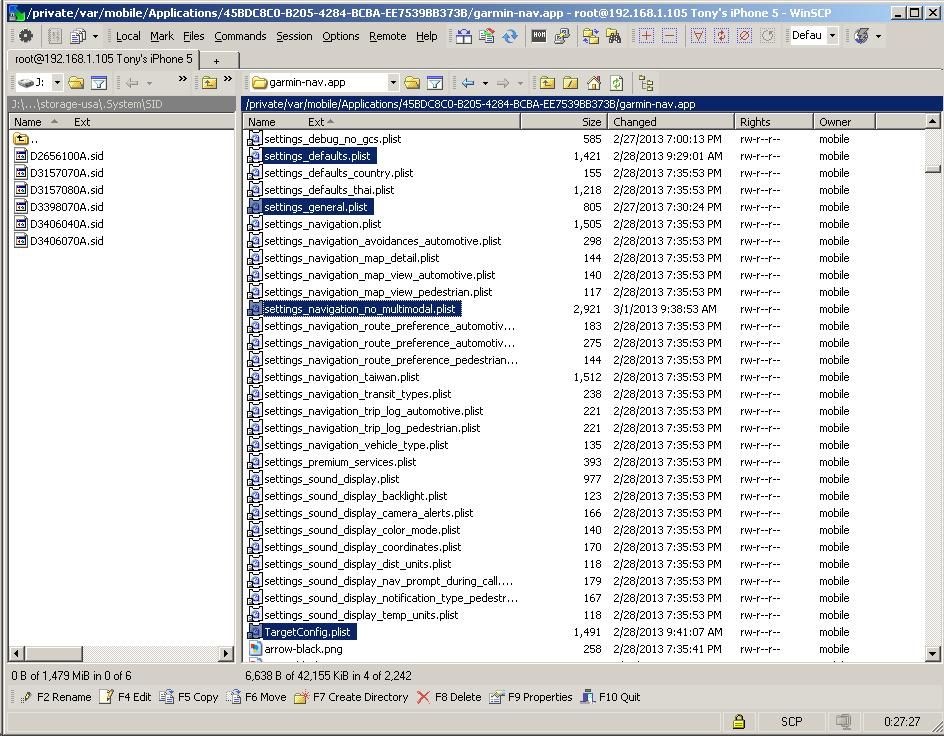
Instructions for changing/verifying file permissions and ownership can be found elsewhere in this thread.
Note--if before having read these instructions you had downloaded these files in the past, please redownload them--turns out I uploaded older revisions of my plist files...sorry about that!!!
5) Once you've completed steps 0-4, now you can start up the Garmin app; acknowledge the Warning messages and allow Location Services when prompted. Make sure that the Location Services icon appears at the top of the iPhone screen--by waiting for it to appear, you will at least give the Garmin app enough time to generate the files that you will need to delete later on in this tutorial--LOL.
6) Once step 5 is completed, exit out of the app; make sure you completely kill it--double tap on the iPhone Home button and kill it from the background task list.
Once you've completed steps 0-6 above, then proceed to deleting the following files--again, I used WinSCP but you can use whatever works for you. Also--you may want to refresh the directory listing just in case they don't show up right away when you go into the directories listed below:
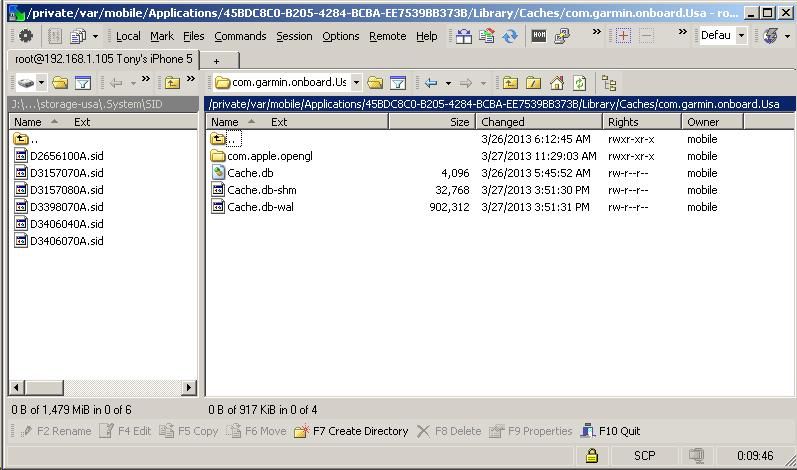
7) Delete all of the Cache.db* files in /private/var/mobile/Applications/****/Library/Caches/com.garmin.onboard.***/
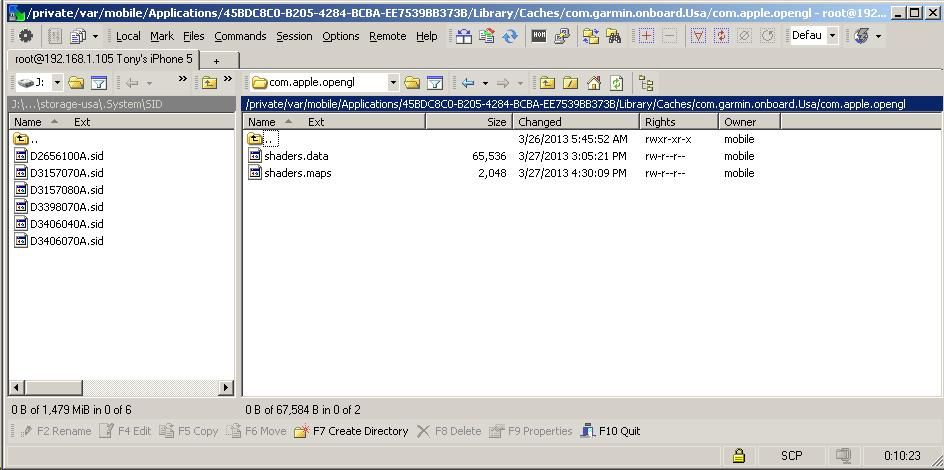
8) Delete all of the shaders.* files in /private/var/mobile/Applications/****/Library/Caches/com.garmin.onboard.***/com.apple.opengl/
9) Delete all of the GARMIN* files in /private/var/mobile/Applications/****/Library/persist/Garmin/nonvol/
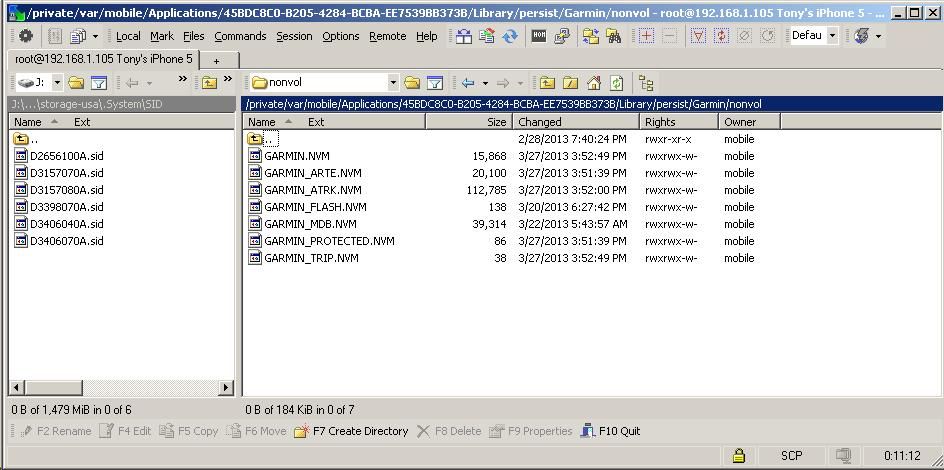
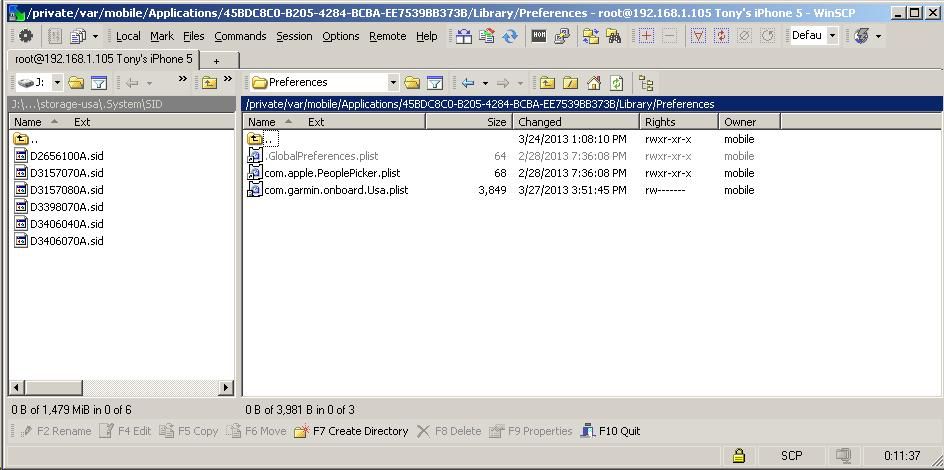
10) Delete the com.garmin.onboard.***.plist file in /private/var/mobile/Applications/****/Library/Preferences/
11) Delete all of the *.db files in /private/var/mobile/Applications/****/Library/sdcard/.System/SQLite/
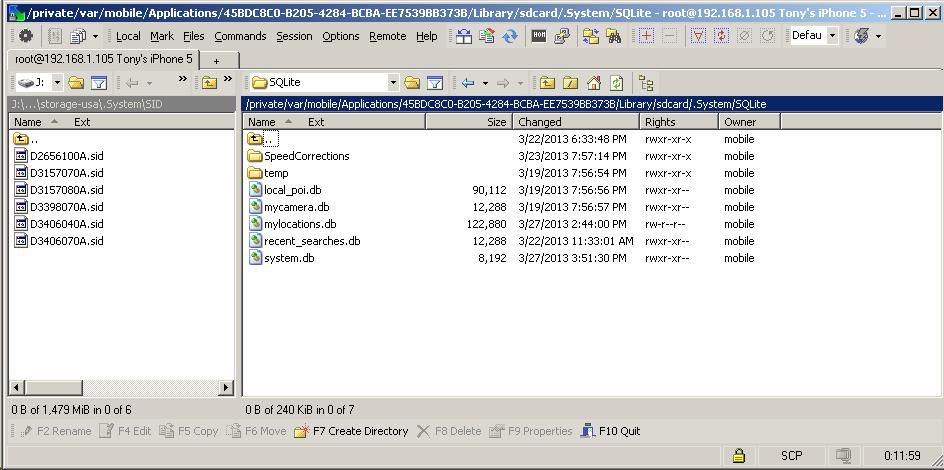
You may want to refresh the directory listing after each of the steps in 7-11 to make sure that the files did indeed get deleted.
If you didn't find any files to delete in any of the steps in 7-11 above, then you either didn't refresh the directory listing like I suggested, missed a step in 1-6 above, and/or followed the instructions out of order--if so, then delete the Garmin app and start all over from the beginning.
Make sure that the files you deleted in steps 7-11 are actually indeed deleted! Once you've made sure of this, then go ahead and start up the Garmin app again; acknowledge the Warning messages again, wait for the Location Services icon to appear at the top, then go ahead and check to see if Google/Traffic/Weather work.
Again, it goes without saying--you need an internet connection in order for Google/Traffic/Weather to work correctly, whether it be over Wifi or cellular. No internet connection = No worky Google/Traffic/Weather.
I personally made sure that following all of the above steps in the exact order listed will result in a working Google/Traffic/Weather, with the only possible caveat being that I'm using Garmin USA 2.2 app on an iPhone while in the USA.
Hope this finally ends the puzzle on how to get everything to work in 2.2 once and for all!
P.S.: In order to receive live data of traffic congestion areas (where offered), you will need to install the free trafficTrends in-app option in the Extras menu; if you don't, then don't be surprised if, when you tap Traffic -> Traffic Search, it says "No traffic incidents found"...Last edited by tonytone; 28th March 2013 at 01:05 AM. Reason: Updated complete full instructions for making Garmin 2.2 work completely--rev 2.0
-
27th March 2013, 04:14 AM #437Member
- Join Date
- Mar 2013
- Location
- US
- Posts
- 15
- Rep Power
- 0
Hey tony, did al that, still no luck. I did a clean install of the 2.2 and look for those files and they were not there... probably because you need to open the app first so that they are created as you stated. So like those files were not there, I could not erase them. Then I opened the app, close the app, checked again and the files were created, all those files. Next I erased them and installed your .plist files, set permissions, all that, open the app, and still no google. I think you did something different that perhaps you didn't pay attention to and that is how you got it fixed. But this way, I tested it twice and it does not fix the google search or weather or traffic... thanks for all the help though... Originally Posted by tonytone

Last edited by Neil; 27th March 2013 at 04:33 AM. Reason: Reduce quote.
-
27th March 2013, 04:39 AM #438Garmin/GPS Systems GMod.


- Join Date
- Aug 2011
- Location
- Oz.
- Posts
- 6,859
- Rep Power
- 2569
Guys, no need to quote the whole post particularly if it's a long one. Just reduce it down, or if your making a post immediately after it, don't bother with a quote at all, just address the member it's meant for. Helps to keep the thread readable.
@tonytone
Great work mate. If you're satisfied you've ironed the bugs out we can put a link in Post #1 to get ppl here quicker. 'Thanking Posts' are banned. To thank someone, and/or to see hidden links and content, use the [Only registered and activated users can see links. ] button below left of the helpful post then refresh your browser [F5 key]. 'Thanking Posts' are banned.
Please don't spam. Posts serving no purpose other than to thank or to ask about hidden links are trashed or deleted, it's GPSPower's policy under [Only registered and activated users can see links. ]. Please don't spam.
[Only registered and activated users can see links. ] should make their first post as a new Intro Thread in [Only registered and activated users can see links. ].
-
27th March 2013, 04:43 AM #439tonytoneGuest
angelsinojos--if you did those things in the exact order you stated in your reply, then that's probably why it didn't work. I don't know which copy of 2.2 you are installing or where you got it from; please follow my instructions in the exact order I listed them. If you installed my custom plist files AFTER you erased those files--that's not gonna work; you need to erase those files AFTER you do all of the other prep work first.
Anyways, please read my updated instructions.Last edited by tonytone; 27th March 2013 at 05:54 AM.
-
27th March 2013, 04:46 AM #440tonytoneGuest
Neil--thanks for the props! I won't call it good just yet, if anything because I don't know what IPAs other folks are using; I'm running a Garmin USA 2.2, so I cannot guarantee my instructions will work if some other non-USA IPA is being used. I do know that, with the USA 2.2 and some refinement of my instructions, I'm fairly confident that Google/Traffic/Weather will work if my steps are followed exactly as detailed. Originally Posted by Neil
Update--turns out part of the problem was that I uploaded older/incorrect plist files; I've since uploaded the correct ones (download links are in the original download link post) so folks will need to redownload them as part of my instructions...speaking of which, I've updated the instructions again so that there will be very little doubt as to what needs to be done and in what order.Last edited by tonytone; 27th March 2013 at 05:45 AM.


Bookmarks