
 Likes:
 Reply With Quote
Load the "B - 64 bit.png" and try to save as NNG .bmp, and it will crashed.
Welcome guest, is this your first visit? Click the "Create Account" button now to join.


Results 31 to 40 of 63
-
10th October 2018, 07:03 PM #31Master


- Join Date
- Mar 2017
- Location
- España
- Posts
- 155
- Rep Power
- 524

I do not like your sarcasm, but I will answer you.....
Loading the image (png) in the program. Then:
File\Save As...\NNG Bitmap (*.bmp)
It works for me!
Edit.....
If you want video, I will.....Last edited by railroad; 10th October 2018 at 07:06 PM.
-
10th October 2018, 07:08 PM #32Important User


- Join Date
- Apr 2012
- Location
- Darkside of the Moon
- Posts
- 2,849
- Rep Power
- 1398
Do not PM me with questions. That's what a forum is for.
-
10th October 2018, 08:05 PM #33Master
- Join Date
- Mar 2017
- Location
- España
- Posts
- 155
- Rep Power
- 524
Whoever wants to believe, who wants to not believe.....
I say that this morning and tonight happened.
Now I wanted to record the video and the program began to crash.
Let the author of the program intervene and say it is possible!
-
10th October 2018, 08:58 PM #34Master


- Join Date
- Jan 2016
- Location
- TUSCANY - ITALY
- Posts
- 353
- Rep Power
- 298
What worries me is not the 64-bit PNG file, that makes crash the program, this was only a test to remedy the 32-bit PNG file in which you later see the black background.
Until now I have always adopted the "A" option...... from PNG with a black background at 32 bit, to NNG Bitmap with iPAQ.
With this system, however, with DView you can see icons with a black background........
I saw that from PNG with a transparent background at 32 bit, to NNG Bitmap works, and I have to try from BMP at 24 bit to NNG Bitmap if works too.
Rather, I have to see with which system I get the "lightest" images, my icons are more complex and the speedcam.zip file is around 4.5 Mb.
----------------------------------------------------------------------------------------------------------------------
Unfortunately, even if we start from a 24-bit BMP file and converted it to NNG Bitmap with the program, it does not work, we still see the icons with a black background.
For now the only way to work is to start with a 32-bit PNG file with transparent background, (with the icons inserted), and convert it to NNG Bitmap.Last edited by BIRBANTE; 12th October 2018 at 08:46 PM.
-
14th October 2018, 10:14 AM #35Member +

- Join Date
- Apr 2012
- Location
- España
- Posts
- 80
- Rep Power
- 41
@birbante the same problem happens to me that osiris4isis
Open the B - 64 bit.png
Try to save as PNG .bmp
and it will crash.
-
24th December 2018, 09:41 PM #36Important User
- Join Date
- Jan 2013
- Location
- I don't know :x
- Posts
- 65
- Rep Power
- 406
New version 1.1.1 available.
I updated all dependancies and I tried to fix the bug on images with more of 8 bits by color component.
Inversed vertical gradient on svg is fixed too.
@BIRBANTE
I don't understand the problem.
A 24bits bmp do not have an alpha layer so in the converted image you do not have it too.Unfortunately, even if we start from a 24-bit BMP file and converted it to NNG Bitmap with the program, it does not work, we still see the icons with a black background.
If you use a 32bits bmp with alpha the converted will be with alpha too.
Alpha layer is optional on nng bitmap, to get a smaller file I do not add an useless alpha layer.
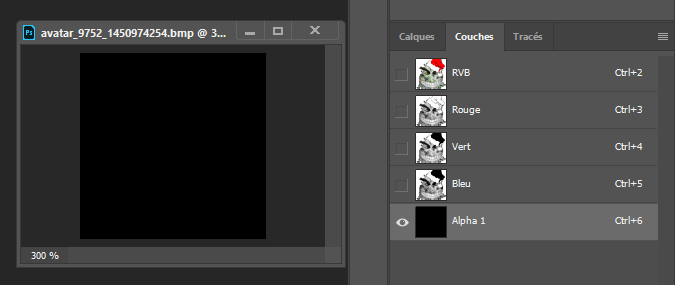
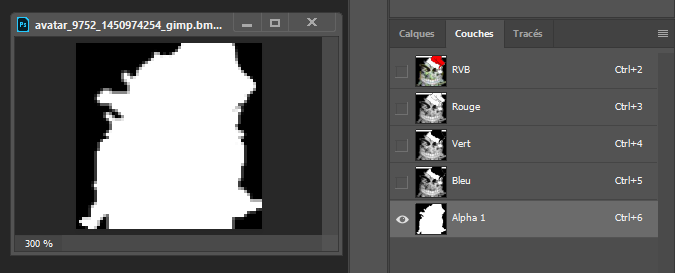
I found a big bug on photoshop, when you convert an image with photoshop to a 32 bits bmp an alpha mask full transparent is applied on the image.
Gimp do not have the bug.
-
24th December 2018, 10:58 PM #37Master
- Join Date
- Jan 2016
- Location
- TUSCANY - ITALY
- Posts
- 353
- Rep Power
- 298
With iGO it would not matter to have a 32 bit BMP image to have transparency, what you want it to be transparent you make it in black RGB 0,0,0.
With Photoshop I started from the black stripes 0.0.0 where I put the images of the icons in PNG. The images of the icons I make in PNG because they have at least transparent angles, and sometimes even something more.
Up to now I saved the strips with the icons in 24 bit BMP, and then I convert them with iPAQ, this procedure has always worked.
if with your program we see black backgrounds it means that in the conversion it turns the pure black RGB 0.0.0 in less dark blacks.
I'm not here to criticize your program, I realized that thing because I used it, we are not many to change the icons, the others did not notice it simply because they never used it.
After a while I learned to use Photoshop and Illustrator and I will continue to use them, the 32 bit BMP bug does not apply to my case, as I already told you, I save the strips with the icons in 24 bit BMP, after which it is iGO to render the black background in transparent background.....It is a bug of iGO......gif ":)))")
Spoiler: img
I have just completed my last speedcam file with the latest icons, but I will gladly try your latest version.
I wish you a Merry Christmas and a Happy New Year.
-
25th December 2018, 01:53 AM #38Important User
- Join Date
- Jan 2013
- Location
- I don't know :x
- Posts
- 65
- Rep Power
- 406
Nope igo do not bugs, it's a bug of ipaq.
Ipaq do not handle properly the transparency
And the photoshop bug is confirmed when you convert an image to a 32bits bmp you can check the result, an alpha layer full transparent on all pixels is added.
Open the result file on photoshop and verify the alpha layer if you don't believe me.
Spoiler: Original png
Spoiler: Save to bmp 32 bits with photoshop cc2019
Spoiler: With gimp
I precise this bug because the result is a full transparent image on dview when it's a 32 bits bmp created with photoshop ...
Ipaq remove the alpha on pixels not black ... I do not understand why, and so you have said that ipaq add alpha on black pixels ... an another mystery :p
For me a proper conversion is when the result is the same than the input in an other format.
The nng bitmap can be defined with an alpha layer or not, it's crazy to add an alpha layer when an opaque image is converted ^^
It's line 483 and 486 where I put alpha to true only if it's detected in the original image => [Only registered and activated users can see links. ]
All of that to say I want to fix all bugs but for that I don't think it's my fault
And my full black 0,0,0 is a full black 0,0,0 and nothing change that.
Merry christmas and happy new year you too, thanks.Last edited by djeman; 25th December 2018 at 03:16 AM.
-
25th December 2018, 09:32 AM #39Master


- Join Date
- Mar 2017
- Location
- Tunisia
- Posts
- 457
- Rep Power
- 1335
Hi Djeman
Thank you for this valuable work tool.
A small problem with your update Version 32: we can not choose it as the default program to open SVG files
It's returns to Internet Explorer ??.With the old version all is OK
RegardsGPS: TomTom ONE
Smartphone: THL T11 Android 4.2.2 Resolution 720x1280
Sygic 14.3.4 IGO Primo 9.6.29.636868 Skins : Doupas V9.0h , Dimka/Frontzosd
-
25th December 2018, 11:15 AM #40Master
- Join Date
- Jan 2016
- Location
- TUSCANY - ITALY
- Posts
- 353
- Rep Power
- 298
It's true, but I'm not able to create/modify programs and I have to stick to their results. Originally Posted by djeman

I had no need to create 32-bit bmp images with Photoshop to use iPAQ, when I get the same result with a 24 bit bmp image or with a png image.I precise this bug because the result is a full transparent image on dview when it's a 32 bits bmp created with photoshop ...
Image 130x4160 pixel in bmp 24 bit with black background 0,0,0 = 1,55 Mb converted with iPAQ = image bmp/rle of 410 kb
Image 130x4160 pixel in png with black background 0,0,0 = 448 kb converted with iPAQ = image bmp/rle of 410 kb (equal)
Image 130x4160 pixel in png with transparent background = 480 kb converted with iPAQ = image bmp/rle of 476 kb (bigger)
And I'll tell you more, if inside the icons there are some black parts 0,0,0 are turned into transparent too and you will see "holes", I have to change them to black 5.5.5.Ipaq remove the alpha on pixels not black ... I do not understand why, and so you have said that ipaq add alpha on black pixels ... an another mystery
I have only used your program in the same way that I use iPAQ obtaining different results....... I'm not able to determine where the bug is.All of that to say I want to fix all bugs but for that I don't think it's my fault
And my full black 0,0,0 is a full black 0,0,0 and nothing change that.
When one knows how it works that thing adjusts accordingly, I only need to get files as small as possible. I will certainly try your new version these days.
Regarding the svg files, I have Illustrator and I see them with it and I can even edit them, especially in complex svg files like ico_speedcam, with the other programs you only see the image at the top of the list.



Bookmarks