
 Likes:
 Reply With Quote
@safealdibiki: If you followed, a lot has happened in the last few months especially in Speedcam-Warning-Voice and the Announcements are missing. Sometimes you had to edit the Dictonary.voice file yourself.
Recommendation: read back umpteen posts - or use Pongo-Skin until [Only registered and activated users can see links. ]
Welcome guest, is this your first visit? Click the "Create Account" button now to join.


Results 2,791 to 2,800 of 3975
-
10th August 2020, 12:16 AM #2791Member +


- Join Date
- Jul 2015
- Location
- Cairo, Egypt
- Posts
- 76
- Rep Power
- 16

Dear golom
Thank for your quick reply
I did the first part befor
sys.txt
[sound.announcer]
overspeedlimit=1
It did not work
The second part
dictionary.voice
You are over the speed limit.="your translation"
Honestly i dont know how i will try to and let u know
Also i like to note that the voice warning with the same igo nextgen was working before Corona virus lock down
Br
-
10th August 2020, 08:10 AM #2792Master


- Join Date
- Mar 2017
- Location
- Germany
- Posts
- 1,061
- Rep Power
- 908
---
ex calipoint say: my Knowledge of today is what I read yesterday 🧐😉
-
10th August 2020, 10:19 AM #2793Master


- Join Date
- Apr 2016
- Location
- Rio de Janeiro
- Posts
- 476
- Rep Power
- 762
-
11th August 2020, 11:34 AM #2794Master


- Join Date
- Jul 2017
- Location
- IL
- Posts
- 847
- Rep Power
- 307
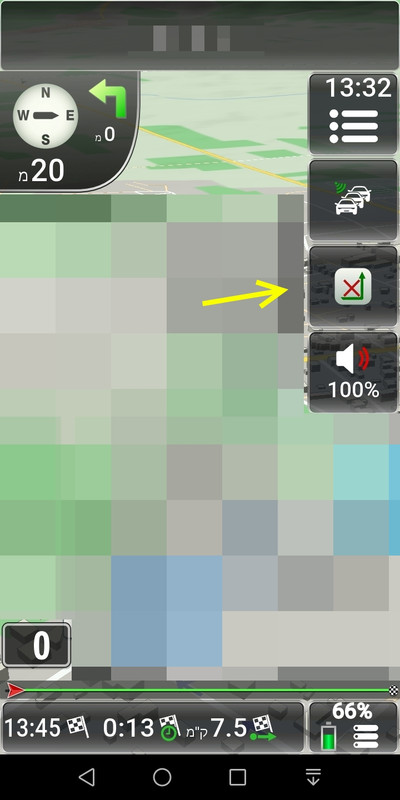
Hello @jorgeultra
At the time, you helped me with this specific UX.
Apparently, i've "lost" it by mistake. Can you plz restore it to me?
My Thanks
Spoiler: button_delete_route
-
12th August 2020, 12:27 AM #2795Master
- Join Date
- Apr 2016
- Location
- Rio de Janeiro
- Posts
- 476
- Rep Power
- 762
-
15th August 2020, 09:01 AM #2796Master

- Join Date
- Nov 2017
- Location
- Romania
- Posts
- 349
- Rep Power
- 167
Also t he ux button_deleteroutewp.zip its not working properly with last version of pongo skin
-
15th August 2020, 09:21 AM #2797Master
- Join Date
- Jul 2017
- Location
- IL
- Posts
- 847
- Rep Power
- 307
-
15th August 2020, 02:36 PM #2798Master
- Join Date
- Apr 2016
- Location
- Rio de Janeiro
- Posts
- 476
- Rep Power
- 762
@cristianyxtl,
Hundreds of users besides me are using this ux with the latest version of Pongo without any problem.
-
21st August 2020, 11:48 AM #2799Master
- Join Date
- Nov 2017
- Location
- Romania
- Posts
- 349
- Rep Power
- 167
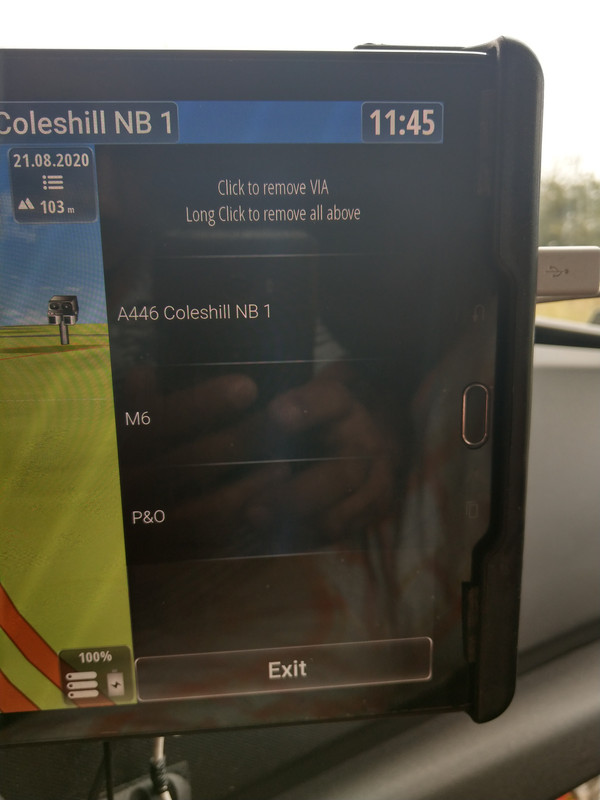
@jorgeultra, when have more than 1intermediate point and press button appear a list with all intermediate points and can choose wich one to delete?
Or directly delete intermediate point?
Spoiler: img
This its how appear with old version of skin
Thx for support, maybe its a problem with my package
-
21st August 2020, 01:55 PM #2800Master
- Join Date
- Apr 2016
- Location
- Rio de Janeiro
- Posts
- 476
- Rep Power
- 762
@cristianyxtl,
I do not know this ux you are using but from the image I believe it should work, that is, clicking on the intermediate point that you do not want to keep it will be deleted.
Have you tried this?
My opinion is that the users of the skins available here on the forum always keep their skins with the most current version.


Bookmarks