
 Likes:
 Reply With Quote
@ jorgeultra: that is what i have been doing for a long time
@BIBUOT: I am of the same opinion as jorgeultra. Can you tell us your secret?
Welcome guest, is this your first visit? Click the "Create Account" button now to join.


Results 2,631 to 2,640 of 3973
-
25th June 2020, 01:43 PM #2631Master


- Join Date
- Apr 2016
- Location
- Rio de Janeiro
- Posts
- 476
- Rep Power
- 762

@coukou,
An alternative is to put disabled=1 and make the settings you want.
As soon as you finish configuring, return the disabed parameter to 0.
@BIBUOT,
Even today I don't understand how to use this form called "dragmode", if you can explain how it works I would be very grateful.
Thanks
-
25th June 2020, 02:16 PM #2632Senior Member

- Join Date
- Dec 2012
- Location
- France
- Posts
- 125
- Rep Power
- 17
-
25th June 2020, 02:42 PM #2633Master


- Join Date
- Jul 2017
- Location
- France
- Posts
- 658
- Rep Power
- 2236
Hello
There is no secret. Since BIBUOT seems to be taking a nap, I will answer:
When you are on the main screen, a single click anywhere on the screen takes you to a new screen which is called "dragmode".
On this new screen, an icon with a star appears at the bottom right.
A long press on this icon will bring up a second icon.
When this second icon is present, this means that the "autorad" function is disabled.
And therefore gives access to the settings of the alerts and speed cameras menu, in addition to displaying speed cameras on the screen even when stopped.
This function was added by Pongo, at the request of the French. And therefore only concerns countries where speed cameras are prohibited on navigation systems.Last edited by Alain57; 25th June 2020 at 02:45 PM.
-
25th June 2020, 02:57 PM #2634Master
- Join Date
- Apr 2016
- Location
- Rio de Janeiro
- Posts
- 476
- Rep Power
- 762
@coukou,
I didn't say it's a secret, I just wrote that I don't know how to use this "dragmode" function.
Dragmode is very old, but I never really understood how it works.
I just learned from our dear friend Alain57.
@Alain57,
Thanks
-
25th June 2020, 03:21 PM #2635Senior Member
- Join Date
- Dec 2012
- Location
- France
- Posts
- 125
- Rep Power
- 17
@jorgeultra: indeed uou didn't say it's a secret. I say it lol

Merci Alain,
BTW, maybe you could help with this too.
Indeed, I managed to adjust the skin to my taste. Everything works perfectly except for the Alert Point/Sound Approaching beep NO SOUND.
1. I'm using Lang_French_by_Phildu91.zip and French_universal_unisex_andTTS-Phildu91_v.1.6.zip
2. All .wav Alert files are in iGO_Basar / ui_nextgen / audio except !Alert6.wav
Following the [Only registered and activated users can see links. ] and after investigation, I realized that the only one !Ialert6.wav file is in the data.zip. I just extracted that !alert6.wav from data.zip and copy it to iGO_Basar / ui_nextgen / audio with the other alerts.
Do you think that would solve my problem?
RegardsLast edited by coukou; 25th June 2020 at 03:23 PM.
-
25th June 2020, 04:39 PM #2636Master


- Join Date
- Jan 2016
- Location
- TUSCANY - ITALY
- Posts
- 353
- Rep Power
- 298
-
25th June 2020, 11:35 PM #2637Master


- Join Date
- Jul 2015
- Location
- Near you
- Posts
- 613
- Rep Power
- 316
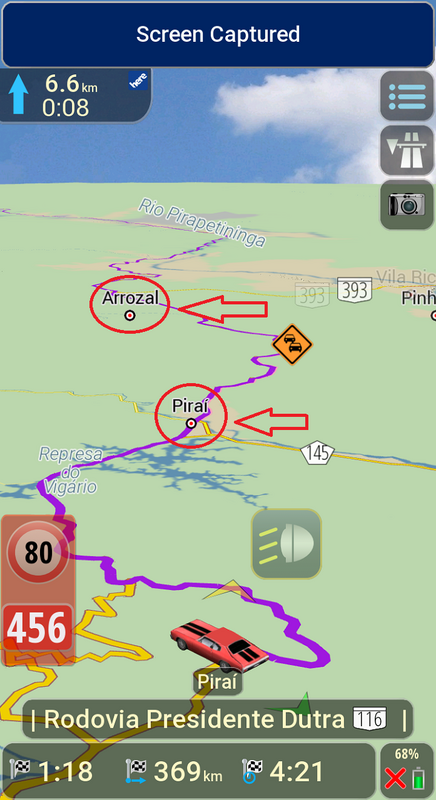
Friends does anybody knows what sys line or maybe even ux is responsible for showing city names or village names when we are driving on highways and automatic overview is enabled.
I tried changing height from 300m up to 1500meters and still no village or city name shows right or left from the road I am.on.
This feature is very useful as an orientation so you know whic citiesnor villages you are passing by.
I attached two photos and as you can see It is in AUTOMATIC OVERVIEW but I see no city names left or right hmm
Thx
[Only registered and activated users can see links. ]
[Only registered and activated users can see links. ]
Something like on third marked photo
[Only registered and activated users can see links. ]Last edited by Texas; 25th June 2020 at 11:47 PM.
NOTICE: By no means I advise installing illegal software nor I support such actions. This is just for EDUCATIONAL PURPOSES. Please use my post in order to understand or learn something new. I am a proud owner of LICENSED NAVIGATION but just to satisfy my curiosity I test, read and research. Sharing illegal material is against the law.
-
26th June 2020, 09:38 AM #2638Master
- Join Date
- Apr 2016
- Location
- Rio de Janeiro
- Posts
- 476
- Rep Power
- 762
With Pongo skin the responsible ux is mapcustom.zip
For me using zoom in 2D=3600 and zoom in 3D=1200 I have the names of the cities on the screen.
Spoiler: image
-
26th June 2020, 10:01 AM #2639Member +
- Join Date
- Feb 2014
- Location
- UAE
- Posts
- 34
- Rep Power
- 14
Should we add this in Sys.txt or mapcustom.zip?
-
26th June 2020, 10:31 AM #2640Master
- Join Date
- Apr 2016
- Location
- Rio de Janeiro
- Posts
- 476
- Rep Power
- 762
Settings > Navigation View > Automatic Overview Settings > Overview Zoom and Tilt
These values in the image are the default for the Pongo skin.
Spoiler: image


Bookmarks