
 Likes:
 Reply With Quote
@Testrunner: Which version of Pongo skin are you using?
I've reviewed versions back to March 2018, and all of them has ability to set altitude correction in the range of -100 to +100 meters or feets (depends on the regional settings).
Code:Please Login or Register to see the links
Welcome guest, is this your first visit? Click the "Create Account" button now to join.


Results 1,201 to 1,210 of 3979
-
15th November 2018, 07:40 AM #1201Master


- Join Date
- Nov 2015
- Location
- Palilula
- Posts
- 238
- Rep Power
- 136

It's a Compass and you can "move" it in Compass settings
-
15th November 2018, 09:33 AM #1202Member +
- Join Date
- Aug 2013
- Location
- Hungary
- Posts
- 36
- Rep Power
- 38
-
15th November 2018, 10:36 AM #1203Master


- Join Date
- Mar 2012
- Location
- France
- Age
- 77
- Posts
- 339
- Rep Power
- 294
Hi
No, no... the red circle depends of autorad function and used to capture a new speedcam during navigationIt's a Compass and you can "move" it in Compass settings
So you can:
- if setted to 1... modify this entry in your sys.txt ( the best option )
[autorad]
disabled=0
- go to alerts settings and inactive the function
- go to transparency settings (for circle) and make this to full
;-)Last edited by BIBUOT; 15th November 2018 at 10:44 AM.
-
15th November 2018, 11:06 AM #1204Master
- Join Date
- Nov 2015
- Location
- Palilula
- Posts
- 238
- Rep Power
- 136
He says color circle, not red circle... Anyway, screenshot would be helpful, right?
There is a lot of circles in Pongo skin
I have tought this one...
Spoiler: pict
Last edited by Boki; 15th November 2018 at 09:38 PM.
-
15th November 2018, 08:38 PM #1205Junior Member
- Join Date
- Nov 2018
- Location
- België
- Posts
- 2
- Rep Power
- 0
Can someone explain?:
Gps test app says 24 sats in view 21 connected
Android menu gps says the same as the app 24vs21
But igo says view 24 connect 12? Why is that?
The 21 connected are 11 gps american and 10 russian.
Regards and thanks!
-
15th November 2018, 08:51 PM #1206Pro-Member

- Join Date
- Dec 2017
- Location
- Austria
- Posts
- 213
- Rep Power
- 20
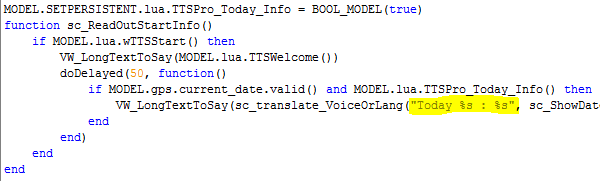
What is the correct string in dict.voice?
"Today% s:% s" = "---" think is not correct, or?
"Today %s:%s" = "---" or "Today %s : %s" = "---" or what?Last edited by userninenine; 15th November 2018 at 09:13 PM.
-
15th November 2018, 09:25 PM #1207Member
- Join Date
- Oct 2018
- Location
- uk
- Posts
- 10
- Rep Power
- 0
Sorry guys, i have been working and couldnt reply straight away. But the colour circle mystery is solved thank you.
The correct answer was. . . . . . . . . .The compass 😀😀😀😀Last edited by Boki; 15th November 2018 at 09:37 PM.
-
15th November 2018, 10:16 PM #1208Master


- Join Date
- Mar 2017
- Location
- Tunisia
- Posts
- 457
- Rep Power
- 1335
@ Userninenine

The right string is the one indicated by Vasile1955
You can test it in: Main Menu \ Settings \ Sound \ TTS Pro \ Read Out Welcoming Message \ Read Out Today Info (ON) \ TestCode:Please Login or Register to see the links
RegardsGPS: TomTom ONE
Smartphone: THL T11 Android 4.2.2 Resolution 720x1280
Sygic 14.3.4 IGO Primo 9.6.29.636868 Skins : Doupas V9.0h , Dimka/Frontzosd
-
15th November 2018, 10:55 PM #1209Member +
- Join Date
- Aug 2013
- Location
- Hungary
- Posts
- 36
- Rep Power
- 38
I think the right answer is:
because %s means string variable. First is replaced (in running time) with the value of the current date, and second with the day of the week.Code:Please Login or Register to see the links
Spoiler: source codeLast edited by Gigya; 15th November 2018 at 11:04 PM.
-
15th November 2018, 11:49 PM #1210Master
- Join Date
- Mar 2017
- Location
- Tunisia
- Posts
- 457
- Rep Power
- 1335
Thank you for your answer personally I did not check the source code, for the simple reason that the actual test with the proposed string is OK.
The string that I propose is taken directly from my file: dictionary.voice
I confess that after decompiling the file: ttspro.lua with two different Lua decompilers I find the same source code as yours.
I even tested it is OK him too
[B]For me both are tested and OK. Can someone else confirm it Thanks[/B]
Regards
Edit: After checking the only valid string is that of Gigya Whithout Quotation Marks ( Problem of double translation voice and lang for me)Last edited by LouBouha; 22nd November 2018 at 09:20 AM.
GPS: TomTom ONE
Smartphone: THL T11 Android 4.2.2 Resolution 720x1280
Sygic 14.3.4 IGO Primo 9.6.29.636868 Skins : Doupas V9.0h , Dimka/Frontzosd


Bookmarks