
 Likes:
 Reply With Quote
lufop - updates from January 10, 2026
[Only registered and activated users can see links. ]Enjoy free and regular updates.
open the file "NO azimut_STD.txt" in the spudigo program, and look where the alerts are set.
I overestimated the capabilities of this database, everything is completely hopeless.
Welcome guest, is this your first visit? Click the "Create Account" button now to join.


Results 291 to 300 of 363
Thread: iGO Speedcam (DISCUSSION)
-
21st December 2025, 09:52 AM #291SUPER MODERATOR


- Join Date
- Oct 2019
- Location
- Belarus
- Posts
- 3,786
- Rep Power
- 2751

Skin_Nextgen_lolo_3oct19
A little about the LOLO skin. It's based on the Pongo skin from February 19, 2019. Updates in the LOLO style (EUR+ encoding) were made on May 3, 2019, and October 3, 2019. All changes are improvements to the skin from February 19, 2019. Pongo skin modifications typically correspond to each Pongo skin update. The problem is that the Pongo skin added a mid-speed lock feature in 2019 (start and finish at 5 km/h), but this feature is missing from the LOLO skin. To lock the mid-speed section, you need to use a timer, as was done in early 2019 before the changes to the Pongo skin's section handling.
How can you tell if you're outside the average speed control zone? When you receive a notification on your navigator screen, you're in the average speed zone - the speed limit is 5 km/h. This is the end of the section. The timer will turn off this notification after the time you specify in plugin.ini - max_section_time=180 (3 min); S P E E D C A M - C A T: 3 (UX - speedcam.zip)
[Only registered and activated users can see links. ]
Spoiler: 5Last edited by Andrey Form; 21st December 2025 at 10:21 AM.

[Only registered and activated users can see links. ]
[Only registered and activated users can see links. ]
[Only registered and activated users can see links. ]
[Only registered and activated users can see links. ]
[Only registered and activated users can see links. ]
[Only registered and activated users can see links. ]
©AF_2020-26
-
11th January 2026, 01:23 PM #292SUPER MODERATOR
- Join Date
- Oct 2019
- Location
- Belarus
- Posts
- 3,786
- Rep Power
- 2751

[Only registered and activated users can see links. ]
[Only registered and activated users can see links. ]
[Only registered and activated users can see links. ]
[Only registered and activated users can see links. ]
[Only registered and activated users can see links. ]
[Only registered and activated users can see links. ]
©AF_2020-26
-
19th January 2026, 10:30 PM #293Member
- Join Date
- Mar 2021
- Location
- Civis
- Posts
- 26
- Rep Power
- 6

Happy New Year!
Andrey Form!
I am a big fan of your work, I use your "NC" coded plugins with pleasure. Thank you for the great work! Please look at the icon image on this path because I don't understand it!
""speedcam_mod_nc_3dfdk_af_v2_64.zip/ui_nextgen/res/common/nodpi"......, and
""speedcam_mod_NC_AF_3DFDK_V2.zip/ui_nextgen/res/common/nodpi" "speedwarn_cockpit_Stop_Prohibited_Camera.svg""
I didn't know where would be the right place to ask this.Last edited by Pasi Sarmos; 19th January 2026 at 10:41 PM.
-
20th January 2026, 05:31 AM #294SUPER MODERATOR
- Join Date
- Oct 2019
- Location
- Belarus
- Posts
- 3,786
- Rep Power
- 2751
Thank you, I will fix it.
PS
Update the files for those who have already downloaded them earlier.Last edited by Andrey Form; 20th January 2026 at 09:05 AM.
[Only registered and activated users can see links. ]
[Only registered and activated users can see links. ]
[Only registered and activated users can see links. ]
[Only registered and activated users can see links. ]
[Only registered and activated users can see links. ]
[Only registered and activated users can see links. ]
©AF_2020-26
-
21st January 2026, 11:50 AM #295SUPER MODERATOR
- Join Date
- Oct 2019
- Location
- Belarus
- Posts
- 3,786
- Rep Power
- 2751
Plugin.ini: use_road_speedlimit=1 and the speed in speedcam.txt = 0.
In this case, the speed alert will always correspond to the speed taken from the map, provided by the map provider, for example, HERE. The speed data taken from the map may not be perfect, for example, outdated data or the map provider may not be aware of the speed limit on a given section of the road.
3.4520,49.0400,1,0,1,90 – entry in speedcam.txt camera speed = 0

So, let's consider the situation (FIGURE 1): you are in zone 1, the speed limit on this section is 70 km/h. 300 meters further on, there is a camera in zone 2, with a speed limit of 50 km/h. But you receive a notification in your navigator about the camera, and after 300 meters, the LIMIT is 70 km/h.

FIGURE 2: The situation is repeated, except that the speed ahead increases. We're in zone 1 and the speed limit is 50 km/h. We receive a notification in our about a speed camera; in 300 meters, the speed limit is 50 km/h.

FIGURE 3. The ideal situation is when the speed doesn't change from one section to the next, and the car and the camera are in the same speed zone.

FIGURE 4. This scenario occurs when speedcam.txt contains an entry indicating the speed, 3.4520,49.0400,1.50,1.90, which guarantees a camera notification at the correct speed. This data is provided by camera information collection databases.Last edited by Andrey Form; 20th April 2026 at 08:14 AM.
[Only registered and activated users can see links. ]
[Only registered and activated users can see links. ]
[Only registered and activated users can see links. ]
[Only registered and activated users can see links. ]
[Only registered and activated users can see links. ]
[Only registered and activated users can see links. ]
©AF_2020-26
-
1st February 2026, 09:48 AM #296SUPER MODERATOR
- Join Date
- Oct 2019
- Location
- Belarus
- Posts
- 3,786
- Rep Power
- 2751
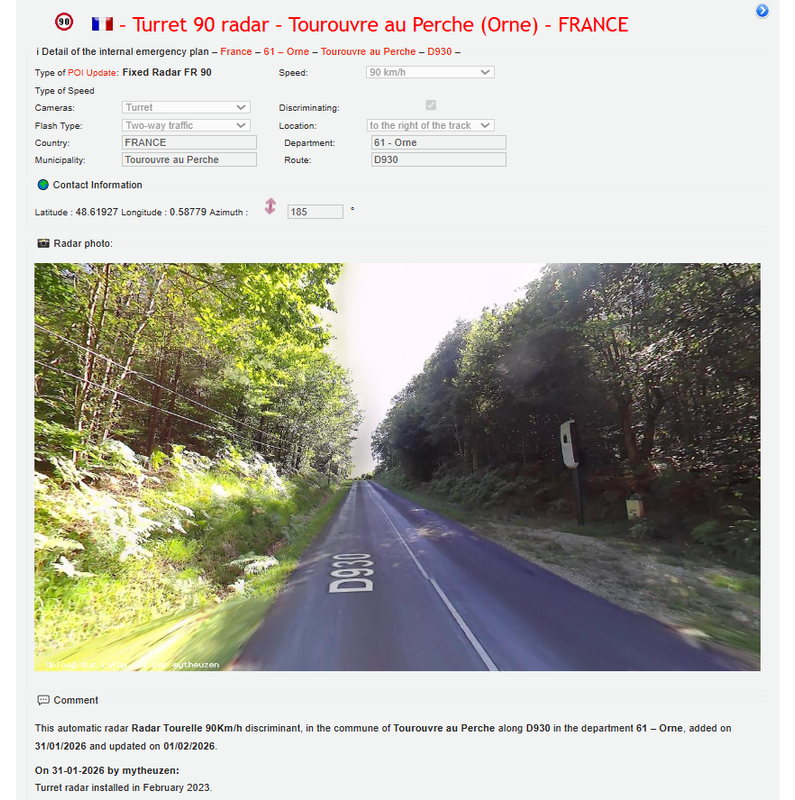
The radar was installed in February 2023. It's now 2026, and it's also February. Three years have passed. The radar has been operational for three years now. This data is available in all radar databases, including OSC, where it was added to the map [Only registered and activated users can see links. ]. However, it wasn't until three years later that it was added to the "lufop" database. In my opinion, this is a record, and the special status of the database is worthless.
Spoiler: +
[Only registered and activated users can see links. ]
[Only registered and activated users can see links. ]
[Only registered and activated users can see links. ]
[Only registered and activated users can see links. ]
[Only registered and activated users can see links. ]
[Only registered and activated users can see links. ]
©AF_2020-26
-
15th February 2026, 11:27 AM #297SUPER MODERATOR
- Join Date
- Oct 2019
- Location
- Belarus
- Posts
- 3,786
- Rep Power
- 2751
FAQ duplicates in spedcam.txt with the same coordinates.
How does iGO navigation solve notification issues when there are two options.
1. The speed is the same
5.29578,59.32092,1,80,0,0
5.29578,59.32092,1,80,0,0
Alert 80 km/h
2. Speed 80 or 90
5.29578,59.32092,1,80,0,0
5.29578,59.32092,1,90,0,0
A lower speed limit of 80 km/h is being notified.
Two different types, a lower speed is notified. That is, the priority is lower speed.
3. A speed of 0 or without a speed paired with a string having a speed.
5.29578,59.32092,1,0,0,0
5.29578,59.32092,1,90,0,0
or
5.29578,59.32092,1,,0,0
5.29578,59.32092,1,90,0,0
The speed will be taken from the map (Here, TomTom)
4. The situation is the same, but with different types of alerts.
5.29578,59.32092,2,0,0,0
5.29578,59.32092,1,90,0,0
or
5.29578,59.32092,2,,0,0
5.29578,59.32092,1,90,0,0
The speed will be taken from the map (Here, TomTom) for 2 types
In general, if the coordinates match, the advantage is lower speed or speed taken from the map (entry in spedcam.txt - speed 0 or no speed)
About what allows you to use the speed from the maps.
[Only registered and activated users can see links. ]Last edited by Andrey Form; 15th February 2026 at 11:30 AM.
[Only registered and activated users can see links. ]
[Only registered and activated users can see links. ]
[Only registered and activated users can see links. ]
[Only registered and activated users can see links. ]
[Only registered and activated users can see links. ]
[Only registered and activated users can see links. ]
©AF_2020-26
-
28th February 2026, 10:59 AM #298SUPER MODERATOR
- Join Date
- Oct 2019
- Location
- Belarus
- Posts
- 3,786
- Rep Power
- 2751
France SCDB Fix SpeedCamText 2026.02.28.
France_SCDB_Fix_SpeedCamText.txt
I'm amazed by what I see online. If a file says France, it's obviously supposed to be France. Files need to be verified before they're published; another scam from SN.
These are radars that were not included in the file and were lost.
These radars have no connection to France or Europe, but belong to Switzerland. It's safe to assume that these radars won't be in Switzerland's files.7.40058,43.72525,2,0,0,0
7.36856,43.72922,4,70,0,0
7.38217,43.73214,4,70,0,0
7.41250,43.73897,1,50,0,0
7.42111,43.74383,1,50,0,0
7.42497,43.74847,1,50,0,0
6.09636,46.14528,1,50,0,0
7.04156,49.14083,1,110,0,0
5.96114,49.45781,1,70,0,0
4.85625,49.81310,1,80,0,0
3.17289,50.74411,1,50,0,0
It's completely unclear why this stupid idea of dividing Europe into countries is even being pursued. If it's going to be done, it should be 100% division. These "games" designed to show off their "skill" ultimately reveal complete indifference and a complete lack of responsibility toward the users they've deceived.6.21681,46.20144,1,50,0,0
6.18242,46.17292,1,50,0,0
6.13719,46.14697,1,50,0,0
6.17239,46.17233,1,40,0,0
6.13456,46.14644,1,50,0,0
6.19833,46.18806,3,40,0,0
6.24406,46.29897,1,50,0,0
-52.37086,4.91150,1,70,0,0
6.20008,46.18922,3,40,0,0
55.46475,-21.33211,1,90,0,0
1.73328,42.54689,1,60,0,0
1.73317,42.54686,2,60,0,0
-61.45550,16.34200,1,50,0,0
55.68500,-20.99922,1,50,0,0
55.51000,-21.29481,1,110,0,0
Author of the division: SN aka Cserrobi -
Last edited by Andrey Form; 28th February 2026 at 11:35 AM.
[Only registered and activated users can see links. ]
[Only registered and activated users can see links. ]
[Only registered and activated users can see links. ]
[Only registered and activated users can see links. ]
[Only registered and activated users can see links. ]
[Only registered and activated users can see links. ]
©AF_2020-26
-
28th February 2026, 11:49 AM #299SUPER MODERATOR
- Join Date
- Oct 2019
- Location
- Belarus
- Posts
- 3,786
- Rep Power
- 2751
France OpenSpeedcam Fix SpeedCamText 2026.02.28.
France_OpenSpeedcam_Fix_SpeedCamText.txt
Another review, the first is the date. The OSC database is exported around the clock, if it were really the 28th, then there would be more radars in the file. Since they were added to the map of France on the 27th, but they are not in this file. And so in the file, the export of the OSC database dated February 26, 2026, is what I specified when posting the file "iGO OEM OSC Europe + Turkey"
Why OEM is a processed export of the OSC - Mod AF database. The radars are adapted to the iGO alert. The default angle of deviation of the azimuth of the radar from the road is 20 degrees.
Since the OSC base is a directional alert, there may always be errors when deviating from the azimuth of the road, which is fixed in "iGO OEM OSC Europe + Turkey".
And so we have already figured out the origin of the file. Now it is a traditional branch of France.
These are radars that were not included in the file and were lost.
These radars have no connection to France, but belong to Switzerland. It's safe to assume that these radars won't be in Switzerland's files.7.412524,43.738986,1,50,1,18
7.421115,43.743822,1,50,1,50
4.856265,49.813114,1,80,2,289
6.096411,46.145300,1,50,1,341
And so gentlemen, "iGO OEM OSC Europe + Turkey" This is an AF mod, so to speak, a proprietary feature, and everyone who publishes files based on my work must indicate the author. You're not the author, are you? SN.1.733296,42.546922,1,60,2,225
6.137208,46.146994,1,50,1,198
6.172390,46.172330,1,40,2,308
6.182449,46.172862,1,50,1,348
6.198330,46.188060,3,40,1,31
6.216810,46.201440,1,50,1,238
6.244060,46.298970,1,50,1,175Last edited by Andrey Form; 28th February 2026 at 01:40 PM.
[Only registered and activated users can see links. ]
[Only registered and activated users can see links. ]
[Only registered and activated users can see links. ]
[Only registered and activated users can see links. ]
[Only registered and activated users can see links. ]
[Only registered and activated users can see links. ]
©AF_2020-26
-
5th March 2026, 04:23 AM #300Member
- Join Date
- Jan 2026
- Location
- česká republika
- Posts
- 10
- Rep Power
- 0
Hello, could I ask, is it possible to somehow insert separate Speed Cameras, Austria? Thank you.


Bookmarks