
 Likes:
 Reply With Quote
Export OSC
[Only registered and activated users can see links. ]
The OSC database provided the ability to export data for iGO skin Pongo users.
To use the OSC database, you need to register and the export will open for you.
Make changes to the database and get the export very quickly, how to do it.
iGO skin Pongo VB coding - this is VB encoding
Spoiler: VB
Objects with ratings from
0 (not dangerous)
Spoiler: 0
Objects with ratings from
1 (dangerous)
Spoiler: 1
Export OSC database iGO Primo OEM
Objects with ratings from
0 (not dangerous)
Spoiler: 0
Objects with ratings from
1 (dangerous)
Spoiler: 1
The OSC database iGO Primo contains 16.
Code:Please Login or Register to see the links
Welcome guest, is this your first visit? Click the "Create Account" button now to join.


Results 1 to 10 of 19
Thread: SpeedCams OpenSpeedcam
-
5th June 2020, 04:39 AM #1SUPER MODERATOR


- Join Date
- Oct 2019
- Location
- Belarus
- Posts
- 3,785
- Rep Power
- 2751
 SpeedCams OpenSpeedcam
 .net
SpeedCams OpenSpeedcam
SpeedCams OpenSpeedcam .net

You can download these alerts yourself by selecting the country and the type you need.
You can add alarm points to the database yourself and use the information for storage and editing.
The OSC database is absolutely free.
Spoiler: Attention!!!
[Only registered and activated users can see links. ]
[Only registered and activated users can see links. ]
[Only registered and activated users can see links. ]
[Only registered and activated users can see links. ]
[Only registered and activated users can see links. ]
[Only registered and activated users can see links. ]
[Only registered and activated users can see links. ]
[Only registered and activated users can see links. ]
[Only registered and activated users can see links. ]

Look please for the latest, in recent posts, at the end of this thread
[Only registered and activated users can see links. ]
Attention!!!
Do not forget to indicate the site gpspower.net as the source, when trying to post any data, on other sites. A clear conscience - more important!Last edited by Andrey Form; 16th July 2026 at 11:57 AM.

[Only registered and activated users can see links. ]
[Only registered and activated users can see links. ]
[Only registered and activated users can see links. ]
[Only registered and activated users can see links. ]
[Only registered and activated users can see links. ]
[Only registered and activated users can see links. ]
©AF_2020-26
-
5th June 2020, 04:49 AM #2SUPER MODERATOR
- Join Date
- Oct 2019
- Location
- Belarus
- Posts
- 3,785
- Rep Power
- 2751

Last edited by Andrey Form; 24th February 2026 at 07:27 PM.
[Only registered and activated users can see links. ]
[Only registered and activated users can see links. ]
[Only registered and activated users can see links. ]
[Only registered and activated users can see links. ]
[Only registered and activated users can see links. ]
[Only registered and activated users can see links. ]
©AF_2020-26
-
5th June 2020, 09:10 AM #3SUPER MODERATOR
- Join Date
- Oct 2019
- Location
- Belarus
- Posts
- 3,785
- Rep Power
- 2751
CODE VB Full
Universal VB code for the skin
Skin pongo Luna
Skin garigor Luna
Skin wal24 Luna
Skin aldo Luna
Skin arimi nextgen
Skin pongo nextgen
Skin wandel nextgen
Application speedcam.txt
Spoiler: +++
CODE VB Pro
Universal VB code for the skin
Skin pongo Luna
Skin garigor Luna
Skin wal24 Luna
Skin aldo Luna
Skin arimi nextgen
Skin pongo nextgen
Skin wandel nextgen
Application speedcam.txt
Spoiler: +++Last edited by Andrey Form; 14th August 2022 at 02:41 PM.
[Only registered and activated users can see links. ]
[Only registered and activated users can see links. ]
[Only registered and activated users can see links. ]
[Only registered and activated users can see links. ]
[Only registered and activated users can see links. ]
[Only registered and activated users can see links. ]
©AF_2020-26
-
5th June 2020, 01:59 PM #4SUPER MODERATOR
- Join Date
- Oct 2019
- Location
- Belarus
- Posts
- 3,785
- Rep Power
- 2751


Example of adding a warning to a map (base OSC)
Spoiler: ++++++ sampleLast edited by Andrey Form; 26th May 2023 at 06:45 PM.
[Only registered and activated users can see links. ]
[Only registered and activated users can see links. ]
[Only registered and activated users can see links. ]
[Only registered and activated users can see links. ]
[Only registered and activated users can see links. ]
[Only registered and activated users can see links. ]
©AF_2020-26
-
5th June 2020, 05:04 PM #5SUPER MODERATOR
- Join Date
- Oct 2019
- Location
- Belarus
- Posts
- 3,785
- Rep Power
- 2751

OSC - Countries Mod AF
Spoiler: CountriesLast edited by Andrey Form; 19th May 2024 at 06:03 PM.
[Only registered and activated users can see links. ]
[Only registered and activated users can see links. ]
[Only registered and activated users can see links. ]
[Only registered and activated users can see links. ]
[Only registered and activated users can see links. ]
[Only registered and activated users can see links. ]
©AF_2020-26
-
20th May 2023, 10:12 AM #6SUPER MODERATOR
- Join Date
- Oct 2019
- Location
- Belarus
- Posts
- 3,785
- Rep Power
- 2751

FAQ
VB code
[Only registered and activated users can see links. ]
If you are using VB-encoded pongo skin and VB-encoded speedcam.txt.
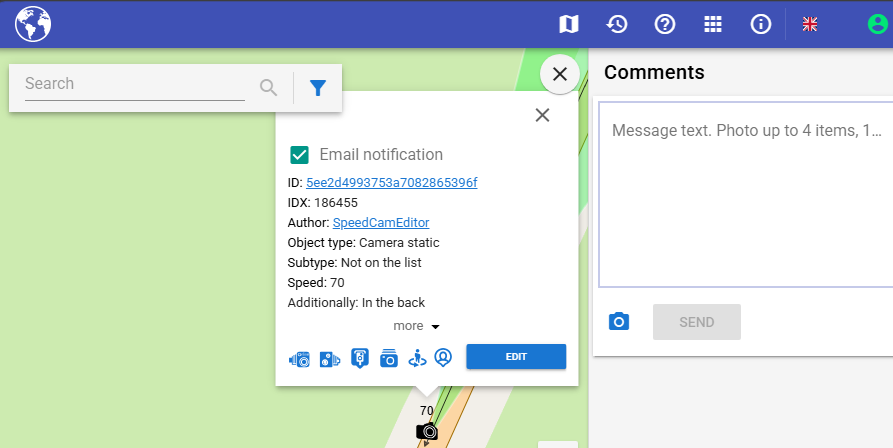
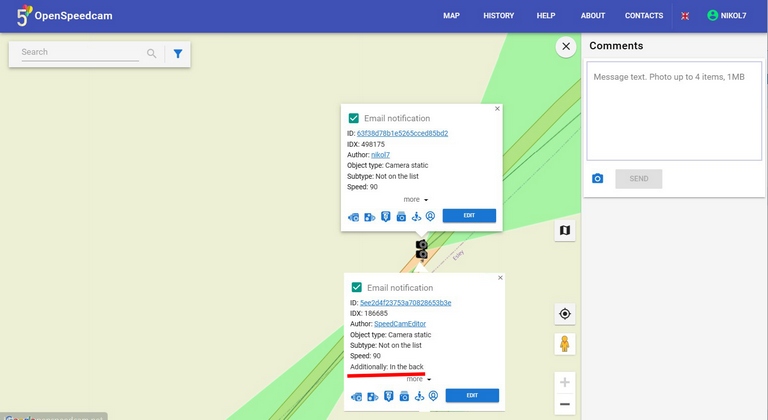
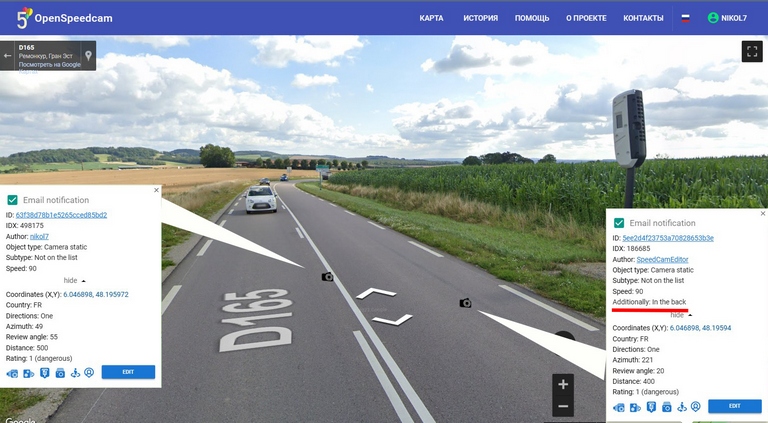
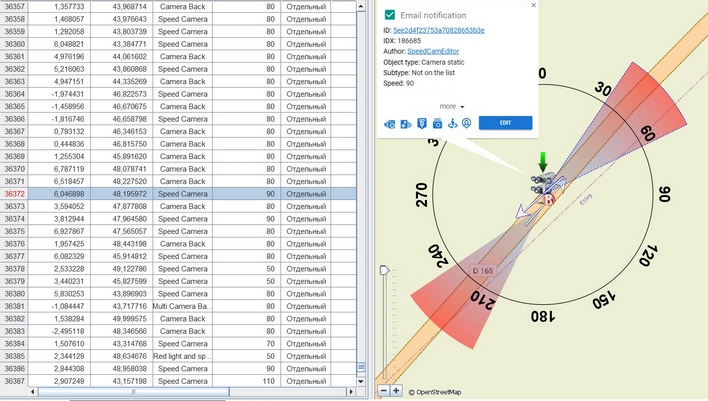
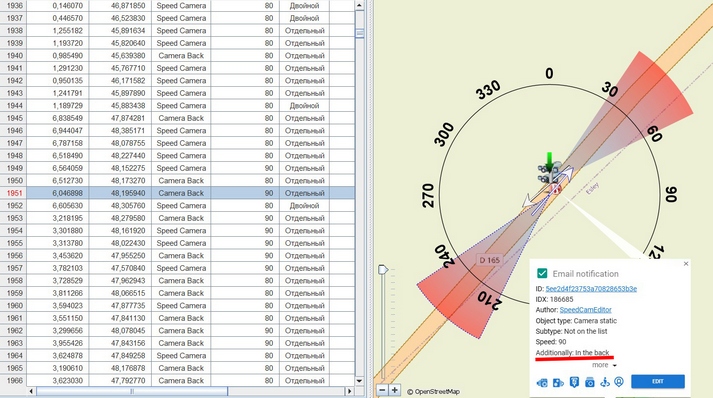
How to properly divide camera notifications into two types, the first type of camera looks to the oncoming stream and the second type, the camera looks to the passing stream - In the OSC database, this type is marked as In the back.Code:Please Login or Register to see the links
"check box" In the back
[Only registered and activated users can see links. ]
Detail in pictures
Spoiler: +Last edited by Andrey Form; 20th May 2023 at 12:12 PM.
[Only registered and activated users can see links. ]
[Only registered and activated users can see links. ]
[Only registered and activated users can see links. ]
[Only registered and activated users can see links. ]
[Only registered and activated users can see links. ]
[Only registered and activated users can see links. ]
©AF_2020-26
-
11th April 2026, 05:46 AM #7SUPER MODERATOR
- Join Date
- Oct 2019
- Location
- Belarus
- Posts
- 3,785
- Rep Power
- 2751

FAQ For OSC users. How to use the OSC database.
The first step is registration. Then you can moderate, find the place you are interested in on the map, and find the alert. Each set point on the map has properties, creation history, creation date, and modification dates. Parameters, notification type, coordinates, speed, notification direction, one direction, two directions, any. You can make changes directly on the map. All changes are controlled by moderators to ensure that the changes comply with the OSC rules. All changes are saved and ready for export.
How to remove the radar from the OSC database if it is no longer there.
Leave a comment on the point on the map and turn the status to rating -1. It is important to understand that you need to be sure that you have correctly located the radar on the map. Since after the -1 rating, the radar will no longer be exported from the OSC database. The radar beam will change color from green to red and will be available for editing within one month. In a month, it will be completely transferred to the OSC database archive and will be unavailable for editing, it will no longer be visible on the map.
The list of alert types available for application to the OSC database
[Only registered and activated users can see links. ]Last edited by Andrey Form; 11th April 2026 at 05:48 AM.
[Only registered and activated users can see links. ]
[Only registered and activated users can see links. ]
[Only registered and activated users can see links. ]
[Only registered and activated users can see links. ]
[Only registered and activated users can see links. ]
[Only registered and activated users can see links. ]
©AF_2020-26
-
5th July 2026, 11:29 AM #8SUPER MODERATOR
- Join Date
- Oct 2019
- Location
- Belarus
- Posts
- 3,785
- Rep Power
- 2751

"Check box" Mobile ambush confirmed after.
Using POIbase mobile navigation, confirmations regarding mobile speed cameras are constantly recorded and time—stamped; therefore, the number of confirmed mobile speed cameras — for example, for a certain month - represents actual data, provided that the driver was physically present at a certain location and confirmed the presence of a mobile speed camera.
Here's how it works in OSC: to confirm the presence of a mobile radar, you need to click a button in the properties of an object on the OSC map. What does it mean? The frequency of mobile radar confirmation is 0.1% per year — in other words, almost no one confirms them. Therefore, you can use the OSC database in two ways.
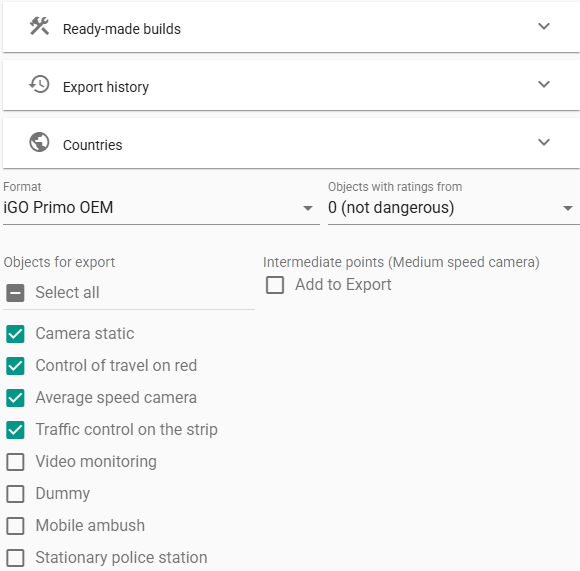
The first way is not to use mobile radars: when exporting, do not check the box next to the "Mobile Ambush" export object.
Spoiler: 1
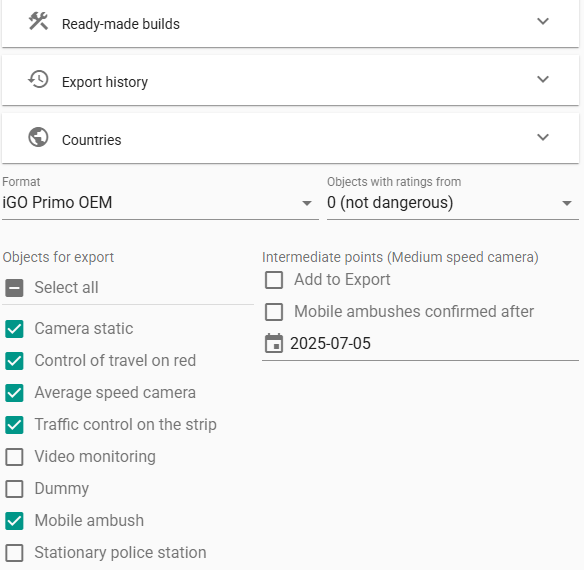
The second way is to export with mobile radars. When exporting, check the box next to the export object labeled "Mobile ambush".
in the other options column on the right, do not mark "Mobile ambush confirmed after".
Spoiler: 2
If you have the "Mobile ambush confirmed after" checkbox enabled during export, you will receive data for mobile radars that have been confirmed. In some Countries, there will be no mobile radars at all.
And if you downloaded the OSC database and decided to share your success by publishing files on the Internet, do it right — the name and content should match, if the file name is "Mobile_SpeedCams" then the file should have this type.
Here is an example:
However, this file contains almost no "mobile radars" data. If you publish OSC database data, you must make sure that it is done correctly — or not publish it at all. Users who download these files from (Cserrobi – Sunnyside Navi) while waiting for alerts from mobile speed cameras do not receive them on their navigation devices; I often encounter such files on various technical forums. Beware of non-competent OSC database publications.iGO_OpenSpeedcam_Fix_&_Mobile_SpeedCams_World _2026.07.03.txt
Romania OpenSpeedcam Fix & Mobile SpeedCamText 2026.07.03..txt
Spoiler: С
OSC World - there is no whole world in the OSC database, there is only Europe. Initially, the OSC project was created for Russia and neighboring countries. Later, through my efforts, the whole of Europe appeared in the database. If you see an opportunity to download other countries in the database, then this is frozen data or incomplete data.Last edited by Andrey Form; 5th July 2026 at 07:05 PM.
[Only registered and activated users can see links. ]
[Only registered and activated users can see links. ]
[Only registered and activated users can see links. ]
[Only registered and activated users can see links. ]
[Only registered and activated users can see links. ]
[Only registered and activated users can see links. ]
©AF_2020-26
-
14th July 2026, 03:31 PM #9SUPER MODERATOR
- Join Date
- Oct 2019
- Location
- Belarus
- Posts
- 3,785
- Rep Power
- 2751
Ready-to-Use speedcam.txt Builds by AF (AndreyForm)
In the world of GPS navigation, the average user usually sees only the final result—a speed camera warning on their device's screen. Few realize that behind a simple text file like speedcam.txt lies complex engineering work dedicated to optimization, sorting, and supporting dozens of different platforms.
When it comes to ready-made, author-curated speedcam builds by AF, it is not just a package of copied coordinates. This is a unique product that incorporates years of experience in moderating major databases and a deep understanding of iGO engine architecture. Let’s break down what happens behind the scenes of a professional build and why it has become the ultimate standard of quality.
Spoiler: Read full details about AF Speedcam Builds Optimization
Summary: Engineering vs. Amateurism
Ready-made speedcam builds by AF represent the final point in the evolution of iGO customization. While amateurs on forums clutter the space with digital garbage by mindlessly slicing databases using automated utilities, this professional approach offers a meticulously refined structure.
You get multi-format compatibility, strict sorting to offload the processor, and the merging of oncoming traffic vectors—all while fully preserving unique rear-facing camera data.
Spoiler: The Logic of Enclaves: Why Monaco is Part of France
Spoiler: Blind ISO Tags: How to Clutter a Navigator with JunkLast edited by Andrey Form; 14th July 2026 at 03:38 PM.
[Only registered and activated users can see links. ]
[Only registered and activated users can see links. ]
[Only registered and activated users can see links. ]
[Only registered and activated users can see links. ]
[Only registered and activated users can see links. ]
[Only registered and activated users can see links. ]
©AF_2020-26
-
16th July 2026, 10:51 AM #10SUPER MODERATOR
- Join Date
- Oct 2019
- Location
- Belarus
- Posts
- 3,785
- Rep Power
- 2751
FAQ OSC VB code
How to correctly set direction for cameras capturing oncoming traffic (front-facing) vs. receding traffic (rear-facing).
How to correctly split camera notifications into two types: the first type captures oncoming traffic, and the second type captures passing traffic, which is marked as In the back in the OSC database.
Spoiler: " In the back" checkbox.
Details in pictures
Spoiler: +Last edited by Andrey Form; 16th July 2026 at 10:55 AM.
[Only registered and activated users can see links. ]
[Only registered and activated users can see links. ]
[Only registered and activated users can see links. ]
[Only registered and activated users can see links. ]
[Only registered and activated users can see links. ]
[Only registered and activated users can see links. ]
©AF_2020-26


 - Code 32 - Camera static / camera name / rating 1 / save [Only registered and activated users can see links.
  - Code 34 - Camera static / camera name / "check box" Built-in / rating 1 / save [Only registered and activated users can see links.
  - Code 37 - Camera static / camera name / "check box" Marking, Row, Lane / rating 1 / save[Only registered and activated users can see links.
  - Code 36 - Control of travel on red / camera name / "check box" Marking, stop line / rating 1 / save[Only registered and activated users can see links.
  - Code 43 - Control of travel on red / camera name / "check box" Marking, SPEED, stop line / rating 1 / save
  - Code 35 - Average speed camera / camera name / rating 1 / Finish and additional points - Add / save[Only registered and activated users can see links.
  - Code 39 - Traffic control on the strip / camera name / check box OT band / rating 1 / save[Only registered and activated users can see links.
  - Code 33 - Mobile ambush / Police crew / "check box" Overtaking is prohibited, etc. / rating 1 / save[Only registered and activated users can see links.
  - Code 49 - Mobile Ambush / Camera (Tripod) / rating 1 / save [Only registered and activated users can see links.
  - Code 56 - Video Monitoring / camera name / "check box" Stop control / rating 1 / save[Only registered and activated users can see links.
  - Code 47 - Video Monitoring / camera name / "check box" Payment control / rating 0 / save [Only registered and activated users can see links.
  - Code 62 - Fake / camera name / HERE everything that does not fine, control of the gas distribution system / rating 0 / save [Only registered and activated users can see links.
  - Code 55 - Stationary police station / rating 1 / save [Only registered and activated users can see links.
  - Code 48 - Stationary traffic police post / "check box" Weight control / rating 0 / save [Only registered and activated users can see links.
  - Code 38 - Railroad crossing / Rating 1 / Save[Only registered and activated users can see links.
  - Code 41 - Caution children / Rating 1 / Save [Only registered and activated users can see links.
  - Code 51 - Bad road / "check box" Pit, springboard, etc. / rating 1 / save[Only registered and activated users can see links.
  - Code 40 - Dangerous intersection / rating 1 / save [Only registered and activated users can see links.
  - Code 44 - Other danger / "check box" Payment point / rating 0 / save [Only registered and activated users can see links.
  - Code 63 - Another danger / "check box" Road works, narrow bridge, etc. / rating 1 / save [Only registered and activated users can see links.
  - Code 50 - Artificial unevenness / rating 1 / save [Only registered and activated users can see links.
  - Code 52- Dangerous bend / rating 1 / save [Only registered and activated users can see links.
  - Code 61- Pedestrian crossing / rating 1 / save [Only registered and activated users can see links.
  - Code 59 - Camera static / camera name / "check box" In the back / rating 1 / save [Only registered and activated users can see links.
  - Code 58 - Camera static / camera name / "check box" In the back, Marking, Row, Lane movement / rating 1 / save [Only registered and activated users can see links.
  - Code 57- Mobile ambush / Camera (Tripod) "check box" In the back, / rating 1 / save [Only registered and activated users can see links.
  - Code 46 - Traffic control on the strip / camera name / "check box" In the back, FROM band / rating 1 / save
 - Code 53 - Another danger / "check box" Tunnel. / rating 1 / save [Only registered and activated users can see links.
  - Code 1 (Code 18 EUR+) - Camera static / Vandal-proof box / rating 1 / save


![2026 07 16 3]](https://i.postimg.cc/sxbZZ7LS/2026-07-16-3.png] "2026 07 16 3]")


Bookmarks