
 Likes:
 Reply With Quote
Hi I have recently noticed that on this version the traffic and weather has stopped working, this was working fine until this stopped, I have not changed anything. Has anyone else noticed this and how to fix this please?
Welcome guest, is this your first visit? Click the "Create Account" button now to join.


Results 161 to 170 of 218
-
6th September 2019, 03:02 PM #161Senior Member


- Join Date
- Nov 2013
- Location
- planet Earth
- Posts
- 117
- Rep Power
- 0

Texas, you the man.
It works while navigating.
can you make it works also while searching for an address, or moving the map to find a place. it means, house numbers will appear near each house or building, like sygic does.
Thanks.
-
13th December 2019, 03:20 PM #162Master


- Join Date
- Mar 2013
- Location
- Blath
- Posts
- 285
- Rep Power
- 71
-
13th December 2019, 04:14 PM #163Global Moderator


- Join Date
- Aug 2009
- Location
- EU
- Posts
- 1,117
- Rep Power
- 3257
-
6th January 2020, 11:01 PM #164Junior Member
- Join Date
- Dec 2019
- Location
- EST
- Posts
- 4
- Rep Power
- 0
Hello,
I have a iGO NextGen Israel app installed.
I need some advice, how to make the gps make sound when i am approaching to a speedcamera?
It show it on the map but no sound.. I'm driving a truck so it's neccesery to have some sound...
-
7th January 2020, 09:40 AM #165Global Moderator
- Join Date
- Aug 2009
- Location
- EU
- Posts
- 1,117
- Rep Power
- 3257
-
8th January 2020, 03:35 PM #166Junior Member
- Join Date
- Dec 2019
- Location
- EST
- Posts
- 4
- Rep Power
- 0
-
8th January 2020, 08:35 PM #167Master

- Join Date
- Jan 2016
- Location
- Germany
- Posts
- 509
- Rep Power
- 894
-
11th January 2020, 09:55 PM #168Junior Member
- Join Date
- Aug 2018
- Location
- Madrid
- Posts
- 4
- Rep Power
- 0
About the blue arrow size in 2D (not fully sure if this thread is the right one to deal with this topic, sorry if not).
I'm using the nextgen Israel version of this thread with the Pongo skin.
I have no problem in modifying the blue arrow size in 3D (with the user profiles menu provided by user_profiles.zip of the skin).
However I don't achieve to modify the blue arrow size in 2D. I've tried to add in the sys.txt the lines below shown but this does not work (unlike in Primo where these lines work perfectly).
[2d]
mincarsize=350
mincarsize_zoomlevel=3000
maxcarsize=350
maxcarsize_zoomlevel=3000
Any suggestion will be appreciated.
-
12th January 2020, 01:34 PM #169Master
- Join Date
- Jan 2016
- Location
- Germany
- Posts
- 509
- Rep Power
- 894
Your question belongs in the Pongo Skin area
Try it without the user_profiles.zip
-
22nd July 2020, 04:48 PM #170Master

- Join Date
- Jul 2017
- Location
- IL
- Posts
- 847
- Rep Power
- 307

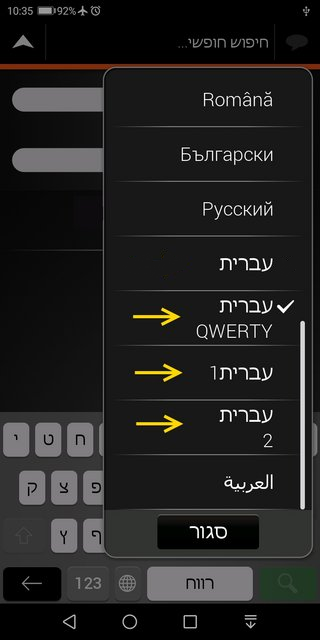
Navigating on Hebrew-interface?
Not satisfied with a single Hebrew keyboard?
For your use and hopefully for your satisfaction,
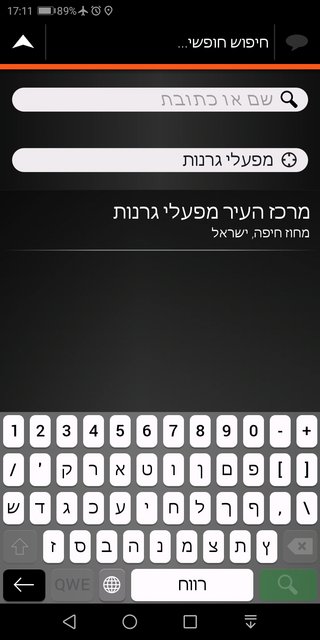
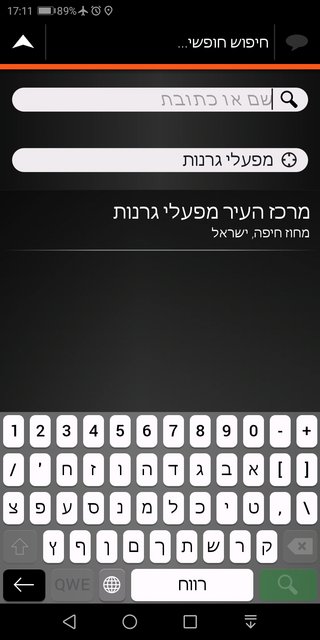
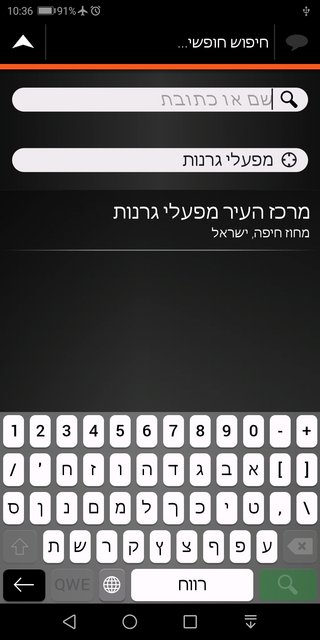
here are Three Modified Hebrew Keyboards in different layouts.
Spoiler: Keyboards list
Spoiler: מקלדת קוורטית :Qעברית
Spoiler: עברית1: כל האותיות הסופיות בסוף
Spoiler: עברית2: כל אות סופית אחרי כל אות ראשונית שלה
Remember to back up your original gpsandmore_android.zip file.Last edited by kwbs; 17th December 2023 at 09:54 AM.



Bookmarks