
 Likes: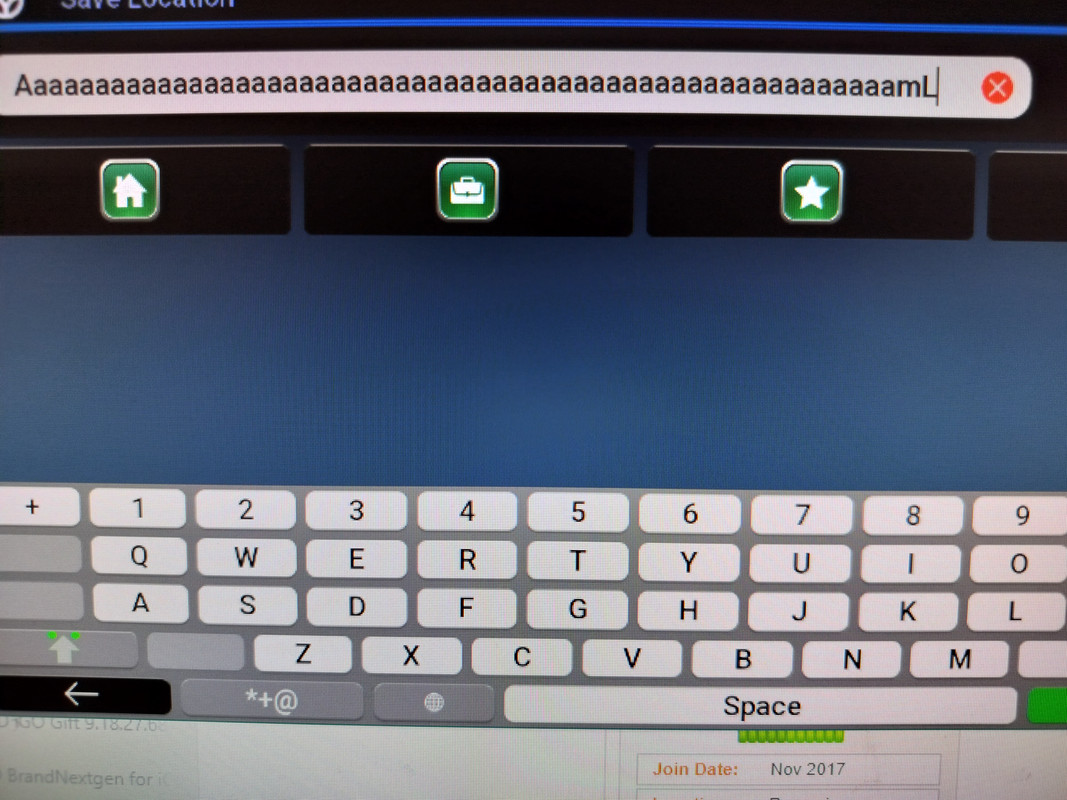

 Reply With Quote
Hi i have a china android head unit 1620x720 8gb ram 128gb storage. I am using Igo Luna with newest pongo skin.When guiding on motorways guiding window goes from big to small and only goes back to big again at 3km to maneuver. this is only on motorways not on normal roads (see pics). How do i fix this, is it in an UX file or sys or maybe in existing file to edit with total commander. I cant find info in search forum ( i am not expert in searching).
Spoiler: 555
Welcome guest, is this your first visit? Click the "Create Account" button now to join.


Results 3,831 to 3,840 of 3979
-
9th September 2024, 01:01 PM #3831Master


- Join Date
- Nov 2017
- Location
- Romania
- Posts
- 349
- Rep Power
- 167

@safealdibiki dont use same character for all 100 ,use different chars. Happend to me same as you first time

Spoiler: 60 or so on to 100
A function to move the cursor where you want without deleting whole text will be useful, to correct the text, as it is on phones, now that we have 100 chars
PS:
For users wich want to help with drag text cursor:
Files to edit its in:data\ui_nextgen\common\ui:keyboards.lua
Reference:txt_kbd_indicator
Its in keyboards.lua references about "txt_kbd_indicator" also the corresponding icon its bmp name"textcursor.bmp and textcursor.spr ,i suppose the spr file must be modified as well
But i look at those lines like a cat at a calendar, which means i don't understand anything
Can be made to be dragged this "textcursor" or not to be dragged ? That its the question
I think in this lines lie the truth.gif "duobt2")
Spoiler: LinesLast edited by cristianyxtl; 15th September 2024 at 12:49 PM.
-
23rd September 2024, 05:53 PM #3832Senior Member

- Join Date
- Nov 2017
- Location
- Danmark
- Posts
- 104
- Rep Power
- 11
Pongo android 13 on igo luna
Last edited by Andrey Form; 23rd September 2024 at 07:15 PM.
-
23rd September 2024, 06:06 PM #3833Master
- Join Date
- Nov 2017
- Location
- Romania
- Posts
- 349
- Rep Power
- 167
When windows its big (pic1)show second manouver, when its small(pic2) single maneuver
Its the same in nextgen pongo skin
If its a setting for it must be in "cockpit" section,i never think much at it (not that I think too much).gif ":bang:")
But i think its normal to appear like this
Well can be deactivated
Skin settings/cockpit/mini maneuver: activated and set distance to 0
0-mean the second maneuver will not appear at all
5(max) will appear when are at 5 clicks away from maneuver (i'm not sure how its work)
Its tricky somehow but you will figure out if you play withLast edited by cristianyxtl; 23rd September 2024 at 06:43 PM.
-
24th September 2024, 09:17 AM #3834Member
- Join Date
- Sep 2013
- Location
- globe
- Age
- 49
- Posts
- 20
- Rep Power
- 15
On the top left I see only the next turn.
How can I see the next 2, like the screenshot?
Thanks.
Spoiler: small picLast edited by Boki; 24th September 2024 at 11:45 AM. Reason: spoiler
-
24th September 2024, 03:29 PM #3835Master

- Join Date
- Jan 2016
- Location
- Germany
- Posts
- 512
- Rep Power
- 894
Search for "Show one diricon"
You will find it
-
24th September 2024, 04:27 PM #3836Senior Member
- Join Date
- Nov 2017
- Location
- Danmark
- Posts
- 104
- Rep Power
- 11
Fixed mini maneuver must be off in menu. dont have setting 0, but turned it off seems to work Originally Posted by cristianyxtl

-
24th September 2024, 05:15 PM #3837Master
- Join Date
- Jan 2016
- Location
- Germany
- Posts
- 512
- Rep Power
- 894
I think "Christos2013" would have come up with that himself. Originally Posted by skiib
-
24th September 2024, 05:42 PM #3838Master
- Join Date
- Nov 2017
- Location
- Romania
- Posts
- 349
- Rep Power
- 167
Mini maneuver
@skiib,its a little wheel and you can set distance Im not familiar with pongo skin for luna , but i assume its pretty much same as for nextgen
Last edited by cristianyxtl; 24th September 2024 at 07:01 PM.
-
6th October 2024, 08:13 AM #3839Member +

- Join Date
- Jul 2015
- Location
- Cairo, Egypt
- Posts
- 77
- Rep Power
- 16
@ cristianyxtl
I did succed using your way to modify data.zip in maximize character number in favorites name
But couldn't succeed in modify the cruser without having to delete the part of the name i want to rename
I would appreciate if you attach your modifed data.zip
Thanks a lot
-
6th October 2024, 11:57 AM #3840Master
- Join Date
- Nov 2017
- Location
- Romania
- Posts
- 349
- Rep Power
- 167
@safealdibiki unfortunately moving cursor manually to delete part of characters its not available,to rename you have to delete all characters and start naming again


Bookmarks