
 Likes:
 Reply With Quote
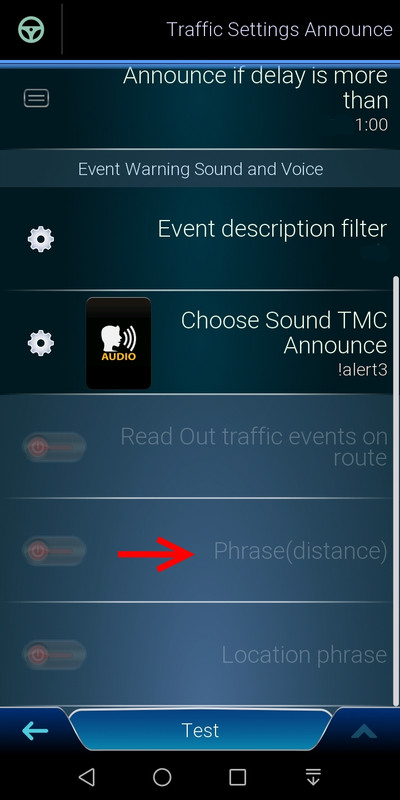
Perhaps that "Phrase (distance)" feature, meets the principle of your positive idea but, as you can see, for me it is not testable.Originally Posted by rider

Spoiler: Phrase (distance)
Welcome guest, is this your first visit? Click the "Create Account" button now to join.


Results 3,001 to 3,010 of 3974
-
12th December 2020, 08:46 AM #3001SUPER MODERATOR


- Join Date
- Oct 2019
- Location
- Belarus
- Posts
- 3,786
- Rep Power
- 2751
 New, mostly taken from the Pongo LUNA skin Originally Posted by safealdibiki

[Only registered and activated users can see links. ]
[Only registered and activated users can see links. ]
[Only registered and activated users can see links. ]
[Only registered and activated users can see links. ]
[Only registered and activated users can see links. ]
[Only registered and activated users can see links. ]
©AF_2020-26
-
12th December 2020, 12:33 PM #3002Master


- Join Date
- Jul 2017
- Location
- IL
- Posts
- 847
- Rep Power
- 307
-
12th December 2020, 05:00 PM #3003Master


- Join Date
- Apr 2016
- Location
- Rio de Janeiro
- Posts
- 476
- Rep Power
- 762
About balloons have you tried to use the parameter below? Maybe I can solve.
[3d_config]
disable_roadsign_navigation_mode=1
-
12th December 2020, 06:03 PM #3004Master
- Join Date
- Apr 2016
- Location
- Rio de Janeiro
- Posts
- 476
- Rep Power
- 762
Dear rider with Pongo skin for Nextgen, there is no ux that performs this function. Originally Posted by rider
-
13th December 2020, 09:25 AM #3005Junior Member
- Join Date
- Aug 2020
- Location
- Athens
- Posts
- 6
- Rep Power
- 0
in the last skin of master pongo i have 'problem' with many speed cameras on map .Can somebody friend help me.sorry for my english
-
13th December 2020, 10:15 AM #3006Master


- Join Date
- Jan 2016
- Location
- Esperia
- Posts
- 1,221
- Rep Power
- 1256
I've not tested it, try replacing in ux folder attached .zip (modded)
-
13th December 2020, 10:35 AM #3007Master
- Join Date
- Jan 2016
- Location
- Germany
- Posts
- 509
- Rep Power
- 894
If you click on the traffic button (long click in the last versions) you will see the distance to the first delay on the left side Originally Posted by rider
-
13th December 2020, 11:31 AM #3008Junior Member
- Join Date
- Aug 2020
- Location
- Athens
- Posts
- 6
- Rep Power
- 0
thanks for your answers,but the problem is samei have 'problem' with many speed cameras on map
-
13th December 2020, 01:20 PM #3009Master
- Join Date
- Apr 2016
- Location
- Rio de Janeiro
- Posts
- 476
- Rep Power
- 762
See the image.
It is what exists.
Spoiler: image
-
13th December 2020, 02:03 PM #3010Master
- Join Date
- Jul 2017
- Location
- IL
- Posts
- 847
- Rep Power
- 307
@rider
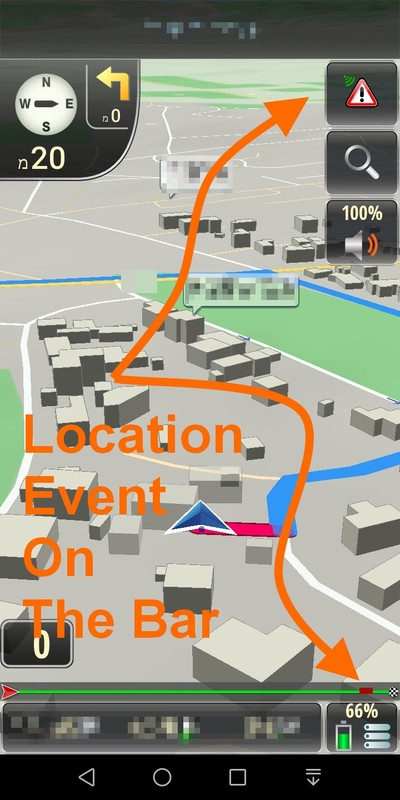
Before clicking on the TMC, you can notice the visual location of the event on the navigation progress bar.
Spoiler: Visual Location of the Event
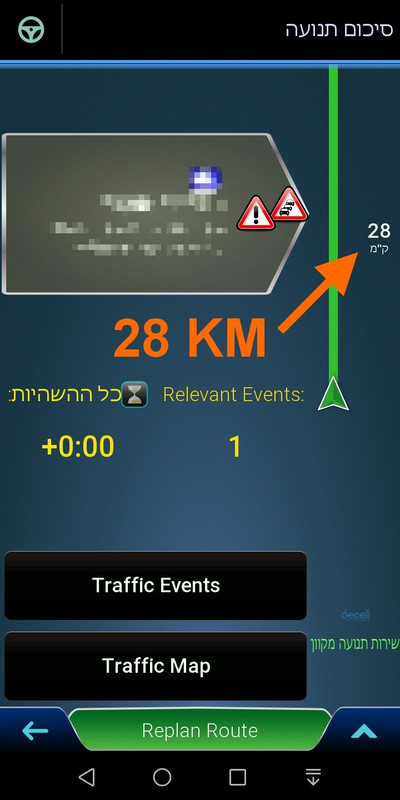
And for me, a short click on the TMC and the distance from the event appears.
Spoiler: Distance from the EventLast edited by kwbs; 15th December 2020 at 07:59 AM.


Bookmarks