
 Likes:
 Reply With Quote
There is cured app in proper topic
Post #2.
Welcome guest, is this your first visit? Click the "Create Account" button now to join.


Results 21 to 30 of 46
Thread: Serbian Language & TTS &...
-
14th August 2019, 03:50 PM #21Master


- Join Date
- Nov 2013
- Location
- somewhere in between
- Posts
- 84
- Rep Power
- 50

The voice synthesis is great, it just annoys the engine (Danica) constantly repeating: "Alfanum demo" at the beginning of each sentence, and it doesn't seem to work with voice commands either, search ...
-
14th August 2019, 04:54 PM #22iGO Enthusiast


- Join Date
- Jun 2014
- Location
- Niš
- Age
- 54
- Posts
- 7,291
- Rep Power
- 4909
Last edited by Boki; 14th August 2019 at 04:57 PM.
-
14th August 2019, 11:34 PM #23Master


- Join Date
- Nov 2015
- Location
- Palilula
- Posts
- 238
- Rep Power
- 136
Voice Command (VR function) is not working in iGO, on Android 8 and above... It doesn't have anything to do, with TTS engine or Voice file. Originally Posted by chopsticks

Last edited by Boki; 15th August 2019 at 07:38 AM.
-
15th August 2019, 08:24 AM #24Master
- Join Date
- Nov 2013
- Location
- somewhere in between
- Posts
- 84
- Rep Power
- 50
OK. I was confused when I saw this option
Spoiler: VR
which seems to be active and there is a complete explanation.
Spoiler: Help-manual
It made me think that something was improved for the Serbian language as well.
With this AlfaNum TTS, I didn't see the ability to add new words or my own dictionaries.
Spoiler: Remark
-
15th August 2019, 08:50 AM #25iGO Enthusiast
- Join Date
- Jun 2014
- Location
- Niš
- Age
- 54
- Posts
- 7,291
- Rep Power
- 4909
This option is general and belongs to the software. Remove ux file vr.zip (and free_text_vr.zip), and it won't confuse you anymore Originally Posted by chopsticks

Originally Posted by chopsticks
Spoiler: I'm sorry but we can not.
Apropos AlfaNUM TTS, keep in mind that this is just the beginning, and there will certainly be many improvements.
-
5th October 2019, 08:33 PM #26Master
- Join Date
- Nov 2015
- Location
- Palilula
- Posts
- 238
- Rep Power
- 136
Serbian Lang & Voice TTS
Update 01.12.2019.
For skins:
- Default skin,
- Pongo skin,
- Arimi & Vamibg default MOD skin
- Vicewandel skin
For using Serbian TTS, you need to install AlfaNumTTS SER from Google PlayLast edited by WOB; 1st December 2019 at 12:19 PM.
-
13th December 2019, 02:14 PM #27Master
- Join Date
- Nov 2013
- Location
- somewhere in between
- Posts
- 84
- Rep Power
- 50
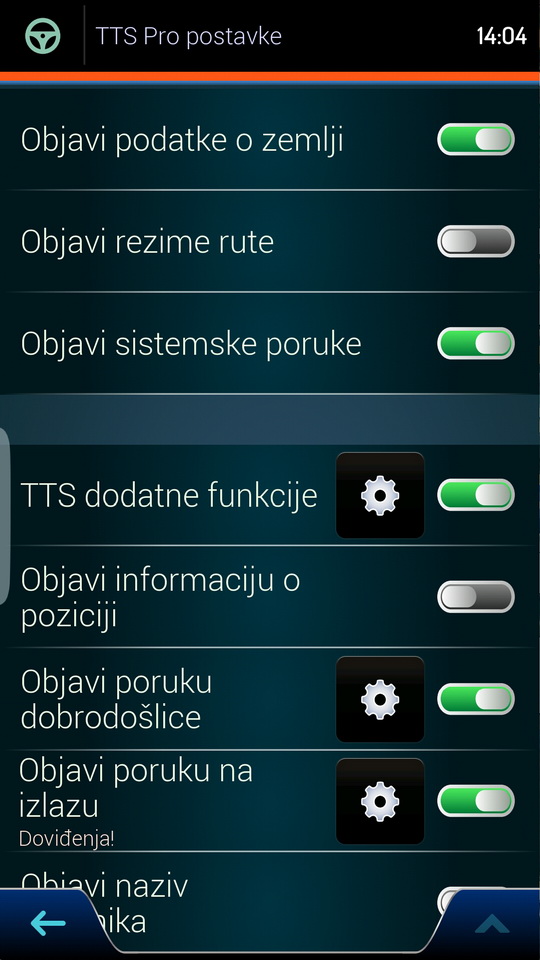
I get a blank screen on my HU in a car (Android 8) where iGO World (iGO NG World v9.18.27.736653) is installed in TTS pro options, while on the smartphone I see all the options. I use AlfanumTTS 1.1.1 on both devices. How to fix and see all options on HU as well?
Spoiler: TTS Pro settings
-
13th December 2019, 02:20 PM #28iGO Enthusiast
- Join Date
- Jun 2014
- Location
- Niš
- Age
- 54
- Posts
- 7,291
- Rep Power
- 4909
Or you made some mistake in the setup
Or this means that the HU system is crippled for some functions (most likely). Then you can do nothing.
This is discussed several times. In almost every case system was problem.
And...crossposting is not allowed.
-
14th December 2019, 01:26 PM #29Master
- Join Date
- Nov 2013
- Location
- somewhere in between
- Posts
- 84
- Rep Power
- 50
I find you very restrictive on this point. Because a small number of members are watching this topic. If I had asked the question in a general discussion, I would have had a better chance of getting a solution. By the way, I don't think it's a problem with the crippled HU, it may be a problem because of the Android 8 version. But I'll try again to completely reinstall everything, so we will see ...
-
16th December 2019, 09:48 PM #30Master
- Join Date
- Nov 2015
- Location
- Palilula
- Posts
- 238
- Rep Power
- 136
You don't see anything in TTS Pro settings, or you cannot enter TTS Pro settings (it's gray)?



Bookmarks