
 Likes:
 Reply With Quote
Thanks Kevin , I corrected starting post. I changed "since sw 7.10" into "since sw 7.00" and "If you flashed the old firmware 7.10" intoOriginally Posted by kevindd992002

"If you flashed the old firmware 6.60".
Welcome guest, is this your first visit? Click the "Create Account" button now to join.


Results 831 to 840 of 1106
-
31st March 2013, 01:40 PM #831Pro-Member


- Join Date
- May 2011
- Location
- Philippines
- Age
- 39
- Posts
- 225
- Rep Power
- 16
 Will do. Originally Posted by Neil
Right on, lol.
-
31st March 2013, 03:02 PM #832Important User


- Join Date
- Nov 2007
- Location
- light side
- Posts
- 15,182
- Rep Power
- 5128

You have to navigate to get to the good.
Galaxy S5 Kitkat 4.4.2 / Nuvi1200->1250 / Nuvi3790T->34xx / Nuvi 2200 / Nuvi 66 / Oregon 600
-
31st March 2013, 03:10 PM #833Pro-Member
- Join Date
- May 2011
- Location
- Philippines
- Age
- 39
- Posts
- 225
- Rep Power
- 16
No problem Originally Posted by catymag
 10char.
-
31st March 2013, 06:16 PM #834GPSPower Helper


- Join Date
- Jul 2010
- Location
- Europe
- Posts
- 213
- Rep Power
- 159
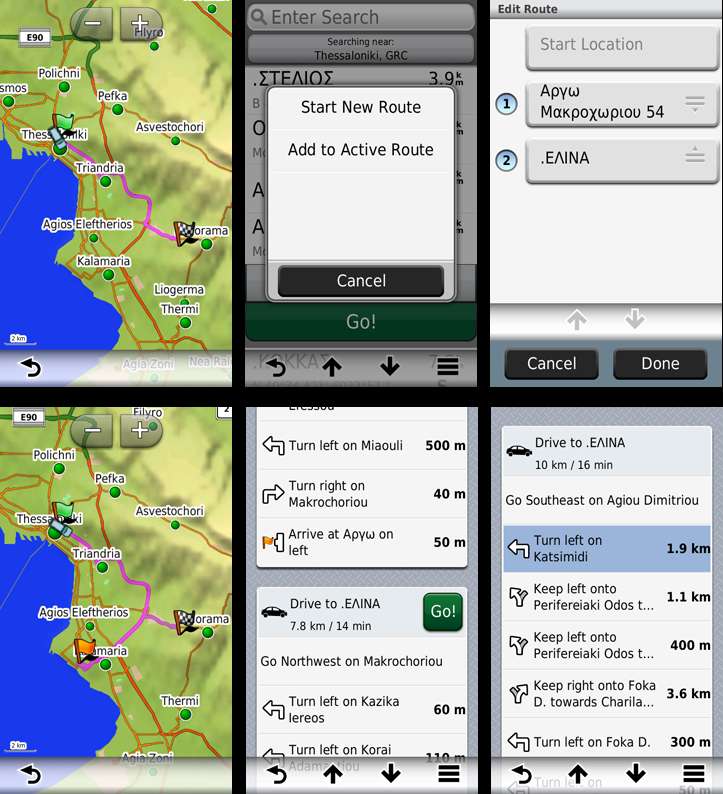
News for VIA point routing capability of 3760>3490 (fw7.80)
Now works with English language too!
I changed Language to English.
I did a hard reset.
Nuvi turned on with English Text
Where to? -> Favorites -> select a point (.EΛINA) as Destination, press GO, the Route is calculated and I start driving.
Again Where to? -> Favorites -> select another point (Αργω) as VIA point, press GO, I now have the options to "Start a New Route" or to "Add to Active Route".
I choose "Add to Active Route", I don't edit the order of the list and the VIA point Route is recalculated with an orange flag at the VIA point.
On the Directions page I now have a Route with two legs.
If I press thε green GO button of the second leg, the first leg (VIA point) disappears, and my Route is recalculated again from my current postion to my original Destination (.ΕΛΙΝΑ)

-
31st March 2013, 06:18 PM #835Junior Member
- Join Date
- Mar 2013
- Location
- asda
- Posts
- 3
- Rep Power
- 0
How can I enable 3d with xml files and mp3 player in audible with xml files? pls help beacause 3d buildings dont work
-
31st March 2013, 08:39 PM #836Important User
- Join Date
- Nov 2007
- Location
- light side
- Posts
- 15,182
- Rep Power
- 5128
Quite impossible to reply to your question, this thread is about 37xx to 34xx, infos are in post n1, if these dont work for you we cant guess why- Which device? Which firmware? What have you done? Originally Posted by Black911

You have to navigate to get to the good.
Galaxy S5 Kitkat 4.4.2 / Nuvi1200->1250 / Nuvi3790T->34xx / Nuvi 2200 / Nuvi 66 / Oregon 600
-
1st April 2013, 12:19 AM #837Pro-Member
- Join Date
- May 2011
- Location
- Philippines
- Age
- 39
- Posts
- 225
- Rep Power
- 16
What is the use of the speed limit in the 34xx firmware? I try to set it while in navigation mode but when I past that particular limit, nothing happens no message or anything?
-
1st April 2013, 12:45 AM #838Garmin/GPS Systems GMod.


- Join Date
- Aug 2011
- Location
- Oz.
- Posts
- 6,810
- Rep Power
- 2568
Not how it works Kevin. If you find a section of road when you are driving where the speed limit is actually, for example, 90kph but the SLI shows as 80, you can change it by pressing on the speed limit box. If there is no limit shown, just a '+', you can also set the actual speed limit if you know it. If you exceed the limit when driving, the SLI goes red but there's no audible warning.
'Thanking Posts' are banned. To thank someone, and/or to see hidden links and content, use the [Only registered and activated users can see links. ] button below left of the helpful post then refresh your browser [F5 key]. 'Thanking Posts' are banned.
Please don't spam. Posts serving no purpose other than to thank or to ask about hidden links are trashed or deleted, it's GPSPower's policy under [Only registered and activated users can see links. ]. Please don't spam.
[Only registered and activated users can see links. ] should make their first post as a new Intro Thread in [Only registered and activated users can see links. ].
-
1st April 2013, 12:53 AM #839Pro-Member
- Join Date
- May 2011
- Location
- Philippines
- Age
- 39
- Posts
- 225
- Rep Power
- 16
Oh ok. I don't think there's any speed limit in the Philippines Roadguide map at all (we are way behind in terms of GPS tech) which is why I don't see any speed limits when in navigation mode. I do see a "+" so I set it manually, but the SLI is not turning red when I exceed that limit? Originally Posted by Neil
-
1st April 2013, 12:55 AM #840Garmin/GPS Systems GMod.
- Join Date
- Aug 2011
- Location
- Oz.
- Posts
- 6,810
- Rep Power
- 2568
Yes, I suspect that function only works with the speed limit embedded in the map.
'Thanking Posts' are banned. To thank someone, and/or to see hidden links and content, use the [Only registered and activated users can see links. ] button below left of the helpful post then refresh your browser [F5 key]. 'Thanking Posts' are banned.
Please don't spam. Posts serving no purpose other than to thank or to ask about hidden links are trashed or deleted, it's GPSPower's policy under [Only registered and activated users can see links. ]. Please don't spam.
[Only registered and activated users can see links. ] should make their first post as a new Intro Thread in [Only registered and activated users can see links. ].


Bookmarks