
 Likes:
 Reply With Quote
To have them working you must have ASR ,SID Fast Routing ,SID Instasearch ,SID AddressSearch ,DB CountryStateSearch specific for 34xx, 37xx ones wont work. 34xx structure is different no G2S folder in 34xx, there is SID folder instead. In 37xx position looks a bit more precise , I cant find any difference in touch,check if you have the latest touch panel softOriginally Posted by webalf

[Only registered and activated users can see links. ]
On the contrary I find 34xx more responsive and faster in drawing the map, I got new features adding *.xml files attached in post n1 and from 34xx firmware ,but I cant add a new destination as a VIA point in a calculated route: this is possible in 37xx
Welcome guest, is this your first visit? Click the "Create Account" button now to join.


Results 211 to 220 of 1106
-
18th February 2012, 11:29 PM #211Member


- Join Date
- Feb 2012
- Location
- Canada
- Age
- 54
- Posts
- 14
- Rep Power
- 0

All right! There's been a few days now that I'm playing with the 3490 UI. A few features from the 3790 are lost, yes, but overall there's no way you should regret the upgrade. I can't tell if there's a loss of map detail as it is something I'm not able to judge due to my area not being awarded by Garmin for all the features my across the border neighbours enjoy (for what I read). Also, I can't tell anything regarding traffic coverage - all seems the same and I didn't buy yet the GMT60 to test for better coverage. So far the only cons I report are the fact that the responsiveness to the touch isn't so instant as before, I mean looks like that one has to re-touch the screen to select the option. I remember this was something I found awesome in the old UI, fast response. Could be my impression, though, as all this happens more while driving so I guess that I'm trying to pay more attention to driving that precision touch. Don't do it often, still I don't recall happening before. Another con has nothing to do with the hardware or software. My voice command still doesn't work for "find Places", "find intersection" and "find address". I'm presented with "this feature is not available for Canada in American English". Now either I fix it, don't bother or use a truck-load of rust-off on my «parler français» lol. I'll seek for help to fix it for sure.
Everything else is good, great, awesome, fantastic!! And the info we get is either more detailed or better shown. Once again I gratefully thank all of you that made this convert possible as it's wayyyy rewarding compared to buying a new 3490!
-
19th February 2012, 12:41 AM #212Important User


- Join Date
- Nov 2007
- Location
- light side
- Posts
- 15,181
- Rep Power
- 5128

You have to navigate to get to the good.
Galaxy S5 Kitkat 4.4.2 / Nuvi1200->1250 / Nuvi3790T->34xx / Nuvi 2200 / Nuvi 66 / Oregon 600
-
19th February 2012, 07:57 AM #213Member
- Join Date
- Feb 2012
- Location
- Canada
- Age
- 54
- Posts
- 14
- Rep Power
- 0
Hi caty! I did install those *.xml files and many others that you also provided. I managed to have all the features running ok so far. When I created the asr folder inside .system (I had none before) I had the chance to download with webupdater the only 2 asr files I needed, en_us & en_uk. after that update my voice feature was enabled, but partially only as I miss those 3 options. I don't know yet how to get those SID and DB files you mention, but I'll be reading again all the info on these tutorials to find my way there. The responsiveness on my 3490 could be just due to the reason I pointed previously. Honestly with the 3790 fw I don't remember having a hiccup on that matter, but then again I didn't enjoy much touching the screen as I do now. Most of my commands were done by voice and I barely had to scream (as I did in my previous 2460 - good unit too, nonetheless) as I easily learned how to talk to the unit. I read many reviews and watched videos were a bad map rendering of the 37xx was evident, but I maybe I am a lucky owner as from day one never had an issue. It happens! To me this convert is a dream come true solely because I wanted a better UI on my Nuvi and I was feeling sad to give it away to buy the new 3490, not to mention "money talks" :-( ! Yes, some good features are lost, but... is worth it!
-
19th February 2012, 05:53 PM #214GPSPower Helper


- Join Date
- Jul 2010
- Location
- Europe
- Posts
- 213
- Rep Power
- 159
Why can't you do it? Originally Posted by catymag
-If I am driving a route and I want to add a Gas Station for example, I go to [Where to?]-->[Gas Stations], choose the one I want, I press [Go], it asks [Start New Route] or [Add to Active Route] and Ι choose the second and now I see the Edit Route screen, and if I want I can also change its position in the list and put it as final destination.
-If I want to edit a saved route, I choose the route-->[3 bars]-->[Edit Destinations]-->[+] and I add via points.
...or do you mean something different?
-
19th February 2012, 06:16 PM #215Important User
- Join Date
- Nov 2007
- Location
- light side
- Posts
- 15,181
- Rep Power
- 5128
I mean all added points in planned trips are "destinations" not VIAs.
Usually old Nuvis drive you to the first point ,then when you arrive there ,they keep on driving you on the preprogrammed route.
This is not possible with 34xx, nuvi will give you many trips , not a single route with VIAs.
You have to navigate to get to the good.
Galaxy S5 Kitkat 4.4.2 / Nuvi1200->1250 / Nuvi3790T->34xx / Nuvi 2200 / Nuvi 66 / Oregon 600
-
19th February 2012, 07:48 PM #216GPSPower Helper
- Join Date
- Jul 2010
- Location
- Europe
- Posts
- 213
- Rep Power
- 159
Yes, that's right. Originally Posted by catymag
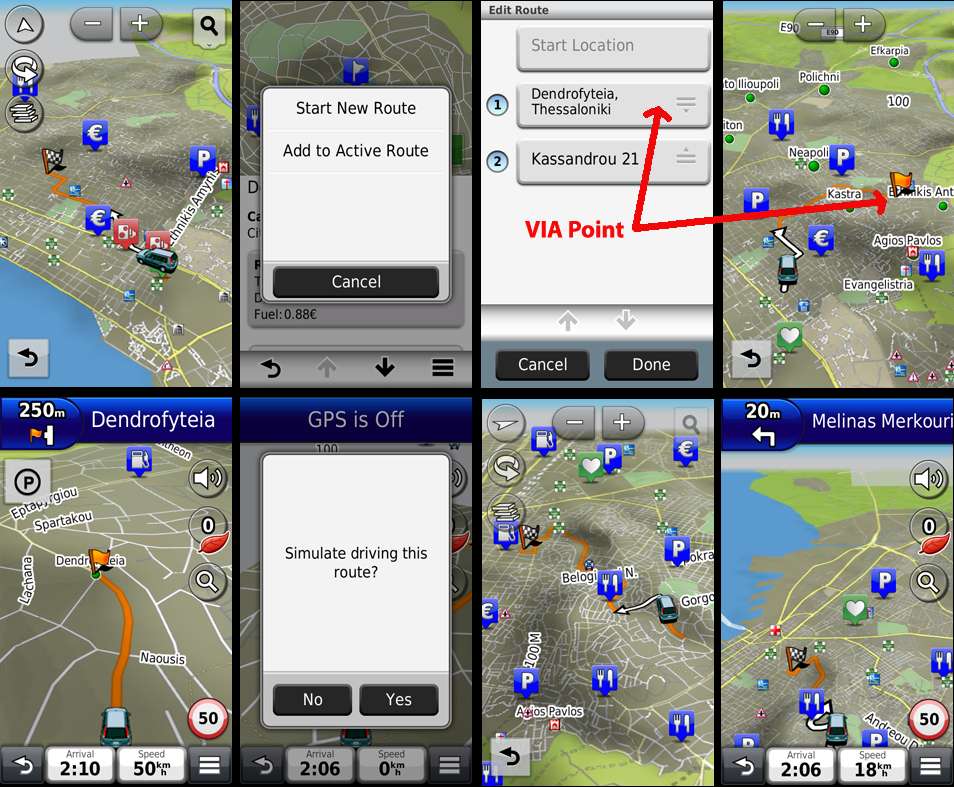
If you try to navigate a planned route, you are presented with all the VIA points first, second ....the last one being the final destination.
You can press the first and start your planned navigation as usual, or jump straight to the third for example (forgetting (1) and (2))
I use this feature a lot because everytime I return to my city, every map I use, navigates me through the traffic jammed city and I want to go home using the Ring Road, so I can't use a straight route to Home.
I saved a multi point route and everytime I want to return to my city, I choose it and press #1 point on the list (the start of the Ring Road) and then the planned route goes on until I reach Home.
So 3760 and 3490 offers you the choice to press the first VIA point on the list and start an ordinary "route VIA points" or jump straight to another point on the list and continue the planned route from there on.
The only problem I find on both devices is that the full route is not shown on screen, just a piece of it driving to the next VIA point.
I own an early 3760 unit, and at first it stopped navigating the planned route after each VIA point.
But after some firmware update it was fixed and an orange flag marked every VIA point.
Then, as soon as I reached the first VIA point, 3760 asked me "to continue".
The same happens now with modded 3490.
I did a simulated example below.
(Clockwise) I assigned a Destination, then choose a VIA point and start navigating towards it.
As soon as I reach it, the message "Simulate driving this route?" appears and even before I press Yes, Voice Directions continue as does the navigation in the background. After I press Yes, navigation to my final destination is continued on screen and I can now see the checkered flag.
-
19th February 2012, 10:08 PM #217KanopusGuest
This question is asked in simulation mode only, but simulations don't show the problem. On real navigation, trips behave badly as a route with VIAs. Originally Posted by x-trail
-
19th February 2012, 10:51 PM #218Member
- Join Date
- Sep 2009
- Location
- Slovenia
- Age
- 74
- Posts
- 13
- Rep Power
- 0
After converting, precision of position is very low, just about 25 m
-
19th February 2012, 11:06 PM #219Navigation software expert

- Join Date
- May 2010
- Location
- EU
- Posts
- 2,354
- Rep Power
- 846
Do your car icon jump up and down on jour nuvi 34xx when you on route?
How is your sattelite accuracy?
My friend have on nuvi 1490 5 satellite and 3 meters accuracy but on 34xx have 9-10 sattelite but 25 meters accuracy in the same place and nuvi 1490 drive on highway but 34xx with the same route settings all the time show that he must go down from highway?
Do you have the same problem?
-
20th February 2012, 03:11 AM #220Important User
- Join Date
- Nov 2007
- Location
- light side
- Posts
- 15,181
- Rep Power
- 5128
Files (ASR ,SID Fast Routing ,SID Instasearch ,SID AddressSearch ,DB CountryStateSearch specific for 34xx,)you need are here in post n2 Originally Posted by webalf
[Only registered and activated users can see links. ]
download ASR and other files for 34xx, for paths look at your Garmin device.xml in Garmin folder, it shows the right paths for every files.
But read
[Only registered and activated users can see links. ]
latest lines :
> North American devices are the only exceptions. For North American
> devices, you may load either Full Coverage of North America or US &
> Canada. However, other smaller regions will NOT work with voice command.
You have to navigate to get to the good.
Galaxy S5 Kitkat 4.4.2 / Nuvi1200->1250 / Nuvi3790T->34xx / Nuvi 2200 / Nuvi 66 / Oregon 600


Bookmarks