
 Likes:

Files (ASR ,SID Fast Routing ,SID Instasearch ,SID AddressSearch ,DB CountryStateSearch specific for 34xx,)you need are here in post n2Originally Posted by webalf

[Only registered and activated users can see links. ]
download ASR and other files for 34xx, for paths look at your Garmin device.xml in Garmin folder, it shows the right paths for every files.
But read
[Only registered and activated users can see links. ]
latest lines :
> North American devices are the only exceptions. For North American
> devices, you may load either Full Coverage of North America or US &
> Canada. However, other smaller regions will NOT work with voice command.
Welcome guest, is this your first visit? Click the "Create Account" button now to join.


Results 211 to 220 of 1106
Hybrid View
-
20th February 2012, 03:11 AM #1Important User


- Join Date
- Nov 2007
- Location
- light side
- Posts
- 15,182
- Rep Power
- 5127


You have to navigate to get to the good.
Galaxy S5 Kitkat 4.4.2 / Nuvi1200->1250 / Nuvi3790T->34xx / Nuvi 2200 / Nuvi 66 / Oregon 600
-
19th February 2012, 06:16 PM #2Important User
- Join Date
- Nov 2007
- Location
- light side
- Posts
- 15,182
- Rep Power
- 5127
I mean all added points in planned trips are "destinations" not VIAs.
Usually old Nuvis drive you to the first point ,then when you arrive there ,they keep on driving you on the preprogrammed route.
This is not possible with 34xx, nuvi will give you many trips , not a single route with VIAs.
You have to navigate to get to the good.
Galaxy S5 Kitkat 4.4.2 / Nuvi1200->1250 / Nuvi3790T->34xx / Nuvi 2200 / Nuvi 66 / Oregon 600
-
19th February 2012, 07:48 PM #3GPSPower Helper


- Join Date
- Jul 2010
- Location
- Europe
- Posts
- 213
- Rep Power
- 159
Yes, that's right. Originally Posted by catymag
If you try to navigate a planned route, you are presented with all the VIA points first, second ....the last one being the final destination.
You can press the first and start your planned navigation as usual, or jump straight to the third for example (forgetting (1) and (2))
I use this feature a lot because everytime I return to my city, every map I use, navigates me through the traffic jammed city and I want to go home using the Ring Road, so I can't use a straight route to Home.
I saved a multi point route and everytime I want to return to my city, I choose it and press #1 point on the list (the start of the Ring Road) and then the planned route goes on until I reach Home.
So 3760 and 3490 offers you the choice to press the first VIA point on the list and start an ordinary "route VIA points" or jump straight to another point on the list and continue the planned route from there on.
The only problem I find on both devices is that the full route is not shown on screen, just a piece of it driving to the next VIA point.
I own an early 3760 unit, and at first it stopped navigating the planned route after each VIA point.
But after some firmware update it was fixed and an orange flag marked every VIA point.
Then, as soon as I reached the first VIA point, 3760 asked me "to continue".
The same happens now with modded 3490.
I did a simulated example below.
(Clockwise) I assigned a Destination, then choose a VIA point and start navigating towards it.
As soon as I reach it, the message "Simulate driving this route?" appears and even before I press Yes, Voice Directions continue as does the navigation in the background. After I press Yes, navigation to my final destination is continued on screen and I can now see the checkered flag.
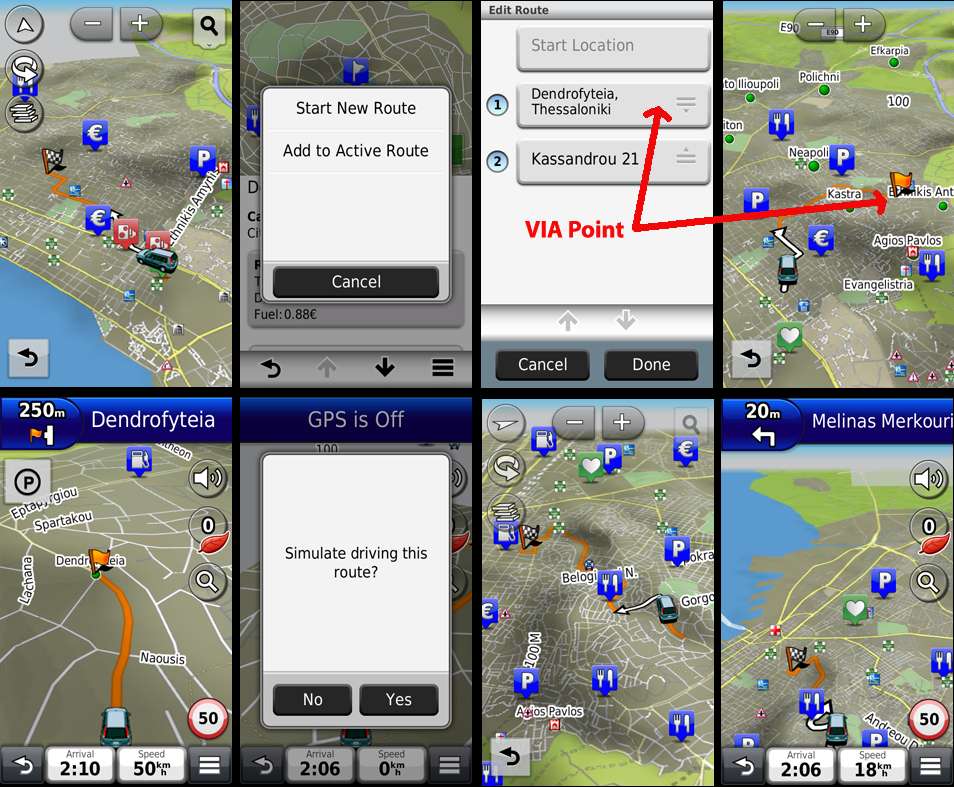
-
19th February 2012, 10:08 PM #4KanopusGuest
This question is asked in simulation mode only, but simulations don't show the problem. On real navigation, trips behave badly as a route with VIAs. Originally Posted by x-trail
-
19th February 2012, 10:51 PM #5Member
- Join Date
- Sep 2009
- Location
- Slovenia
- Age
- 74
- Posts
- 13
- Rep Power
- 0
After converting, precision of position is very low, just about 25 m
-
19th February 2012, 11:06 PM #6Navigation software expert

- Join Date
- May 2010
- Location
- EU
- Posts
- 2,354
- Rep Power
- 845
Do your car icon jump up and down on jour nuvi 34xx when you on route?
How is your sattelite accuracy?
My friend have on nuvi 1490 5 satellite and 3 meters accuracy but on 34xx have 9-10 sattelite but 25 meters accuracy in the same place and nuvi 1490 drive on highway but 34xx with the same route settings all the time show that he must go down from highway?
Do you have the same problem?
-
20th February 2012, 03:17 AM #7Important User
- Join Date
- Nov 2007
- Location
- light side
- Posts
- 15,182
- Rep Power
- 5127
read post 43 Originally Posted by lolypop000

You have to navigate to get to the good.
Galaxy S5 Kitkat 4.4.2 / Nuvi1200->1250 / Nuvi3790T->34xx / Nuvi 2200 / Nuvi 66 / Oregon 600
-
20th February 2012, 08:34 AM #8Member
- Join Date
- Sep 2009
- Location
- Slovenia
- Age
- 74
- Posts
- 13
- Rep Power
- 0
yes, I have exatcly the same problem. What can I do?
-
20th February 2012, 11:35 AM #9Navigation software expert
- Join Date
- May 2010
- Location
- EU
- Posts
- 2,354
- Rep Power
- 845
Caty i readpost 43# and there is no solution.
On my friedn nuvi 3490 satellite and car jump problem is when is on route not in simulation mode.
-
20th February 2012, 03:33 PM #10voyager56Guest
Some addition to post 43#. If you enter a "Diagnostic page" and then "Developer GPS Tools". You can enable "Draw EPE". Then you will see a circle on the map. Circle shows GPS precision. Originally Posted by lolypop000

 Reply With Quote

Bookmarks