
 Likes:
 Reply With Quote
Has anyone actually got the jcv files working on this android 800x480 version.
Im using the ntu map and downloaded regional extras from another thread on this site: UK&RoI ntu unlocked. The contents being
JCV_LaneAssistPortraitFull - D3170160A.jcv
JCV_Nuvi-40,50-Android - D2920150A.jcv
JCV_Split-Screen - D3377140A.jcv
Now Im guessing that only the JCV_Nuvi-40,50-Android is probably compatible with phone and although Ive tried all three files there does not appear to be any difference when exiting highway, complex junctions etc
There was also a g2s file with the bundle which I placed in a g2s folder.
Welcome guest, is this your first visit? Click the "Create Account" button now to join.


Results 131 to 140 of 173
-
4th December 2014, 10:03 PM #131Important User


- Join Date
- Nov 2007
- Location
- light side
- Posts
- 15,182
- Rep Power
- 5128

Sorry but gmap3d.img is usually locked and version dependant, probably you mean gmapdem.img that is unlocked and not version dependant.
gmap3d.img shows cities buildings pictures on map when you zoom in, DEM map shows 3d terrain shadings.
NT and NTU have different FID and different gmap3d with different FID. All addition files are version dependant because they contain their version FID.
This is the reason you must use CNEU NTU if you want JCV.
NT version doesnt provide a working JCV for SP.
Separate jcv files exist and G Express downloads them when users have lifetime for one region only. You cant build them by yourself, but in CNEU threads usually some users post them along separate regions imgs.
sent with my phone
You have to navigate to get to the good.
Galaxy S5 Kitkat 4.4.2 / Nuvi1200->1250 / Nuvi3790T->34xx / Nuvi 2200 / Nuvi 66 / Oregon 600
-
6th December 2014, 07:43 PM #132Member +

- Join Date
- Oct 2012
- Location
- uk
- Posts
- 92
- Rep Power
- 17
-
6th December 2014, 11:35 PM #133Navigation software expert


- Join Date
- May 2011
- Location
- Greece
- Posts
- 462
- Rep Power
- 554
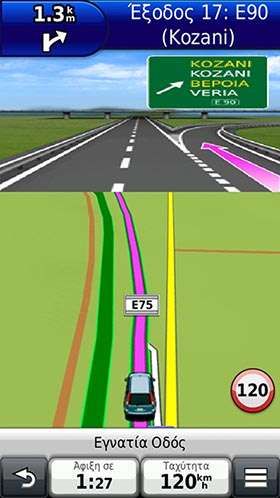
For SP JCV from Nuvi 40/50 should work just fine. Inside .System folder you must have a JCV folder and in there just copy xxxxxx.jcv file. Always use the jcv file that comes with the version of NTU you have because JCV is one of these files that are version dependant. For example i use only the Greek part of CNEU NTU 2015.30 and for JCV file i use D3589140A.JCV from the same topic you mentioned at the first post, it works in landscape and portrait also.
[Only registered and activated users can see links. ]
-
7th December 2014, 01:51 AM #134Important User

- Join Date
- Apr 2012
- Location
- Darkside of the Moon
- Posts
- 2,849
- Rep Power
- 1398
I'm trying to get JCV working for North America map, I use D3478140A.jcv from [Only registered and activated users can see links. ] and put it under <internalStorage>\Garmin\.System\JCV but I don't see any different on map. Is there a way to check to see if it's using the JCV file or turn JCV on/off? My phone is running 4.4.2 so <internalStorage> path is \sdcard0
-
7th December 2014, 03:01 AM #135Important User
- Join Date
- Nov 2007
- Location
- light side
- Posts
- 15,182
- Rep Power
- 5128
Simulate a route to see if junction views will appear.
Set a route for anywhere that you want to check and start the route in simulation mode.
Press on the green bar showing the next turn. This will give you a list of all navigation points. Press the down arrow to see if your route will show some JCV
You have to navigate to get to the good.
Galaxy S5 Kitkat 4.4.2 / Nuvi1200->1250 / Nuvi3790T->34xx / Nuvi 2200 / Nuvi 66 / Oregon 600
-
7th December 2014, 05:20 AM #136Important User
- Join Date
- Apr 2012
- Location
- Darkside of the Moon
- Posts
- 2,849
- Rep Power
- 1398
Thanks! JCV is showing, but not fullscreen. There is a small region at top that it's not clipping correctly and portion of map is showing through it. It's a minor bug. Do you know if there is a JCV split screen that will work instead?
On the right side there is list of bars (one is bordered green) but only half of list is showing (it seem to shift to right and off the screen for half of the image); it's a horizontal alignment problem I think. Little hard to explain; is there a good proggy on Android (not rooted) to use to snapshot the screen to show the error?
I'm use to creating a route from where I'm at and when I want to review the trip, I activate simulation. But Garmin simulation mode is kind of sucky since you have to turn off GPS to simulate and turning off GPS will not get current position. So this is how I "kludged" it
1. Make sure GPS Simulator is off via Settings->Navigation->GPS Simulator
2. After GPS locked, create your route via "Where To?" and make sure you are starting a new route under "Routes" (this will set starting point of route to where you are currently at)
3. Now turn GPS Simulator on via Settings->Navigation->GPS Simulator
I know it's silly; but it does work the way I wanted. Also a stupid pop-up will appear while it's simulating (if your simulation is long) asking "Simulate driving this route". Again, it's pretty silly.
Update: JCV working!Last edited by osiris4isis; 30th May 2018 at 10:40 PM.
-
7th December 2014, 01:03 PM #137GPSPower Helper

- Join Date
- Jul 2010
- Location
- Europe
- Posts
- 213
- Rep Power
- 159
@ osiris4isis
With SP you can simulate a route from any point to any point (directly or with route planner).
- Activate simulation.
- Tap "Where to" and choose any Address, City, Poi, point on map etc.
- On the Info page of this point there is now a new button "Set Location", press it.
- Now this is your starting point and you can create and simulate the route you like.
The misaligned buttons on the right are your next available Highway Exits on your route (3 in landscape mode, 2 in portrait mode) and are updated as you drive and pass them.
To deactivate them go to Settings>Navigation>Highway Mode>uncheck
On devices with larger screens (i.e. 1920x1080) there is no misalignment.In portrait mode the JCV is displayed split screen.Spoiler: .Spoiler: .
-
7th December 2014, 02:24 PM #138Important User
- Join Date
- Apr 2012
- Location
- Darkside of the Moon
- Posts
- 2,849
- Rep Power
- 1398
Thanks for the tip x-trail. Too bad "next available exits" display is messed up for 800x480; hope it's fixed soon.
BTW, alert points from Cyclop won't show up when doing simulation, right?Last edited by Boki; 7th January 2021 at 01:05 PM. Reason: removed unnecessary quote
-
7th December 2014, 02:59 PM #139Member +
- Join Date
- Oct 2012
- Location
- uk
- Posts
- 92
- Rep Power
- 17
@Ellinas
Thanks, I guess that I had the JCV folder in wrong location. My Garmin folder is on root of internal card. I was previously instructed to place the JCV folder inside the Garmin folder, this was the problem and did not work. It now sees it ok inside the Garmin\.System folder
-
27th December 2014, 03:44 AM #140Member
- Join Date
- Nov 2014
- Location
- austalia
- Age
- 67
- Posts
- 10
- Rep Power
- 0
I have been trying for a few days now to get this to work and need some help thanks
Android Sony xperia E1 Kitkat 4.42
/storage/sdcard1
/storage/emulated/0
I would like to put it on the sd card if I can.
could you guys point me towards the right apk and Garmin folder thanks
Mark
I just had a look at the path the Garmin folder was installing to is says E1\SD\Card\ as in my pic below
Spoiler: attached imageLast edited by mark000; 27th December 2014 at 08:41 AM.



Bookmarks