Welcome guest, is this your first visit? Click the "Create Account" button now to join.

Results 1 to 10 of 30

Hybrid View

  1. #1
    GPSPower Helper Voice Command support is not available for American English" Problem ?
    x-trail's Avatar
    Join Date
    Jul 2010
    Location
    Europe
    Posts
    213
    Rep Power
    158

    Default

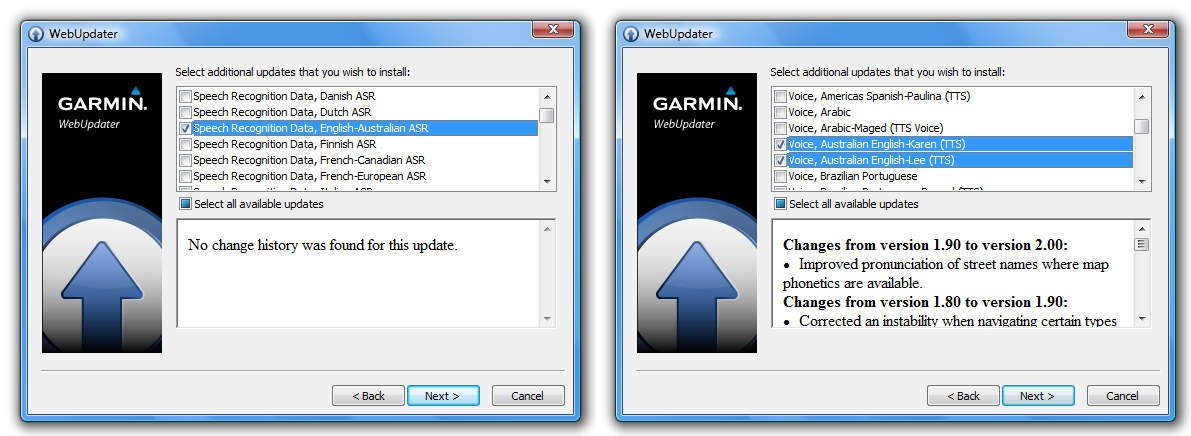
    Connect your device with Webupdater program, proceed to check for additional updates and check if you have the following:
    Spoiler: screenshots
    ausx

    So, you will need "Speech Recognition Data, English-Australian ASR" file (***.SRD) and the Australian TTS vioces installed through webupdater.
    Then you will need the appropriate (suitable) ***.ASR and ***.SRX files for the map you are using.
    You must select one of the two Australian TTS voices on your device.
    Last edited by x-trail; 10th October 2012 at 08:05 PM.

  2.    Advertissements


  3. #2
    Junior Member
    Join Date
    Oct 2012
    Location
    Perth
    Posts
    6
    Rep Power
    0

    Default

    Thanks X-trail. That was listed in the first post but does not work. In webupdater there is only additional voices and vehicles. I am already using an Australian voice.

  4. #3
    Senior Member
    Join Date
    Oct 2010
    Location
    Oz
    Posts
    114
    Rep Power
    28

    Default

    Quote Originally Posted by rookie1 View Post
    Thanks X-trail. That was listed in the first post but does not work. In webupdater there is only additional voices and vehicles. I am already using an Australian voice.
    @Rookie1
    Not sure which device you have but my probs with voice recog were only fixed when some kind person uploaded correct ASR2 files for my device, one that also matched my map.
    My experience is with 3790 and then it is converted to 3490.
    Firstly ASR files must match the map and the device for voice recognition to work fully. Navteq map on 3490 did not have full voice recognition until someone uploaded the correct .SRD files. If you have genuine map install update then SRD/SRX files can be downloaded via web updater.
    With a "free" map the SRD/SRX are simply not available via webupdater.
    I think for you to get it to work fully you need someone with "same device/same map" and "working voice recog" to allow you access to there srd/srx files.


Bookmarks

Posting Permissions

  • You may not post new threads
  • You may not post replies
  • You may not post attachments
  • You may not edit your posts
  •