
 Likes:


I make same for my last red light speed trap home made!
I unzoom my map and i check if i saw way point alert, i remember the old spot!
So if you said, your kit is not visible, ill tryed with simulation travel in same sector ?
Welcome guest, is this your first visit? Click the "Create Account" button now to join.


Results 1 to 10 of 412
Thread: Cyclop Safety Cameras for Garmin
Hybrid View
-
27th August 2014, 12:32 AM #1Master


- Join Date
- Jun 2010
- Location
- Quebec/Canada
- Posts
- 145
- Rep Power
- 210

-
27th August 2014, 12:48 AM #2Navigation software expert


- Join Date
- Apr 2009
- Location
- Suomi-Russia
- Age
- 59
- Posts
- 2,150
- Rep Power
- 730
The Neil bless you on it he is good fellow Originally Posted by quebec001

 No doubt that lucky will be with you after him good words.
Garmin, how much is 30 pieces of silver for Judas today? Were they worthy for crucifix of GPSPower?
-
28th August 2014, 01:42 AM #3Navigation software expert
- Join Date
- Apr 2009
- Location
- Suomi-Russia
- Age
- 59
- Posts
- 2,150
- Rep Power
- 730
Do you wait his permissions? Why? Try simulation if you remember some spots. Also you can check spots from any free database.
There are no other way check Cyclops without simulation. You can check for successful installation in menu -> system -> about device -> search in list for safety cameras. But for fact of showing and alarm you should go to simulation.Garmin, how much is 30 pieces of silver for Judas today? Were they worthy for crucifix of GPSPower?
-
28th August 2014, 03:18 PM #4Master
- Join Date
- Jun 2010
- Location
- Quebec/Canada
- Posts
- 145
- Rep Power
- 210
is not for permissions lol, ok now i saw system -> about device -> search in list for safety cameras!
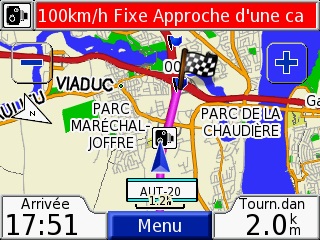
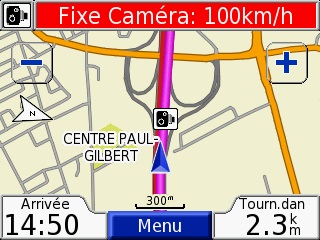
SO ITS OK, i am simulate for one point and simulation warning me for one speed trap at 100km/hr
Spoiler: pic
My test for one waypoint: warning and alert
Spoiler: pics
if some want checking for all point for Quebec (in Canada)
we have in english (or ine french) some PDF with read light and speed camera location (so this PDF is made in 2009, probably no new spot)
Spoiler: Transport Quebec
SO i have 2 questions
- first-- i dont know how many feet before warning if is for 100km/hr or 50km/hr speed trap
- second -- I did not find any tools to convert the .GPI to .CSV file
Last edited by quebec001; 14th September 2014 at 06:39 PM.
-
29th August 2014, 02:56 AM #5Navigation software expert
- Join Date
- Apr 2009
- Location
- Suomi-Russia
- Age
- 59
- Posts
- 2,150
- Rep Power
- 730
The first is coctail from speed and distance. Maybe anybody have got more info. You can find discussion on forum for Cyclops in dedicated threads. Originally Posted by quebec001
The second is not impossible for Cyclops. For usual POI it is not problem usually. See dedicated threads if you want to see investigation but there are not tools that ready for use.Garmin, how much is 30 pieces of silver for Judas today? Were they worthy for crucifix of GPSPower?
-
29th August 2014, 05:28 PM #6Master
- Join Date
- Jun 2010
- Location
- Quebec/Canada
- Posts
- 145
- Rep Power
- 210
ok and thanks for answear
so in find this one in Garmin site french France
Spoiler: link
4 km on motorways, 2 km outside urban areas and 300 meters in urban areas. Danger areas are: Fixed speed cameras, mobile speed zones, railway crossings, the road narrowed, bridges and tunnels, steep slopes, dangerous turn reported, schools and summer camps, hospitals ...Last edited by Boki; 17th May 2022 at 09:14 PM.
-
19th October 2015, 01:36 PM #7Junior Member
- Join Date
- Oct 2015
- Location
- Quebec, QC
- Posts
- 2
- Rep Power
- 0
I have a Nuvi 370 with the same software versions as you. I tested the Cyclops USA/canada file (Oct 8, 2015) with the same speed camera as you. However, when I pass the camera on highway 20 in Levis like you, I only get an icon. I don't get a sound warming and the bar at the top of the screen does not turn red (stays green).
If I test camera in the UK, it works perfectly.
Any ideas?
-
19th October 2015, 10:07 PM #8Garmin/GPS Systems GMod.


- Join Date
- Aug 2011
- Location
- Oz.
- Posts
- 6,881
- Rep Power
- 2569
Originally Posted by garmin dan
'..... with the same software versions as you'? '...... with the same speed camera as you'? Same as who? Were you answering your own post from the day before? Originally Posted by garmin dan
'Thanking Posts' are banned. To thank someone, and/or to see hidden links and content, use the [Only registered and activated users can see links. ] button below left of the helpful post then refresh your browser [F5 key]. 'Thanking Posts' are banned.
Please don't spam. Posts serving no purpose other than to thank or to ask about hidden links are trashed or deleted, it's GPSPower's policy under [Only registered and activated users can see links. ]. Please don't spam.
[Only registered and activated users can see links. ] should make their first post as a new Intro Thread in [Only registered and activated users can see links. ].
-
25th October 2015, 10:07 PM #9Master
- Join Date
- Jun 2010
- Location
- Quebec/Canada
- Posts
- 145
- Rep Power
- 210
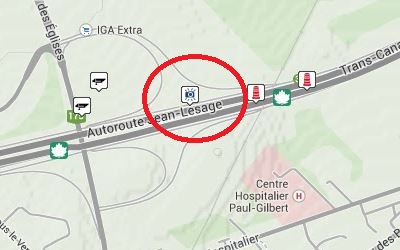
i just checking now "highway 20 in Levis " with simulate mode and is working , Originally Posted by garmin dan
if you check in simulate and if you are too near speedtrap camera, probably you warning is not possible
- in simulate mode you need keep your starting simulate far your camera speed trap, same my capture

- and we have 2 warning alarm near your camera speedtrap
- the camera is normaly not visible on my gps when i am not on it!

 Reply With Quote




Bookmarks