
 Likes:
 Reply With Quote
Spudigo_v2.12
- Open the archive - Spudigo_v2.12.zip and you will get a folder - Spudigo. There are two files in it - Spudigo_v2.12.jar and Spudigo_v2.12.bat.
- The executable file is - Spudigo_v2.12.jar.
Instructions for use -
When you open an existing speed camera file - speedcam.txt - you can do the following -
By double-clicking on a point you can change what you want for a specific point
SHIFT + MOUSE movement = move the point on the map
ALT + MOUSE movement = change the camera angle
SHIFT + Left click = add a new PoI
It is possible to find duplicate points - camera - Edit - Find duplicates...
Spoiler: Link
Tnx - djeman
Welcome guest, is this your first visit? Click the "Create Account" button now to join.


Results 41 to 45 of 45
Thread: Spudigo speedcam editing tool
-
23rd December 2024, 11:23 AM #41SUPER MODERATOR


- Join Date
- Oct 2019
- Location
- Belarus
- Posts
- 3,724
- Rep Power
- 2722
Last edited by Andrey Form; 23rd December 2024 at 11:28 AM.

[Only registered and activated users can see links. ]
[Only registered and activated users can see links. ]
[Only registered and activated users can see links. ]
[Only registered and activated users can see links. ]
[Only registered and activated users can see links. ]
[Only registered and activated users can see links. ]
©AF_2020-26
-
24th September 2025, 04:14 PM #42Moderator



- Join Date
- Jun 2014
- Location
- φ , λ
- Posts
- 860
- Rep Power
- 1513

-
24th September 2025, 04:17 PM #43SUPER MODERATOR
- Join Date
- Oct 2019
- Location
- Belarus
- Posts
- 3,724
- Rep Power
- 2722

Spudigo-v2.12_Mod AF
Adapted for encoding VB
Spoiler: +
Bonus icons speedcam 0-31
Spoiler: +++++++
EXPORT OSC Base - IgoSkinPongo.txt (speedcam.txt VB code)
[Only registered and activated users can see links. ]
Code:Please Login or Register to see the links
Last edited by Andrey Form; 24th September 2025 at 04:44 PM.
[Only registered and activated users can see links. ]
[Only registered and activated users can see links. ]
[Only registered and activated users can see links. ]
[Only registered and activated users can see links. ]
[Only registered and activated users can see links. ]
[Only registered and activated users can see links. ]
©AF_2020-26
-
26th September 2025, 04:18 PM #44SUPER MODERATOR
- Join Date
- Oct 2019
- Location
- Belarus
- Posts
- 3,724
- Rep Power
- 2722
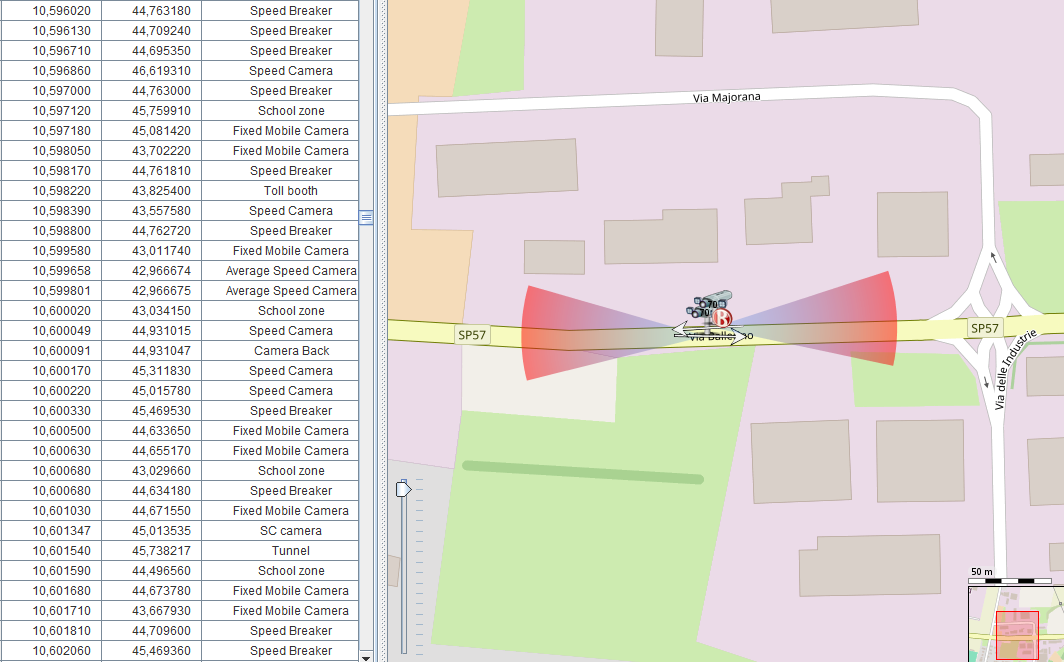
Spudigo In more detail on the functionality:
Add a point to the open file list speedcam.txt
SHIFT + left-click = add a new point on the map
SHIFT + mouse movement = move a point on the map (bring the map under the point)
Edit the added point in the list, select the type, speed, number of directions, azimuth. The beam should always be towards you,
taking into account right-hand or left-hand traffic, recording in the speedcam.txt is 180 degrees opposite to the beam direction.
Then you can save the modified one. speedcam.txt
Mouse wheel - changes the map zoom.
Searching for duplicates according to the specified parameters (distance between points and angle of direction),
finds only two points, the next duplicate needs to be searched again.
Briefly about the program, the first issue is 2015, since then there have been many changes and improvements.
What the program can do:
- Convert speedcam.txt from one encoding to another,
- Smash the speedcam.txt to individual files by notification type,
- merge open speedcam windows.txt to a single file speedcam.txt
- export the speedcam.txt to spud and back
- open speedcam.spud
By editing speedcam.txt:
- add new points with the ability to save the modified file,
- edit - edit points on the map with the ability to save the modified file.
It has a multi-functional program for reviewing speedcam files with the ability to edit.
Suitable for creating and storing speedcam.txt home databases
(small groups of social networks, for example Facebook)
[Only registered and activated users can see links. ]
[Only registered and activated users can see links. ]
[Only registered and activated users can see links. ]
[Only registered and activated users can see links. ]
[Only registered and activated users can see links. ]
[Only registered and activated users can see links. ]
©AF_2020-26
-
Today, 10:36 AM #45SUPER MODERATOR
- Join Date
- Oct 2019
- Location
- Belarus
- Posts
- 3,724
- Rep Power
- 2722
The Evolution and Downfall of Navigation Software: How OSC Made Spudigo Obsolete
Introduction: What Was Spudigo and Why Was It Created?
The Spudigo utility (actively developed on the French forum Chez M'sieurlolo by developer djeman with community coordination by cacou13) was designed as a specialized desktop tool for managing speed camera databases and road alerts. It was engineered to process speedcam.txt and *.spud files used in navigation systems, primarily the iGO ecosystem.
The core concept of the software was to visually project text-based coordinates onto a map for subsequent manual refinement.
Why Was Visualizing speedcam.txt on a Map Once Necessary?
During the software's peak years, ready-made speed camera files from public sources were frequently plagued by inaccuracies. A raw text file made it impossible to see the bigger picture, so Spudigo solved several critical issues:
Coordinate Accuracy Correction: Users could instantly center the map on a specific camera, cross-reference its position with real-world road geometry (via Google Maps / Street View integrations), and fix misaligned points.
Azimuth (Direction of Control) Tuning: Using key combinations (such as Alt + mouse), users could manually rotate a camera’s vector directly on the map. In the iGO system, if the azimuth angle is incorrect, the navigation software completely fails to warn the driver when approaching the radar.
Duplicate Cleanup: Built-in filters allowed users to quickly find and purge overlapping or double-entered points, preventing the navigation system from triggering non-stop false alerts on the road.
Handling "Notebook" Databases and Integrating External Feeds
In an era before automated data exchange between mapping services became standardized, Spudigo served as a vital bridge between raw telemetry and a deployment-ready navigation file:
A Tool for Enthusiasts: If a user gathered data manually—recording GPS coordinates in a notebook during their travels—the program provided a fast interface to input these points, batch-modify their types, and append comments.
Importing External Feeds: The utility streamlined the process of importing coordinates from third-party French databases (like the Radalerte / Redalert project). It seamlessly resolved formatting compatibility issues, such as automatically swapping commas to dots when pasting data strings.
Redalert - the base itself needed constant corrections, the azimuths of the radars deviated significantly from the real direction of the road.
The EUR+ Format Era and the Loss of Technical Purpose
One of Spudigo's primary technical features was its ability to dynamically categorize files and convert standard speed camera syntax into the EUR+ format (and vice versa).
When the primary database provider for the EUR+ format permanently closed its website at the end of 2022, the influx of fresh, structured data abruptly dried up. The software immediately lost its core utility, transforming into a legacy archive tool for rare, localized modifications.
Modern Realities: Why the Rise of OSC Rendered Spudigo Obsolete
With the emergence and rapid growth of the global, open-source OSC (OpenSpeedcam) project, desktop utilities like Spudigo version 2.12 have officially become relics of the past. The accessibility and cloud-driven interactive nature of OSC completely rewrote the rules:
In-Browser Corrections: The OSC platform completely eliminates the need for external software. Users can correct coordinates, move points, change camera types, and fine-tune azimuth vectors directly on the interactive OSC web map using any standard browser.
No More Manual Conversion: Drivers no longer have to manually fiddle with regional character encodings, data syntax, or obsolete formats like EUR+.
Unique Pre-Built Exports: The OSC server automatically compiles and generates completely deployment-ready, unique export files tailored for specific navigation setups (including iGO Primo/NextGen). The user simply downloads the fresh file and copies it onto their storage drive.
Server-Side Automation: The tasks that previously required launching Spudigo—such as merging multiple files, automatic duplicate filtering, and data validation—are now processed instantly on the OSC server side without any user intervention.
Conclusion
The open and transparent approach of OpenSpeedcam shattered the old ecosystem of closed forum-centric databases and manual text-file manipulation. In today's navigation landscape, Spudigo is completely obsolete, replaced by a unified, live, and crowdsourced online platform where the community maintains accurate, real-time road safety data.
Modern Realities — Ultimate Obsolescence
Current Status: Despite the resuscitation in 2023, the evolution of OSC itself has made desktop software completely unnecessary. Since OSC has developed a powerful native server engine that allows users to move speed cameras, adjust control angles, and download unique pre-built exports directly from the browser, the intermediate step in the form of the local Spudigo v2.12 MOD AF program has completely outlived its usefulness in today's realities.Last edited by Andrey Form; Today at 10:51 AM.
[Only registered and activated users can see links. ]
[Only registered and activated users can see links. ]
[Only registered and activated users can see links. ]
[Only registered and activated users can see links. ]
[Only registered and activated users can see links. ]
[Only registered and activated users can see links. ]
©AF_2020-26


Bookmarks