
 Likes:

Your question belongs in the Pongo Skin area
Try it without the user_profiles.zip
Welcome guest, is this your first visit? Click the "Create Account" button now to join.


Results 171 to 180 of 218
Hybrid View
-
12th January 2020, 01:34 PM #1Master


- Join Date
- Jan 2016
- Location
- Germany
- Posts
- 509
- Rep Power
- 894

-
22nd July 2020, 04:48 PM #2Master

- Join Date
- Jul 2017
- Location
- IL
- Posts
- 847
- Rep Power
- 307

Navigating on Hebrew-interface?
Not satisfied with a single Hebrew keyboard?
For your use and hopefully for your satisfaction,
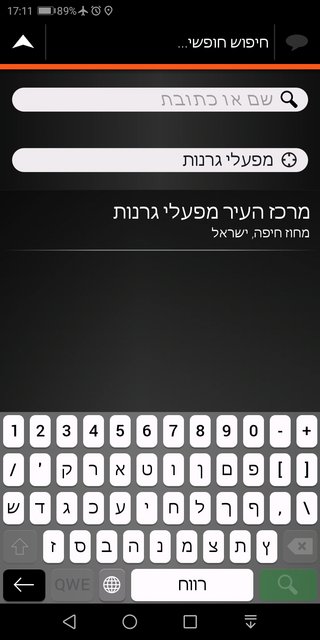
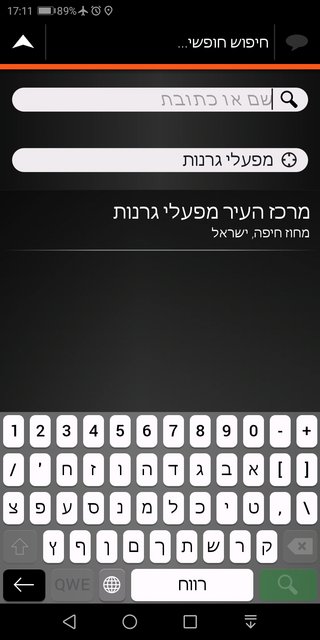
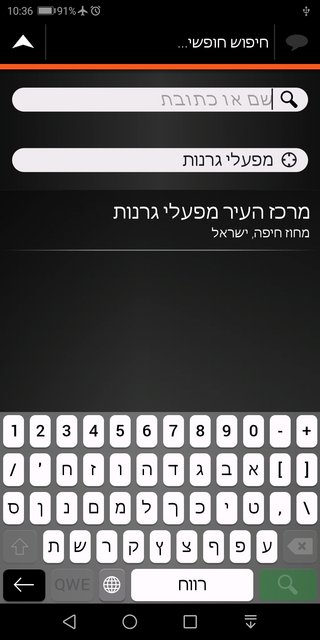
here are Three Modified Hebrew Keyboards in different layouts.
Spoiler: Keyboards list
Spoiler: מקלדת קוורטית :Qעברית
Spoiler: עברית1: כל האותיות הסופיות בסוף
Spoiler: עברית2: כל אות סופית אחרי כל אות ראשונית שלה
Remember to back up your original gpsandmore_android.zip file.Last edited by kwbs; 17th December 2023 at 09:54 AM.
-
23rd July 2020, 01:54 PM #3Junior Member
- Join Date
- Dec 2017
- Location
- Albania
- Posts
- 1
- Rep Power
- 0
anyone know that which addons / newer versions where tmc is more clearer (traffic jam length / another situations)?

You should Give a presentation first before making a post after so long hey
Then you may find your posts are not Moderated ???
Just saying.
-
24th July 2020, 12:47 AM #4Master

- Join Date
- Jul 2015
- Location
- Near you
- Posts
- 613
- Rep Power
- 316
Does anybody remember sys lines to adjust at which height/distance are icons visible when in OVERVIEW mode or Normal view.
Sometimes I find it very cluttered especially if you have.more POIs enabled on the map. I remember there were sys lines where you could adjust POI visibility but I forgot it.
The image down is what I would like to avoid. I would like to have only first few pois or none at certain height etc etc or even.map.
- Can we order igo how.much enabled POI it can show at the current moment?
- At what distance/height it can show or high enabled POIs?
Spoiler: IMAGE SPLASHSCREEN
Sent from my SM-N950F using TapatalkLast edited by Texas; 24th July 2020 at 12:50 AM.
NOTICE: By no means I advise installing illegal software nor I support such actions. This is just for EDUCATIONAL PURPOSES. Please use my post in order to understand or learn something new. I am a proud owner of LICENSED NAVIGATION but just to satisfy my curiosity I test, read and research. Sharing illegal material is against the law.
-
24th July 2020, 08:52 AM #5Master
- Join Date
- Jul 2017
- Location
- IL
- Posts
- 847
- Rep Power
- 307
@Texas
Maybe the lines from iGO LUNA sys:
Origin
[map]
3d_max_zoomlevel=100
3d_max_tiltlevel=7500
New:
[map]
3d_max_zoomlevel=100
3d_max_tiltlevel=4000
poi_3d_speedcam_icon_overlap=0
or from iGO PAL sys:
[map]
3dcarsizemin=5000
3dcarsizemax=8000
3d_min_zoomlevel=15
will refresh you the lines you're looking for.
-
24th July 2020, 09:34 AM #6Master

- Join Date
- Mar 2013
- Location
- Blath
- Posts
- 285
- Rep Power
- 71
How do you make similar settings for tilt level in landscape mode, as these setting only seem to work in portrait mode?
I have these settings for [poi] not to show the 3 dots on the POI icon and it is not working, what settings do I need?
[poi]
use_multi_poi_icon=0
use_mixed_poi_icon=0
-
24th July 2020, 11:14 AM #7Master


- Join Date
- Apr 2016
- Location
- Rio de Janeiro
- Posts
- 476
- Rep Power
- 762
Try this configuration in the SYS.TXT file:
[poi]
group_poi_icons=1
multi_poi_overlay=0
multipoi=0
use_mixed_poi_icon=0
use_multi_poi_icon=0
-
24th July 2020, 11:50 AM #8Master
- Join Date
- Mar 2013
- Location
- Blath
- Posts
- 285
- Rep Power
- 71
Tried settings in #178 this made no difference
-
24th July 2020, 01:00 PM #9Master
- Join Date
- Jul 2015
- Location
- Near you
- Posts
- 613
- Rep Power
- 316
I hope I explained it well..
What I need is to set POI visibility for example
If I am driving on the highway I would like POI icons to disappear at 1000m meters height.
If I am driving in normal.mode I would like to see only few icons that are for example few kilometers from.me. not the whole bunch of those in the distance.
Thx.
Sent from my SM-N950F using TapatalkNOTICE: By no means I advise installing illegal software nor I support such actions. This is just for EDUCATIONAL PURPOSES. Please use my post in order to understand or learn something new. I am a proud owner of LICENSED NAVIGATION but just to satisfy my curiosity I test, read and research. Sharing illegal material is against the law.
-
24th July 2020, 01:15 PM #10Master


- Join Date
- Nov 2010
- Location
- Land of Smile
- Age
- 77
- Posts
- 173
- Rep Power
- 1403
If I remember correctly, these settings are in the file "poi-visiblities.txt" (save-> proffiles-> 01-> ...)

 Reply With Quote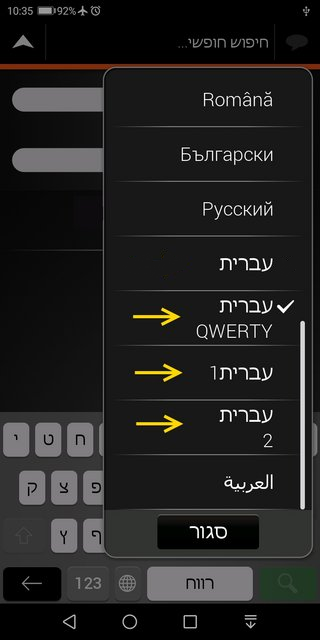


Bookmarks