
 Likes:

I found these entries:
Route OverView=""
Font of Interface=""
FOnt of Big Clock=""
Font Styles=""
Settings Font Interface=""
Settings Font Big Clock=""
"Transparency Clock: "=""
Welcome guest, is this your first visit? Click the "Create Account" button now to join.


Results 41 to 50 of 231
Thread: Skin IGO LUNA by wal24
Hybrid View
-
29th January 2022, 07:52 AM #1Master


- Join Date
- Apr 2017
- Location
- Athens, Greece
- Age
- 55
- Posts
- 447
- Rep Power
- 950

Last edited by AnthonyGreek; 29th January 2022 at 08:22 AM.
-
23rd February 2022, 11:19 AM #2Master

- Join Date
- Mar 2013
- Location
- Blath
- Posts
- 285
- Rep Power
- 71
I have found a bug in the skin, this happens when you try to do a POI search, from "New Route" select "places" then select "Search by Name or Category" then select "around here" then select "In a Town" at this point when you have entered the details of the town you wish to search in and press "select" it does not go back to perform the search, it stays in this screen. I tested this with Pongo skin and it works as expected but in Waldek skin it does not work.
Please can someone advise if they have noticed the same thing?
Spoiler: POI Search
-
23rd February 2022, 05:20 PM #3Master


- Join Date
- Oct 2015
- Location
- Poland
- Age
- 68
- Posts
- 120
- Rep Power
- 573
Thank you De5i for finding the bug.
Update.
Improved POI search, graphics and some bugs found.
Complete iGO_Luna navigation with maps of Poland and wal24 skin. Installation files are necessary in the package. Due to the size of the maps of other countries, you have to complete them yourself. This is best done before starting navigation for the first time.
[Only registered and activated users can see links. ]
Skin wal24 for iGO_Luna.
[Only registered and activated users can see links. ]
-
26th April 2022, 08:12 AM #4Master
- Join Date
- Oct 2015
- Location
- Poland
- Age
- 68
- Posts
- 120
- Rep Power
- 573
Update of the wal24 skin for iGO_Luna. Copy (replace) files in the ux directory.
Added:
- altitude correction above sea level.
- auto radar (hiding speed camera settings)
Required entries in sys.txt:
[Only registered and activated users can see links. ]Code:Please Login or Register to see the links
Last edited by waldek; 26th April 2022 at 08:14 AM.
-
18th July 2022, 08:48 PM #5Junior Member
- Join Date
- Jan 2019
- Location
- Brühl--Deutschland
- Posts
- 5
- Rep Power
- 0
Hello, is it possible to integrate a button like in the pongo skin into the skin.
Thanks
Spoiler: +

Use spoilers for large pictures.
[Only registered and activated users can see links. ]
Respect all other rules as well. Read carefully:
[Only registered and activated users can see links. ]
and
[Only registered and activated users can see links. ]Last edited by Andrey Form; 19th July 2022 at 06:02 AM.
-
19th July 2022, 12:36 PM #6Member
- Join Date
- May 2014
- Location
- Poland
- Posts
- 19
- Rep Power
- 0
-
20th July 2022, 08:30 AM #7Junior Member
- Join Date
- Jan 2019
- Location
- Brühl--Deutschland
- Posts
- 5
- Rep Power
- 0
Hello, thanks for the quick reply, but the batton changes the size of the poi. With the batton that I marked, the telepules size is changed.
Thanks
Spoiler: Big picsLast edited by Boki; 18th April 2023 at 12:11 PM. Reason: corrected spoiler, image links, again
-
18th April 2023, 10:30 AM #8Senior Member

- Join Date
- Nov 2015
- Location
- Greece
- Posts
- 108
- Rep Power
- 14
Is this project dead? @waldek
It works fine. I was just wondering, as it hasn't been updated for a year now..
Thank you
Sent from my NE2213 using Tapatalk
-
18th April 2023, 01:48 PM #9Master
- Join Date
- Oct 2015
- Location
- Poland
- Age
- 68
- Posts
- 120
- Rep Power
- 573
It's not dead. But I don't know what else can be improved.
-
12th May 2023, 01:23 AM #10Member +


- Join Date
- Mar 2018
- Location
- ohio
- Posts
- 90
- Rep Power
- 0
waldek love your skin! im trying to change some of the color graghics so it matches my interior lights better mostly using orange highlights. can you tell me where to look to make the following color changes. im using the following setting for color interface style alain57, laneinfocolor orange,colorbmap garigor, color road orange.
the items id like the change colors on are the arrow color on road that shows you what direction to turn it is currently light blue.T he on off button colors when it is on it is currently blue. thanks also if anyone has a sheet that tells what items are in color.ini and what they change that would be helpful.
ok got the arrow stuff figured out its in the ux roads under plannedmaterials i have added the roads file it just changes the arror to yellow i also changed colorlanes ux and changed two colors to yellow and blackLast edited by badwhip; 14th May 2023 at 03:47 PM.

 Reply With Quote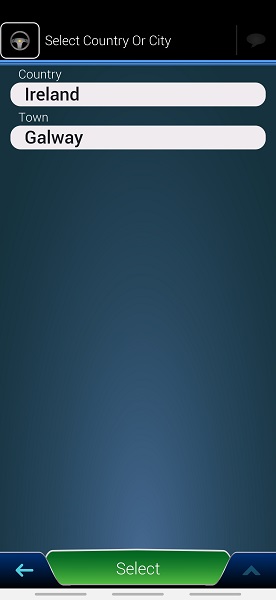


Bookmarks