Welcome guest, is this your first visit? Click the "Create Account" button now to join.

Page 115 of 124 FirstFirst ... 1565105113114115116117 ... LastLast
Results 1,141 to 1,150 of 1232
  1. #1141
    Senior Member Jaloga's Avatar
    Join Date
    Sep 2023
    Location
    Spain
    Posts
    132
    Rep Power
    5

    Default

    Hi
    If I wanted to put a scheme from another igo, where should I put it?
    Here I will thank all the contributions
    Thank You so Much.

    vil2 anglais4
    Greetings of Jaloga

  2.    Advertissements


  3. #1142
    Master segaal's Avatar
    Join Date
    Dec 2014
    Location
    Hungary
    Age
    68
    Posts
    145
    Rep Power
    129

    Default

    Hi!
    -It's not that easy to change or add a scheme in Luna.
    -Use ready-made packs from skin makers.
    Last edited by segaal; 5th December 2024 at 08:56 AM.
    [Only registered and activated users can see links. ]

    by-segaal®

  4. #1143
    Member Pensionato's Avatar
    Join Date
    Mar 2023
    Location
    Roma
    Posts
    26
    Rep Power
    3

    Default

    In fact I was interested in an alternative version of the skies, especially night skies.
    It was easier with the skies in .bmp now it is much more difficult.

  5. #1144
    Master segaal's Avatar
    Join Date
    Dec 2014
    Location
    Hungary
    Age
    68
    Posts
    145
    Rep Power
    129

    Default

    Hi!
    -There are many places and options to place the image in the skin packs.
    -You have to try which one you like!
    -Taking a night image is not an easy task.
    -It takes expertise!
    [Only registered and activated users can see links. ]

    by-segaal®

  6. #1145
    Senior Member Jaloga's Avatar
    Join Date
    Sep 2023
    Location
    Spain
    Posts
    132
    Rep Power
    5

    Default

    Hi @segaal
    -Use ready-made packs from skin makers.

    Where do I find them?
    PS: How does weather skies work?
    Here I will thank all the contributions
    Thank You so Much.

    vil2 anglais4
    Greetings of Jaloga

  7. #1146
    iGO Enthusiast Skin IGO NextGen LUNA by Pongo (DISCUSSION)
    Boki's Avatar
    Join Date
    Jun 2014
    Location
    Niš
    Age
    53
    Posts
    7,040
    Rep Power
    4755

    Default

    From skin packages, logically
    Before asking a question, know it's already discussed here and at 99.9% is not unique. Use search.
    NO ONE IS A SEER, READ (click on): [Only registered and activated users can see links. ] <- Click!
    [Only registered and activated users can see links. ] <- Click!

    Spoiler: obs
    Many questions become very arduous, a lot of time chewed deja vu...Since we have lost all the year of work and effort, many people have no will to answer the same questions again. Me neither. Use a search, please.

  8. #1147
    Senior Member Jaloga's Avatar
    Join Date
    Sep 2023
    Location
    Spain
    Posts
    132
    Rep Power
    5

    Default

    @Boki
    It doesn't matter if you choose autumn or winter for example? Or does that not matter?
    Here I will thank all the contributions
    Thank You so Much.

    vil2 anglais4
    Greetings of Jaloga

  9. #1148
    Master
    Join Date
    Apr 2017
    Location
    Athens, Greece
    Age
    54
    Posts
    401
    Rep Power
    848

    Default

    For each season and for each type of weather there are different ini files where you can set the colours.
    Check the files in mapconfig folder and not in scheme folder.

    I have made my own scheme, check this: [Only registered and activated users can see links. ]
    Inside the ini files I have some notes that could help you, they are in Greek but you can google translate them.

    You can also find information in data.zip\ui_nextgen\scheme\colorscheme.xml file.
    Last edited by AnthonyGreek; 5th December 2024 at 09:17 PM.

  10. #1149
    Senior Member Jaloga's Avatar
    Join Date
    Sep 2023
    Location
    Spain
    Posts
    132
    Rep Power
    5

    Default

    Hi @AnthonyGreek
    I have made my own scheme, check this: [Only registered and activated users can see links. ]
    The link to mega Not working
    Last edited by Jaloga; 7th December 2024 at 06:03 AM.
    Here I will thank all the contributions
    Thank You so Much.

    vil2 anglais4
    Greetings of Jaloga

  11. #1150
    Member
    Join Date
    Dec 2019
    Location
    Ukraine
    Posts
    22
    Rep Power
    89

    Default

    My greetings to all!
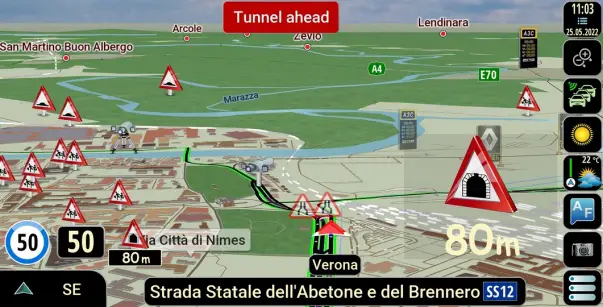
    For those with poor eyesight
    Spoiler: Description of the SKIN PONGO 26.11.24 changed

    1. Black keyboard with white characters
    2. Increased sign and numbers of the speed limit sign
    3. Increased font size in the address search window
    4. Increased the size of the border of the current speed
    5. Increased current speed numbers
    6. Changed the color of the current speed numbers from white to khaki in the dark scheme
    7. Changed the width of the roads when viewing the route and on the route
    8. The size of the diricon in the upper left corner has been increased
    9. The second maneuver arrow in the upper left corner has been enlarged
    10. Increased the font size of the distance to the first and second maneuver in the upper left corner
    11. The size of road signs has been increased
    12. The size of the route progress indicator and TMS of events on it have been increased


    Spoiler: Screenhots
    https://www.mediafire.com/file/4b8w2qnf5j8z5by/SCREENSHOTS.rar/file


    Spoiler: Files
    https://www.mediafire.com/file/x4qfd5tm8ju7co1/SKIN+PONGO+26.11.24.rar/file P.S.

    P.S. Unpack files from the archive SKIN PONGO 26.11.24.rar and upload them to a folder UX (in replacement of existing ones)
    Last edited by PRICEP; 11th December 2024 at 02:47 PM.


Tags for this Thread

Bookmarks

Posting Permissions

  • You may not post new threads
  • You may not post replies
  • You may not post attachments
  • You may not edit your posts
  •