
 Likes:

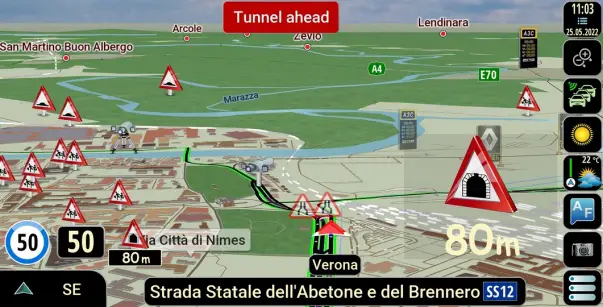
Skin IGO NextGen LUNA by Pongo®
[Only registered and activated users can see links. ]
Spoiler: Link 2022.01.11
Spoiler: Link 2022.01.14
[Only registered and activated users can see links. ]
[Only registered and activated users can see links. ]
[Only registered and activated users can see links. ]
[Only registered and activated users can see links. ]
[Only registered and activated users can see links. ]
[Only registered and activated users can see links. ]
[Only registered and activated users can see links. ]
[Only registered and activated users can see links. ]
[Only registered and activated users can see links. ]
[Only registered and activated users can see links. ]
[Only registered and activated users can see links. ]
speedcam.zip Mod AF for skin pongo Luna
Now in a new topic
[Only registered and activated users can see links. ]
Skin nextgen LUNA by pongo® - author's theme (Start 06.05.2022) here:
[Only registered and activated users can see links. ]
Welcome guest, is this your first visit? Click the "Create Account" button now to join.


Results 1 to 10 of 1255
Hybrid View
-
2nd June 2020, 10:34 AM #1SUPER MODERATOR


- Join Date
- Oct 2019
- Location
- Belarus
- Posts
- 3,786
- Rep Power
- 2751
 Skin IGO NextGen LUNA by Pongo (DISCUSSION)
Last edited by Andrey Form; 3rd January 2026 at 12:30 PM.

[Only registered and activated users can see links. ]
[Only registered and activated users can see links. ]
[Only registered and activated users can see links. ]
[Only registered and activated users can see links. ]
[Only registered and activated users can see links. ]
[Only registered and activated users can see links. ]
©AF_2020-26
-
1st August 2024, 11:17 PM #2Member
- Join Date
- Apr 2017
- Location
- España
- Posts
- 14
- Rep Power
- 0
My question is, can I install igo luna on an SD card?
Because I can't install it and I do the same thing that I did with the same igo nextgen installation on my SD card, but I don't know why igo luna doesn't recognize me.
I hope this has been understood by now.
-
20th August 2025, 06:56 AM #3Junior Member
- Join Date
- Aug 2025
- Location
- Hun
- Posts
- 3
- Rep Power
- 0
Hi, the buildings not visible in my setup.
How to add them?
Thanks
Spoiler: imageLast edited by Boki; 20th August 2025 at 07:44 AM. Reason: spoiler
-
2nd August 2024, 06:37 AM #4iGO Enthusiast


- Join Date
- Jun 2014
- Location
- Niš
- Age
- 54
- Posts
- 7,231
- Rep Power
- 4867
It is primarily a system matter. Newer androids generally don't allow software on the card. In rare cases yes, but it is by no means a rule.
Bbesides, it is more difficult to set it up, there are some other problems also ,,,
After all, as for any iGO software, it can be in the memory, up to a hundred megabytes, CONTENT can be placed on the card
You have been a member for over 7 years, browse the sections and topics. It has been discussed many times, there are threads dedicated to just that.
-
2nd August 2024, 06:55 AM #5SUPER MODERATOR
- Join Date
- Oct 2019
- Location
- Belarus
- Posts
- 3,786
- Rep Power
- 2751

FAQ: installing maps on external memory iGO_Luna.
SYS - Luna
2400-DD0A replace these numbers with your external memory card name.Code:Please Login or Register to see the links
_______
If NextGen and Luna are installed, addons1 for Luna
SYS - Israel, (Pal.......)
SYS - LunaCode:Please Login or Register to see the links
2400-DD0A replace these numbers with your external memory card name.Code:Please Login or Register to see the links
- As usual, do not transfer the speedcam folder to external memory, leave it on the main memory.
- Leave globalcfg (mandatory) and lang/voice files in the internal memory of the device
- Transferring content is only possible after 2-3 successful launches of iGO Luna.
Last edited by Andrey Form; 2nd August 2024 at 07:18 AM.
[Only registered and activated users can see links. ]
[Only registered and activated users can see links. ]
[Only registered and activated users can see links. ]
[Only registered and activated users can see links. ]
[Only registered and activated users can see links. ]
[Only registered and activated users can see links. ]
©AF_2020-26
-
6th August 2024, 08:37 AM #6Senior Member

- Join Date
- Nov 2017
- Location
- Danmark
- Posts
- 104
- Rep Power
- 11
Hi Have installed Igo Luna on my new 10,33" android head unit, and as on my old unit it works fine. I do have one problem that i cant find soulution for here. On sound button it says 60% (see picture). I cant change this, and in sound menu it says 100%. Anyone know how to fix this, or where this is located.
Spoiler: imageLast edited by Boki; 6th August 2024 at 08:55 AM. Reason: spoiler!
-
7th August 2024, 09:50 PM #7Member +

- Join Date
- Dec 2015
- Location
- Portugal
- Posts
- 69
- Rep Power
- 43
Long shot, but maybe you have the "navigation_audio_stream" parameter in the sys.txt file not set correctly?
-
8th August 2024, 08:44 AM #8Senior Member
- Join Date
- Nov 2017
- Location
- Danmark
- Posts
- 104
- Rep Power
- 11
can you guide me to where in sys i should make change, i dont seen to have anything like "navigation audio stream" in my sys.
Last edited by Boki; 8th August 2024 at 08:54 AM. Reason: removed excessive quote
-
8th August 2024, 08:57 AM #9iGO Enthusiast
- Join Date
- Jun 2014
- Location
- Niš
- Age
- 54
- Posts
- 7,231
- Rep Power
- 4867
Oh skiib, you continue to act as if you registered on the forum this morning
Personally, I think that your problem is directly related to the device, i.e. its launcher.
Maybe, if you transferred the package from one device to another device, there is some conflict
Delete save folder (backup it if you have anything saved) configure software again, try again...
Otherwise navigation audio stream is mentioned so many times in different topics sound (voice/audio) related.
The information that you don't have it written in your sys file tells me that you are not using a good sys file, because the complete one is always included with the pongo skin
Quick search, [Only registered and activated users can see links. ] for example
-
8th August 2024, 09:12 AM #10Senior Member
- Join Date
- Nov 2017
- Location
- Danmark
- Posts
- 104
- Rep Power
- 11
Thak you BOKI i have read the thread you link to and you are correct that it is Luna icl sys from my old unit i am using. Have tryed to download and install new pongo skin with his sys without succes. Think problem maybe is in new unit android 13 but have installed Luna on new unit with apk for android 13. it is only sound that is problem, maybe my sys is corrupted. Do you have a clean sys that i could try.


 Reply With Quote

Bookmarks