
 Likes:
 Reply With Quote
Due to wrong color config naming:
colorconfig = "day_winter_blue"
in map_config.zip\ui_nextgen\common\mapconfig\night_autumn_blue\signs.lua file which is released in [Only registered and activated users can see links. ]
the output presented map is wrong when you choose the night autumn blue scheme. Luna shows a Winter day with blue route instead of an Autumn night with blue route.
Specific signs.lua file content changed to:
colorconfig = "night_autumn_blue"
and all output schems are OK.
[Only registered and activated users can see links. ]
Welcome guest, is this your first visit? Click the "Create Account" button now to join.


Results 931 to 940 of 1255
-
30th December 2022, 11:39 AM #931Master


- Join Date
- Jan 2016
- Location
- TUSCANY - ITALY
- Posts
- 353
- Rep Power
- 298
 First of all, I reiterate what batiskaf told you regarding truck attributes in Luna.
 Originally Posted by pelae

But if you want the maximum speed limit that you can have with your vehicle to appear, just set the vehicle (in Settings/Route Preferences/Vehicle) in Lorry and then set this limit in "Maximum Speed" option.
If the road limits are lower than what you have set they will appear, but if they are higher they will not appear, only what you have set will appear.
If you have also set the warnings for exceeding the speed limit, you will also have those, always referring to the one you have set.
-
9th January 2023, 05:33 PM #932Master


- Join Date
- Sep 2021
- Location
- Greece
- Posts
- 132
- Rep Power
- 411
original map_config.zip correction
-
9th January 2023, 11:56 PM #933Master
- Join Date
- Jan 2016
- Location
- TUSCANY - ITALY
- Posts
- 353
- Rep Power
- 298
For me it works fine, that's the setup I'm currently using. Originally Posted by NikonM
I don't use the winter configuration because the view completely snowy is a situation that happens every 3-4 years and only for a few days.
It would be necessary (who is capable) to change that type of winter landscape that is typical of the far north with one more suited to central-southern European areas...
-
10th January 2023, 07:57 AM #934Master

- Join Date
- Apr 2017
- Location
- Athens, Greece
- Age
- 55
- Posts
- 447
- Rep Power
- 950
Yes, you're right. The same in Athens, we have snow 2,3 days per year.
Someone must change this. Do you hear NikonM?.gif ":)))")
-
10th January 2023, 03:16 PM #935Master
- Join Date
- Sep 2021
- Location
- Greece
- Posts
- 132
- Rep Power
- 411
@AnthonyGreek I read and hear loud and clear!

I won't say no but it needs more spare time....
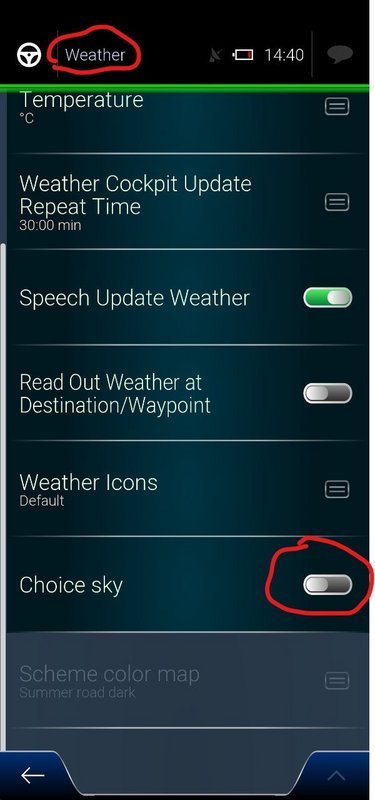
@BIRBANTE map_config.zip takes the map color scheme selector role in case choice sky is not activated in weather menu. Originally Posted by BIRBANTE
Spoiler: Weather Menu
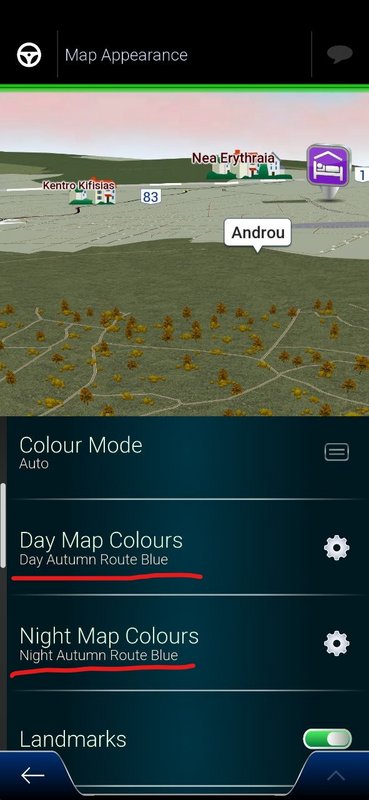
In this case you have to choose the day and night map color schemes under Map appearance menu.
Spoiler: Map Appearance Menu
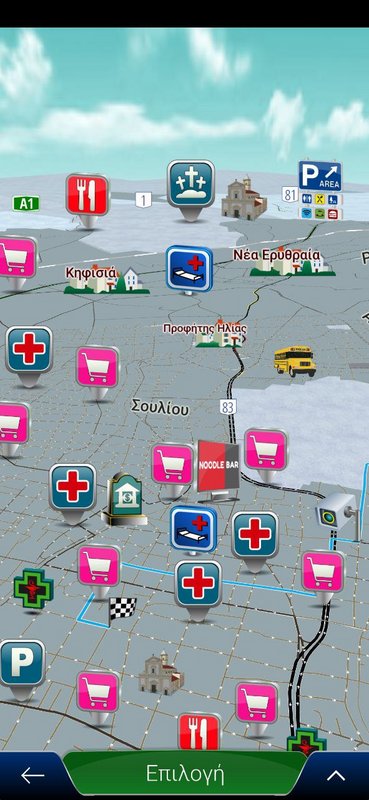
Using the original released map_config.zip I see the below result, when choice sky is not activated and I select Night Autumn Route Blue map color scheme:
Spoiler: Winter day with blue route
which is clearly a Winter day with blue route. You can also find it out by opening the original map_config.zip\ui_nextgen\common\mapconfig\night_autumn_blue\signs.lua file.
At the beginning of this file the below line exits:
colorconfig = "day_winter_blue"
This is wrong. It should be corrected to:
colorconfig = "night_autumn_blue"
And this is the thing I did [Only registered and activated users can see links. ]
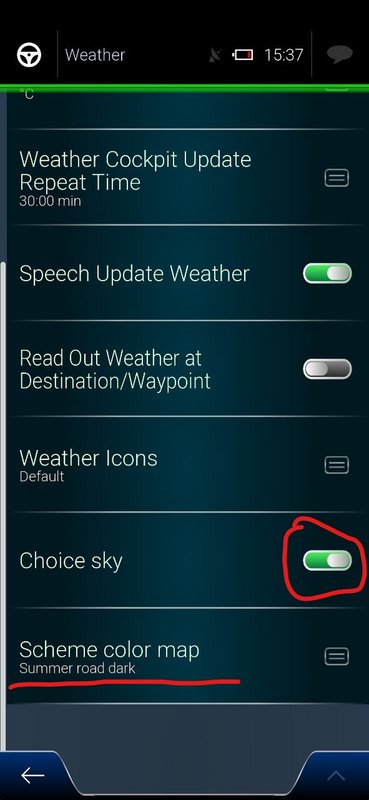
In case Choice Sky is activated (in Weather menu) everything works fine as weather.zip takes on the map color scheme selector role.
Day and night Color schemes are registered fine in weather.zip
Spoiler: Choice Sky activated
So what is your case? Do you have Choice Sky activated or not? Is the Choice Sky switch on or off?Last edited by NikonM; 10th January 2023 at 03:54 PM.
-
10th January 2023, 04:54 PM #936Master
- Join Date
- Jan 2016
- Location
- TUSCANY - ITALY
- Posts
- 353
- Rep Power
- 298
I use, and have always used, the option Choice Sky activated, and at this point I think everyone uses this option, otherwise someone else would have noticed this error too. Originally Posted by NikonM
To tell the truth that's something I've wanted to change for some time now, usually before asking others I try to do it myself, but after seeing the presence of the various pvr, mtl, tga, obj files, I resigned, Illustrator I learned to use it, but in that case it goes too complicated. Originally Posted by AnthonyGreek
-
10th January 2023, 05:41 PM #937Master
- Join Date
- Sep 2021
- Location
- Greece
- Posts
- 132
- Rep Power
- 411
Not me, as I use specific angle in the map in which I don't see the sky. At least till the middle of 2022 Originally Posted by BIRBANTE
Then AnthonyGreek convinced me to use the sky option which is only visible in portrait position.
I always use Landscape position in my car with an angle in which sky is not visible
The color codes for road and land items can be changed. This is the easy part. Originally Posted by BIRBANTE
Then Autumn folder can be duplicated, for the various pvr, mtl, tga, obj files, as Autumn and light Winter are not so different.
Or we can learn more about pvr, mtl, tga, obj editing and create Winter trees without leaves
BTW tga looks to me the most easy manipulation. Not that I know many things about it.
-
13th January 2023, 11:03 AM #938SUPER MODERATOR


- Join Date
- Oct 2019
- Location
- Belarus
- Posts
- 3,786
- Rep Power
- 2751
 Luna
Luna
Skin by pongo LUNA 2022-10-10
Code:Please Login or Register to see the links
Spoiler: LinkLast edited by Andrey Form; 13th January 2023 at 11:39 AM.

[Only registered and activated users can see links. ]
[Only registered and activated users can see links. ]
[Only registered and activated users can see links. ]
[Only registered and activated users can see links. ]
[Only registered and activated users can see links. ]
[Only registered and activated users can see links. ]
©AF_2020-26
-
14th January 2023, 04:29 PM #939Member
- Join Date
- May 2014
- Location
- Poland
- Posts
- 19
- Rep Power
- 0
I know it's not important but where can I change it?
Spoiler: screenshotLast edited by Boki; 14th January 2023 at 06:57 PM. Reason: image link correction, spoiler
-
14th January 2023, 04:43 PM #940SUPER MODERATOR
- Join Date
- Oct 2019
- Location
- Belarus
- Posts
- 3,786
- Rep Power
- 2751
@rawid
today it has already been changed
Code:Please Login or Register to see the links
Spoiler: +Last edited by Andrey Form; 14th January 2023 at 04:54 PM.
[Only registered and activated users can see links. ]
[Only registered and activated users can see links. ]
[Only registered and activated users can see links. ]
[Only registered and activated users can see links. ]
[Only registered and activated users can see links. ]
[Only registered and activated users can see links. ]
©AF_2020-26


Bookmarks