
 Likes:
 Reply With Quote
Hello!
How can I get rid of the minitower on the left circled in blue?
I made an infobar and I don't know in "the skin" I have to cancel it.
Spoiler: +++
Welcome guest, is this your first visit? Click the "Create Account" button now to join.


Results 281 to 290 of 290
-
7th June 2023, 12:52 PM #281Member +


- Join Date
- Jan 2018
- Location
- Hungary
- Posts
- 43
- Rep Power
- 0

Greeting!
In the lower left corner data field how to increase the size of numbers/letters?
How can the size of the speed limit be increased in the field above it?
How can you cancel the announcement of the distance of road signs?
Best regards with thanksLast edited by Boki; 7th June 2023 at 01:12 PM. Reason: moved to proper topic
-
25th September 2023, 03:10 PM #282Junior Member

- Join Date
- Jul 2023
- Location
- Bucharest
- Posts
- 7
- Rep Power
- 0
rid of the minitower
Last edited by Andrey Form; 25th September 2023 at 04:37 PM.
-
26th September 2023, 09:29 AM #283Banned


- Join Date
- Nov 2020
- Location
- Poland
- Posts
- 195
- Rep Power
- 0
...these are three icons: time, arrival time, km, and remaining time to the destination. You can always make icons transparent only, you need to edit the icon
-
6th February 2024, 02:09 PM #284GPSPower Helper


- Join Date
- Dec 2009
- Location
- ro
- Age
- 38
- Posts
- 501
- Rep Power
- 947
Everyone with their preferences...
With each skin update I had to:
- delete / rename the extension of certain ux (so as not to be used by the program)
- to copy the additional folders in the ux folder:
skin pongo : ux_additionally
skin wandel : Extra
skin pongo sumsum : Aditionale
- to copy certain ux from the additional folder
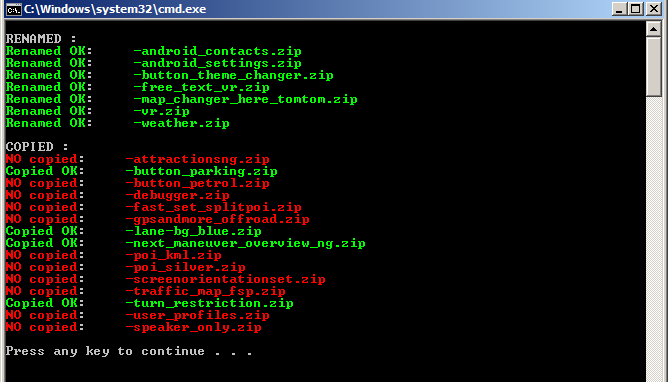
I created [Only registered and activated users can see links. ] for each skin .
0_library.bat contains several functions called by each of the other .bat, so it must be copied next to each of these .bat in the ux folders.
1. You starts from 0_Pongo1_Israel_4.bat / 0_Wandel1_Israel_4.bat which is copied to the ux folder together with 0_library.bat
In section "REM ============= rename files" find the files to which the extension will be renamed ( .zip- )
If you want to keep one of the ux that I didn't want, delete / comment the 2 corresponding lines :
- SET /a index_rename=%index_rename%+1
- SET file_rename[%index_rename%]=Want_ux.zip
If you want to give up another ux than the ones I didn't want, add the 2 corresponding lines:
- SET /a index_rename=%index_rename%+1
- SET file_rename[%index_rename%]=No_want_ux.zip
In section "REM ============= copy files from folder 1" find the files that will be copied from the additional folders.
If you don't want one of the ux I wanted, delete / comment the 2 corresponding lines :
SET /a index_copy=%index_copy%+1
SET file_copy[%index_copy%]=No_want_ux.zip
If you want to add another ux than the ones I wanted, add the 2 corresponding lines :
SET /a index_copy=%index_copy%+1
SET file_copy[%index_copy%]=Want_ux.zip
2. For executables that can't start external programs, in addition use 0_Pongo2_World_4.bat / 0_Wandel3_World_4.bat
The same story with the section "REM ============= rename files" where you can find ux that will not be used.
3. For WinCE executables, in addition use 0_Pongo3_WinCE_4.bat / 0_Wandel4_WinCE_4.bat to rename the extension for ux that will not be used.
4. In the case of skin pongo sumsum, the same story as point 1 and in addition rename the_skin_by_pongo.zip => the_skin_by_pongo_sumsum.zip
This is if you use Wandel's SkinChanger.
Also, here you have to rename (using Total Commander) :
the_skin_by_pongo_sumsum.zip\ux\the_skin_by_pongo => the_skin_by_pongo_sumsum
5. In case skin wandel for AVIC, in addition use 0_Wandel2_Avic_4 which copies specific ux from folder "Replace only for iGO Avicsync"
It is important that the path to ux folders that will be processed in this way, to not contain any spaces, like this :
e:\card_telefon\iGO_Israel\ux OK
e:\card telefon\iGO_Israel\ux Not OK
Spoiler: imgLast edited by costas3850; 6th February 2024 at 04:44 PM.
-
6th February 2024, 10:52 PM #285Member
- Join Date
- Dec 2011
- Location
- Bucuresti
- Posts
- 17
- Rep Power
- 0
@costas3850 very interesting...
so your batch is to run on windows....with card mounted to pc.....direct not conected with cable bewtween pc/laptop and gps/phone?
-
7th February 2024, 07:33 AM #286GPSPower Helper
- Join Date
- Dec 2009
- Location
- ro
- Age
- 38
- Posts
- 501
- Rep Power
- 947
In principle YES, on the card in the card reader.
In fact, I have a copy of the card on the PC, I make the changes in the ux folder on the PC and then transfer them to the phone.
Anyway, we are talking about updates.
Why would you first copy the ux folder on the phone and then process it ?
You can process it on the PC and then transfer it to the phone.
-
23rd October 2025, 08:57 AM #287SUPER MODERATOR


- Join Date
- Oct 2019
- Location
- Belarus
- Posts
- 3,786
- Rep Power
- 2751

FAQ for running Speedcam in iGO
As for skins, everything is very simple.
1. you need to check where the content/speedcam folder is located - the folder must be located on the device's physical memory. (To use speedcam.txt)
2. Check if radar alerts are enabled in the skin. Menu/Setting/Warning/Alert Points/Alert Points Warning - ON
3. Sometimes the activation remains until the first reboot of the navigation, to do this, reboot iGO and check the specified path to save the ON position - If the button is in the OFF position, for other reasons, check that the skin is installed correctly.
PS
The main errors are copying UX files with replacement. There may be fewer UX files in the new update. The best solution is to clear the UX folder and then copy the new files.

Last edited by Andrey Form; 23rd October 2025 at 09:15 AM.

[Only registered and activated users can see links. ]
[Only registered and activated users can see links. ]
[Only registered and activated users can see links. ]
[Only registered and activated users can see links. ]
[Only registered and activated users can see links. ]
[Only registered and activated users can see links. ]
©AF_2020-26
-
23rd October 2025, 01:52 PM #288Member
- Join Date
- Jul 2017
- Location
- Aust
- Posts
- 16
- Rep Power
- 0
I red old posting from 2019, my english was always weak, i will ask some body to help me to use translator, i say thankyou to all you, you are helping me and every body, my respect to forum, greetings
thankyou for Support
skin wandel 17.10.2025, igo israel
content/speedcam/txt files
ux fresh copied
radar warning activated ON, beep on approach active
issue is: no camera radar displayed, of course no sound warning
i can also not save after adding cam on map
map 2025 here, tt 2024
i have Screenshots also, if you like
please ask me if you need more information
in sys.txt i added
[autorad]
enabled=1
thankyouLast edited by Andrey Form; 23rd October 2025 at 04:53 PM.
-
23rd October 2025, 05:00 PM #289Master
- Join Date
- Jan 2016
- Location
- Germany
- Posts
- 509
- Rep Power
- 894
@hoschoo
With this sys.txt entry, the speed cameras are back:
[warning]
speedcam_enabled=1
speedcam_warning=1
is_spoken=1
But I still recommend a skin that's easier to use.
-
23rd October 2025, 06:00 PM #290Member
- Join Date
- Jul 2017
- Location
- Aust
- Posts
- 16
- Rep Power
- 0
@Golom
thankyou very much to you
cameras are back
i will test it tomorrow, i hope i will hear warning sounds too
nice evening


Bookmarks