
 Likes:
 Reply With Quote
Hello...
open "speedcam.zip\ui_nextgen\common\ui\speedcam.ui" find the original text in the code about the icons... is 32 lines...
is from:
<row text="Speed Camera" id=0
to
<row text="Dangerous Area" id=31
copy the list in a new text and close the zip... keep only the words inside the " " as it is...
make a translation in your language like the folowing example...
Speed Camera="מצלמת מהירות"
Dangerous Area="אזור מסוכן"
first keep a copy of tts voice for backup to be sure...
open your tts voice with total commander, find and open "dictyonary.voice" and add this translated list... save and then try the new updated tts voice...
Welcome guest, is this your first visit? Click the "Create Account" button now to join.


Results 11 to 20 of 290
-
6th December 2017, 07:10 PM #11Member


- Join Date
- Feb 2016
- Location
- israel
- Posts
- 22
- Rep Power
- 12
-
6th December 2017, 11:05 PM #12Master



- Join Date
- Sep 2015
- Location
- Athens Greece
- Posts
- 413
- Rep Power
- 1381

Last edited by Boki; 7th December 2017 at 07:48 AM. Reason: removed unnecessary quote
-
8th December 2017, 05:54 AM #13Member
- Join Date
- Feb 2016
- Location
- israel
- Posts
- 22
- Rep Power
- 12
I dont have the knowledge of how to do it ...
Can you please help me ?
-
8th December 2017, 07:11 AM #14iGO Enthusiast


- Join Date
- Jun 2014
- Location
- Niš
- Age
- 54
- Posts
- 7,231
- Rep Power
- 4868
Use total commander, easiest way.
Configure it to use internal zip packer and unpacker whenever possible (settings > packers >...), but of course he needs an external one (WinRAR is enough).
Then you can enter archive and manipulate with its content. To edit ui (and ini, and ...) files, just pres F4 and it will activate notepad. Write values you wont, close notepad, TTC will ask you to save file in archive and that's it.
Archive - zip files (dat.zip, language.zip, ux files, etc...)
Or, if you are not sure enough about what you are doing:
open archive with TTC, find proper file, extract it (F5) somewhere on hard, then use Notepad++ to edit file. When finish, put back in archive modified file - replace those inside.
Of course, backup original archive first.
When manipulating these files the most important thing is to preserve the original level of compression.
That's why it is recommended to use TTC because it preserves original attributes of archive.
If you use WinZip, WinRAR or similar, it is very difficult to hit the required value, because they vary from version to version.
If you are still fond of the classic archiver, an older version of WinRar is recommended, you can find it in forum
Last edited by Boki; 8th December 2017 at 08:26 AM.
-
25th December 2017, 10:20 AM #15Smartphone MOD


- Join Date
- Nov 2014
- Location
- WALLACHIA
- Posts
- 941
- Rep Power
- 1627

... and another Christmas present
with music, jokes and great authors.
There, and the differences will not be forgotten ... and the horoscope is lowered ... to the ground))
... and the co-authors are notable: Ivan Kotlyarevsky and Leonid Filatov.
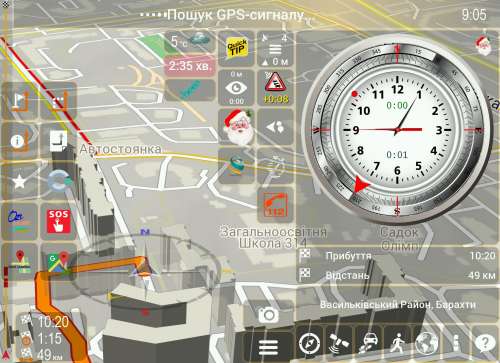
Spoiler: Link
Thanks vicewandel
-
7th January 2018, 01:41 AM #16Member +

- Join Date
- Dec 2015
- Location
- Portugal
- Posts
- 69
- Rep Power
- 43
can't understand why but this skin is extremely laggy on my asus Zenpad, ad and throws "out of memory" errors... any help?
thanks in advance
-
7th January 2018, 09:25 PM #17Junior Member
- Join Date
- May 2017
- Location
- EU
- Posts
- 7
- Rep Power
- 0
Are you using the last version, that is 05.01.2018?
I had the same problems with the version from end of December, but the last one is working OK.
-
8th January 2018, 12:03 AM #18Member +
- Join Date
- Dec 2015
- Location
- Portugal
- Posts
- 69
- Rep Power
- 43
yes i downloaded the latest (05/01), thanks anyway...
Last edited by Boki; 8th January 2018 at 08:08 AM. Reason: removed unnecessary quote
-
15th January 2018, 07:01 PM #19Master

- Join Date
- Aug 2013
- Location
- romania
- Age
- 71
- Posts
- 108
- Rep Power
- 604
Ux
Update UX
RemoveStopover.zip
Will be the name of VIA crop, and the second line with the more informative name of the settlement and the data wrap. Let it be for now.
In addition, the first line of instruction is how to use it.
In addition, he will also say with a voice.
[Only registered and activated users can see links. ]
Thanks vicewandel
-
20th January 2018, 12:49 PM #20Smartphone MOD
- Join Date
- Nov 2014
- Location
- WALLACHIA
- Posts
- 941
- Rep Power
- 1627

O.P. updated 20.01.2017
What's new:
- tilt_the_map.zip - fixes
- ShowSpeedCam.zip - the button is present even when the notification is off and you can tap on it and get the information about the camera
- speedcam.zip - when the speed is exceeded, the flashing character alternates with the view of that same camera
- RemoveStopover.zip - source of information was replaced. So more visually and informatively ... and full
- garbage_button.zip - configured to display information about the route. There's a lot of useful information
- VWTripComputer.zip - the view of the field in the limb of the clock has been changed to exceed the time of continuous movement (4.5 hours)
Thanks vicewandel


Bookmarks