
 Likes:

 Reply With Quote
@LouBouha.
Sorry for misunderstanding.
map changer works but skin changer does not find the path as mentioned earlier.
my all maps are on sd card with addons file no problem.
Welcome guest, is this your first visit? Click the "Create Account" button now to join.


Results 61 to 70 of 132
-
30th May 2020, 01:04 AM #61Master


- Join Date
- Mar 2017
- Location
- Tunisia
- Posts
- 457
- Rep Power
- 1335
-
30th May 2020, 03:28 AM #62Member


- Join Date
- May 2011
- Location
- nj
- Posts
- 28
- Rep Power
- 0

-
30th May 2020, 05:51 AM #63Member +

- Join Date
- Jun 2017
- Location
- Poland
- Posts
- 61
- Rep Power
- 11
The ux and save directory names must be as entered in SConf.inibut skin changer does not find the path as mentioned earlier.
-
30th May 2020, 09:44 AM #64Master
- Join Date
- Mar 2017
- Location
- Tunisia
- Posts
- 457
- Rep Power
- 1335
Last edited by LouBouha; 30th May 2020 at 09:53 AM.
GPS: TomTom ONE
Smartphone: THL T11 Android 4.2.2 Resolution 720x1280
Sygic 14.3.4 IGO Primo 9.6.29.636868 Skins : Doupas V9.0h , Dimka/Frontzosd
-
30th May 2020, 04:17 PM #65GPSPower Helper


- Join Date
- Dec 2009
- Location
- ro
- Age
- 38
- Posts
- 501
- Rep Power
- 947
-
4th June 2020, 08:17 PM #66Master
- Join Date
- Mar 2017
- Location
- Tunisia
- Posts
- 457
- Rep Power
- 1335
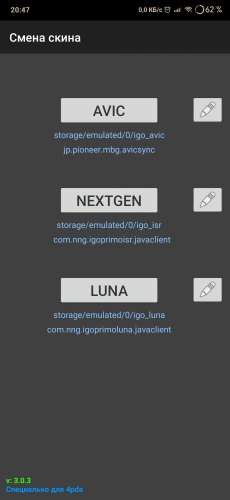
Update: Skin Change V 3.0.3


Update SkinChange.Apk Neoss75 (Thanks to him)
What's New: Skin Changer Trial Version 3.0.3
- Now the skin changer can work with three iGO programs at the same time.
The iGO start button has been added for launching without changing the skin.
Button names are written in the SCconf.ini file, for this you have to add the line buttonName = imya_knopki must be a
Latin name . We write the name of the button in each program file, i.e. For example, in the iGO_Luna folder we write buttonName = Luna, and in the iGO_Pal folder we write buttonName = Pal, so in each folder with the program we will have our own SCconf.ini file, nothing has changed in the save.ch files. For example, I attach an archive with the file and folder structure.
For the name to appear on the button, you have to click on the Ok button.
Translated From Russian
Spoiler: Pics
Spoiler: APK
Spoiler: Change Skin Structure
RegardsLast edited by LouBouha; 4th June 2020 at 08:36 PM. Reason: link update
GPS: TomTom ONE
Smartphone: THL T11 Android 4.2.2 Resolution 720x1280
Sygic 14.3.4 IGO Primo 9.6.29.636868 Skins : Doupas V9.0h , Dimka/Frontzosd
-
5th June 2020, 02:46 PM #67GPSPower Helper
- Join Date
- Dec 2009
- Location
- ro
- Age
- 38
- Posts
- 501
- Rep Power
- 947
[Only registered and activated users can see links. ] thanks to Neoss75.
Allows management of 3 different packages of NextGen.
The text displayed on the buttons is dictated by the SCconf.ini file - the buttonName field.
Improved RO translation.
Pre-completed path corresponding to the Samsung structure :
Luna : /storage/emulated/0/iGO_Luna
NextGen : - N3_Ext : /mnt/extSdCard/iGO_World & /mnt/extSdCard/iGO_XXX
- N8_Int : /storage/emulated/0/iGO_World & /storage/emulated/0/iGO_XXX
-
7th June 2020, 06:14 PM #68Member
- Join Date
- May 2011
- Location
- nj
- Posts
- 28
- Rep Power
- 0
I tried everything correctly. Skin changer saved ok too. But once try to change the skin every time ARIMI skin open not able to load other skin. Originally Posted by LouBouha

Please help
-
7th June 2020, 07:59 PM #69Master

- Join Date
- Mar 2016
- Location
- NYC
- Posts
- 140
- Rep Power
- 275
Make sure save.ch is different in each save folder (each gives different number e.g. skin1, skin 2, retc). If you copied one version to all save folders, then there is a problem. Also make sure your save folders are named accordingly.
If you think I helped you, please add to my reputation
-
8th June 2020, 02:47 PM #70Member
- Join Date
- May 2011
- Location
- nj
- Posts
- 28
- Rep Power
- 0
I used same pamphlet from costas3850. Just placed different ux in different folder. Used the same data zip from the iGO_Pal. If I use same in internal memory it works fine but If I placed in sdcard/ Android/Data/com... file then skin changer recognized it all different skin but open only default arimi skin. Originally Posted by iVoy
Last edited by vaghunger; 8th June 2020 at 03:29 PM.

Bookmarks