
 Likes:
 Reply With Quote
[Only registered and activated users can see links. ]
- changed the package name to allow installation in parallel with the original one
- when selecting a starter application passed on the first line of the World package
- improved RO translation
- default completed path to iGO folder :
-- Skinchange 2.0.0 WORLD N3 Ext => /mnt/extSdCard/iGO_World
-- Skinchange 2.0.0 WORLD N8 Int => /storage/emulated/0/iGO_World
Welcome guest, is this your first visit? Click the "Create Account" button now to join.


Results 41 to 50 of 132
-
14th March 2020, 07:44 PM #41Master


- Join Date
- Mar 2012
- Location
- EX USSR
- Posts
- 426
- Rep Power
- 2257
 Skinchange_2.0.5
Last edited by batiskaf; 16th March 2020 at 04:10 PM. Reason: Added 6 button
-
15th March 2020, 01:47 PM #42GPSPower Helper


- Join Date
- Dec 2009
- Location
- ro
- Age
- 38
- Posts
- 501
- Rep Power
- 947

-
16th March 2020, 04:00 AM #43Master

- Join Date
- Mar 2016
- Location
- NYC
- Posts
- 140
- Rep Power
- 275
It works only one way if SkinChanger ux is not edited. One way means changing the skin directly from SkinChanger but not from iGO. If the latter it will open the original SkinChanger. Originally Posted by costas3850

I have already edited SkinChanger to work with Pal, but still am working on the ux.
Anyone any ideas?
*** I know I need to edit skin_changer.lua in each ux ***
Sent from my Redmi Note 7 using TapatalkLast edited by iVoy; 16th March 2020 at 04:43 AM.
If you think I helped you, please add to my reputation
-
16th March 2020, 03:16 PM #44GPSPower Helper
- Join Date
- Dec 2009
- Location
- ro
- Age
- 38
- Posts
- 501
- Rep Power
- 947
I have not yet found iGO World that can launch an external application.
So YES, for iGO World, skin can be change only from apk, NOT from iGO.Last edited by costas3850; 16th March 2020 at 05:09 PM.
-
16th March 2020, 05:27 PM #45Smartphone MOD

- Join Date
- Nov 2014
- Location
- WALLACHIA
- Posts
- 941
- Rep Power
- 1627
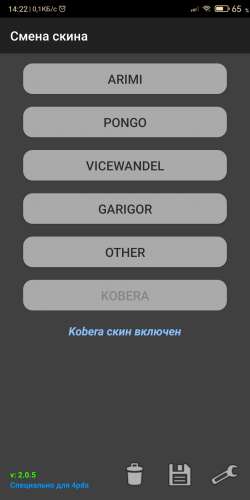
Skinchange_2.0.5
Skin changer update
Version 2.0.5
- added button for sixth skin
- updated translations
for sixth skin add lines to SCconf.ini
name - for the button and prefix to the archive and folderCode:Please Login or Register to see the links
Spoiler: Pictures
Spoiler: Download
Thanks to Neoss75!Last edited by quartzo; 16th March 2020 at 05:33 PM.

-
16th March 2020, 06:25 PM #46GPSPower Helper
- Join Date
- Dec 2009
- Location
- ro
- Age
- 38
- Posts
- 501
- Rep Power
- 947
-
19th March 2020, 03:45 AM #47Master
- Join Date
- Mar 2016
- Location
- NYC
- Posts
- 140
- Rep Power
- 275
PAL Skin Changer 2.0.5
Finally figured how to edit SkinChanger by Neoss and UX files: skinchanger.zip (I hope frontzosd will be OK with my edit of his UXs) to make it work with another iGO instant. In this case it will create PAL Skin Changer to work with iGO PAL. Now you may have two SkinChangers on your device (one default and one especially for PAL).
All works 100%. Folder structure in the archive: copy and merge.
Enjoy!If you think I helped you, please add to my reputation
-
19th March 2020, 04:47 PM #48Master

- Join Date
- Mar 2017
- Location
- Tunisia
- Posts
- 457
- Rep Power
- 1335
Skin Change V 2.0.5 New Look
.gif "hi3")
I propose you the latest version of SkinChange 2.0.5 from Neoss75 (Thanks) with a new look.
What's New:
1/ Change Apk icon: Puzzle with the initials of the 4 Main Skins: Arimi, Frontzosd, Pongo, and Wandel.
Spoiler: Pics
2/ Change of the ux icons with the name of the running Skin.
Spoiler: Pics
3/ Improvement of the french translation.
Spoiler: APK
Spoiler: ChangeSkin Structure
Respect the order according to SCconfig.ini and especially change the ux: skin_changer.zip
RegardsLast edited by LouBouha; 19th March 2020 at 05:50 PM.
GPS: TomTom ONE
Smartphone: THL T11 Android 4.2.2 Resolution 720x1280
Sygic 14.3.4 IGO Primo 9.6.29.636868 Skins : Doupas V9.0h , Dimka/Frontzosd
-
9th April 2020, 07:13 PM #49Member
- Join Date
- Nov 2019
- Location
- Greece
- Posts
- 29
- Rep Power
- 7
I did read the whole topics (is is not very big anyway) and I tried version 2.8 but is is not working for me. It does not find the map files and does not show me anything so I can select to make the switch. I have tomtom maps and Here maps in the same map folder located in igo/content/map. The map changer option is shown in the menu of IGO. When I press this option in the menu I get a message "To change the maps on your device must be installed the program Mapchanger.apk.....".
- What is Device that you have problem with: Huawei Honor 6
- What is device screen resolution: 1080x1920
- what is application (software) resolution in portrait and landscape mode (for Android)? Auto
- Whether the device is rooted or not (for Android based devices)? device not routed
- Which version of Android (Or WinCE) ? Android 6
- Which version of the navigation software, exactly? iGO World 9.18.27.736653 - 19.jun.2018
- Where the navigation software is (internal / external memory)? internal memory
- Which edition of maps and extras? Greece_TomTom_2019.12 and Here 2019_12 / standard voices (no TTS)
- Whether the use of the skin (which)?? Default skin
I try to use the mapchanger on post #33 but it does not show me the maps so I can make the switch. Both map files are in the igo/content/map folder and there licenses are in the license folder. I put is the ux folder the externalmap changer.zip and then I install the mapchange aplication (for internal sd). In the igo menu I can see the mapchanger option.
-
9th April 2020, 10:29 PM #50Master
- Join Date
- Mar 2017
- Location
- Tunisia
- Posts
- 457
- Rep Power
- 1335
MapChangerExt
Thank you for All the information provided

Mapchanger Ext is an Apk that works by recognizing the iGO's package name.
My friend Modemakias (Thanks) specifies the valid package name.
supports the following versions:
1. iGO Basarsoft ----------- "com.basarsoft.igonextgen.javaclient"
2. iGO Avic ---------------- "jp.pioneer.mbg.avicsync"
3. iGO Tracks4Africa ------- "za.co.tracks4africa.nng.africa"
4. iGO Nextgen Israel------- "com.nng.igoprimoisrael.javaclient"
5. iGO Palestine, Pal ------- "com.nng.igo.primong.palestine"
6. iGO Navigation, World --- "com.nng.igo.primong.igoworld"
Probably the package name of your iGO is not in this list so it will not be recognized.
So check your package name, don't forget to respect the folders.( map, map_hr, map_ot, map_tm, ....)
If your package name isn't in the list give it to me and I'll try to do something about it ...I can't promise anything.
RegardsGPS: TomTom ONE
Smartphone: THL T11 Android 4.2.2 Resolution 720x1280
Sygic 14.3.4 IGO Primo 9.6.29.636868 Skins : Doupas V9.0h , Dimka/Frontzosd



Bookmarks