
 Likes:
Information for truck drivers
You know how to use these files, right?
In principle, they can be used in any encoding and even if you do not have a skin installed.iGO 5w iTruck speedcam - code 1,2,3,4,5
iGO 4w iTruck speedcam - code 1,2,3,4 NOMob
From March 2026, you can download another version of radars for trucks, called - "Truck" speedcam.txt.
It can be found on the forum in the topics of the OSC and SCDB radar databases.
I also remind you that if you do not have the skin installed, the average speed section will only close manually by tapping on the average speed icon on the navigator screen, while you see a speed of 5 km/h.iGO OEM OSC Europe + Turkey -
Europe TRUCK
OSC_Eastern_Europe.txt
OSC_Western_Europe_no_GBR.txt
OSC_GBR_Great Britain_mph.txt
OSC_GBR_Great Britain_kmh.txt
OSC_TUR_Turkey.txt
iGO OEM SCDB World/Europe -
Europe TRUCK
SCDB_Eastern_Europe.txt
SCDB_Western_Europe_no_GBR.txt
SCDB_TUR_Turkey.txt
SCDB_GBR_Great Britain_mph.txt
SCDB_GBR_Great Britain_kmh.txt
Welcome guest, is this your first visit? Click the "Create Account" button now to join.


Results 21 to 30 of 31
-
21st December 2025, 10:36 AM #21SUPER MODERATOR

![FAQ iGO encodings and speedcam.txt [compatibility]](http://i.imgur.com/93Gle9H.png)
![FAQ iGO encodings and speedcam.txt [compatibility]](https://www.gpspower.net/images/ranks/Medals/52_50377.gif)
![FAQ iGO encodings and speedcam.txt [compatibility]](https://www.gpspower.net/images/ranks/Medals/52_50358.gif)
![FAQ iGO encodings and speedcam.txt [compatibility]](https://www.gpspower.net/images/ranks/Medals/piaoliang12.gif)


- Join Date
- Oct 2019
- Location
- Belarus
- Posts
- 3,923
- Rep Power
- 2815

ASC - Average Speed Control.
If you're using a modern version of a skin in your navigator, such as the 2025 Pongo skin, this issue was resolved in the 2019 Pongo skin and in the 2020 Wandel skin.
(Pongo iGO Nextgen skin from March 17, 2019. Wandel iGO Nextgen skin from April 27, 2020,)
Average speed section - starts and ends at 5 km/h. Calculates the average speed for the entire section until the section closes. To see how this works, you need to have a speedcam.txt file in the content/speedcam folder with average speed section data.
Currently, the OSC database is the only database for European countries with average speed closure parameters, and the BBS database is the only database for Spain, Portugal, and Andorra. Other databases, such as the SDCB and POI database, do not have section closure parameters.
How it works if you use SCDB database.
A circular alert system notifies each camera, both when entering and exiting an average speed zone, as a new average speed zone. Drivers must determine whether they are within an average speed zone or have left it. Average speed zones can end, or new zones can begin, one zone following another. It seems that if you don't disable the average speed zone yourself, you risk receiving alerts until you turn off your car.X,Y,TYPE,SPEED,DIRTYPE,DIRECTION
2.343954,48.249634,35,90,0,0, start
2.393596,48.283276,35,90,0,0, start
2.393441,48.283202,35,90,0,0, start
2.343788,48.249575,35,90,0,0, start
How it works if you use "POIbase" database.
In this case, things aren't as bad as with the SCDB. The section ends at the first stationary camera encountered, in theory.X,Y,TYPE,SPEED,DIRTYPE,DIRECTION
2.343954,48.249634,35,90,1,45, start
2.393596,48.283276,32,90,1,45, finish
2.393441,48.283202,35,90,1,224, start
2.343788,48.249575,32,90,1,225, finish
P.S.
Timer
- the time after which the area will automatically close, which eliminates the need for "Finish" coordinates and, accordingly, the problem of searching for "Finish" is eliminated.Code:Please Login or Register to see the links
The solution, of course, isn't ideal, but it's viable for older versions of the skin.
To use the timer, remove all "Finish" from speedcam.txt, to avoid problems, leave only "Start". Speedcam.txt "starts only"
The timer applies to Pongo skins published before March 17, 2019
If you do not delete "Finish", then all points will be notified as "Start"X,Y,TYPE,SPEED,DirType,Direction, // OpenSpeedcam 26-12-2025 09:08
2.343954,48.249634,4,90,1,45, start
2.393596,48.283276,4,90,1,45, finish DELETE
2.393441,48.283202,4,90,1,224, start
2.343788,48.249575,4,90,1,225, finish DELETE
X,Y,TYPE,SPEED,DirType,Direction, // OpenSpeedcam 26-12-2025 09:08
2.343954,48.249634,4,90,1,45, start
2.393596,48.283276,4,90,1,45, start
2.393441,48.283202,4,90,1,224, start
2.343788,48.249575,4,90,1,225, startLast edited by Andrey Form; 26th December 2025 at 03:52 PM.

[Only registered and activated users can see links. ]
[Only registered and activated users can see links. ]
[Only registered and activated users can see links. ]
[Only registered and activated users can see links. ]
[Only registered and activated users can see links. ]
[Only registered and activated users can see links. ]
©AF_2020-26
-
14th March 2026, 04:34 PM #22SUPER MODERATOR
- Join Date
- Oct 2019
- Location
- Belarus
- Posts
- 3,923
- Rep Power
- 2815

Last edited by Andrey Form; 14th March 2026 at 04:46 PM.
[Only registered and activated users can see links. ]
[Only registered and activated users can see links. ]
[Only registered and activated users can see links. ]
[Only registered and activated users can see links. ]
[Only registered and activated users can see links. ]
[Only registered and activated users can see links. ]
©AF_2020-26
-
26th April 2026, 10:00 AM #23SUPER MODERATOR
- Join Date
- Oct 2019
- Location
- Belarus
- Posts
- 3,923
- Rep Power
- 2815
iGO Primo w16
Primo 16 is the iGO Primo standard used when no skin is applied. It can also be used with a skin, but in that case, only default warnings will be displayed. Additionally, it is used in factory car navigation systems; when using it in Renault R-Link 2, remember to use the correct filenames — usually, these are country names following the standard.
(for example, France or Italy) to provide a replacement for the spedcam file.txt in the car navigator.
w16

OSC base
iGO Primo w16 Full
(32 Speed Camera), (34 Built-in Camera), (36 Red Light), (43 Red Light and Speed Camera), (35 Average Speed Camera), (35 Average Speed Camera - Finish 5 km h), (39 Bus Lane Camera), (33 Mobile Speed Camera), (38 Railway crossing), (42 Town Entry Point), (41 School Zone), (40 High Accident Zone), (44 Toll Booth), (63 Dangerous Area), (47 Congestion Charge Zone)
iGO Primo w16 Pro
(32 Speed Camera), (34 Built-in Camera), (36 Red Light), (43 Red Light and Speed Camera), (35 Average Speed Camera), (35 Average Speed Camera - Finish 5 km h), (39 Bus Lane Camera), (33 Mobile Speed Camera), (47 Congestion Charge Zone)
iGO 5w speedcam - code 1,2,3,4,5
1 - (32 Speed Camera),
2 - (34 Built-in Camera),
3 - (36 Red Light),
4 - (35 Average Speed Camera + Finish 5 km h)
5 - (33 Mobile Speed Camera)
iGO 4w speedcam - code 1,2,3,4 NOMob
1 - (32 Speed Camera),
2 - (34 Built-in Camera),
3 - (36 Red Light),
4 - (35 Average Speed Camera + Finish 5 km h)
SCDB base NOMob
1 - (32 Speed Camera),
2 - (34 Built-in Camera),
3 - (36 Red Light),
4 - (35 Average Speed Camera)
SCDB base Code 5
5 - (33 Mobile Speed Camera)
POI base NOMob
1 - (32 Speed Camera),
2 - (34 Built-in Camera),
3 - (36 Red Light),
4 - (35 Average Speed Camera)
POI base Code 5
5 - (33 Mobile Speed Camera)
OSC base OEM, POI base OEM, SCDB base OEM (maximum radar azimuth adaptation is relatively expensive)
1 - (32 Speed Camera),
2 - (34 Built-in Camera),
3 - (36 Red Light),
4 - (35 Average Speed Camera)Last edited by Andrey Form; 19th October 2026 at 02:22 PM.
[Only registered and activated users can see links. ]
[Only registered and activated users can see links. ]
[Only registered and activated users can see links. ]
[Only registered and activated users can see links. ]
[Only registered and activated users can see links. ]
[Only registered and activated users can see links. ]
©AF_2020-26
-
28th April 2026, 06:10 AM #24SUPER MODERATOR
- Join Date
- Oct 2019
- Location
- Belarus
- Posts
- 3,923
- Rep Power
- 2815
This could be said of any of pongo’s creative works. Many users are still unsure how to properly use a skin. Let’s start with the basics: a skin is built from UX files. It isn't just a random collection of plugins, but a cohesive system integrated with the APK’s core features (the author usually specifies which iGO versions are compatible). Every skin undergoes rigorous testing and bug-fixing before it’s released to the public. For passenger car drivers, the default skin is typically more than enough.
However, for professional use—specifically truck drivers—modders have developed additional plugins to streamline the experience, such as adding quick-access controls directly to the navigation screen. The original skin remains the foundation of a stable system. In recent years, many 'Truck' or 'Logistics' builds based on pongo’s work have appeared, often burying his name at the bottom of the credits or removing it entirely. In my view, this is a poor practice that often compromises performance. Regardless, you can always replace the UX folder in these builds with the original pongo skin to ensure your navigator runs reliably (leaving a specific shell of these assemblies).
[Only registered and activated users can see links. ]Last edited by Andrey Form; 28th April 2026 at 07:18 AM.
[Only registered and activated users can see links. ]
[Only registered and activated users can see links. ]
[Only registered and activated users can see links. ]
[Only registered and activated users can see links. ]
[Only registered and activated users can see links. ]
[Only registered and activated users can see links. ]
©AF_2020-26
-
4th May 2026, 03:43 PM #25SUPER MODERATOR
- Join Date
- Oct 2019
- Location
- Belarus
- Posts
- 3,923
- Rep Power
- 2815
radar warning system in the PONGO skin
Currently, the alert scenario from Pongo Igo Luna is based on the alert distance. It is the distance in plugin.ini that determines the priority of alerts of one type or another. Thus, important alerts are displayed first, even if they are further away on the route map. This ensures that all types of alerts are displayed in a timely manner. This is not the default behavior of Igo. The only requirement is to follow the recommendations from Pongo, including speedcam.txt. It is important to close the section with a speed of 5 km/h.
This alert scenario, the beginning of Luna 32 bit. And further implemented in all pongo skins, 64 bit. (Luna, Basar, World). It is important when you edit the alert distance in the plugin.ini. Apply longer distances for radars, and shorter distances for road signs. Radars will be alerted even if they are the second ones in the direction of movement.
[Only registered and activated users can see links. ]
[Only registered and activated users can see links. ]
[Only registered and activated users can see links. ]
[Only registered and activated users can see links. ]
[Only registered and activated users can see links. ]
[Only registered and activated users can see links. ]
©AF_2020-26
-
4th May 2026, 06:11 PM #26SUPER MODERATOR
- Join Date
- Oct 2019
- Location
- Belarus
- Posts
- 3,923
- Rep Power
- 2815
Pongo skin update and speedcam activation (May 2026)
since the "auto_road" plugin has a disabled=0 speedcam entry constantly pending.
To activate temporarily:
-Cameras can be turned on via "drag mode" long tap on the rightmost "favorites" button
To activate permanently:
Go to the menu and turn on the alerts. Skin settings/ Warnings/ Cameras/ Report cameras - on.Code:Please Login or Register to see the links
For Luna 64 bit - add to plugin
Code:Please Login or Register to see the links
.gif ":basket:")
Last edited by Andrey Form; 4th May 2026 at 06:17 PM.
[Only registered and activated users can see links. ]
[Only registered and activated users can see links. ]
[Only registered and activated users can see links. ]
[Only registered and activated users can see links. ]
[Only registered and activated users can see links. ]
[Only registered and activated users can see links. ]
©AF_2020-26
-
8th May 2026, 07:54 AM #27SUPER MODERATOR
- Join Date
- Oct 2019
- Location
- Belarus
- Posts
- 3,923
- Rep Power
- 2815
iGO NextGen 32 bit - Skin by WANDEL™
speedcam_mod VB, NC, BG, FR, Eur+, GR, SP, ITOn April 14, 2022, a master, a well-known skin for iGO nextGen, joined us - Skin from @Wandel.
speedcam_mod_AF
[Only registered and activated users can see links. ]
How speedcam_mod.zip for Wandel skin works:
Any speedcam_mod.zip needs to be moved to the UX folder, speedcam.zip should also be in the UX.
If you need to replace speedcam_mod.zip (encoding or icons) you need to remove the replacement file.
In the UX folder may be speedcam.zip, or set speedcam.zip, speedcam_mod.zip
Working Average Speed Camera in the Wandel skin.
In more detail about the Average Speed Camera
for the correct warning "Average Speed zone" there must be two cameras:
- the first (the beginning of the zone) with a measurable limit limit, for example 70 km / h
- second (end of zone) with a speed limit of 5 km / h,
on the navigator screen, both cameras are directed against the traffic ( in speedcam.txt in the direction of travel );
in those areas where the speed is controlled by both directions, there must be four cameras (two opposite ones)Last edited by Andrey Form; 8th May 2026 at 07:57 AM.
[Only registered and activated users can see links. ]
[Only registered and activated users can see links. ]
[Only registered and activated users can see links. ]
[Only registered and activated users can see links. ]
[Only registered and activated users can see links. ]
[Only registered and activated users can see links. ]
©AF_2020-26
-
27th May 2026, 07:06 PM #28SUPER MODERATOR
- Join Date
- Oct 2019
- Location
- Belarus
- Posts
- 3,923
- Rep Power
- 2815
Expert Warning: Why iGO Misses Speedcams and How to Choose the Right Database
The iGO navigation engine is extremely sensitive to the structure and geometry of data inside the speedcam.txt file. Using an incompatible or "raw" database can lead to massive camera misses on the road and unexpected fines.Below are the critical technical details that every iGO user must consider when choosing a data source.
⚠️ Main Technical Pitfalls for iGO
- Strict Direction Filter (±20°): iGO uses a rigid heading control algorithm. If the camera's direction vector in the file deviates from the actual road axis by more than ±20 degrees, the navigation software simply ignores the speedcam.
Blindness on Winding Roads: Speedcams that work perfectly on straight highways can become invisible on serpentines, exits, junctions, and 90-degree intersections. This happens because their angles are not mathematically adapted to iGO's movement tracking algorithms.
Differences in Data Collection Methods by Databases When choosing a database, it is vital to understand the mathematical method used to generate its direction angles:
Spoiler: 1. POIBase
Spoiler: 2. Local Forum Databases (Without Auto-Filtering)
Spoiler: 3. Professional Databases (OpenSpeedcam / OSC with Adaptation)
Recommendations for Choosing an iGO Database
Avoid "Direct Imports": Do not use databases exported directly from universal international projects (such as POIBase) without pre-processing.Look for Modified Files: Choose modified sources (e.g., Mod AF), where the data has been optimized as much as possible for iGO.
Check the Header Structure: Before copying the database into your navigation device, make sure the first line of the speedcam.txt file is strictly standardized and does not contain stray punctuation marks (especially semicolons ;), which can completely break the software's parser.
Recommendations for Extending the Detection Angle in iGO
You can manually expand the camera deviation angle from the road centerline to (±40°):
Note: This is for users who have access to editing the hidden settings (sys.txt) of the iGO navigation software.[warning]Speedcam_max_angle=40Last edited by Andrey Form; 27th May 2026 at 07:10 PM.
[Only registered and activated users can see links. ]
[Only registered and activated users can see links. ]
[Only registered and activated users can see links. ]
[Only registered and activated users can see links. ]
[Only registered and activated users can see links. ]
[Only registered and activated users can see links. ]
©AF_2020-26
-
10th July 2026, 12:41 PM #29SUPER MODERATOR
- Join Date
- Oct 2019
- Location
- Belarus
- Posts
- 3,923
- Rep Power
- 2815
FAQ: Radar & Speedcam Alert Priority (Standard iGO vs. Pongo Skin)
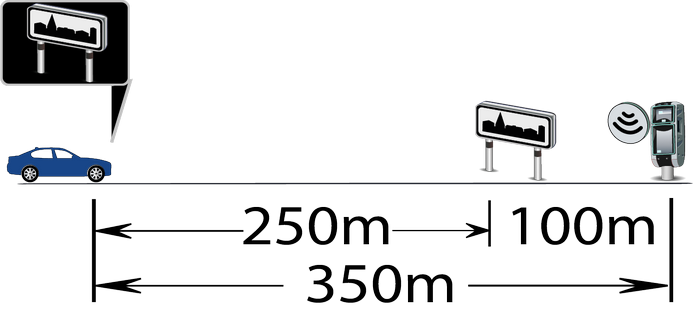
In modern Pongo skins (starting from Luna 32-bit up to all current 64-bit versions for Luna, Basar, World, and Avic), the alert processing logic has been completely redesigned. Unlike the standard iGO behavior, the alert priority here is based solely on the warning distance specified in the plugin.ini file.
Below is a detailed guide on how this mechanism works and how it differs from the stock engine.
Comparison of Alert Algorithms
1. Standard Behavior (iGO Primo & iGO Nextgen 32-bit)The stock system issues warnings strictly in chronological order based on your GPS position. The closest object along the route is always displayed first, even if it is a minor road sign and a critical speed camera is located immediately behind it.
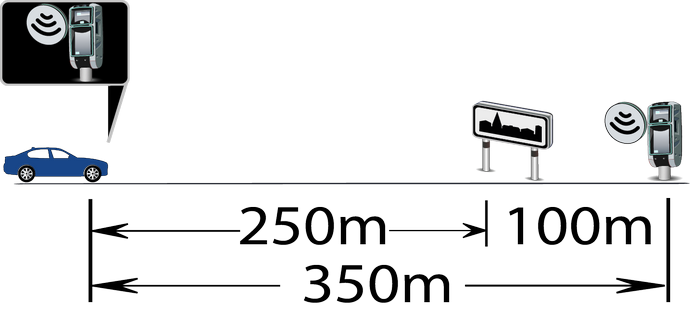
2. Pongo Skin Algorithm (Luna 32/64-bit, Basar, World, Avic 64-bit)The priority is completely shifted to the alert distance defined in your plugin.ini. If a larger warning distance is configured for a radar, it will override the nearby sign and be displayed first. This crucial change ensures you never miss critical speed cameras.
How It Works under the Hood
Distance-Based Priority: High-priority objects are displayed first, even if they are located further away on the map than other POIs. This guarantees that the driver is always informed well in advance.
Type Overlapping: If a speed camera has a wider alert radius configuration, the system will trigger a warning for it immediately—completely bypassing lower-priority objects (such as road signs) that are physically closer to the vehicle in the direction of travel.
Tip for users: When editing the warning distances in your plugin.ini, always assign larger distances for radars/speedcams and shorter distances for road signs to make full advantage of this feature.
[Only registered and activated users can see links. ]
[Only registered and activated users can see links. ]
[Only registered and activated users can see links. ]
[Only registered and activated users can see links. ]
[Only registered and activated users can see links. ]
[Only registered and activated users can see links. ]
©AF_2020-26
-
17th July 2026, 02:14 PM #30SUPER MODERATOR
- Join Date
- Oct 2019
- Location
- Belarus
- Posts
- 3,923
- Rep Power
- 2815
FAQ speedcam.zip + speedcam_mod.zip
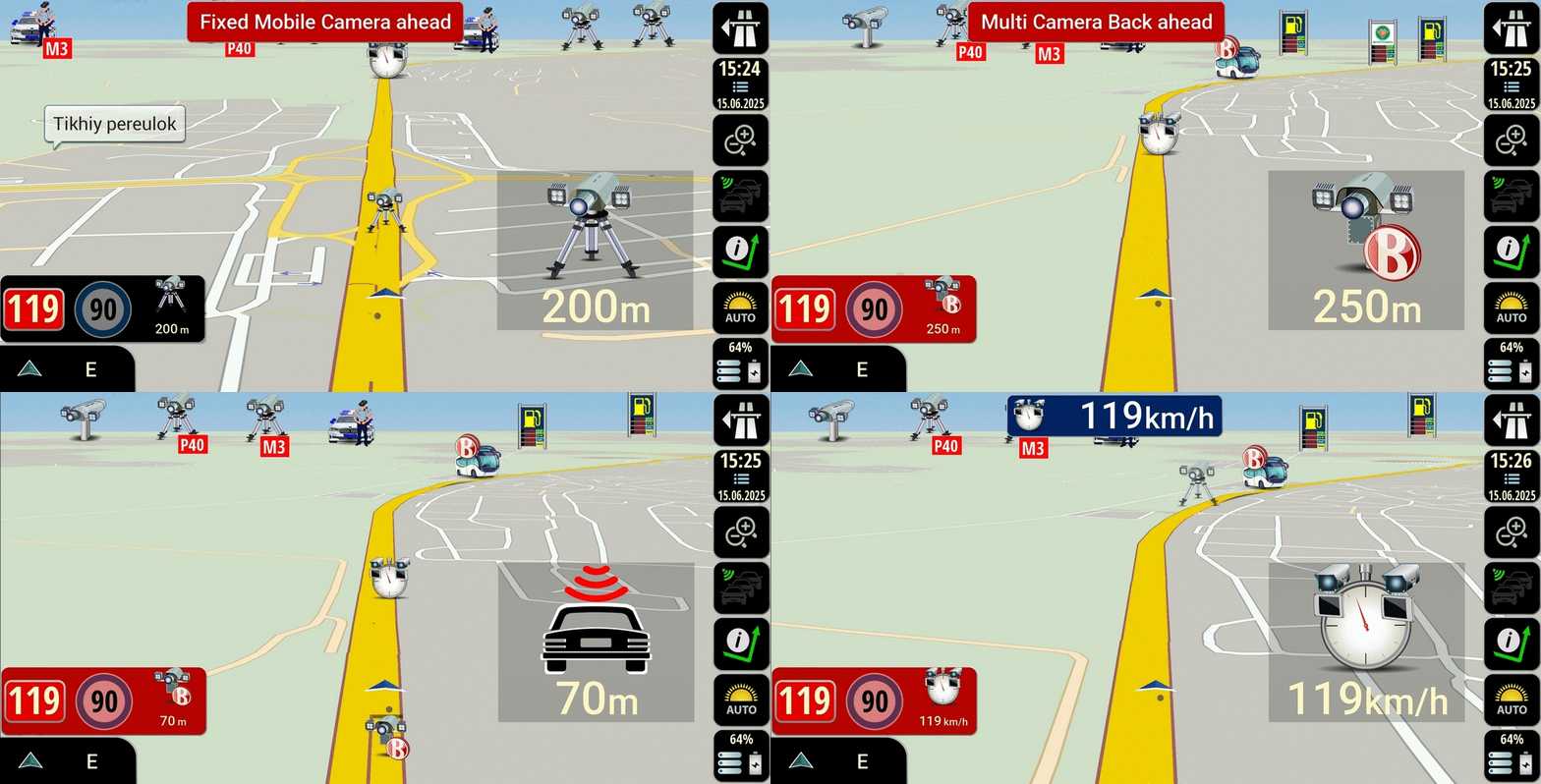
- original speedcam.zip from Pongo combined with speedcam_mod.zip Mod AF
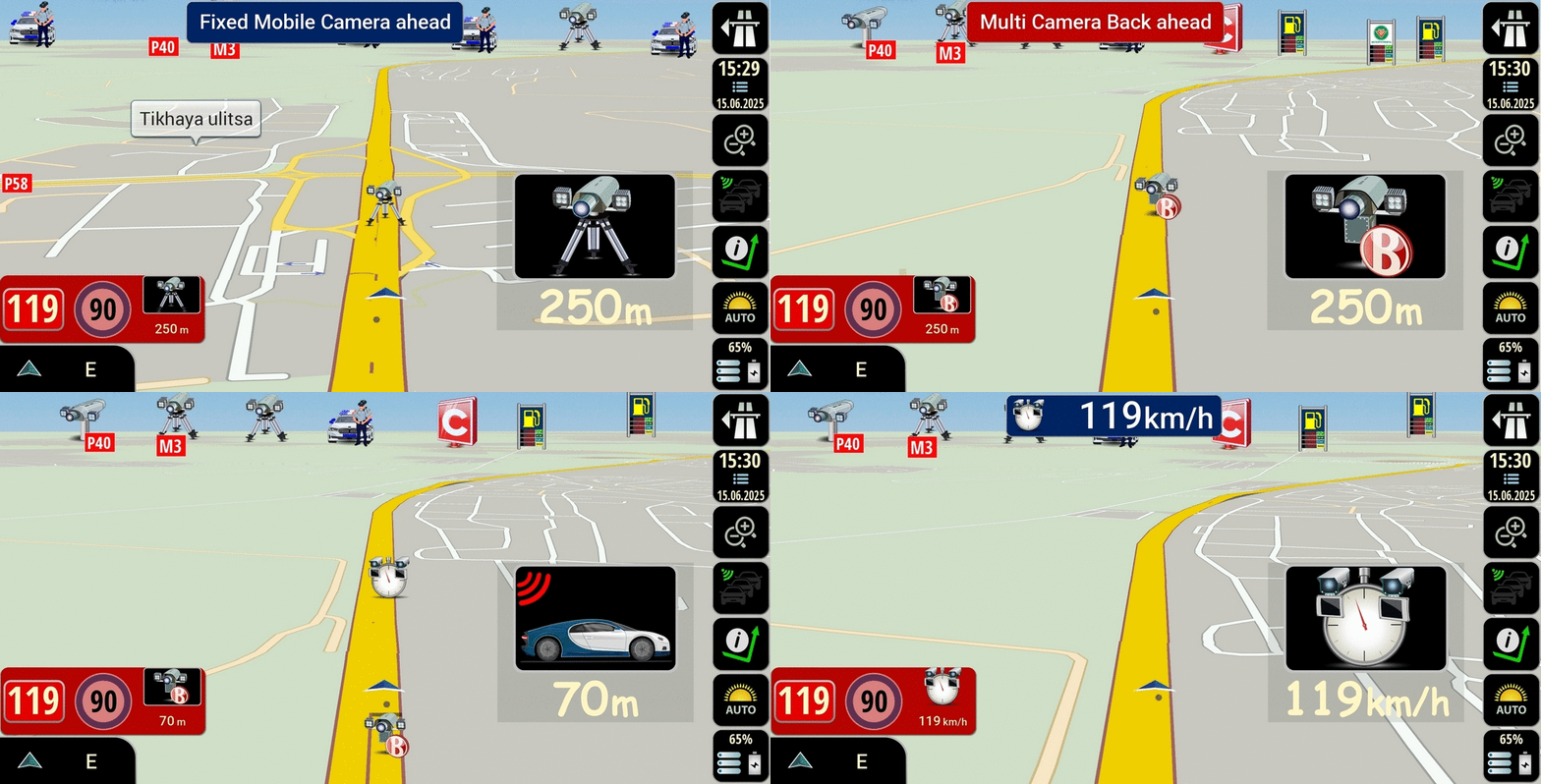
- speedcam.zip Mod AF combined with speedcam_mod.zip Mod AF
Let's find the differences in using speedcam.zip original pongo + speedcam_mod.zip Mod AF
Spoiler: 1
and the second option speedcam.zip Mod AF + speedcam_mod.zip Mod AF
Spoiler: 2
speedcam.zip original pongo is configured to display radar icons in the default version, only normal icons are used.
speedcam.zip Mod AF expands the display capabilities of radar icons from the cockpit group.
[Only registered and activated users can see links. ]
[Only registered and activated users can see links. ]
[Only registered and activated users can see links. ]
[Only registered and activated users can see links. ]
[Only registered and activated users can see links. ]
[Only registered and activated users can see links. ]
©AF_2020-26
Advertissements
Tags for this Thread

 Posting Permissions
Powered by vBulletin
Copyright © 2026 vBulletin Solutions, Inc. All rights reserved.
Copyright © 2026 vBulletin Solutions, Inc. All rights reserved.
All times are GMT +1. The time now is 06:00 AM.
Bookmarks