
 Likes:

It is not a problem, in
[rawdisplay]
force_renderer="RENDER_MOYA"
driver=engine
screen_xy="680"
dpi="620"
base_dpi =160
;dpi=120
;dpi=160
;dpi=240
;dpi=320
;dpi=480
;dpi=640
;driver="gdi"
;highres=1
instead of screen_xy = "auto" enter the number as suggested above
instead of dpi = "auto" also enter the number as suggested above. Depending on the size of the display, it is necessary to test it.
Welcome guest, is this your first visit? Click the "Create Account" button now to join.


Results 1 to 5 of 5
Hybrid View
-
23rd January 2019, 03:07 PM #1Junior Member


- Join Date
- Mar 2017
- Location
- cs
- Posts
- 1
- Rep Power
- 0

Last edited by Boki; 23rd January 2019 at 03:27 PM. Reason: translated to english
-
23rd January 2019, 04:18 PM #2Member
- Join Date
- Jan 2019
- Location
- Polska
- Posts
- 27
- Rep Power
- 8
Answer for Votava.
Unfortunately, these settings do not change. Navigation after zooming in the image - "airplane" returns to default values before each turnout on the highway and does not return to the previous magnification
I found.
Settings / Automatic Overview Settings / Overview Zoom and Tilt /
We set the parameter:
Overview zoom in 2D: 10000 max.
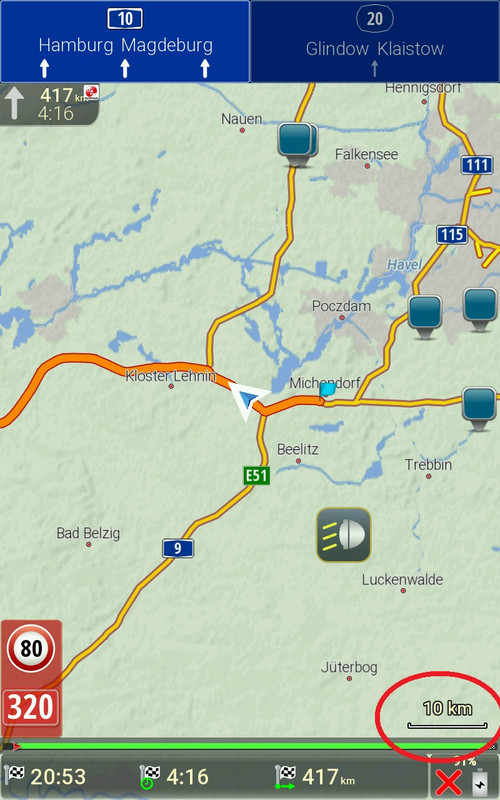
This gives a scale on the map 1 cm -10 km.
These settings are available in the latest Skin Pongo.
Spoiler: pic1
Spoiler: pic2Last edited by Boki; 23rd January 2019 at 07:13 PM.

 Reply With Quote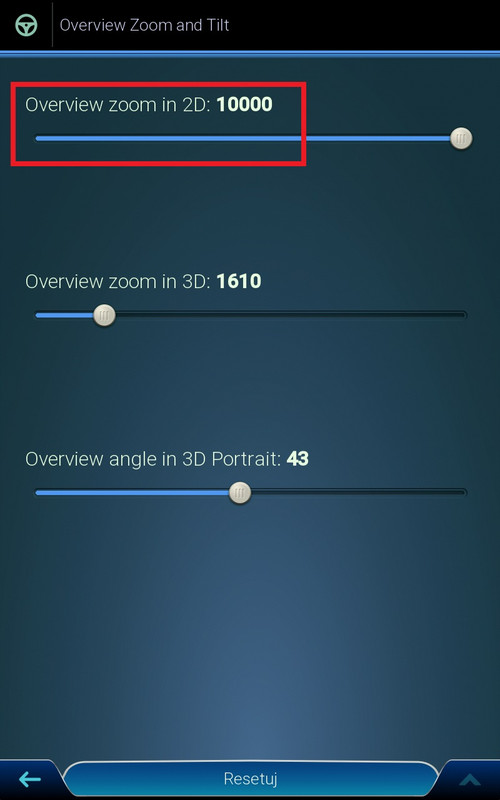


Bookmarks