
 Likes:

 Reply With Quote
I return to the subject, can it be expanded as speedcam_mobile_camera?Originally Posted by Andrey Form

I've tried to expand it with illustrator and lnskape and I don't know why when it comes to trying it gets caught,
Spoiler: image
I've modified the images, but when I start iGO, it stops and closes when it gets to the speedwam.
Any solution?
Solved!! Instead of exporting, Save As, and has kept me
Modified larger size
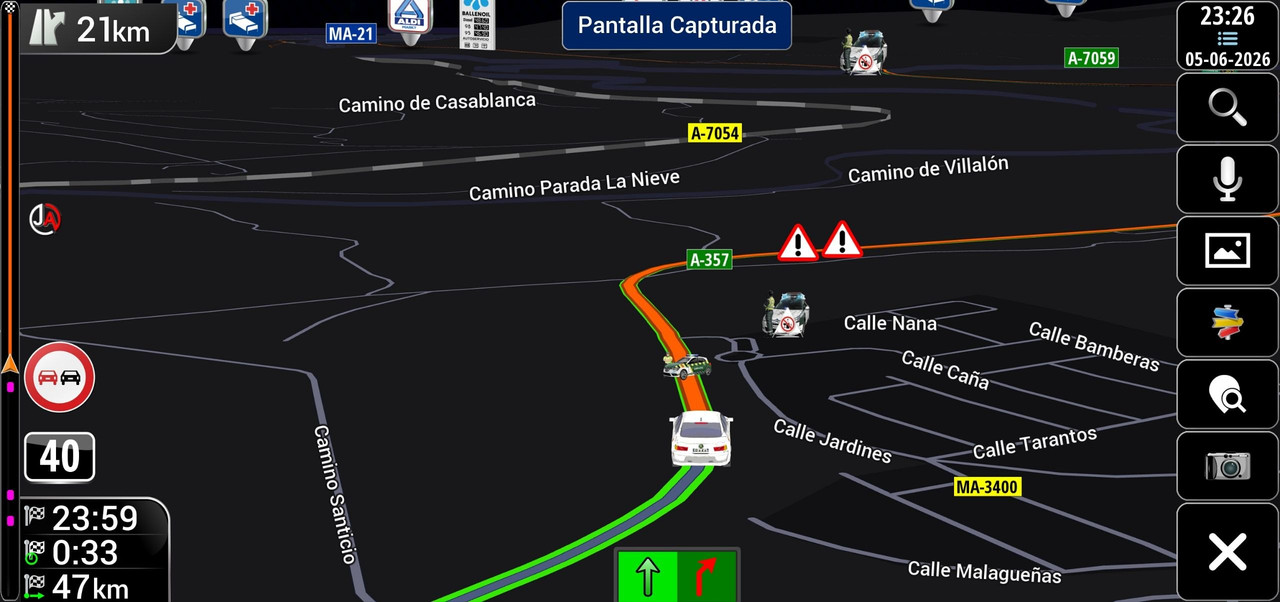
No Police
Police & Car
Welcome guest, is this your first visit? Click the "Create Account" button now to join.


Results 251 to 256 of 256
Thread: SVG developments
-
19th March 2026, 06:54 PM #251Master


- Join Date
- Jul 2017
- Location
- France
- Posts
- 658
- Rep Power
- 2237

Hello,
As there have been several suggestions, I’ve finally decided to draw it as well.
If you want to use it, don’t forget to rename the file !
Spoiler: Example
Of course, the ‘svg’ file is in the archive.
-
5th June 2026, 12:30 AM #252Super Member


- Join Date
- Sep 2023
- Location
- Spain
- Posts
- 149
- Rep Power
- 7
Last edited by Jaloga; 17th June 2026 at 07:04 PM.
Here I will thank all the contributions
Thank You so Much.

Greetings of Jaloga
-
Today, 09:15 AM #253Junior Member
- Join Date
- Aug 2026
- Location
- Bosna i Hercegovina
- Posts
- 6
- Rep Power
- 0
I would like someone to help me with the creation of "SVG" photos. Namely, in the "ux > zip. folder speedcam" I want to change the appearance of some radars (cameras) for speed and I tried with the "inkscape" program, but when I use the "Total Commander" to insert the "SVG" icons (thumbnails) created in this way into the ux > zip. folder speedcam > ui_nextgen > res > common, those new thumbnails do not appear in the place where they should appear, i.e. those places are empty and in that place I still have the appropriate TTS voice but there is no thumbnail that shows that radar (speed camera). would I be successful if I converted the "PNG" photos to "SVG" using the program "Adobe Illustrator".
-
Today, 10:55 AM #254SUPER MODERATOR


- Join Date
- Oct 2019
- Location
- Belarus
- Posts
- 3,927
- Rep Power
- 2820
This thread is not a training school for graphic design, so we won't be teaching you how to use Illustrator or Inkscape from scratch. However, if you attach your problematic SVG file here, I can look into its internal code and make the necessary corrections to make it work in iGO.

[Only registered and activated users can see links. ]
[Only registered and activated users can see links. ]
[Only registered and activated users can see links. ]
[Only registered and activated users can see links. ]
[Only registered and activated users can see links. ]
[Only registered and activated users can see links. ]
©AF_2020-26
-
Today, 12:47 PM #255Junior Member
- Join Date
- Aug 2026
- Location
- Bosna i Hercegovina
- Posts
- 6
- Rep Power
- 0
Hello! Here are the SVG images I created using Inkscape; iGO Nextgen Pongo does not recognize them, so the space where the images should appear remains empty. I managed to get the BMP version working, and those images now display in the cockpit. For your reference, I have also included the PNG files that I used to create the SVGs.
-
Today, 01:04 PM #256SUPER MODERATOR
- Join Date
- Oct 2019
- Location
- Belarus
- Posts
- 3,927
- Rep Power
- 2820
Verdict: These files cannot be fixed; they belong in the trash bin.
You just took raster PNG images and passed them through Inkscape's automatic tracing tool. As a result, the code inside these SVG files is a complete mess. It is filled with thousands of redundant vector paths, multi-layered nodes, masks, transparencies, and kilometers of junk XML metadata that Inkscape adds by default.
The iGO Nextgen graphic engine is very old and primitive. It cannot calculate complex nested layers (<g>) or handle overlapping auto-traced paths. When it encounters such a "vector salad," it simply chokes and renders a blank space.
If you want custom speedcam icons that actually work in iGO Nextgen, you have to draw them manually from scratch as simple, clean vector shapes with minimal <path d="..." /> coordinates and clean fills, rather than just auto-converting heavy PNG images.
[Only registered and activated users can see links. ]
[Only registered and activated users can see links. ]
[Only registered and activated users can see links. ]
[Only registered and activated users can see links. ]
[Only registered and activated users can see links. ]
[Only registered and activated users can see links. ]
©AF_2020-26


Bookmarks