
 Likes:

Please bear with me Boki, i will try to answer your questions, so as you leave this thread on the forum (or make up another if necessary and make it a sticky) as it might come handy for some one else in the future.
Everywhere i looked for help to find software for these Chinese units, people asked money to help me, so i decided to tackle this problem myself.
As you have noticed, i have been a member since 2010 or so on this forum (age 64)
Back in the day i messed around a lot with WinCE PND's as well as Android PND's (i still use a 5" WinCE (running iGO Primo) on my travels & i update the maps i download from your site)
But I had not messed around installing iGO for many years till i ordered this Android Chinese Head unit, so the first thing i did was to go into my file archives to dig out the last Android software i used, not thinking that it was a very early android version & i would need a more up to date version to work on this new head unit..(i still keep my file archives from 15 years ago)
next thing was to come to gpspower forum to find a solution..
To cut a long story short, yes i did install iGO on a Chinese Android head unit and run into the issue which i wrote in my initial post..
Since my last post yesterday, i changed that version to another better version today which i downloaded from gpspower forum..
My head unit is XTRONS Android 13 Universal Double DIN 7 inch 4GB RAM + 64GB ROM (was advertised as Android 12 but it came with 13
[Only registered and activated users can see links. ]
Downloaded Maps.me and Waze from playstore just to test if back button will switch back to main menu, which they did.
Previously i mentioned iGO_NexGen_KOLEKCIJA is a set of files which i downloaded from your link below (they did not work for me)
[Only registered and activated users can see links. ]
As of now, i have iGO Basar 9.18.27.736574 - 13.June 2018 installed and working well..(link below)
Method of installing was, i placed the folder below into head unit>Local>Download folder and then executed the .apk file.
I then placed maps,poi, sys.txt and even my custom made speed files in to relevant folders and all is OK (well almost all as i couldn't get skins to work)
[Only registered and activated users can see links. ]
I also installed iGO AVICSYNC 9.18.28.696728 - 10.apr.2017 but did not like it, so replaced it with above Basarsoft version.
[Only registered and activated users can see links. ]
my maps are downloaded from the link below
[Only registered and activated users can see links. ]
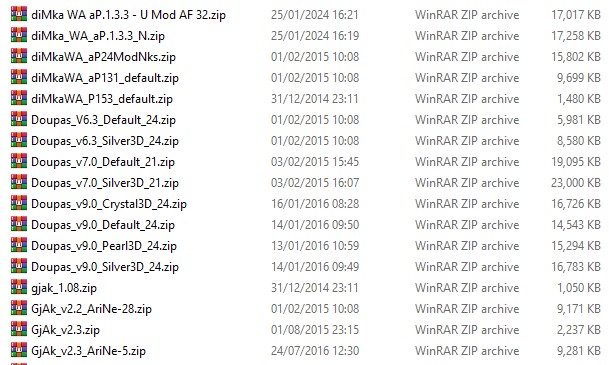
List of Android skins i loaded with no joy are listed below
Spoiler: pic
Back button works OK with this version & my only issue now is that on this iGO Basarsoft 9.18.27.736574 - 13.June 2018, i wanted to install a skin, but although i placed various skin files in content>skin folder when i go into menu>settings>display>day skin theme i do NOT see any skins to implement!
any ideas why this might be?
Welcome guest, is this your first visit? Click the "Create Account" button now to join.


Results 1 to 10 of 11
Threaded View
-
26th January 2024, 04:03 PM #6Junior Member


- Join Date
- Dec 2010
- Location
- Cyprus
- Posts
- 7
- Rep Power
- 0

Last edited by Midnight Blues; 27th January 2024 at 12:00 AM.

 Reply With Quote

Bookmarks