
 Likes:


I dont understand your language, anyway this option must be changed:
Uncheck the Hide protected operating system files box and tick show hidden files, folders and drives
Spoiler: pic1
and untick
Spoiler: pic2
Welcome guest, is this your first visit? Click the "Create Account" button now to join.


Results 71 to 80 of 339
-
21st May 2015, 11:45 AM #71Master


- Join Date
- May 2014
- Location
- seattle
- Posts
- 30
- Rep Power
- 24

Does anyone know, which disappears folder .system on Samsung Galaxy 4, 5?
After the first startup .system folder is no longer visible even on pc set -show hidden files , folders, or drives
Spoiler: pics
Garmin is working completely normally, the only unfortunate that you can not access the folder .system
whether there is a file explorer that can to solve?Last edited by JulianAssa; 21st May 2015 at 11:48 AM.
-
21st May 2015, 01:29 PM #72Important User


- Join Date
- Nov 2007
- Location
- light side
- Posts
- 15,182
- Rep Power
- 5127
Last edited by Boki; 6th June 2023 at 06:41 AM.

You have to navigate to get to the good.
Galaxy S5 Kitkat 4.4.2 / Nuvi1200->1250 / Nuvi3790T->34xx / Nuvi 2200 / Nuvi 66 / Oregon 600
-
21st May 2015, 02:15 PM #73Junior Member
- Join Date
- Jan 2015
- Location
- South Africa
- Posts
- 6
- Rep Power
- 0
Dear Catymag
I have tried everything to get streetpilot to work on my Galaxy tab 3 lite SM-t110.
I see on the thread of working/non working devices it is listed as working.
You asked me a few months to update the tablet, which I did without success.
I have now tried V2.37 but afraid, still no go.
Attached some screengrabs, I also got CPU-Z info for you to look at.
Hopefully you have since come across this and found a remedy .
Also, would be intersting if somebody else has the same problem. I have successfully installed Streetpilot on various phones and tablets, so I pretty sure I have configuration sorted. Maps are installed.
You will see as I zoom out you will eventually see the basemap, but as you come in one gets this strange picture instead of the selected map.
Please help if you can. As said, I have tried every possible APK and they all do the same.
All menus and submenus work, just the darn map display.gif "beating")
Many thanks
Deon
Spoiler: pics
-
21st May 2015, 04:11 PM #74Important User
- Join Date
- Nov 2007
- Location
- light side
- Posts
- 15,182
- Rep Power
- 5127
Hi
redownload and replace the basemap, IMHO it's not good or badly named, it doesn't work in your SP
You have to navigate to get to the good.
Galaxy S5 Kitkat 4.4.2 / Nuvi1200->1250 / Nuvi3790T->34xx / Nuvi 2200 / Nuvi 66 / Oregon 600
-
21st May 2015, 06:59 PM #75Master

- Join Date
- Dec 2009
- Location
- Santana de Parnaiba
- Posts
- 76
- Rep Power
- 185
JulianAssa,
in addition to Catymag´s suggestion, try this:
In de phone´s file app, under settings check the show hidden files option.
[Only registered and activated users can see links. ][Only registered and activated users can see links. ]
I had the same issue with my wife´s Galaxy S3 and that worked for me.
-
21st May 2015, 11:48 PM #76Master
- Join Date
- May 2014
- Location
- seattle
- Posts
- 30
- Rep Power
- 24
you do not read carefully what I write
everything is already pre-set to display hidden files and folders
All set to show display hidden files
xplore also set to see hidden files.
but despite setting not see.
it is not logical, but it is really
when the phone restart the .system file shows
when you start Garmin, disappears again
only when the restart phone then again returns .system
so it is the same at the galaxy 4 and 5
I did not believe that such a thing is possible, to be set to display hidden files and hidden files that you do not seeLast edited by JulianAssa; 21st May 2015 at 11:53 PM.
-
22nd May 2015, 12:23 AM #77Master
- Join Date
- Jun 2011
- Location
- world
- Posts
- 62
- Rep Power
- 67
take root explorer to read .System
and root explorer can copy any file from anywhere to .System too
-
22nd May 2015, 12:46 PM #78Junior Member
- Join Date
- Jun 2010
- Location
- Sydney
- Posts
- 2
- Rep Power
- 0
Confirmed. 2.37 working fine on Samsung Galaxy S5 SM-G900I.
-
23rd May 2015, 09:32 AM #79GPSPower Helper


- Join Date
- Jul 2010
- Location
- Europe
- Posts
- 213
- Rep Power
- 159
Any file or folder with a dot in front of its name is a "hidden" file or folder for Android system by default. Originally Posted by JulianAssa

For windows a file or folder with a dot in front is not a hidden file by default.
Here is the misunderstanding about this folder.
When Garmin introduced this ".System" folder in Nuvis, Garmin made this folder both "hidden" and "system protected" for windows (using the folder attributes for windows) so that normal Nuvi users don't mess with it.
There are two kinds of connections of a Νuvi to windows, as a "device" and as an "external storage" (external hard disk).
- When you connect a Nuvi to windows as "device" (factory set connection for a Nuvi) you can NEVER see this folder in windows.
Nuvis' software hide this folder from windows!!!
- When you connect a Nuvi to windows as an "external storage" (setting it in a secret Nuvi menu) you can not see this folder at first.
Windows system now hides this folder (as is already hidden and system protected "for windows").
You have to do as Caty says above to be able to see this folder in windows.
For an android phone and Streetpilot now...
Because of bad luck or bad coincidence, Garmin used the same name ".System" in Streetpilot too!!!
Now the file is hidden for Android system!!!
Galaxy s4 and s5 have (like Garmin Nuvis) two kinds of connections to windows, as a "device" and as an "external storage" (external hard disk).
- When you connect a Galaxy to windows as "device" (default connection for a Galaxy) you can NEVER see this folder in windows, no matter what changes you do in windows settings.
Android system "hides" this folder from windows, both in internal phone memory and in external micoSD card.
- You can connect a Galaxy as an "external storage" only if you root it (USB debugging mode).
Then in windows you see two external disks (internal memory and microSD card) and now the folder is not hidden anymore.
This happens because the "android" version of ".System" folder is hidden only by Android system and not by windows, and now you are connected as "external hard disk" and you don't have android system to mess with your windows!!!
The only problem now for NOT seeing this folder in windows is IF you used an "existing .System folder from a Nuvi", that its attributes are already "hidden and system protected" for windows and you have to do what Caty says above to see it.
If you created a new folder in windows using the name .System, then this folder has "normal" attributes and you can see it at once!
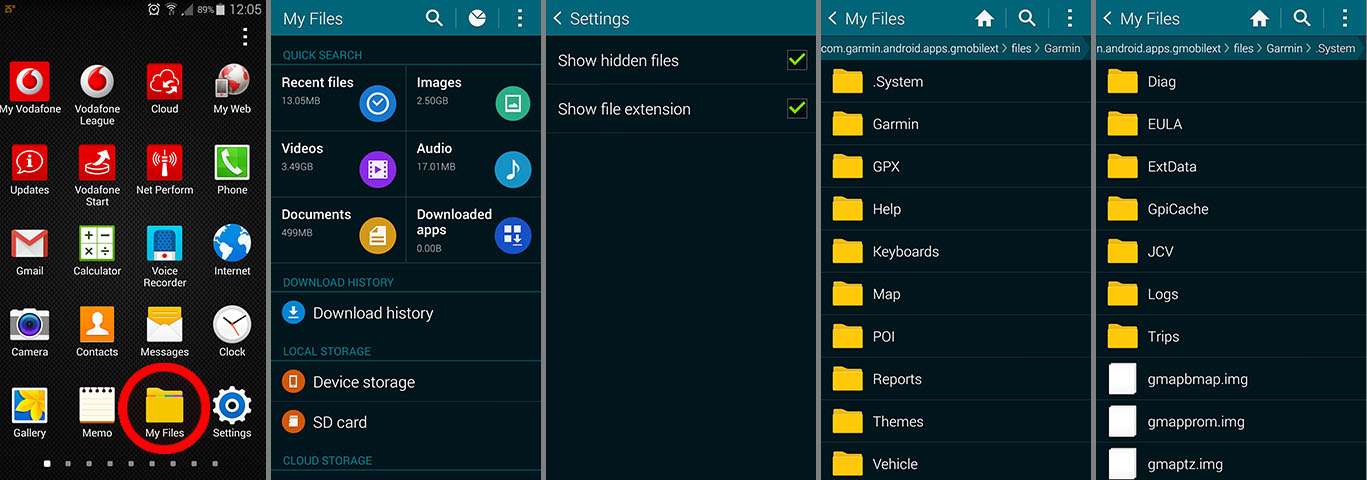
If your Galaxy is not rooted (like my s5) you can use Samsung's installed "My Files" app to view and work with this folder, after you've change its settings to "view hidden files".
This way, when you want to replace a file in this folder, connect you Galaxy as "device" to windows, copy your file to the microSD card, open "My Files" app on the phone, go to where your .System is on your phone, erase the file you want to replace, then go to microSD card and move your new file to .System
This way I can always see .System on my Galaxy s5.
OR
Install Streetpilot on the microSD card, eject the card from your phone, insert it in a card reader and do the changes you want in windows.
(Now you can see "android version" .System on the microSD card because is not hidden for windows system, only "Nuvis version" .System folder is hidden and protected for windows).Last edited by x-trail; 23rd May 2015 at 10:00 AM.

-
23rd May 2015, 04:01 PM #80Master
- Join Date
- May 2014
- Location
- seattle
- Posts
- 30
- Rep Power
- 24
What works of these additional functions ?
JCV=yes/no
ASR=yes/no
SQLite=yes/no
SQL=yes/no
G2S=yes/no
MD2=yes/no
SID=yes/no


Bookmarks