
 Likes:
 Reply With Quote
Thank you sherco40 for the advice!
The testing goes well...
I've created two TYP files for N.America (and Europe), the first one is with only the Map Background and 61 Draw Orders.
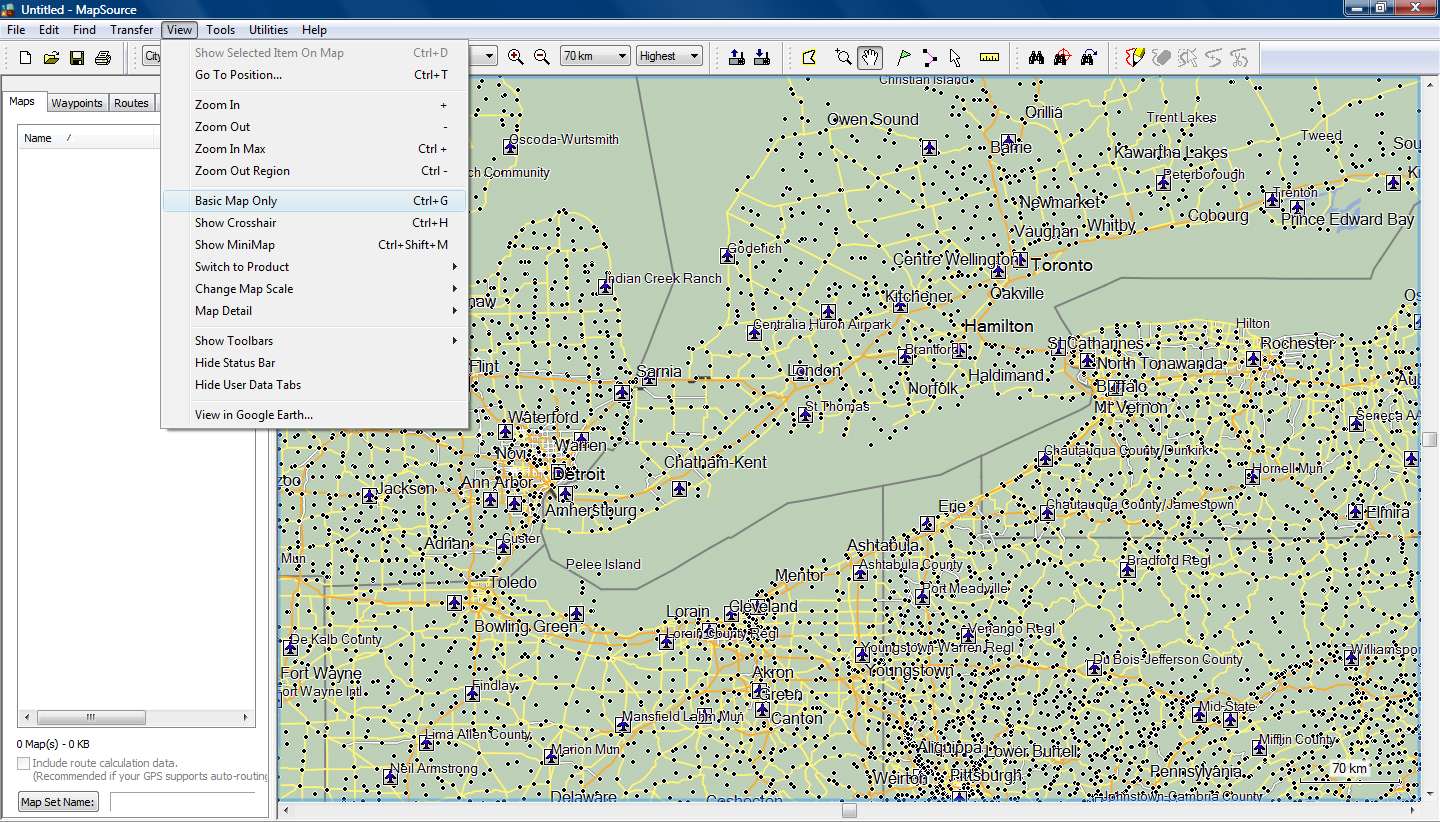
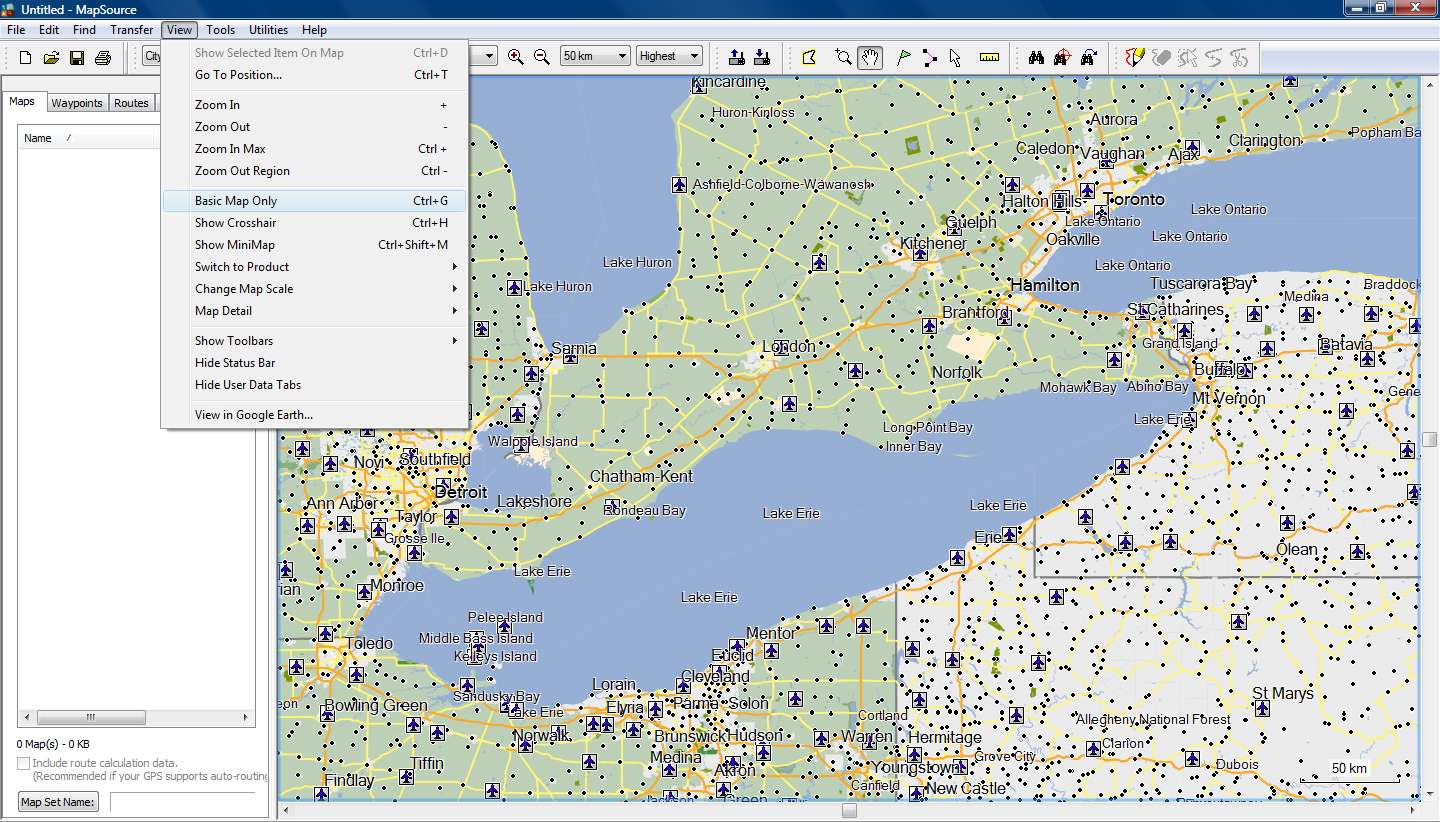
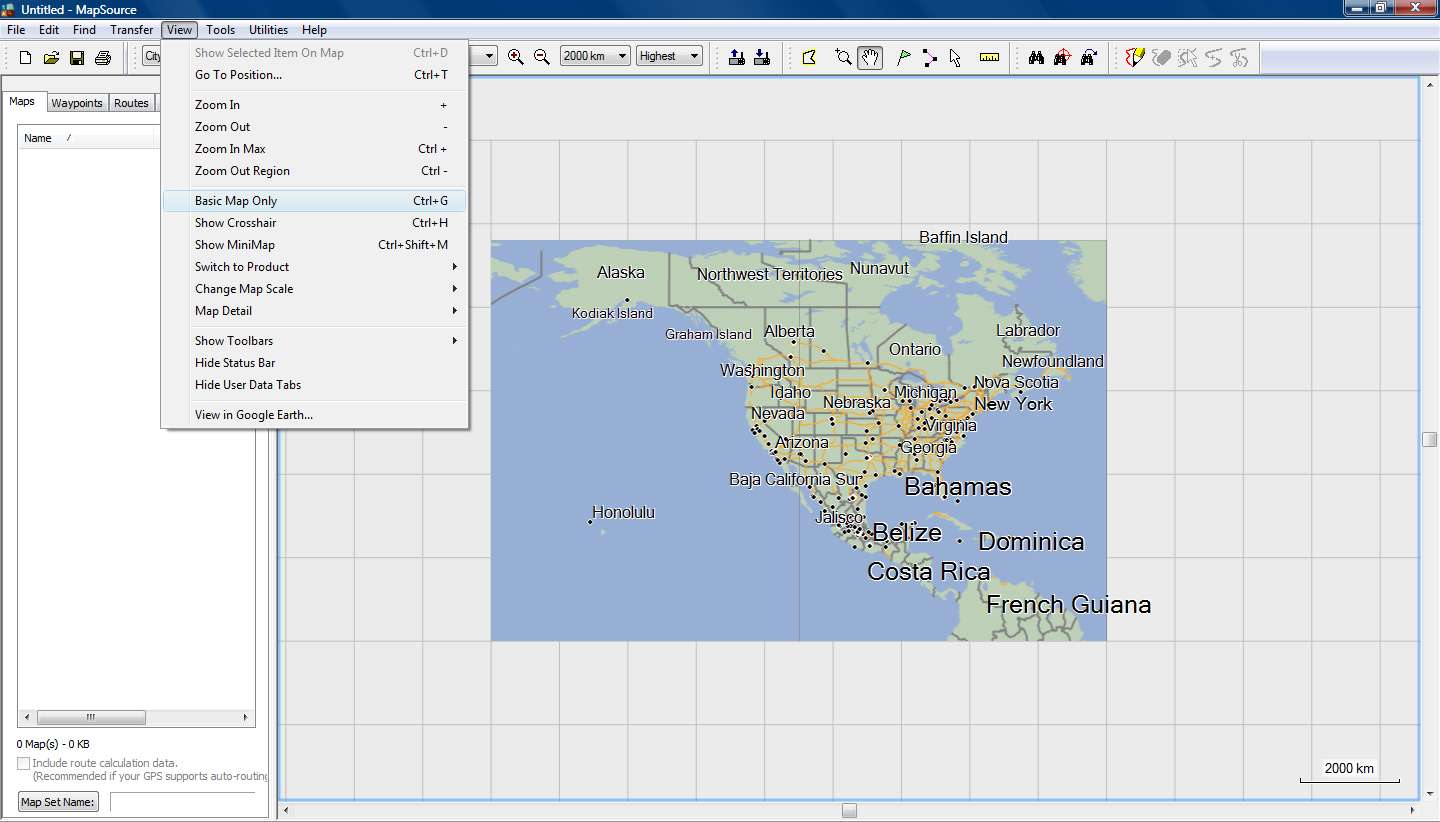
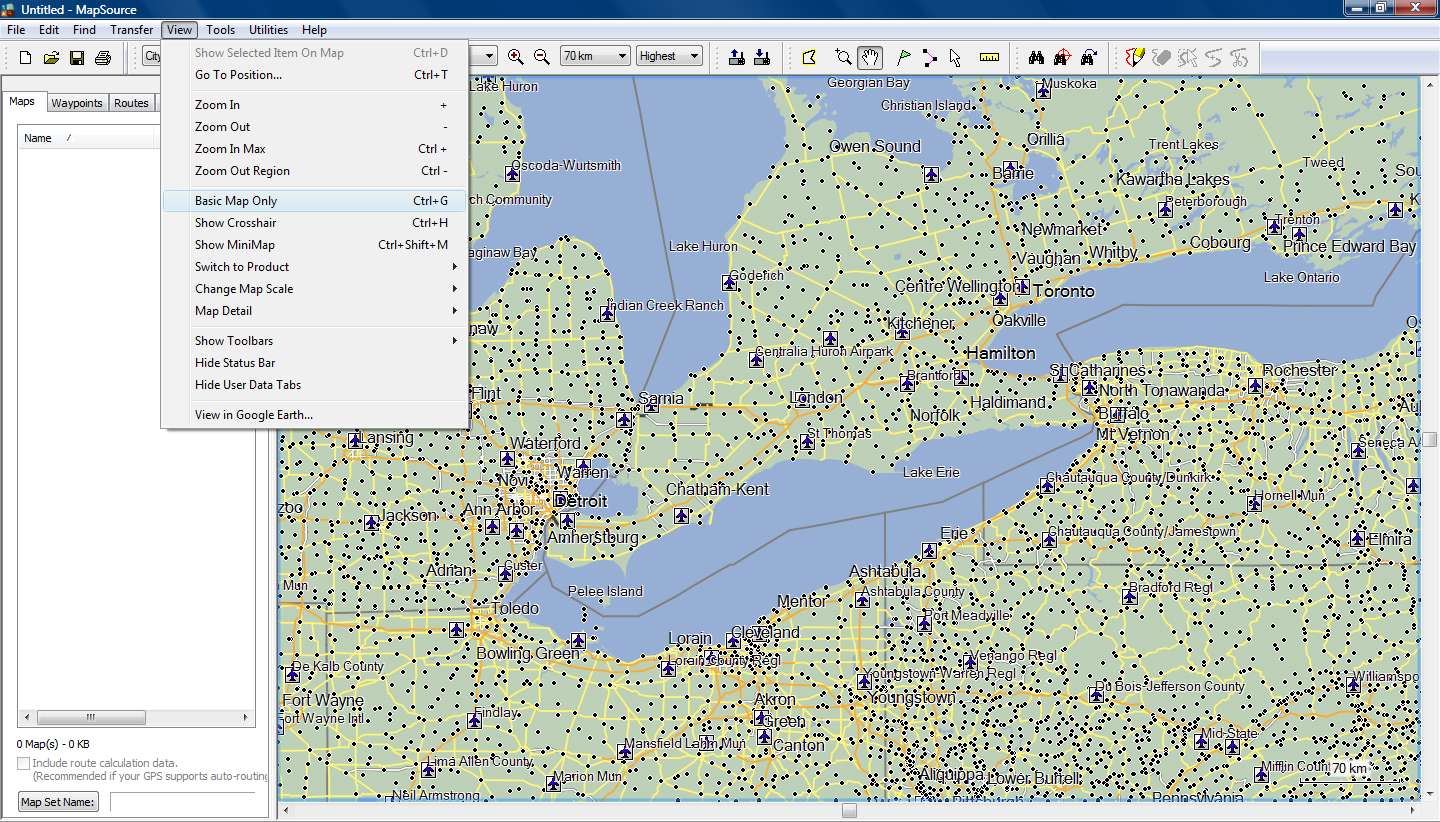
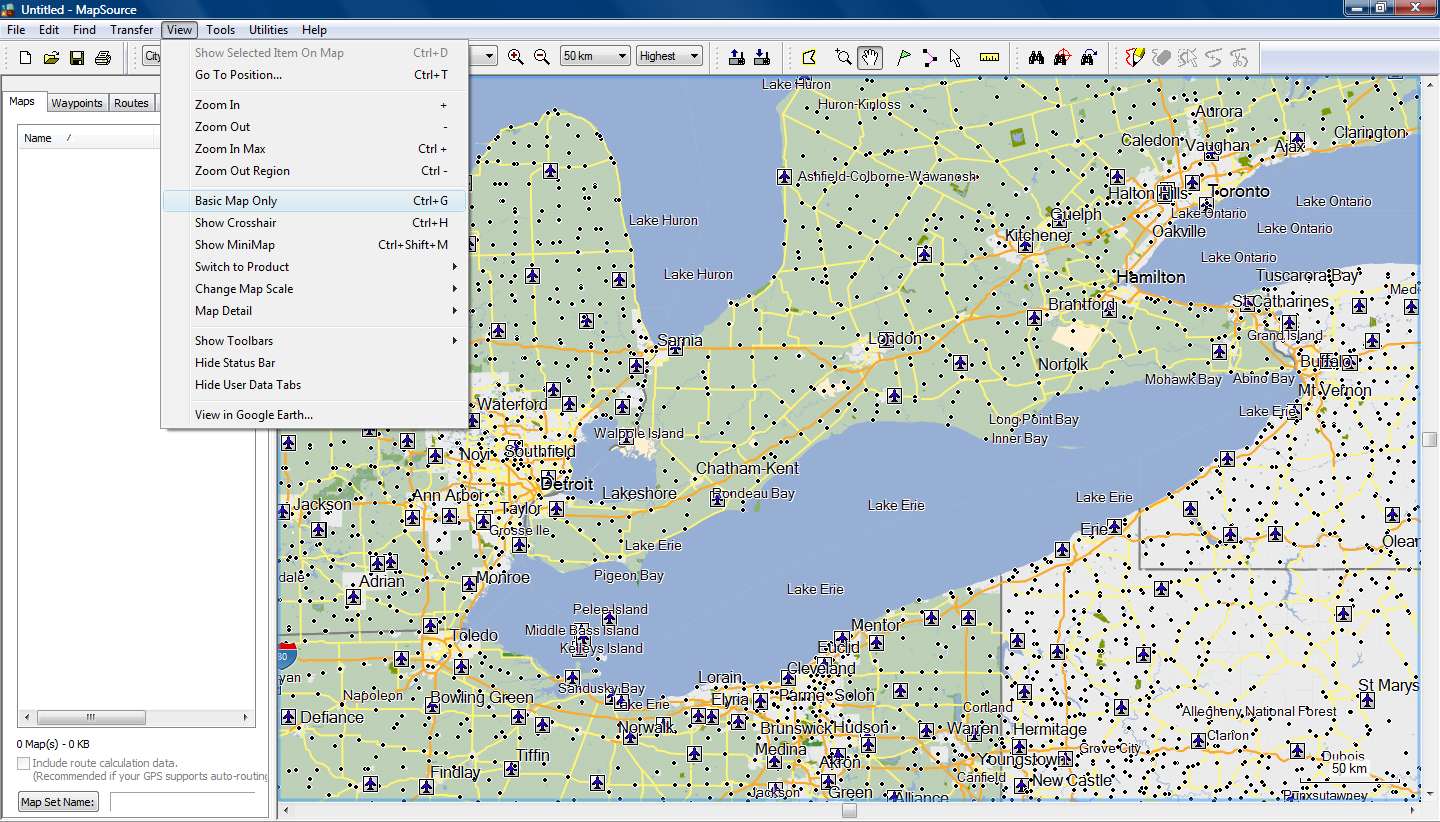
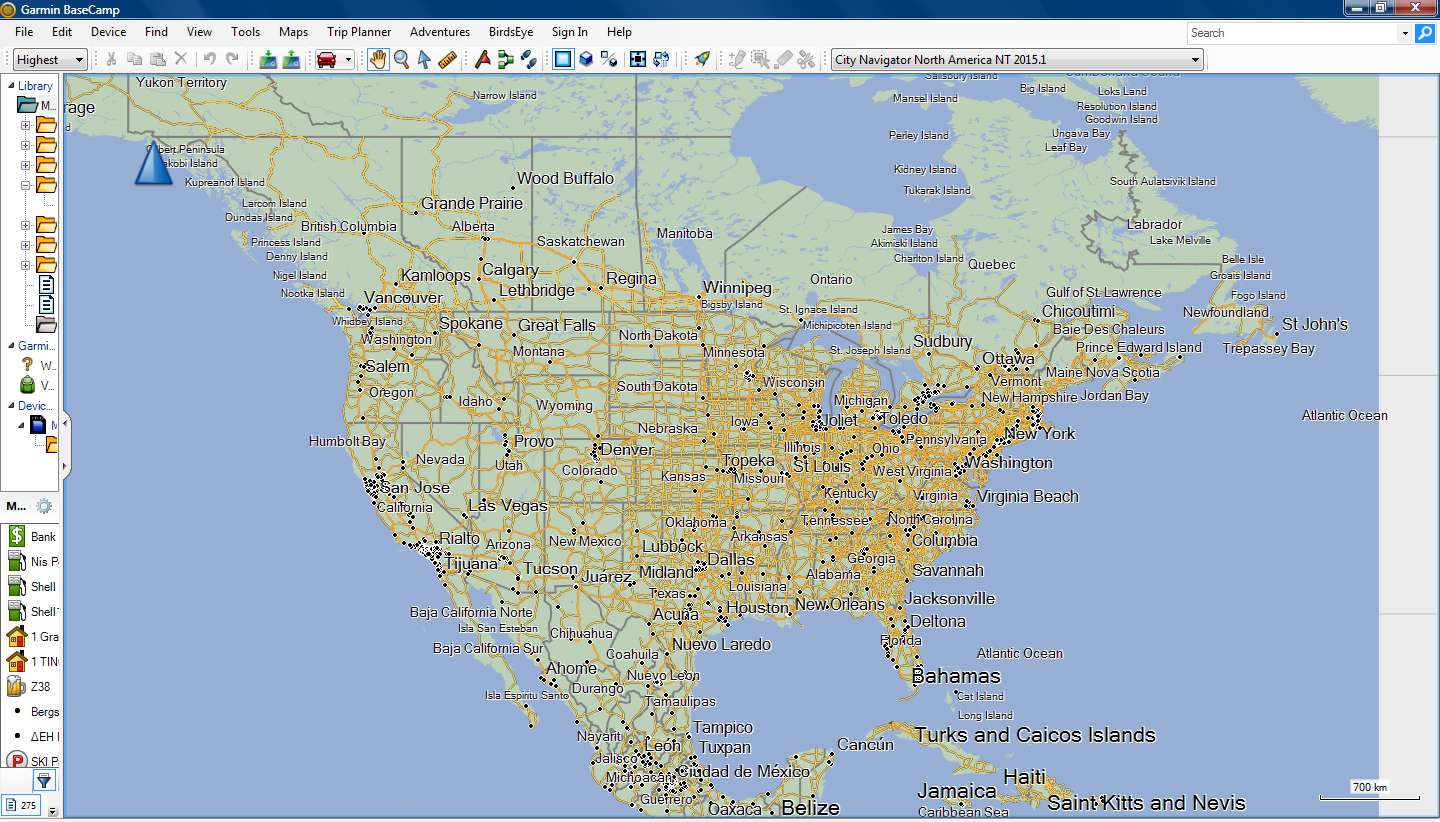
The main problems are in CNNA where there are I had to add nonNT polygons for Lakes (and Rivers and Ocean) because the Background was covering them in various zoom levels (highest detail) in Mapsource.
After that I can see for example all the big US lakes from 3000 km zoom level and lowest detail !!!
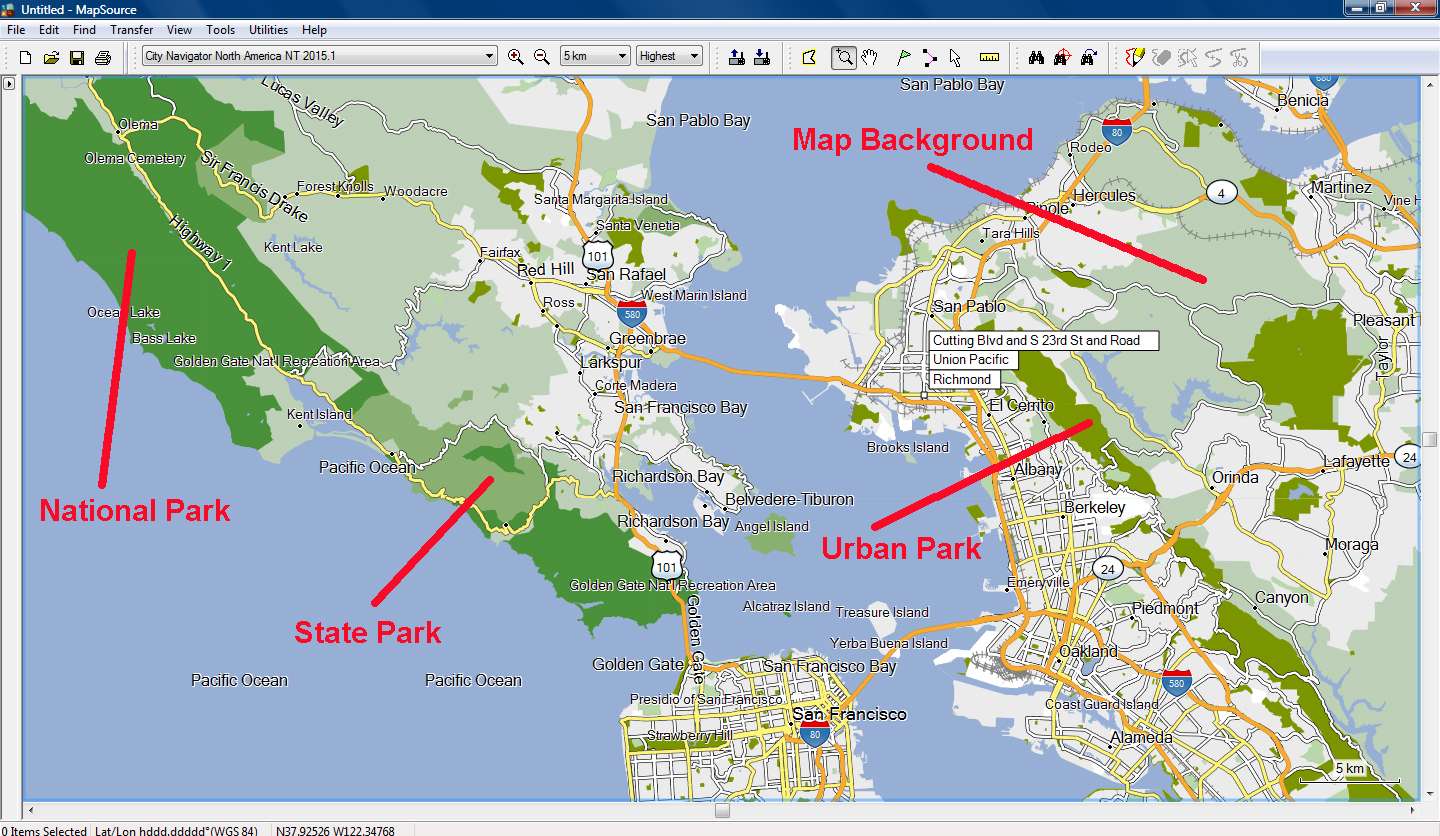
In the second TYP I've added the Parks polygons, so that we can see the difference between National, State and Urban parks.
Again there are Garmin's errors, like a Desert National Wildlife Refuge that is designated as Urban Park....
I don't really know if those errors were made by Garmin, or by Here (Navteq)[SPOILER][/SPOILER]
I'm also thinking of adding all the water polygons, since the river polylines appear with a slightly different blue color than Garmin's default color for rivers, lakes and sea polygons.
Spoiler:
Welcome guest, is this your first visit? Click the "Create Account" button now to join.


Results 11 to 20 of 21
Thread: Change the Map Color?
-
29th May 2014, 07:35 AM #11Important User


- Join Date
- Aug 2011
- Location
- France
- Posts
- 272
- Rep Power
- 196
 Recent CN typ files only contain ExtraPOI and a list of labels (no polygon, no polyline, no POI and the draworder list is empty).The problem is that CN Typ file is empty!!!
No, this is not how it works.o if you add 0x10d01 and draw order 1, this polygon covers the entire map
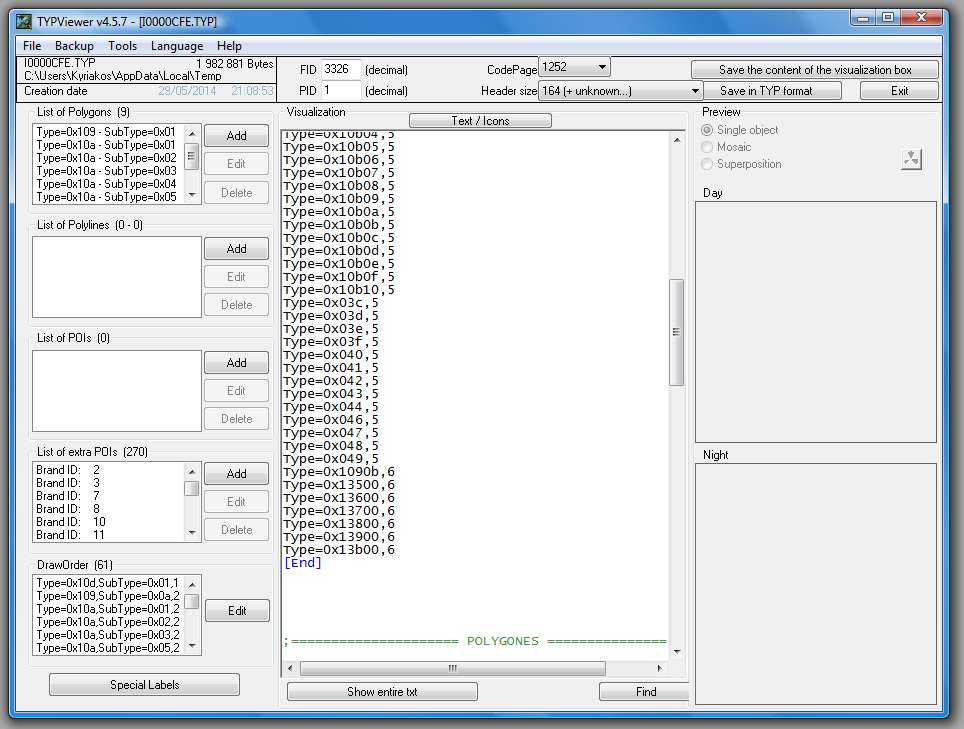
In all the cases, the background (0x4b for non NT and 0x10d01 for NT) covers all the map: this polygon is drawn everywhere. The problem comes from the draworder: when you uses a typ file with an empty draworder, ALL the polygons are displayed and their draworder is set by the rendering engine (i.e. MapSource,BaseCamp or the firmware of the GPS unit), but if the draworder list of your typ file is not empty , only the polygons indicated in this list are displayed.
So if you add the polygon 0x10d01 to the draworder list of a typ file with an empty draworder list, all the other polygons won't be displayed.
So to change the color of the background:
- if the original typ file has a non empty draworder list: add the background polygon (with the color your want) to the polygon list and to the draworder list (with draworder=1) and increase the draworder of all other polygons by 1
- if the original typ file has an empty draworder (like recent CN) ,there are 2 ways to do it:
1) you add the background to the polygon list but not to the draworder: it is not sure that you obtain what you want, it depends on the map, the firmware, the version of Mapqource/Basecamp
2) you add the background to the polygon list AND to the draworder list: in this case you have to add to the draworder list all the polygons used by the map and correctly adjust the different levels: if you want I can give you a list of polygons often used in CN
-
29th May 2014, 08:21 PM #12GPSPower Helper


- Join Date
- Jul 2010
- Location
- Europe
- Posts
- 213
- Rep Power
- 159

-
29th May 2014, 08:50 PM #13Junior Member
- Join Date
- May 2014
- Location
- OH
- Age
- 45
- Posts
- 3
- Rep Power
- 0
Thanks! Now how do i implement this on my device?
-
29th May 2014, 09:24 PM #14GPSPower Helper
- Join Date
- Jul 2010
- Location
- Europe
- Posts
- 213
- Rep Power
- 159
You can download my current TYP file (with Park polygons) for CNNA 2015.1 here
If you have the Mapsource version of the map installed on your PC, go to C:\ProgramData(hidden folder)\Garmin\Maps\City Navigator North America NT 2015.10.gmap\ and rename the original TYP file to I0000CFE_original.TYP for backup.Code:Please Login or Register to see the links
Copy there the file you've downloaded.
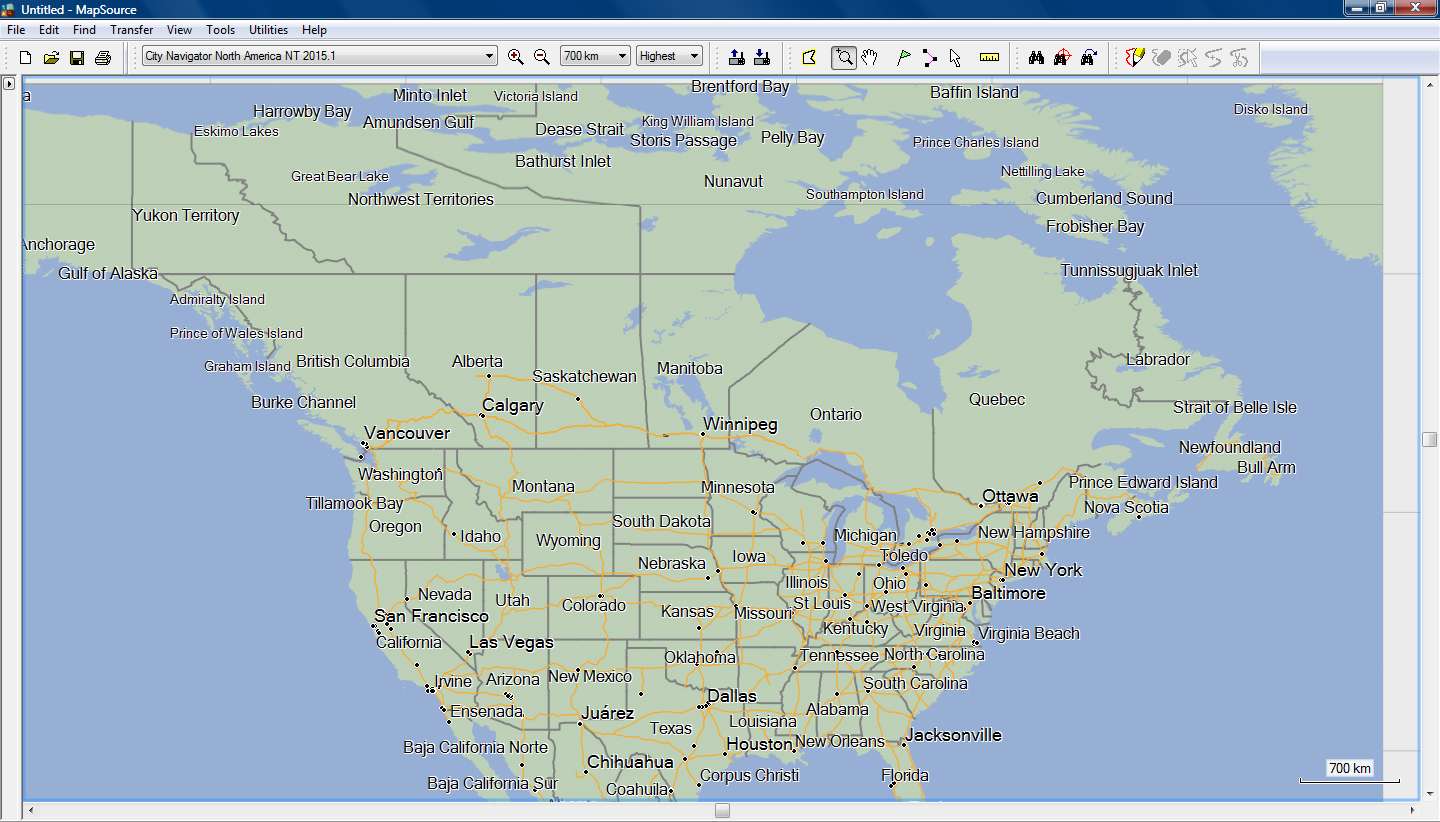
Use Mapinstall (or Mapsource, its just for testing the view) to choose some US map tiles to send to your device.
The map is now send using the modified TYP file.
Work is still in progress and this will not be my final TYP, but you can download it and tell us your opinion.
I don't live in US but after so much testing, I've become much better in ....geography.gif ":)))")
To view or edit the TYP file you need to download and instal [Only registered and activated users can see links. ]
Tip
Mapsource and Basecamp have cache memory.
If you change the TYP file (or edit it and save it) and open the program, the old colors are shown.
To empty the cache memory change the Detail Level from Highest to Lowest to Highest and the new colors are shown!
-
29th May 2014, 10:27 PM #15Important User
- Join Date
- Aug 2011
- Location
- France
- Posts
- 272
- Rep Power
- 196
Lakes, river and ocean are not displayed because you have not added them in the draworder (remember, when the draworder is not empty, only the polygons set in the draworder list are displayed)The main problems are in CNNA where there are I had to add nonNT polygons for Lakes (and Rivers and Ocean) because the Background was covering them in various zoom levels (highest detail) in Mapsource.
If you are searching for non NT codes, for water they are : 0x28, 0x32 , 0x40, 0x41 .... to 0x4c . You can find the codes used by Garmin in the file MPCTypes.txt in the main directory of TYPViewer.
This is the basemap: when you zoom out, the basemap is displayed and not the detail map: your typ file doesn't affect the basemap so you can see your lakes...After that I can see for example all the big US lakes from 3000 km zoom level and lowest detail !!!
You can install (or change) the typ of a mapset with TYPViewer : after that, TYPViewer will ask you if you want to clear the cache (you can also clear the cache with the command Tools-->Clear Mapsource/BaseCamp/HomePort cache )Mapsource and Basecamp have cache memory.
If you change the TYP file (or edit it and save it) and open the program, the old colors are shown.
To install or change the typ file of a mapset installed on your computer, use the command Tools-->Install a TYP file. In the new window select the mapset and click on "Choose a TYP file". Select on your computer the typ file you want (no need to change its name) , then if PID/FID are not correct, TYPViewer will ask you for according them to the mapset.
You can also hit CTRL+G twice in Mapsource/Basecamp (one hit will display the basemap, the second hit will display the detail map again but with the new colors).To empty the cache memory change the Detail Level from Highest to Lowest to Highest and the new colors are shown!
-
30th May 2014, 02:11 AM #16GPSPower Helper
- Join Date
- Jul 2010
- Location
- Europe
- Posts
- 213
- Rep Power
- 159
Bad for you that it seems you didn't bother to download my TYP file, where you could have seen that I've added the polygone's Draw Order you're talking about. Originally Posted by sherco40

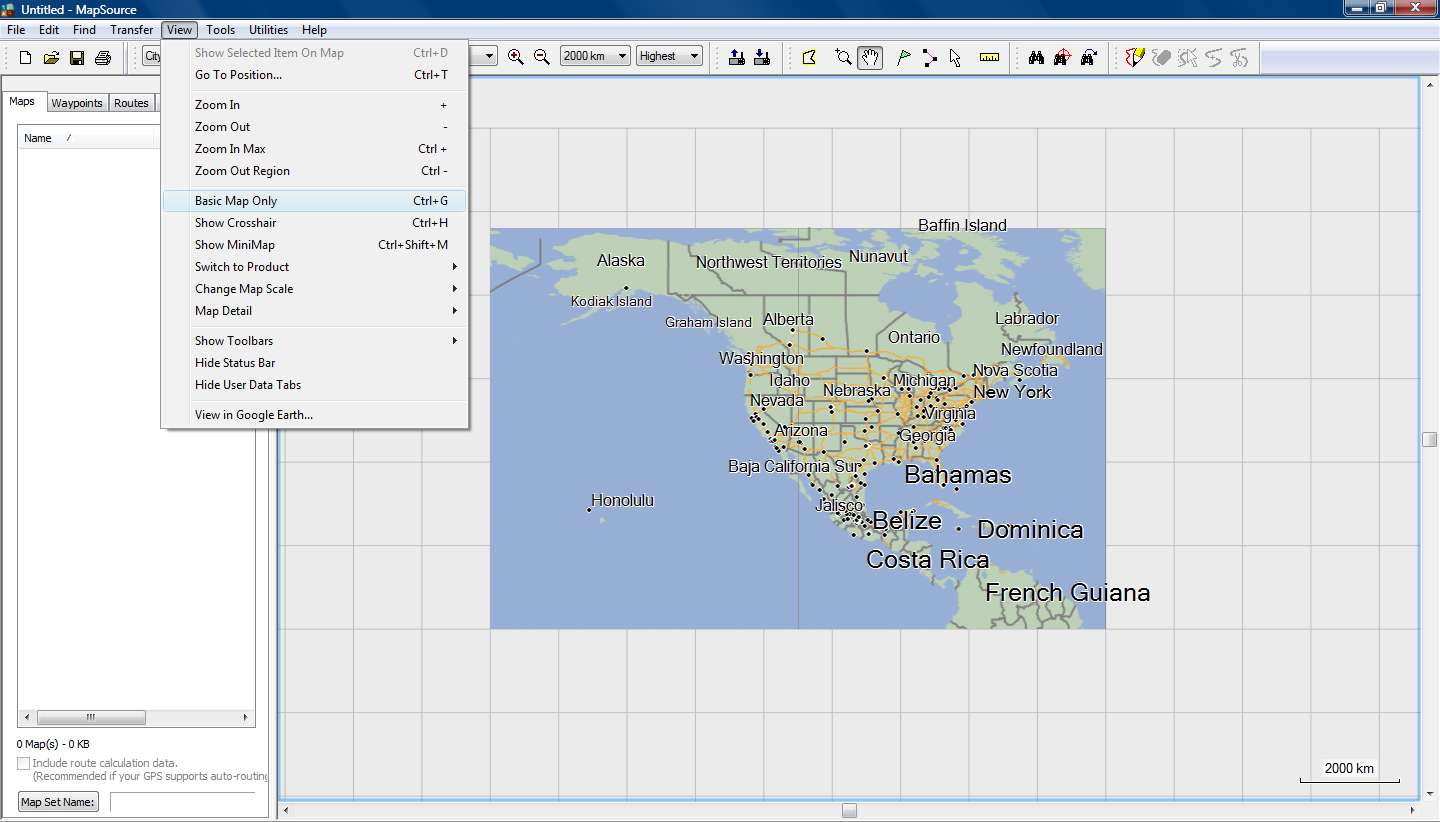
In the spoiler are Mapsource screenshots where you can see, that without the nonNT Lake polygons, I cannot see the Lakes up to zoom 70 KM and "Basemap" is OFF and Detail at highest
Spoiler:
Thanks, I've known the codes for many years, I'm working with Garmins more than a decade, my phd involved some GIS and polygones about Greenways. Originally Posted by sherco40
I'm also an administrator of the greek garmin forum and I modify TYPs for more than five years. Now you know a little about me...
Bad luck for you that there is no 0x10d01 in the mpctypes.txt. You can check it for yourself if you like, and if you find an entry for 0x10d01, it's about POIs.
May I was not so clear, I am taking about Mapsource, and Mapsource doesn't have a "Basemap", only devices have... Originally Posted by sherco40
My TypViewer never asked to clear the cache...and of course I know to clear the cache from TypViewer. Originally Posted by sherco40
But when inside a folder gmap I have 8 renamed TYPs and I want to check them all by renaming them to the default TYP name, do you think that is good to open TypViewer every time and clean cache, or just do it from Mapsource's Detail Level????
By install you mean to write the modified TYP file to the map folder on my PC. Originally Posted by sherco40
Why to do so, when I can double click the TYP file inside its folder, modify it, click save, open Mapsource, clear cache, check new colors.
Only the last few days, I've done this more than two hundred times, how about you???
Because this TYP is very easy to start but what about 10 or more polygone colors, road colors, trail polyline, and above all the map Themes that change the road colors above the polygones, so yes more than two hundred times...
Bad luck that when I try to do like you say, I see in the list less than one third of my maps, and NO CNNA or CNEU anywhere to be found!!!
Oh really???? Originally Posted by sherco40
Of course I know (since I'm using Mapsource since the time it was called Trip and Waypoint Manager), it's the sixth from the top command in the View menu.
Too bad that is called "Basic Map" and not "Basemap" that exist only in devices.
This "Basic Map" deactivates (at any Detail Levels) polygones and polylines and makes the map simpler, but in case of a gmaptool map, you just see an empty screen.
It is easily forgotten "on" and can drive you crazy, if you don't notice the lower right corner.
So I can live without Ctrl+G, better safe than ...upset!!!
It's better to give advice after you've done some specific testing, and its bad to give advice quoting someone, because its getting personal and annoying.
We're here to help and give advice to other people and try for them things they don't know, and then show them how to do them.
If you look at the time of post #3, I modified the TYP in less than 50 minutes, but that was the start and a lot of testing was needed to make it fully functional. We're taking about two super size maps (NA and EU) with differences between them and a lot of close zoom checking had to be made, put aside the testing on 3 programs and 4 devices, until the results were the same on each and every one of them. Now you also know the story between my posts here.
But anyway, it's late at night, no harm done, no worries and a new testing day is coming!!!Last edited by x-trail; 30th May 2014 at 02:20 AM.
-
30th May 2014, 08:18 AM #17Navigation software expert


- Join Date
- Jan 2010
- Location
- CIS
- Posts
- 1,032
- Rep Power
- 552
It's no big deal, you can edit this file manually, for example: Originally Posted by x-trail
Code:Please Login or Register to see the links
-
30th May 2014, 01:51 PM #18GPSPower Helper
- Join Date
- Jul 2010
- Location
- Europe
- Posts
- 213
- Rep Power
- 159
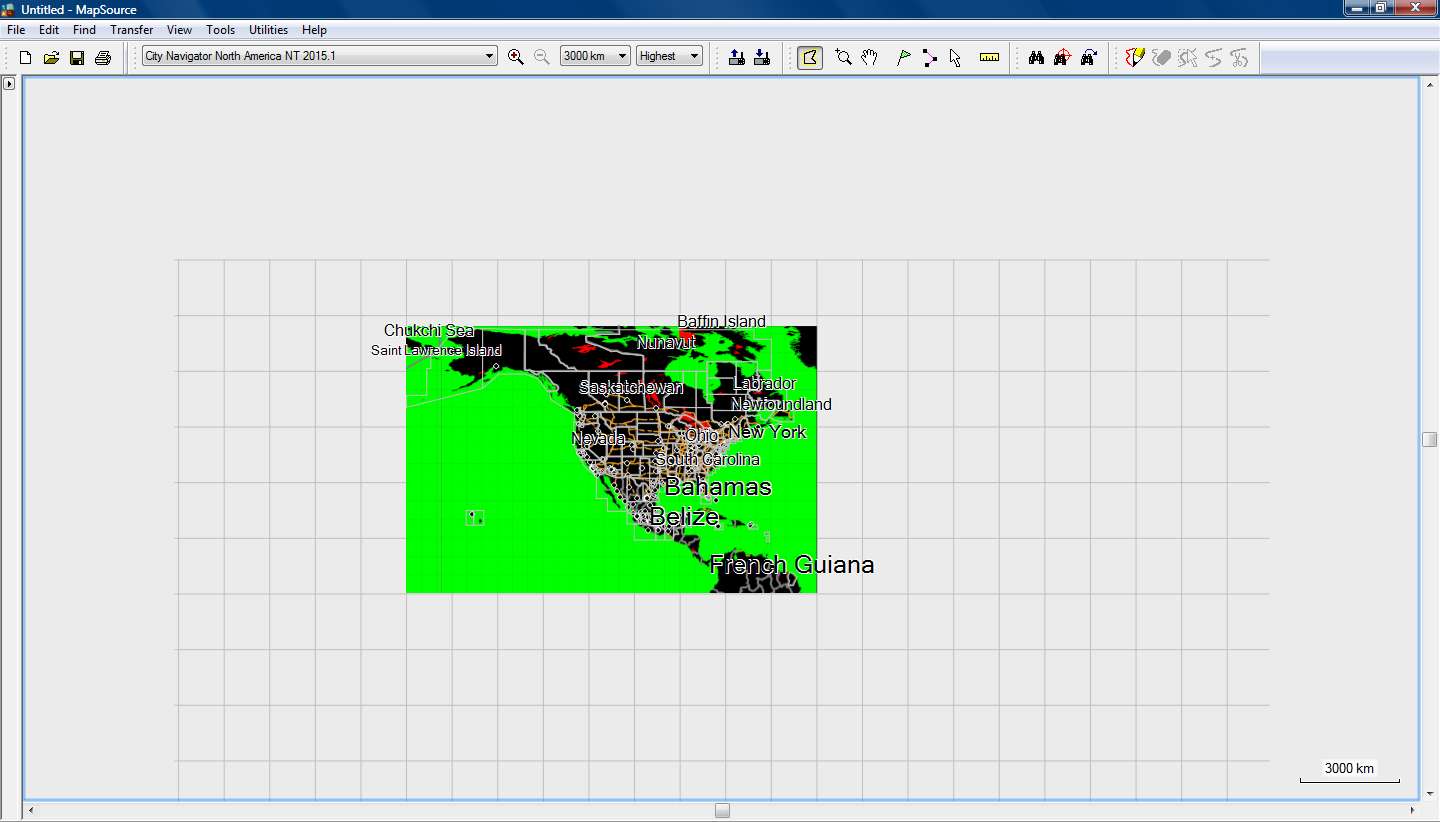
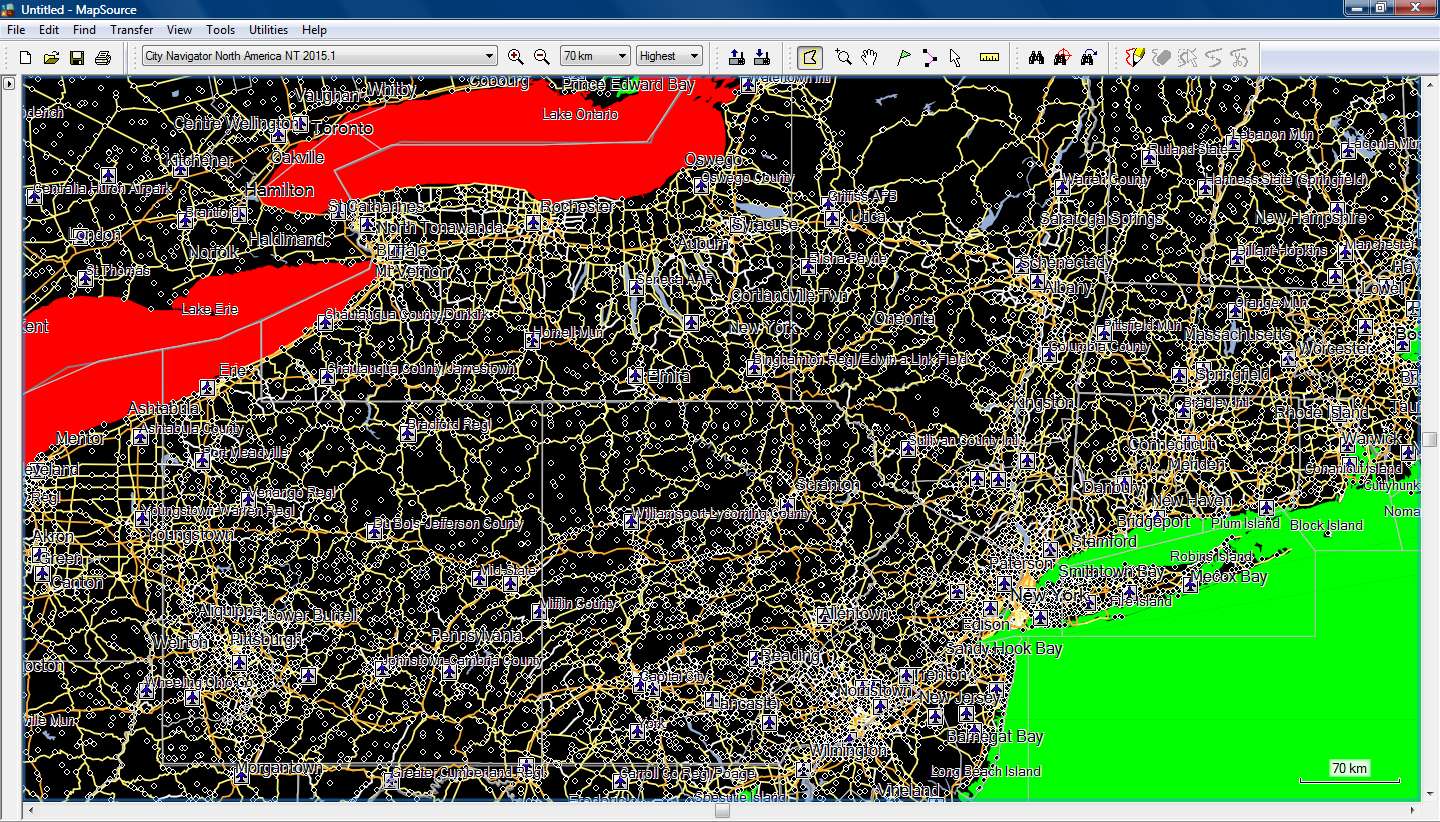
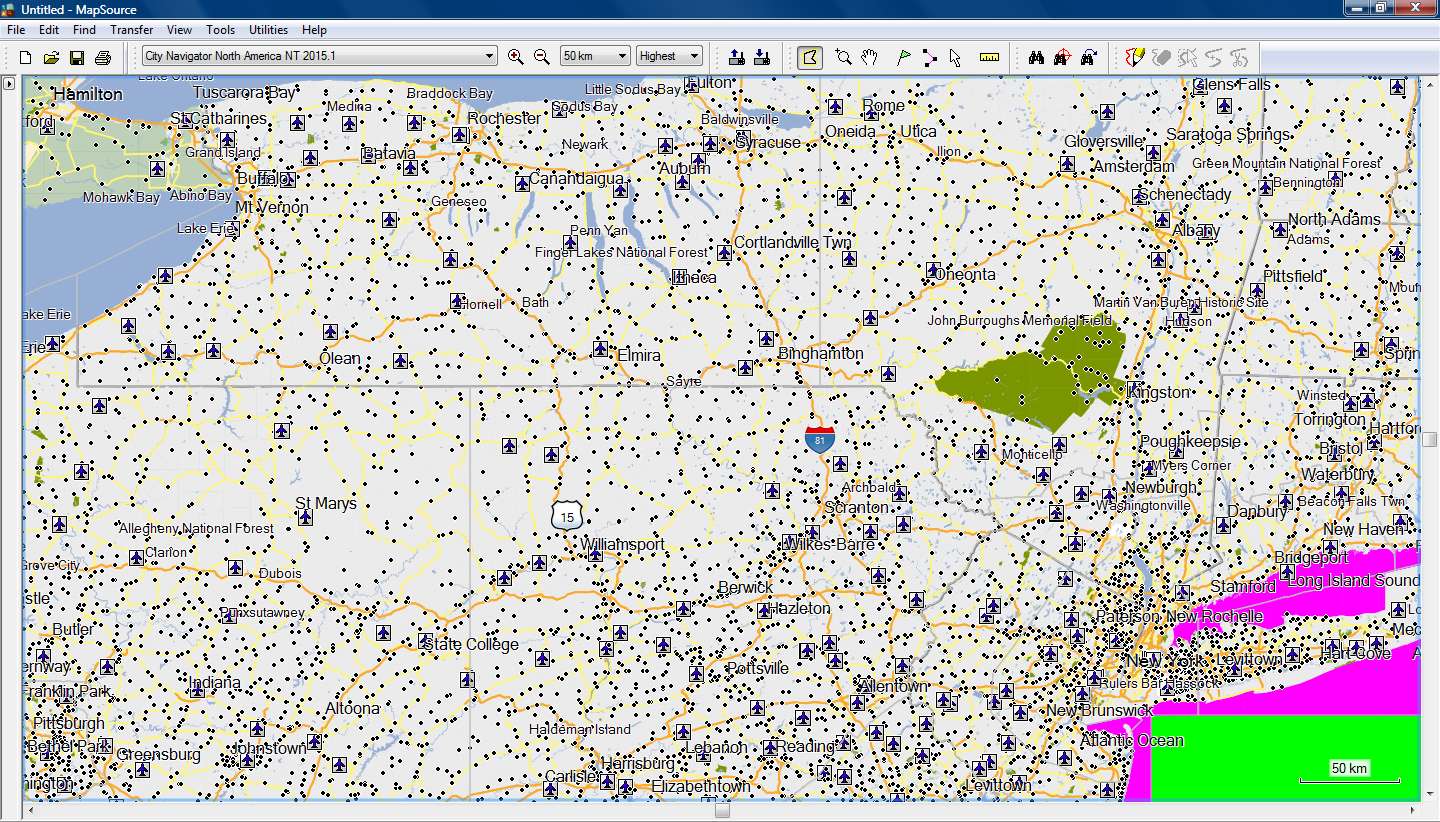
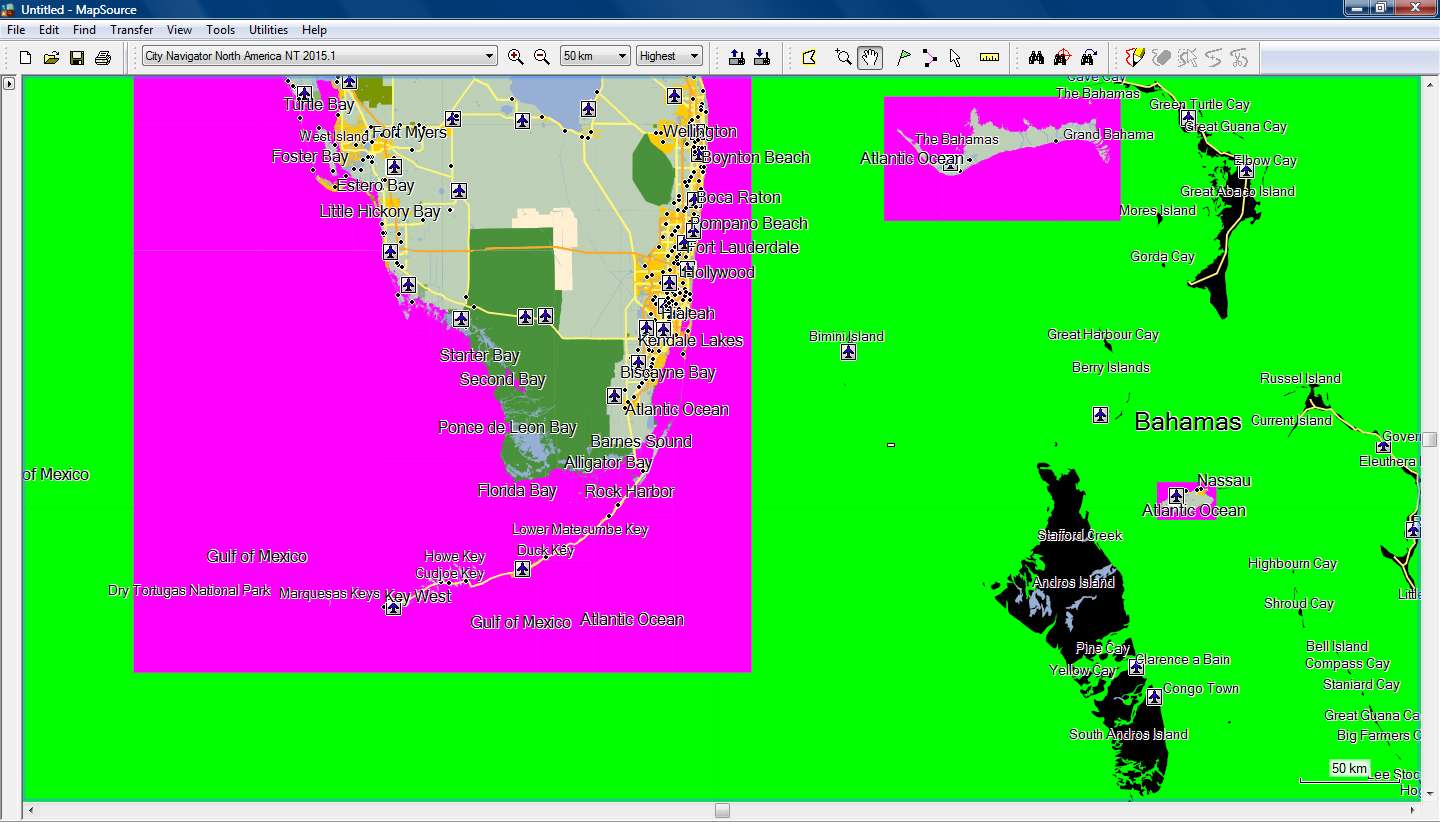
After some more testing I decided to add some nonNT polygons with colors to check how the map is drawn in Mapsource (and basecamp)
I added:
- DATA BOUNDS 0x4b as BLACK
- LAKE _GT_1000MI 0x42 as RED
- OCEAN 0x28 as GREEN
- OCEAN_(NT) 0x10b01 as PURPLE
- TOWN_(NT) 0x10802 as YELLOW
From zoom 3000km up to 70km Mapsource draw the map using nonNT colors.
It started using NT colors from zoom 50km and on.
Basecamp did the same but at different zoom levels.
Detail level is always at Highest.
As we can see, the Ocean_(NT) polygon covers just the sea area from the shoreline to the limits of the map tile.
From there on, Mapsource draws the nonNT Ocean polygon.
From zoom 50km and on, all the land that is not inside a map tile is drawn as black nonNT Data Bound (nonNT map Background)
Spoiler:
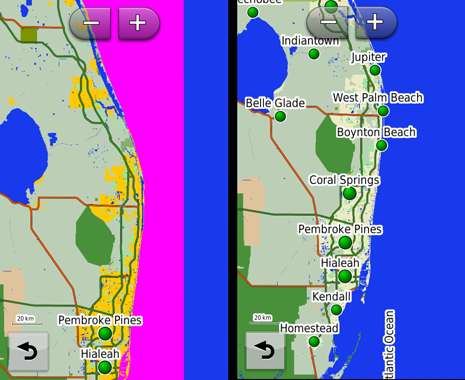
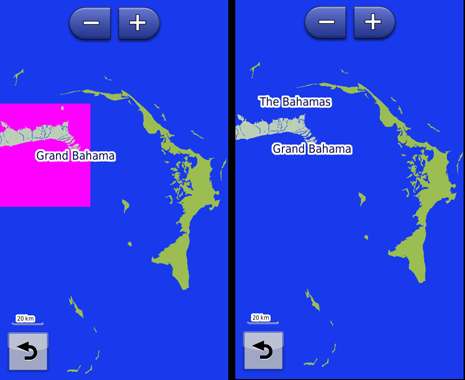
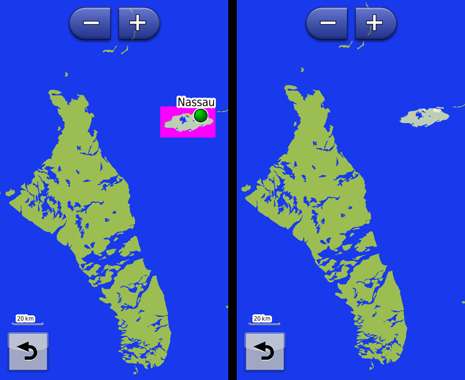
But things are different when I send this map to Nuvi 3490...
The zoom threshold is now at 20km, up to that zoom level everything is drawn as 3490's World Basemap.
The images on the left side are those with the TYP with colored polygons.
3490 totally ignores nonNT polygons and draws the map area outside the map tiles with 3490's World Basemap colors.
The islands outside map tiles that were black in Mapsource, now they have the color of the World Basemap, so has the sea.
The images on the right side are from a map with a TYP that doesn't include any nonNT polygon and in the Draw Order there are no entries for nonNT polygons (only NT polygons).
We can see that the land and sea inside the map tiles is drawn according to the colors of NT polygons, while the land and sea outside are drawn according to the World Basemap colors.
Spoiler:
So in Mapsource/Basecamp we need some nonNT polygons in the Draw Order, but this does not affect Nuvi 3490, with or without nonNT polygons, the result on 3490 is the same.
-
30th May 2014, 05:06 PM #19Important User
- Join Date
- Aug 2011
- Location
- France
- Posts
- 272
- Rep Power
- 196
I don't want to be controversial , I just want to help and share what I know about typ files and basemaps, because this explains what we can see on the screenshots and explains too what to do to fix it.
Sorry If my previous posts has hurted some of you.
The typ of post #14 doesn't show lakes with a zoom over 70km because , on Mapsource and Basecamp, over that zoom , this is the basemap of CNNA that is displayed.
In CN (for example CN NA ) the basemap is a non NT map so the objects codes are non NT codes that's the reason why I have given the non NT codes of lakes, river... on my previous post, because they were not in the draworder of the typ ( Yes, I had downloaded and tested this typ before posting my previous post).
In fact, there are 2 types of basemaps on Mapsource/Basecamp: first of all, the basemap embedded in the installation of Mapsource/Basecamp ( for recent installation you can find it in <Mapsource/Basecamp install dir>/Maps/Global Application Basemap v2.gmap) This is a non NT map as we can see with the files TRE, RGN .... This basemap is used when you choose "Global Map" in the menu of Basecamp or Mapsource.
Second type of basemap: most of the mapsets have there own basemap. For example , for City Navigator EU , can can find it in the gmap folder in the subfolder Product1/Global Application Basemap v2.gmap (it is the same name than the previous one, but it is not the same map). This map is also a non NT map. This map is displayed over a high level zoom ( more or equal than 70 km for CN)and is also displayed when you hit CTRL+G (or choose "Basic Map" in the menu of Basecamp) .
It is different from setting details to lowest level: even with lowest level, the detail map is displayed.
So , when CN is displayed in Mapsource/Basecamp at a high zoom (for example over or equal to 70 km for cnna and it is the same for CN EU) then, the basemap of CNNA (called "Basic Map" by Basecamp) is displayed. This is a non NT map so, if the draworder doesn't embed the codes of non NT lake, they are not displayed.
The typ file of CNNA has an action on the basemap of CNNA (but not on the Global Basemap of MapsourceBaseCamp).
So, if you want to see the lakes at all levels of zoom you have to add in the draworder the codes of the non NT objects.
In the GPS devices, it is different because the basemap of each mapset is not sent to the device. On the device there is only the basemap of .... the device. And this basemap is not affected by the typ file of CNNA.
Regarding the MPCTypes.txt: yes, the type 0x10d01 was missing! there are 7527 lines in this file, so excuse me for that forgetting and thank you very much to Cnfhbr who is behind that list.
Last thing about TYPViewer: if you want to change several times the typ file of the mapset in Mapsource/Basecamp, open TYPViewer-->Tools-->Install a typ file , it is , in my opinion much faster than renaming the typ files (and typviewer will clear the cache), but it is just my opinion..
If you can't find your mapset in typviewer/tools/install a typ file, this is not normal, feel free to report me this bug.Last edited by sherco40; 30th May 2014 at 05:15 PM.
-
30th May 2014, 06:59 PM #20GPSPower Helper
- Join Date
- Jul 2010
- Location
- Europe
- Posts
- 213
- Rep Power
- 159
No bad feelings, no problem sherco, as I wrote above it was ..."late at night"

In the TYP in post #14 I do have the entries for the nonNT water objects in the Draw Order List.
That's why I can see the Lakes with that TYP all the way to 3000km zoom level.
I don't understand why you can't see them with the same TYP...
Spoiler:
For Basemaps you are right, but I cannot find Mapsource's Basemap (....ancient installation), I don't have any Global Map in my list (as I have in Basecamp).
Because I always use maps with Highest Detail, I never bothered to look for a basic map, thank you very much!!!
Here I was ...teasing you!!! Because for this topic it was the only and most important polygon (teasing again), but anyway I knew it from some years ago when I wanted to improve the looks of very wrong looking greek topomap in Mapsource! Originally Posted by sherco40
I don't believe that there is even one person working with TYPs, that is not grateful to you for your program!!!
Finally we came to the same conclusion, you through science, me through testing, that for Mapsource/Basecamp we need NT and nonNT polygons/Draw Order, but devices read only NT objects (with NT maps) and discard nonNT.
Finally I have a small problem in New York and Long Island, where only with the original Garmin TYP I get a correct view both in Mapsource, Basecamp and device.
Maybe it's Garmin's fault, maybe not, we' ll discuss it later on.
For the problem I have with TypViewer and install TYP command I'll post later tonight.


Bookmarks