Hello, everyone. I apologize if this is not the place for my request.
Can anyone share a nice "branding.zip" tested on this version ... !!!
Hello, everyone. I apologize if this is not the place for my request.
Can anyone share a nice "branding.zip" tested on this version ... !!!
I'll check tomorrow on my daughter's Motorola
Edit - ups, I almost forgot to answer:
In fact, her model is One Fusion Plus, different resolution (2340x1080), but all is OK.
Also, on Huawei with 2560x1440 » full screen no problems.
If you are using full package, remove for example "Arimi's 2D/3D" ux and try.
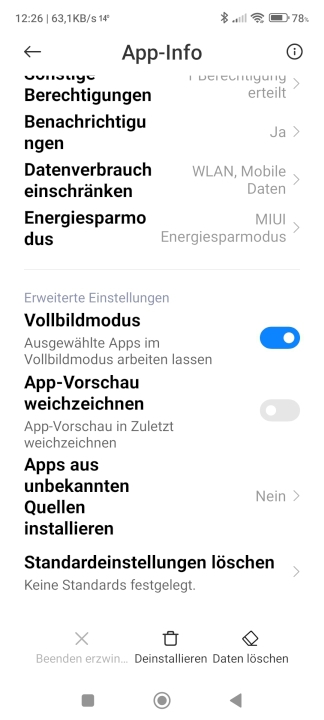
I have activated the full screen mode in the settings (Settings - Manage apps)
Spoiler: Screenshot
Ok, the screenshot is in German, but I can translate:
Extended settings, full screen mode, selected apps in full screen mode.
It works that way for me.
Last edited by Boki; 7th June 2022 at 01:44 PM. Reason: quote shortened, approved


@Brucie:
there are often problems with the resolution when a complete save folder is taken over from another device.
Often only the cache->delete all data and also delete the save folder helps here. Even if everything has to be reconfigured.
Last edited by Andrey Form; 7th June 2022 at 06:29 AM.
---
ex calipoint say: my Knowledge of today is what I read yesterday 🧐😉
I'm using this iGO version on my phone, everything works great, even weather and TMC. But it's strange that If I copy the same version (1:1 copy) to any other Android tablet, online features doesn't work and I cannot figure it out why. Data connection on the tablet are enabled trough the hot spot..sys is identical. Any suggestions? I tried with or without my SAVE folder, doesn't make a difference. Any suggestions?
It's not that I'm so smart, it's just that I stay with problems longer. (Albert Einstein)
I'd like to thank you for this explanation in
[Only registered and activated users can see links. ]
I installed this on my old Android 4.4 Acer and it works flawless, with or without sdcard inserted.
So I did the same on myold Medion 5001 Android 5.0.2 and also success!
Some minor issues with buttons I don't like on the navigation screen, so I'm scrolling through the discussion pages for this iGO_Pal now.
Big salute.
Edit:
I've installed this version and for me it does everything I want.
There are some small issues however.
On my navigation screen there is a globe, when I click there's this message.
1. What do I do to get rid of this button?
2. I'd like more a button on the nav. screen to delete the actual route while driving, if no more needed.
I saw it in my iGO-Gift version, but there it didn't come on the nav. screen. Every time I checked it it disappeared when I re-opened the menu .
Spoiler: large images
Last edited by Boki; 28th July 2022 at 07:58 PM. Reason: merged two posts, spoiler, approved
These are not issues. It is normal (standard)
Discussed already
- Delete gpsandmore_gse ux. It's safe.
- No, all iGO editions have the same basic buttons. To get some new ones, you have to use a Skin
For starters, try Arimi's. Many of his ux's can work without skin. The names are logical, you will easily understand the function.
Bookmarks