
 Likes:
  all tests write: 'incomplete folder iGO / iGO_Motrex'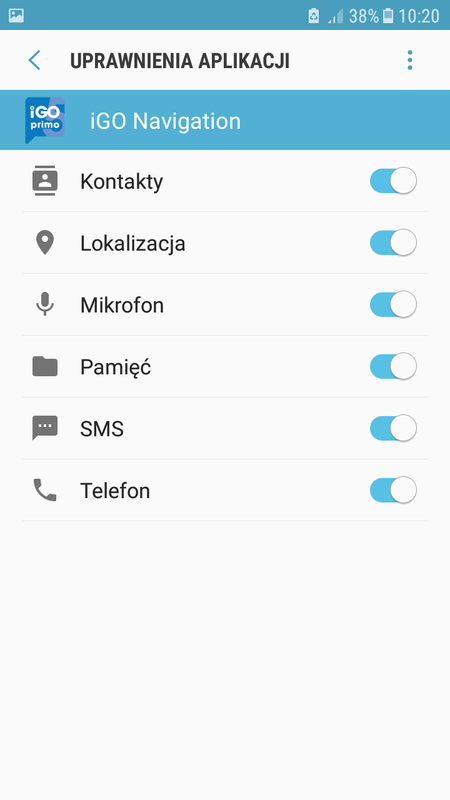

 Reply With Quote
yes! all options off! I turn on all: new error message!
Spoiler: error
now misses License - and a folder IMO in the data.zip?
supplement:
i change folder only name iGO - [OK] for error Message ------ Motrex working!
and:
where does traffic work and with what setting for TMC. in DE nothing with entry in SYS.txt or with entry of NG_Israel
Welcome guest, is this your first visit? Click the "Create Account" button now to join.


Results 21 to 30 of 77
-
22nd June 2018, 09:20 AM #21Important User


- Join Date
- May 2014
- Location
- Where you live
- Posts
- 737
- Rep Power
- 2412
 Check the permissions @ korin_ro wrote
 Originally Posted by rondoan

Take a look at the screen
Spoiler: IMG *****
*****
-
22nd June 2018, 11:52 AM #22Master

- Join Date
- Mar 2017
- Location
- Germany
- Posts
- 1,061
- Rep Power
- 908
Last edited by rondoan; 22nd June 2018 at 01:32 PM.
-
22nd June 2018, 02:18 PM #23iGO Enthusiast


- Join Date
- Jun 2014
- Location
- Niš
- Age
- 54
- Posts
- 7,231
- Rep Power
- 4867
You really hate to read from beginning, did you.

Already said about changing folder name.
Already said about online services, and in OP, and confirmed by others: no one online service works.
Did not test it with fronzosd's package yet.Last edited by Boki; 22nd June 2018 at 02:24 PM.
-
22nd June 2018, 04:45 PM #24Master
- Join Date
- Mar 2017
- Location
- Germany
- Posts
- 1,061
- Rep Power
- 908
sorry, i have read the Problem Folder and tried both, but you are right, i have not read everything anymore. thank you for information!
-
22nd June 2018, 10:09 PM #25Master


- Join Date
- Mar 2017
- Location
- Tunisia
- Posts
- 457
- Rep Power
- 1335
Weather NextGen v1.08.3 Mod iGO Motrex
Here Version of NextGen Weather 1.08.3 from Neoss75 I thank.

Change made at the path level: com.nng.igo.nextgen.motrex
This version is for the testers since for the moment we do not have ux weather that is functional. if it can help someone (I did some tests: Negatives).
Spoiler: Hide
Spoiler: pics
RegardsGPS: TomTom ONE
Smartphone: THL T11 Android 4.2.2 Resolution 720x1280
Sygic 14.3.4 IGO Primo 9.6.29.636868 Skins : Doupas V9.0h , Dimka/Frontzosd
-
23rd June 2018, 08:37 AM #26Master


- Join Date
- Dec 2014
- Location
- Portugal
- Posts
- 81
- Rep Power
- 131
Two iGO Motrex APKs in the make sys look like the first post [Only registered and activated users can see links. ], what differs is that in the sys install is not created and the installation folder has also changed.
Can be installed together, there is no conflict between them.
Tested with original skin and frontzosd [Only registered and activated users can see links. ]
1- iGO_Motrex_9.35.6.91911_no_ make_sys
package name-com.nng.igo.nextgen.motrex
sys.txt is not created
installation folder- iGO_Motrex
[folders]
data_folder_name="iGO_Motrex"
Spoiler: download 1
2-NextGen_Motrex_9.35.6.91911_no_ make_sys
package name-com.nng.igo.motrex.nextgen
sys.txt is not created
installation folder- NextGen_Motrex
[folders]
data_folder_name="NextGen_Motrex"
Spoiler: download 2Last edited by cam1981; 23rd June 2018 at 11:16 AM.

-
23rd June 2018, 11:09 AM #27Master


- Join Date
- Jul 2015
- Location
- Near you
- Posts
- 613
- Rep Power
- 316
It works.
Spoiler: Click to Expand
OS: Oreo 8.0
Device: Note 8 64GB LTE
Non-rooted
Following what was said above is very easy to set.
Impressions hmm...nothing special...some licenses are missing but 95% is working.
Just in case somebody did not understand it here is simplified tutorial.
1)
Base folder from [Only registered and activated users can see links. ]
2)
APK from post NO MAKE SYS (use your own sys) [Only registered and activated users can see links. ]
3)
So on your INTERNAL MEMORY there has to be a folder named:
NextGen_Motrex
Inside that folder just add your own sys from previous versions or you can use mine:
This post requires you to click the "LIKE this post" button and hit F5 to read this content.
4) You need to give your app permissions but manually so do it like this:
- Settings
- Apps
- NextGen_Motrex
- Give permissions to all just like I did on my image
Spoiler: Click to expand
When all above is done properly only than NextGen_Motrex will work. Again it is too early to say but no need to have this version along PERFECT ISRAEL version that works absolutely amazing. But for us enthusiasts this is just a test or a research.NOTICE: By no means I advise installing illegal software nor I support such actions. This is just for EDUCATIONAL PURPOSES. Please use my post in order to understand or learn something new. I am a proud owner of LICENSED NAVIGATION but just to satisfy my curiosity I test, read and research. Sharing illegal material is against the law.
-
23rd June 2018, 04:20 PM #28Pro-Member

- Join Date
- Dec 2011
- Location
- middle east
- Posts
- 273
- Rep Power
- 22
Is there any chance to open middle east map .
-
23rd June 2018, 04:48 PM #29iGO Enthusiast
- Join Date
- Jun 2014
- Location
- Niš
- Age
- 54
- Posts
- 7,231
- Rep Power
- 4867
No lycs available for ME.
Mr.mmyhassan, you've already asked many times for that during this years.
Use completely cr*cked software, (Primo/Israel etc...), or stop experimenting and complaining.
You can only make complaints to your compatriots. So far, nobody, but no one, has shared any license or content with us. And I know very well that paying is not a problem.
-
23rd June 2018, 10:35 PM #30Master


- Join Date
- Jan 2016
- Location
- TUSCANY - ITALY
- Posts
- 353
- Rep Power
- 298
I've already made some small changes to the icons. Those in the menus depend on the speedcam.zip file, but there are only 17 categories, instead of the 32 of the "old" versions. There are no more complex svg files with overlapping icons, each category has 4 different icons, some empty, and some with a transparent image? On the one hand they have simplified but from another they have made it the most complicated thing.
In the speedcam.zip file there are no more bmp images that appeared on the route, now these are on the data.zip.
Spoiler: screen
I added the Nuance VR voices TTS that I use with Israel, (tts_nua_ve1 folder), and they work.
Tomorrow I try the skin that made Frontzosd .......gif ":)))")
Last edited by BIRBANTE; 24th June 2018 at 08:58 AM. Reason: added information


Bookmarks