Welcome guest, is this your first visit? Click the "Create Account" button now to join.



 Likes:
Results 101 to 110 of 182
-
20th November 2017, 12:09 AM #101Master


- Join Date
- Jul 2015
- Location
- Near you
- Posts
- 613
- Rep Power
- 316

That is why I would like to have it. It is very useful, just sometimes inaccurate. Can you do that or somehow add option to show ETA without TMC like on the last picture. I hate cluttered screens too, that is why extra ETA is way better.
NOTICE: By no means I advise installing illegal software nor I support such actions. This is just for EDUCATIONAL PURPOSES. Please use my post in order to understand or learn something new. I am a proud owner of LICENSED NAVIGATION but just to satisfy my curiosity I test, read and research. Sharing illegal material is against the law.
-
20th November 2017, 03:24 PM #102Master

- Join Date
- Aug 2011
- Location
- uk
- Posts
- 169
- Rep Power
- 805
-
20th November 2017, 04:51 PM #103Master
- Join Date
- Jul 2015
- Location
- Near you
- Posts
- 613
- Rep Power
- 316
Man this is exactly what I was asking for. It turn TMC on/off and shows ETA with or without TMC. This is great. Better would to have ETA displayed all the time but this is awesome. From this day on this will be my "must have" ux. Thank you.
TMC On
Spoiler: ON
TMC
Spoiler: IMAGELast edited by Texas; 20th November 2017 at 05:12 PM.
NOTICE: By no means I advise installing illegal software nor I support such actions. This is just for EDUCATIONAL PURPOSES. Please use my post in order to understand or learn something new. I am a proud owner of LICENSED NAVIGATION but just to satisfy my curiosity I test, read and research. Sharing illegal material is against the law.
-
20th November 2017, 05:11 PM #104Master


- Join Date
- Sep 2015
- Location
- Athens Greece
- Posts
- 413
- Rep Power
- 1381
OK...... @morco send him the bill......

UPDATE
i have tried this with long click on the first icon but failure....i'm new about this.....Last edited by modemakias; 20th November 2017 at 05:22 PM.
-
20th November 2017, 05:14 PM #105Master
- Join Date
- Jul 2015
- Location
- Near you
- Posts
- 613
- Rep Power
- 316
@modemakias you can make ux to display ETA without.tmc all.the time and ofc send.me.the bill

or map.selector haha
later I will.post what our colleague @Marx sent me.NOTICE: By no means I advise installing illegal software nor I support such actions. This is just for EDUCATIONAL PURPOSES. Please use my post in order to understand or learn something new. I am a proud owner of LICENSED NAVIGATION but just to satisfy my curiosity I test, read and research. Sharing illegal material is against the law.
-
21st November 2017, 05:12 PM #106Master
- Join Date
- Mar 2016
- Location
- NYC
- Posts
- 140
- Rep Power
- 275
And I am using yet another map_changer ux, tweaked by some Brazilian (unfortunately, I forgot his name), that lets you show the name of the map under settings - select map provider menu e.g. TomTom 2014 or HERE Spain 2017.3 (whatever you put in your sys.txt).
If interested I can post it here.It would also be great , if someone could merge it with the Texas's one as "mine" does not show HERE or TT logos- ignore it, forgot to click show Provider InfoLast edited by iVoy; 21st November 2017 at 05:37 PM.
If you think I helped you, please add to my reputation
-
21st November 2017, 09:10 PM #107Important User


- Join Date
- Nov 2013
- Location
- Polska
- Posts
- 863
- Rep Power
- 1258
This map changer - which you write is probably part of the compilation prepared by the team 'cam1981, jorgeultra e Luixx - iNP18 Team' from Brazil.
Here is a link to the entire ux for iGO_Gift Pack 2018 and screen from the map changer
link:
ux.rar
This post requires you to click the "LIKE this post" button and hit F5 to read this content.
Spoiler: SCREENSHOT
thx iVoy.gif ":)))")
 - it is a very interesting mod skins
Bravo colleagues from Brazil
Last edited by Boki; 24th November 2017 at 07:08 AM.
Password for My Files: wojpen
User (when necessary): wojpen
Closed Link - Please PM
regards
-
21st November 2017, 11:19 PM #108Important User
- Join Date
- Nov 2013
- Location
- Polska
- Posts
- 863
- Rep Power
- 1258
For all the interesting "DIY Man"
completing the previous post: ...[Only registered and activated users can see links. ]
Version - about which he wrote @ Ivoy and I - has an interesting feature - author (s) mod apk prepared 2 versions (based on SD version to @modemakias ):
):
1 - for non root phone
2 - for root phone
Below are links to both versions, plus data.zip and sys.txt
Spoiler: Link:
Spoiler: Screen:
Detailed description of the installation of this version together with iGO_Basarsoft - tomorrow in new topic
tbc....
regards wojpen
PS Look pls this topic -> [Only registered and activated users can see links. ]
regardsLast edited by wojpen; 22nd November 2017 at 01:19 AM.
Password for My Files: wojpen
User (when necessary): wojpen
Closed Link - Please PM
regards
-
23rd November 2017, 10:10 PM #109Master
- Join Date
- Jul 2015
- Location
- Near you
- Posts
- 613
- Rep Power
- 316
Hello friends...
I am so happy to announce that our friend @morco did great job and on my request created two UX files that I Find useful.
UX No.1 - TMC On/OFF
TMC - On/Off
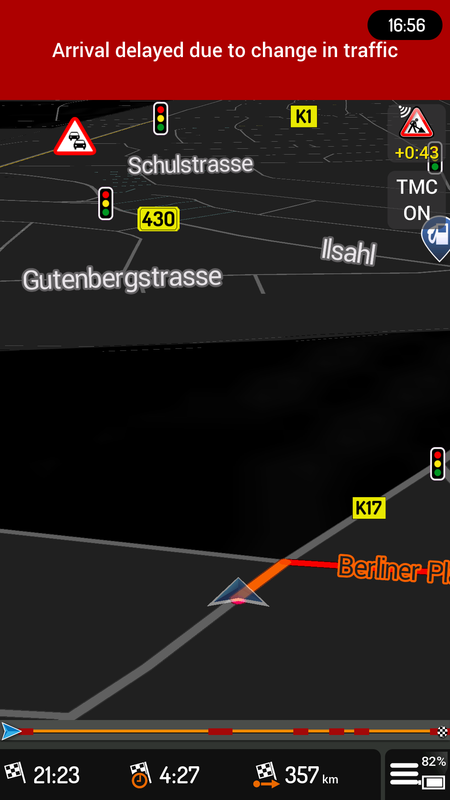
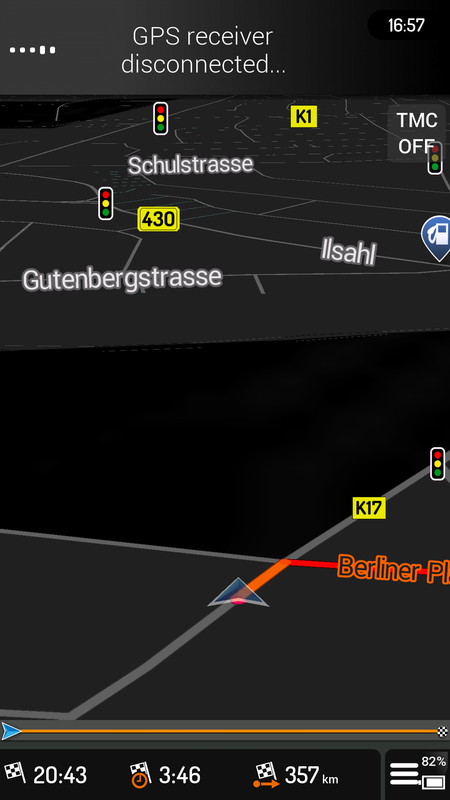
What this UX does is it turns off/on your TMC and historical data. Wht is the purpose of this? Well as you my know iGO TMC is not always accurate and up to date. Sometimes when I drive it adds up to 2 3 or more hours due to info it receives from servers. But it happens that I need clear ETA (driving to the airport, receiving call "How far are you?" etc) It order to know that you have to disable your net, restart navi or go to settings, traffic info and turn it off. That is a quite a work to during driving, very DISTRACTING and DANGEROUS. Our @morco created simple UX that turns off/on TMC directly from your cockpit, just one click. Simple, Safe, Effective.
Here is how it looks like (notice ETA change)
TMC ON
Spoiler: Click
TMC OFF
Spoiler: Click
Spoiler: link
UX - No.2 - Route Overview
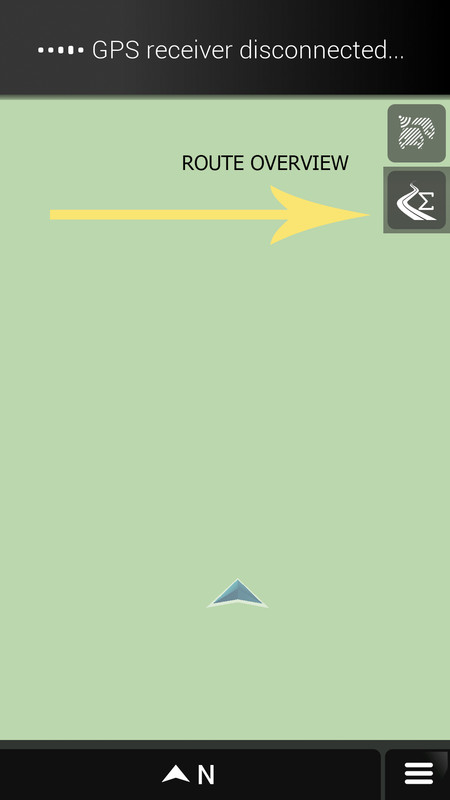
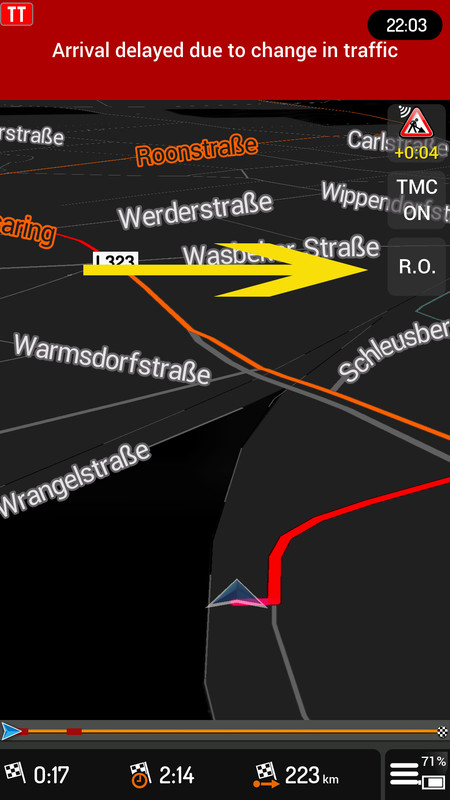
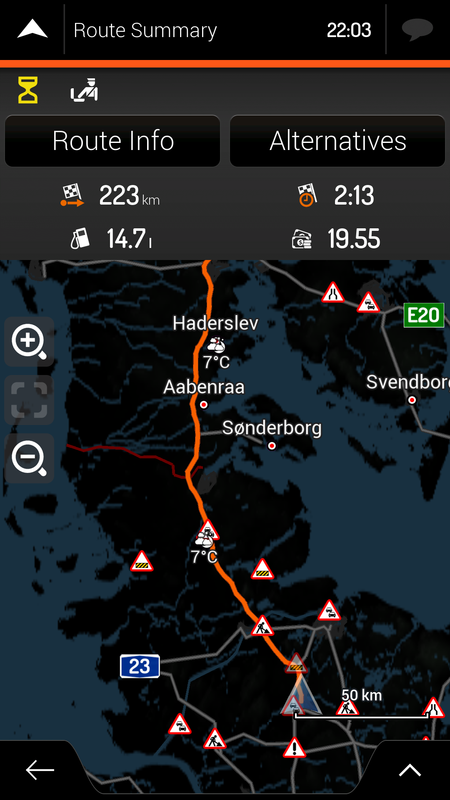
This option was presented in iGO_Israel or with some skin but not in other versions. So @morco did this on my request. Thank you my friend. Why this UX? It is very useful when you are driving long routes and suspect that route is not good. So you can quickly check route. Normaly it would take couple of clicks, this way 1x click from cockpit.
iGO ISRAEL
Spoiler: Click
Morco UX - Image
Spoiler: Click
Route Overview
Spoiler: Click
Spoiler: link
I asked for this in GIFT section hence I tested it with GIFT but I believe it works on all versions.
Have a nice time and enjoy those universal UXs from our friend @morco
Spoiler: ATTACHED all buttonsLast edited by Boki; 3rd November 2019 at 08:18 AM.
NOTICE: By no means I advise installing illegal software nor I support such actions. This is just for EDUCATIONAL PURPOSES. Please use my post in order to understand or learn something new. I am a proud owner of LICENSED NAVIGATION but just to satisfy my curiosity I test, read and research. Sharing illegal material is against the law.
-
24th November 2017, 11:22 PM #110Master
- Join Date
- Mar 2016
- Location
- NYC
- Posts
- 140
- Rep Power
- 275
o4i's DayNightTilt and SidelistButton uxs work perfectly with the app
If you think I helped you, please add to my reputation

 Reply With Quote




Bookmarks