
 Likes:
 Reply With Quote
Report 19.03.2017
I believe our friend Boki_Srb deserves feedback so here is it...
Devices I installed it on are:
[Only registered and activated users can see links. ]
[Only registered and activated users can see links. ]
[Only registered and activated users can see links. ]
Spoiler: Click to expand
Spoiler: Click to expand
Fast, stable and fully functional. (I have not tested TTS but I have no doubt it works, if not just replace TTS PRO file with updated dict.)
EXTERNAL CARD CONTENT
has_secondary_root=1
android_secondary_root_path="/storage/extSdCard/addons"
Fully cracked
HERE 2014.Q4 all active
ONLINE SERVICES:
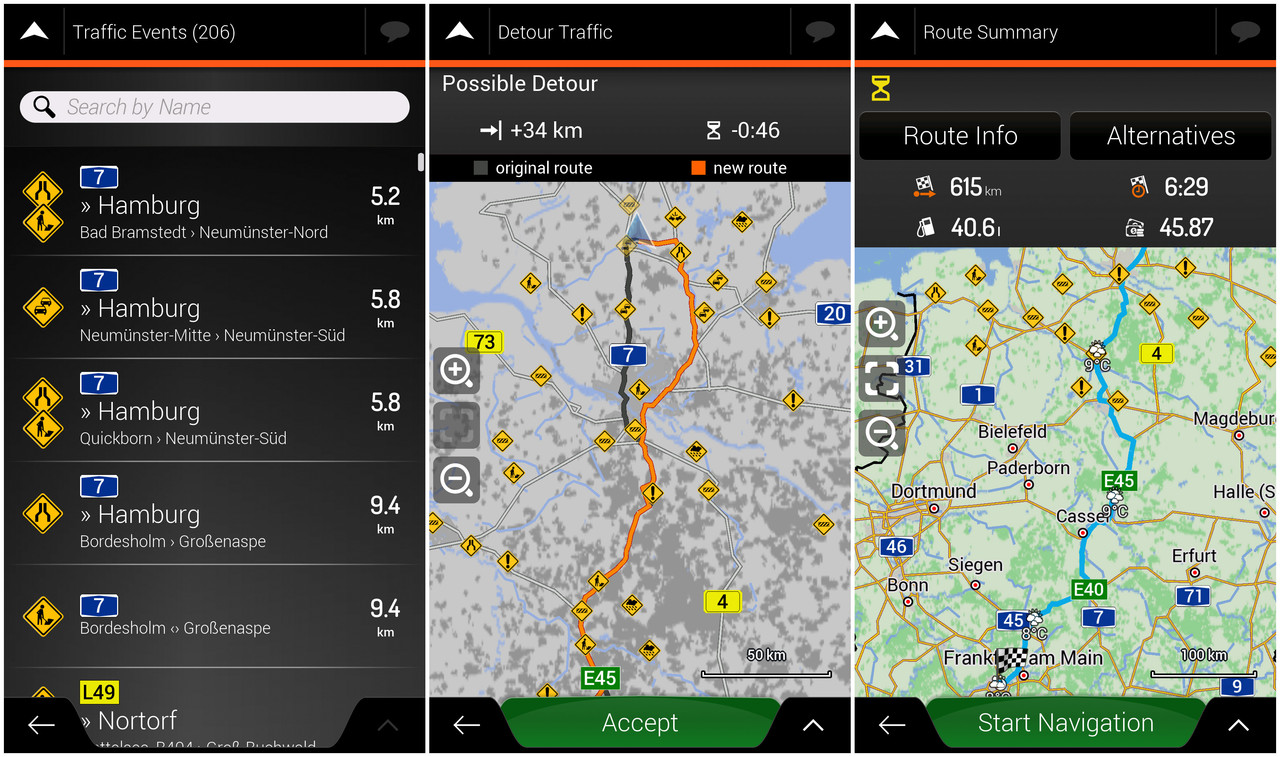
TMC
Weather
I like factory default navigation, I hate skins etc so Gift works fantastic as it is.
I added UX some addons:
arimi battery in menu - battery and percentage
osiris4isis Route - extra route preferencs option (most highway, less highways)
fuel - car mode only, how much fuel we need per route
QHD screen res support UX - In case I need it in future, for now is disabled
poi silver - better looking icons but still similar to the original
Sys modification:
Spoiler: GEOTAG
Spoiler: GUIDANCE AT HIGHWAY
Spoiler: HIDE YOUR IMEI
Spoiler: Tunnel Icon in the left corner - no animation
Spoiler: Remove destination uppon arrival
Spoiler: Who wants more TMC events - approx 2000 events
With these minimal interventions from my side iGO_Gift calculates long 2000 km routes in few seconds, no screen overview freezing etc.
EDIT: UXs per request @iVoy
[Only registered and activated users can see links. ]
Welcome guest, is this your first visit? Click the "Create Account" button now to join.


Results 1 to 10 of 185
-
19th March 2017, 09:10 PM #1iGO Enthusiast


- Join Date
- Jun 2014
- Location
- Niš
- Age
- 54
- Posts
- 7,289
- Rep Power
- 4909
 iGO Gift 9.18.27.687519 - 26.jan.2017
iGO Gift 9.18.27.687519 - 26.jan.2017
iGO Gift 9.18.27.687519 - 26.jan.2017
Navi App can be installed in iGO or iGO_Gift folder
No need licenses
VR working (version 2)
Full folder (package) - Apps (make.sys/no.make.sys), ux, data.zip:
Spoiler: link
Only apps, made by iVoy, changed name from Israel to Gift
in post [Only registered and activated users can see links. ]
-
19th March 2017, 11:32 PM #2Master


- Join Date
- Jul 2015
- Location
- Near you
- Posts
- 613
- Rep Power
- 316
iGO Gift 9.18.27.687519 - 26.jan.2017 (discussion)
Last edited by Texas; 20th March 2017 at 07:34 PM.
NOTICE: By no means I advise installing illegal software nor I support such actions. This is just for EDUCATIONAL PURPOSES. Please use my post in order to understand or learn something new. I am a proud owner of LICENSED NAVIGATION but just to satisfy my curiosity I test, read and research. Sharing illegal material is against the law.
-
20th March 2017, 06:08 AM #3Master

- Join Date
- Mar 2016
- Location
- NYC
- Posts
- 140
- Rep Power
- 276
 Mind sharing the above? After the crash (I guess) cant find any of the 'old' posts and threads.
 Originally Posted by Texas

TIAIf you think I helped you, please add to my reputation
-
20th March 2017, 11:07 AM #4Master


- Join Date
- Sep 2015
- Location
- Athens Greece
- Posts
- 413
- Rep Power
- 1383
iGO Gift 9.18.27.687519 SD.... mod
APK name: iGO Gift
Package name: com.nng.igoprimong.gift
Data folder: "iGO_Gift"
The installation can be done:
Internal or SD > Android/data/<package_name>/files/iGO_xxxx
UPDATED...
O.L version FIXED Online Services... (weather + TMC)Last edited by modemakias; 8th November 2019 at 04:51 PM.
-
20th March 2017, 04:22 PM #5Master
- Join Date
- Jul 2015
- Location
- Near you
- Posts
- 613
- Rep Power
- 316
Post#2 updated.... UXs per request... @iVoy
NOTICE: By no means I advise installing illegal software nor I support such actions. This is just for EDUCATIONAL PURPOSES. Please use my post in order to understand or learn something new. I am a proud owner of LICENSED NAVIGATION but just to satisfy my curiosity I test, read and research. Sharing illegal material is against the law.
-
20th March 2017, 07:14 PM #6Master
- Join Date
- Mar 2016
- Location
- NYC
- Posts
- 140
- Rep Power
- 276
Poblems with the app:
* TTS Pro not working
* "Kid in the car" alert in Hebrew
* App tries to force you to set TTS Speech Engine to Hebrew
Any solution?
On the side-note, I added extra UXs:
* simulation by Arimi
* labs (extra settings: ScreenGrab, Raster Maps)
* map_changer that with modded sys shows the names of the maps (got it from a Brazilian forum, don't remember whom)
* tmc_yellow (yellow TMC icons)
* zoom_with_button_in_menu
* address_Tap_OnMap
* fuel_consumption
(* last_mile_navigation, * online_parking TESTING)
I haven't noticed any slow down in the performance with the above added
@TEXAS
"fuel - car mode only, how much fuel we need per route" where in the app can I see that info?
Mapchanger sys edit (you put any name you want - ta = tomtom, nt = here):
Spoiler:
Here are all the extra ux's I use (including the ones Texas had already suggested):Last edited by iVoy; 21st March 2017 at 01:26 PM.
If you think I helped you, please add to my reputation
-
20th March 2017, 11:17 PM #7Master
- Join Date
- Jul 2015
- Location
- Near you
- Posts
- 613
- Rep Power
- 316
You go to the route preference/ car/ edit profile amd. there adjust fuel settings. Make sure you enable it. And. Maybe it would be great idea for you to upload your UXs
NOTICE: By no means I advise installing illegal software nor I support such actions. This is just for EDUCATIONAL PURPOSES. Please use my post in order to understand or learn something new. I am a proud owner of LICENSED NAVIGATION but just to satisfy my curiosity I test, read and research. Sharing illegal material is against the law.
-
21st March 2017, 08:40 AM #8Junior Member
- Join Date
- Mar 2017
- Location
- EU
- Posts
- 3
- Rep Power
- 0
Hi iVoy,
which of this ux zip files is responsible for "zoom_with_button_in_menu" ?
-
21st March 2017, 01:27 PM #9Master
- Join Date
- Mar 2016
- Location
- NYC
- Posts
- 140
- Rep Power
- 276
Oops.
Corrected
If you think I helped you, please add to my reputation
-
21st March 2017, 02:01 PM #10Master
- Join Date
- Jul 2015
- Location
- Near you
- Posts
- 613
- Rep Power
- 316
 Spoiler: REAL LOOK - YELLOW TMC
TEST
Just finished testing the following version of NEXGEN (that were published lately 2017)
VERSIONS:
iGO GIFT
iGO ISRAEL
iGO BASARSOFT
iGO WORLD
Device I was using was GALAXY TAB 4 7" 1.5 GB RAM-a
PARAMETERS:
Same Sys settings
Full EU HERE Maps Pack
Full EU speedcam Pack
Same set of licenses
Car mode
Same routes
In the end iGO_Gift proved to be FASTEST version by:
- moving though menus,
- map overview,
- zoom in out,
- route calculation,
- tmc alternative route changes etc way better than any other version I tested.
I am not saying I am right or anything, this is just my test and what I got by testing same settings and requests. This test was just as a my attempt to help less experienced members with their choice of version. Again, it does not necessarily mean that I was right or that it will work in same manner on your device but this can just be a point in right direction.
So for now @Boki_Srb thank you, your GIFT version proved to be the best version for me on this day.
Same result and very pleasant was achieved by installing this version on:
NOTE 3 LTE
GALAXY TAB 4 7"
HTC DESIRE 320
COOLPAD TORINO R108Last edited by Boki; 16th January 2019 at 07:50 PM.
NOTICE: By no means I advise installing illegal software nor I support such actions. This is just for EDUCATIONAL PURPOSES. Please use my post in order to understand or learn something new. I am a proud owner of LICENSED NAVIGATION but just to satisfy my curiosity I test, read and research. Sharing illegal material is against the law.




Bookmarks