
 Likes:
 Reply With Quote
The change to driveralerts.zip was ONLY to change the color, so if you're having problem with "shows no traffic road signs", it's not from it. But as you already know (from my PM and updated post), that change was wrong. The correct change is in the_skin.zip, correctly tested by you.Originally Posted by Texas

Welcome guest, is this your first visit? Click the "Create Account" button now to join.


Results 51 to 60 of 182
-
7th April 2017, 12:46 AM #51Important User


- Join Date
- Apr 2012
- Location
- Darkside of the Moon
- Posts
- 2,849
- Rep Power
- 1398

When I have time, I will add some customization (let user select the color) and post in the "Osiris mod/hack Gift" thread. Still need to learn more how the notification system works. Meanwhile, I've updated post #54 with the hack [Only registered and activated users can see links. ]
Update: Let it be written, let it be done [Only registered and activated users can see links. ]Last edited by osiris4isis; 7th April 2017 at 07:41 PM.
-
7th April 2017, 05:37 AM #52Important User
- Join Date
- Apr 2012
- Location
- Darkside of the Moon
- Posts
- 2,849
- Rep Power
- 1398
-
8th April 2017, 09:30 AM #53Junior Member
- Join Date
- Mar 2017
- Location
- usa
- Posts
- 3
- Rep Power
- 0
There is no one can provide can be used for this version of the google text to the voice of the TTS Chinese voice packets, the Chinese TTS voice package, first thank you! There is a problem! ... I TMC state which can not see any events, Whether or not planning the route ... I used pongo + ux_plugins_2017.03.20,
My SYS.TXT
Spoiler: sys.txtLast edited by Boki; 8th April 2017 at 11:08 AM. Reason: SPOLER, Good posting rules !
-
8th April 2017, 04:37 PM #54Important User
- Join Date
- Apr 2012
- Location
- Darkside of the Moon
- Posts
- 2,849
- Rep Power
- 1398
Online traffic works if settings in sys.txt are correct. Problem still exists without using Pongo skin?
BTW, I suggest you not mess with the formatting of sys.txt, keep it all lower cases for section and field name.Last edited by osiris4isis; 8th April 2017 at 04:40 PM.
-
9th April 2017, 07:36 AM #55Member +
- Join Date
- Mar 2017
- Location
- israel
- Posts
- 33
- Rep Power
- 10
Peace!
It is impossible to change the car by choosing the blue triangle shape. I tried all settings and did not find.
Does any of your friends know where to change?
Thanks to all the helpers.
-
9th April 2017, 08:07 AM #56Important User
- Join Date
- Apr 2012
- Location
- Darkside of the Moon
- Posts
- 2,849
- Rep Power
- 1398
Sure, it's possible
Spoiler: .
-
9th April 2017, 11:59 AM #57Master


- Join Date
- Jul 2015
- Location
- Near you
- Posts
- 613
- Rep Power
- 316
 Speedcam bug / collision with primo
Dear friends...
I believe I found two bugs related to speedcam files...I have not tested this on any other version because I am more than happy with GIFT.
So here it is..
BUG No.1
First of when you load SCDB or POIPLAZZA Full Europe Speedcam database almost all of them are seen as MOBILE SPEEDCAMs. I tried all kinds of combinations and it keeps seeing most 95% of speedcams as a mobile speedcams.
Edit: Issue No. 1 is not an issue. Somebody made many mobile speedcam entries, everything is ok with Gift.
Spoiler: MOBILE SPEEDCAM ISSUE
BUG No.2
If you have made some manual speedcam entries for example in your city you have some speedcam that are not in the database and you add them manually, guess what next time you run GIFT they are gonna. It took me a while to figure out why but thanks to my other device that I have which has only GIFT but NOT PRIMO installed I realized it was up to PRIMO. So If you delete PRIMO than you can have your SPEEDCAMs but you have to manually enter them again.
Or simply delete device.nng file and enter manually speedcams. I tried replacing my scdb.spub file but it does not work only by entering it again.
I do not know if this is isolated case but for me it does not work. This is also for our friend @seria who is making a very nice post about iGO versions.Last edited by Texas; 9th April 2017 at 02:54 PM.
NOTICE: By no means I advise installing illegal software nor I support such actions. This is just for EDUCATIONAL PURPOSES. Please use my post in order to understand or learn something new. I am a proud owner of LICENSED NAVIGATION but just to satisfy my curiosity I test, read and research. Sharing illegal material is against the law.
-
9th April 2017, 12:26 PM #58Master


- Join Date
- Mar 2012
- Location
- France
- Age
- 77
- Posts
- 339
- Rep Power
- 294
Hi
The bug N°2 is frequent. It depends of Primo versions installed on the smartphone...
In configurations where they are aside iGO-Primo or Avicsync, the .spud file created from the user under Gift - World - Isreal is overwrited by a new empty one at the next reboot
Nobody found a workaround for the moment and you must know that djeman or Tanuki do not encounter this issue. So, it is difficult for them to find any explanation/solution...

Last edited by BIBUOT; 9th April 2017 at 12:53 PM.
-
9th April 2017, 01:14 PM #59Master
- Join Date
- Jul 2015
- Location
- Near you
- Posts
- 613
- Rep Power
- 316

So basically only solution would be:
1. Remove PRIMO and use only NG - Create your SPC once more
2. Use spudigo and make your entries there and everything would be great
Not the best solution but it works
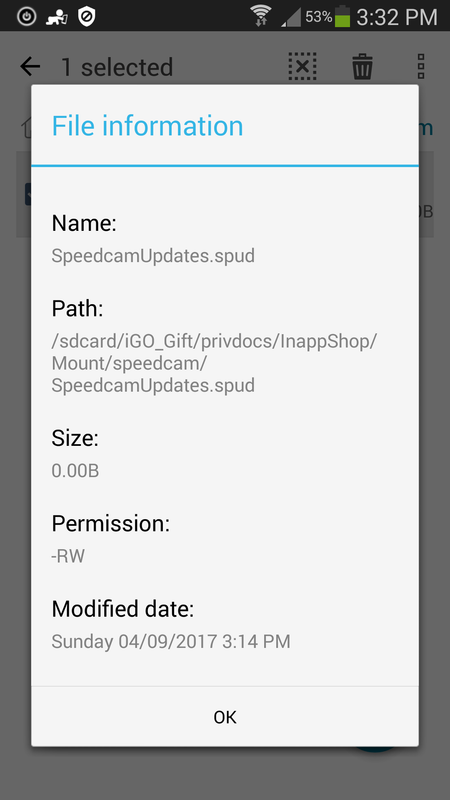
Edit: This is where Gift keeps spud updates
Spoiler: Spud location
Eureka:
We do not have to. enter speedcams all over again.
1. Delete device. nng
2. Copy your speedcam updates. from your backup
3. Paste it all inside Gift/Privdocs/InappShop/Mount/speedcam and. it. works.
Beware every time Primo is started it will. overwrite it but at least you do not have to enter it again simply make backup and restore it in the location I provided.
Do not restore it. in Gift/content/speedcam it will not work.
Good luck and. keep good backup
Last edited by Boki; 16th January 2019 at 07:45 PM.
NOTICE: By no means I advise installing illegal software nor I support such actions. This is just for EDUCATIONAL PURPOSES. Please use my post in order to understand or learn something new. I am a proud owner of LICENSED NAVIGATION but just to satisfy my curiosity I test, read and research. Sharing illegal material is against the law.
-
9th April 2017, 03:43 PM #60Master


- Join Date
- Dec 2015
- Location
- Beograd
- Posts
- 71
- Rep Power
- 142
Try this:
[warning]
enable_speedcam_updates=1



Bookmarks