
 Likes:
 Reply With Quote
@Segaal
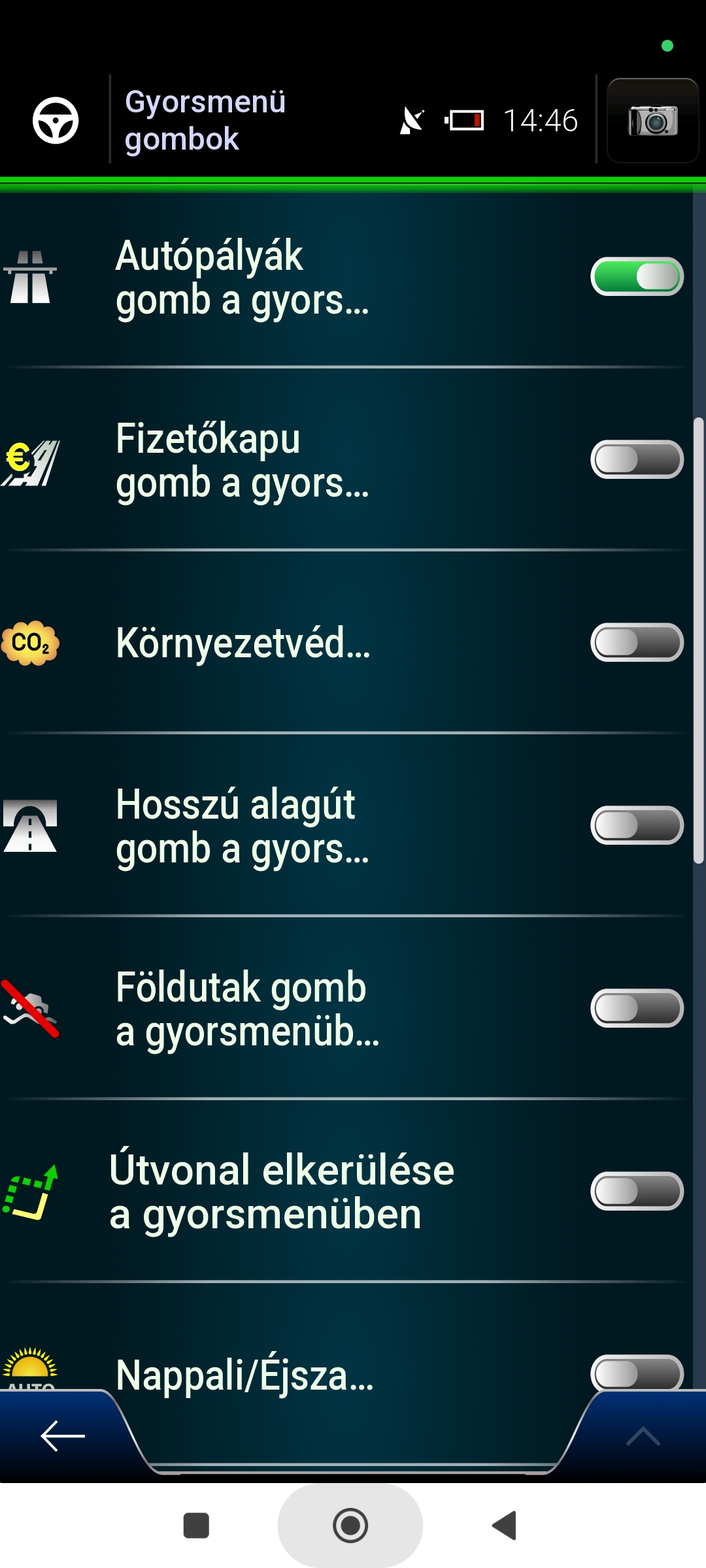
Couldn't it be possible to select the buttons in the Cockpit and QuickMenu together in one row for the side menu buttons (see the top row in the picture, or if you can't have 2 switches in one row: see rows 2-5 in the picture)?
Any button could be in Cockpit/QuickMenu.
Spoiler: Screenshot:
Welcome guest, is this your first visit? Click the "Create Account" button now to join.


Results 71 to 80 of 163
-
31st March 2025, 10:46 AM #71Senior Member


- Join Date
- Aug 2015
- Location
- Hungary
- Posts
- 120
- Rep Power
- 21

@Golom
I think the problem is not with the button, but with the view. Both buttons take you to the same "Route Overview"!
The error occurs using either button, and once the error occurs, it doesn't matter, using either button doesn't fix it until I clear the settings.Last edited by Papp G; 4th April 2025 at 05:51 PM.
-
3rd April 2025, 08:49 AM #72Senior Member
- Join Date
- Aug 2015
- Location
- Hungary
- Posts
- 120
- Rep Power
- 21
Last edited by Papp G; 4th April 2025 at 05:50 PM.
-
3rd April 2025, 01:50 PM #73Master

- Join Date
- Dec 2014
- Location
- Hungary
- Posts
- 150
- Rep Power
- 132
-
4th April 2025, 05:50 PM #74Senior Member
- Join Date
- Aug 2015
- Location
- Hungary
- Posts
- 120
- Rep Power
- 21
@Segaal
Couldn't the speed camera distance be increased because it's so tiny?
I think it could be 1.5-2 times that size!
Spoiler: Screenshot:
-
5th April 2025, 07:01 PM #75Junior Member


- Join Date
- Mar 2025
- Location
- Belgium
- Posts
- 4
- Rep Power
- 0
Hello everyone,
I would like to translate skin settings into French. Looking in file "content\lang\Lang_English-uk\i18n\Dictionary.lang", I can't find variables with text of skin settings.
Is there a specific lang file? Where can I find it ?
Regards
-
5th April 2025, 10:01 PM #76iGO Enthusiast


- Join Date
- Jun 2014
- Location
- Ni�
- Age
- 53
- Posts
- 7,070
- Rep Power
- 4761
-
5th April 2025, 11:48 PM #77Member +

- Join Date
- Dec 2015
- Location
- Portugal
- Posts
- 65
- Rep Power
- 43
Could there be a reason for a voice.zip file that works perfectly on 32 bit iGO app with Pongo skin, to say complete garbage on this package? btw it does the same no matter the TTS engine used (vocalizerex, google, samsung tts...)
-
6th April 2025, 07:57 AM #78Master

- Join Date
- Jan 2016
- Location
- Germany
- Posts
- 588
- Rep Power
- 892
@Xabregas
The "problem" isn't new.
These 64-bit apps (World, Basar, Israel (Luna)) only work on my Samsung with Android 14 with Vocalizer 3.8.2 (available here) or with VocalizerEx2 (on "only" 64-bit devices in conjunction with SmartVoice).
Edit: I doubt that "rondoan" has tried my solutionsLast edited by Golom; 6th April 2025 at 11:10 AM.
-
6th April 2025, 10:08 AM #79Master
- Join Date
- Mar 2017
- Location
- Germany
- Posts
- 984
- Rep Power
- 757
I had no problems with the Redmi Note series 👍 Now, with the Samsung S21 Ultra, I get a single TTS message displayed endlessly in the list, and no matter which engine or TTS.zip I use, it sounds terrible and incomprehensible 😖
I now have non-TTS voice as an announcement, which is at least understandable 👍😉
+-+-+-+-+-+-+-
Rem: TTS has nothing to do with the skin itself - actually wrong category hereLast edited by rondoan; 6th April 2025 at 10:13 AM.
---
ex calipoint say: my Knowledge of today is what I read yesterday 🧐😉
-
6th April 2025, 06:40 PM #80Master


- Join Date
- Mar 2017
- Location
- italy
- Posts
- 216
- Rep Power
- 220
I had the same problem on Samsung, first Flip 4 then S24 Ultra. I solved it with these steep:
-selected the tts voice I went to save to check the system.ini file in the following section:
[regional]
default_voice_dir_name="voice/iGO LUNA TTS_Ita.zip"
default_voice_engine_capabilities="|,default,can_play_loc_string,1,engine_name,android,language_name,ces-CZE,speaker_name,N/A"
default_voice_id="3641"
I then noticed that the language in "android,language_name,ces-CZE" was not in fact Italian, despite being selected.
-I then inserted the correct strings in the sys.zip/plugin:
[regional]
default_voice_dir_name="voice/iGO LUNA TTS_Ita.zip"
default_voice_engine_capabilities="|,default,can_play_loc_string,1,engine_name,android,language_name,ita-ITA,speaker_name,N/A"
default_voice_id="3641"
default_voice_key="TTS_android_ita_Gg"
Obviously you will have to check and insert the correct strings for your language
This trick worked for me...


Bookmarks