
 Likes:
 Reply With Quote
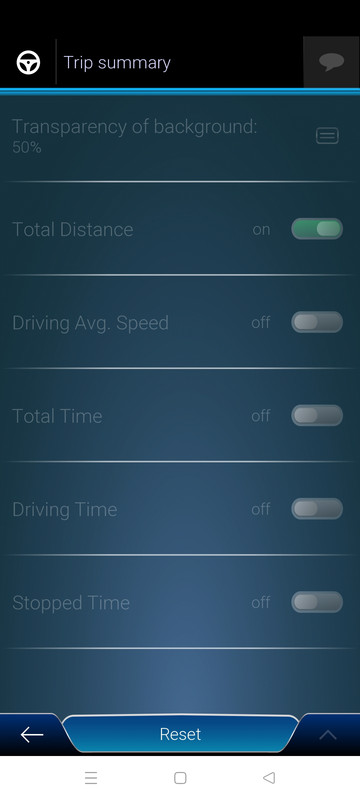
Heya colleagues Can someone confirm to have the panel from screen working?
And where its located ? Probably in the skin by pongo ,but i cant find it
Spoiler: screen
Welcome guest, is this your first visit? Click the "Create Account" button now to join.


Results 3,921 to 3,930 of 3979
-
22nd December 2025, 04:25 PM #3921SUPER MODERATOR


- Join Date
- Oct 2019
- Location
- Belarus
- Posts
- 3,852
- Rep Power
- 2768

Move the contents of the hdpi folder to the xhdpi folder in the speedcam_mod.zip file.

[Only registered and activated users can see links. ]
[Only registered and activated users can see links. ]
[Only registered and activated users can see links. ]
[Only registered and activated users can see links. ]
[Only registered and activated users can see links. ]
[Only registered and activated users can see links. ]
©AF_2020-26
-
28th December 2025, 02:43 PM #3922Master

- Join Date
- Nov 2017
- Location
- Romania
- Posts
- 349
- Rep Power
- 167
-
28th December 2025, 03:45 PM #3923Master

- Join Date
- Mar 2012
- Location
- EX USSR
- Posts
- 429
- Rep Power
- 2268
In the current edition of Pongo skin 04.10.2025 everything works, turns on in the cockpit settings.
Spoiler: Pongo skin
Pongo has the main functions in the the_skin_by_pongo.zip Originally Posted by cristianyxtl

Last edited by batiskaf; 28th December 2025 at 11:25 PM.
-
28th December 2025, 04:03 PM #3924Master
- Join Date
- Nov 2017
- Location
- Romania
- Posts
- 349
- Rep Power
- 167
thx ,batiskaf ,for a long time i dont use this feature Can i ask if you know in wich zip its written?
-
28th December 2025, 09:58 PM #3925iGO Enthusiast


- Join Date
- Jun 2014
- Location
- Niš
- Age
- 54
- Posts
- 7,258
- Rep Power
- 4872
It is part of main ux - skin itself, not separate
-
2nd January 2026, 07:32 PM #3926Member +

- Join Date
- Mar 2019
- Location
- spain
- Posts
- 52
- Rep Power
- 8
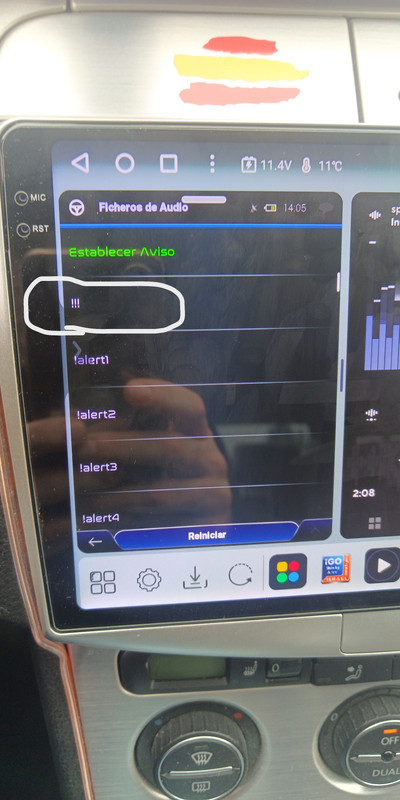
Hello forum, I have a slight problem. I'm using the Pongo skin on Nextgen 9.18.27.687519 and it works very well on my Chinese car GPS, but when a road sign or lane information appears, the volume lowers as if it's trying to give a warning. I've checked the alerts and there's no option for "no sound." Does anyone have a "no sound" setting I could add to the alerts to stop the radio volume from lowering?
-
2nd January 2026, 07:54 PM #3927Member
- Join Date
- Jan 2022
- Location
- Germany
- Posts
- 13
- Rep Power
- 0
I also use a chinese gps and had the same problem with basar7 pongo skin, also could not find the trigger lowering volume.
I deleted igo completely from the radio, downloaded the same igo basar7 pongo , new maps and the problem was gone.
-
4th January 2026, 11:42 PM #3928Member +
- Join Date
- Mar 2019
- Location
- spain
- Posts
- 52
- Rep Power
- 8
I'm going to try removing the "delete save" option from the browser and see what happens. Thanks and Happy New Year!
Hello forum, I uninstalled iGO NextGen, and when I reinstall it without saving, the GPS volume keeps lowering. I have a screenshot of the notifications that I want to delete so that the volume doesn't lower when highway signs appear. It also happens with turn signals and lane arrows. Does anyone know the solution?
[Spoiler: ÷Last edited by Boki; 6th January 2026 at 02:34 PM. Reason: merged
-
7th February 2026, 07:30 AM #3929Master
- Join Date
- Apr 2017
- Location
- Athens, Greece
- Age
- 55
- Posts
- 474
- Rep Power
- 951
I am trying to change the transparency and the text size on street names bubbles.
Any other way to change the text size?Code:Please Login or Register to see the links
Transparency must be in data.zip\ street_name spr files but I don't know what values to give
Could anyone explain the values in spr files?
EDIT
Size of roads is in:
[interface]
mapfontscale= ;road text size
mapfontscale3dframed= ;road text size in bubble
Transparency
[3d_config]
roadsign_bitmaps=1
My question is still if you have roadsign=1 (transparent) how can you change the transparency value?Last edited by AnthonyGreek; 9th February 2026 at 08:48 AM.
-
9th February 2026, 06:17 PM #3930Master

- Join Date
- Nov 2017
- Location
- europa
- Posts
- 138
- Rep Power
- 246
To get a complete detailed overview of SPR files, use ChatGPT and ask it this question: Originally Posted by AnthonyGreek
"Create a complete table of all known parameters with their exact effect on the display, ready to copy and paste into an iGO .spr file. This should include flags, animations, offsets, anchors, etc."
else an usage closer to these parameters can be seen in <SPRITE> tags in UI files and sometimes in CSS.
 [/url]


Bookmarks