
 Likes:


hello.
I am using Igo Pal 9.18.27.719974 with pongo skin version 21/10/2023.
From skin cockpit settings I select new route button. I see it in cockpit fine but if I press it I cannot select address. Also button for route cancel not working at all through navigation , I can cancel it from menu.
Can this been fixed somehow?
Spoiler: ++++
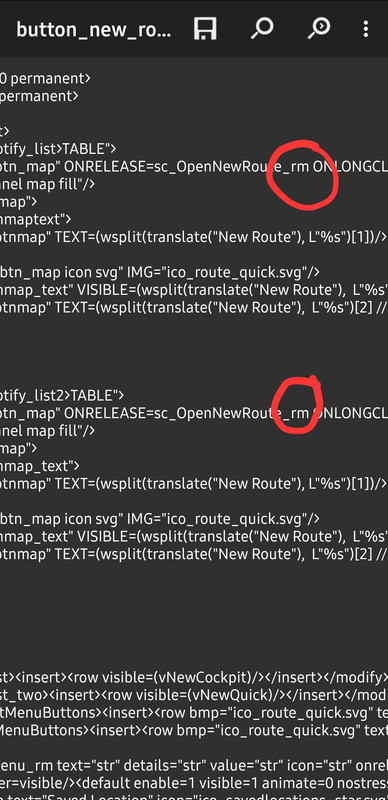
SOLVED: the corresponding file is button_new_route_quick.zip
Inside it there is a ui file (ui_nextgen/common/ui) named button_new-route-quick.ini.
Inside it ,find sc_OpenNewRoute_rmand delete _rm
👍
I use totalcommander with my android phone
[Only registered and activated users can see links. ]
Spoiler: +++
Use spoilers for large pictures.
[Only registered and activated users can see links. ]
Respect all other rules as well. Read carefully:
[Only registered and activated users can see links. ]
and
[Only registered and activated users can see links. ]
Welcome guest, is this your first visit? Click the "Create Account" button now to join.


Results 1 to 10 of 3990
Threaded View
-
9th July 2025, 04:49 PM #11Member +


- Join Date
- Jul 2005
- Location
- Greece
- Age
- 50
- Posts
- 36
- Rep Power
- 41
 Button_new_route_quick FIXED
Last edited by Maverick; 25th August 2025 at 06:14 AM. Reason: Found a solution


 Reply With Quote


Bookmarks