
 Likes:


Here is the latest version Change Skin 1.10.3 of Neoss75's that I thank
It is fully translated with a personalization of the 4 skins.
Translated to: Arabic, German, Spanish, French, Italian, Polish, Portuguese, Brazilian (Pt) and Serbian. with Google Translate ......I do not master all these languagesSome translations are made in the original version: Greek, Romanian, Lithuanian, Russian ...
Spoiler: Pics
Put the UX:
Arimi ==> ux
Pongo ==> ux_pongo
Vice Wandel ==> ux_alt
Frontzosd ==> ux_alt2
Especially keep the files: skin_changer.zip and save.ch
Spoiler: Hide
I put online a file:To Translate.xml for those who want to help us translate into other languages Or for rectification...to return by PM
Spoiler: Hide
Thanks to Vasile1955
Regards
Welcome guest, is this your first visit? Click the "Create Account" button now to join.


Results 21 to 30 of 132
Hybrid View
-
27th January 2019, 01:23 PM #1Master


- Join Date
- Mar 2017
- Location
- Tunisia
- Posts
- 457
- Rep Power
- 1336
 Skin Change 1.10.3 MultiLang
Last edited by LouBouha; 27th January 2019 at 06:19 PM.
GPS: TomTom ONE
Smartphone: THL T11 Android 4.2.2 Resolution 720x1280
Sygic 14.3.4 IGO Primo 9.6.29.636868 Skins : Doupas V9.0h , Dimka/Frontzosd
-
27th January 2019, 01:51 PM #2Pro-Member


- Join Date
- Dec 2017
- Location
- Austria
- Posts
- 213
- Rep Power
- 20
Nice!
Here the German translation...Last edited by userninenine; 27th January 2019 at 01:56 PM.
-
4th February 2019, 07:35 PM #3Master

- Join Date
- Mar 2016
- Location
- NYC
- Posts
- 140
- Rep Power
- 276
Problem with Skin Changer 1.10.5
Hi,
I have been trying to use the skin changer with my Avic for quite a while now. Unfortunately, the app cannot find the path. It is [I]jp.pioneer.mbg.avicync-2[/I] and in the drop-down list in the settinhs there is only [I]jp.pioneer.mbg.avicync[/I]
Is there any easy fix for that? Any help appreciated.
TIA
Nevermind that. Save.ch was missing in the main ux.
Now I have another issue, whatever skin I choose it always opens the main one (arimi). What is wrong now? Any ideas?
Solved
See [Only registered and activated users can see links. ]Last edited by iVoy; 6th February 2019 at 05:37 AM.
If you think I helped you, please add to my reputation
-
4th February 2019, 08:59 PM #4Master
- Join Date
- Aug 2013
- Location
- romania
- Age
- 71
- Posts
- 108
- Rep Power
- 604
Skinchange_1.10.5-release.apk (957.37 KB)
A request has been added to remove the Preloads folder from save, in some cases it helps when igo does not start
In the settings, if the daw is set to option, then the preloads folder will be cleared every time the skins are changed, on the main screen you can clear the folder on the current skin with the button, without changing the skins themselve
Spoiler: Link
Thanks Neoss 75
-
5th February 2019, 08:43 PM #5Master
- Join Date
- Mar 2016
- Location
- NYC
- Posts
- 140
- Rep Power
- 276
Skin Changer 1.10.6
Skinchange_1.10.6.apk
Update 1.10.6 - added disable button "Delete Preloads" on the main screen - updated translation (thanks to Lithuanian arimi ©)
fromby Neoss75Code:Please Login or Register to see the links
Still, can't make it work with iGO Avicsync 9.18.28.696728. Whichever skin I pick it is always the default one (ie. arimi).
Any ideas?
Fixed
See [Only registered and activated users can see links. ]Last edited by iVoy; 6th February 2019 at 05:38 AM.
If you think I helped you, please add to my reputation
-
5th February 2019, 09:45 PM #6Master
- Join Date
- Mar 2017
- Location
- Tunisia
- Posts
- 457
- Rep Power
- 1336
Hi Ivoy
and thanks for the update and Vasile1955 and Neoss75
I have not yet test the last two versions. I am still at 1.10.3
With AvicSync 9.18.28.696728 the last full Cr_k_d version of Arimi that I use everything is Ok
Especially not touch the files skin_changer.zip in the folder ux and the file save.ch in the folders Save.
Well indicated the right path to iGO
And have the right package Name in the drop-down list.
Which version of SkinChange you are using and which Package Name of your iGO AvicSync ?
RegardsLast edited by LouBouha; 5th February 2019 at 09:50 PM.
GPS: TomTom ONE
Smartphone: THL T11 Android 4.2.2 Resolution 720x1280
Sygic 14.3.4 IGO Primo 9.6.29.636868 Skins : Doupas V9.0h , Dimka/Frontzosd
-
5th February 2019, 10:38 PM #7Master
- Join Date
- Mar 2016
- Location
- NYC
- Posts
- 140
- Rep Power
- 276
 Originally Posted by LouBouha

Hey,
I am using the same Avic as you do, with the latest Skin changer and Skin. My pathway is jp.pioneer... something, do not remember.
I have tried different Avic versions, different Skin Changer versions and different skin_changer.zip UXs, to no avail. Nothing works.
A question, can you see Skin Changer under the iGO app settings? And another one, where do you have your iGO_Avic folder (internal memory or SD card)?
*** FIXED ***
Finally, the path under Skin Changer settings must lead to sdcard (internal not external one!). As my iGO_Avic folder is symlinked to one on the external SD, I thought I could use that path. That was the mistake.
Now everything is working !!!!Last edited by iVoy; 6th February 2019 at 04:23 AM.
If you think I helped you, please add to my reputation
-
28th March 2019, 03:22 PM #8Master
- Join Date
- Mar 2017
- Location
- Tunisia
- Posts
- 457
- Rep Power
- 1336
Setting Skin Change
Following a request in MP on the configuration of Skin Change by Neoss75 That I Thank
As a reminder not touch the files skin_changer.zip in the UX folders and the file save.ch in the Save folders.
For Settings:
1/ The path you will have to enter yourself varies depending on :
your Device (Samsung, Huawei, Xiaomi ....) and installed iGO Pal in internal or external memory .
The simplest is to use Total Commande that will help you find the exact path to iGO_XXX: you copy what is indicated at the top.
Spoiler: pics
2/ The package name of your iGO: is often indicated by the colleague who put it online. if not always Total Commande will search you in data \ data for the list of all the package names.
The package name must be in the drop-down list , just choose it and click on.
Spoiler: pics
3/Check the boxes:
Close the program after the change skin
Run iGO NextGen
Once the setting is done close Skin change and do not touch it anymore.
Open iGO and proceed to change the Skin from
Main Menu \ Settings \ Display \ Skin Changer \ Program Restarts choose the new Skin \ Success
if iGO does not open: no longer touching Skin Change you relaunch it from its shortcut.
RegardsLast edited by LouBouha; 28th March 2019 at 04:59 PM.
GPS: TomTom ONE
Smartphone: THL T11 Android 4.2.2 Resolution 720x1280
Sygic 14.3.4 IGO Primo 9.6.29.636868 Skins : Doupas V9.0h , Dimka/Frontzosd
-
29th May 2019, 02:46 AM #9Master

- Join Date
- Sep 2015
- Location
- Athens Greece
- Posts
- 413
- Rep Power
- 1383
Hello...
New Mapchanger Nextgen 28.05.2019 version 2.8 from Arimi ©
Mapchanger_Nextgen_2.8.apk
supports the following versions:
1. iGO Basarsoft ----------- "com.basarsoft.igonextgen.javaclient"
2. iGO Avic ---------------- "jp.pioneer.mbg.avicsync"
3. iGO Tracks4Africa ------- "za.co.tracks4africa.nng.africa"
4. iGO Nextgen Israel------- "com.nng.igoprimoisrael.javaclient"
5. iGO Palestine, Pal ------- "com.nng.igo.primong.palestine"
6. iGO Navigation, World --- "com.nng.igo.primong.igoworld"
-
10th March 2020, 09:36 PM #10Master
- Join Date
- Mar 2017
- Location
- Tunisia
- Posts
- 457
- Rep Power
- 1336
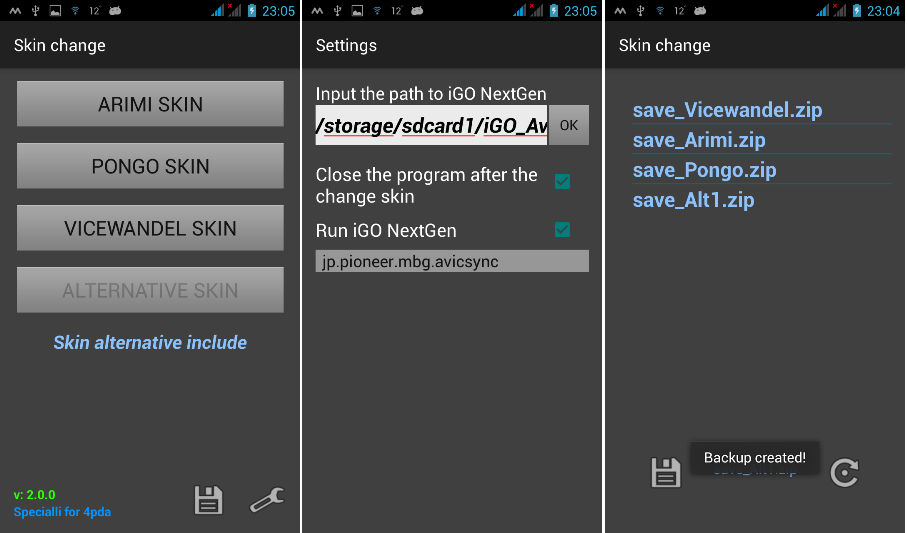
Skin Change V 2.0.0
Update SkinChange.Apk Neoss75 (Thanks to him)
What's New
- Backup / Restore added from the backup folder
- Fixed horizontal orientation
-Possibility to have a fifth skin: Alternative Skin 3.
The backup is stored in the Backup folder in the folder with the installed program, the backup itself as a zip archive. A backup of the folder of the currently activated skin is created and restored, as indicated by the registration. Creating a backup is fast, so the progress bar did not do it, and unpacking it takes a little longer, so progress is made. The backup folder does not need to be deleted (and it is important not to delete it or there will be an error), during the restore all files will be replaced.
Spoiler: Pics
Spoiler: Hide
RegardsLast edited by LouBouha; 11th March 2020 at 08:50 AM. Reason: Add Pictures
GPS: TomTom ONE
Smartphone: THL T11 Android 4.2.2 Resolution 720x1280
Sygic 14.3.4 IGO Primo 9.6.29.636868 Skins : Doupas V9.0h , Dimka/Frontzosd


 Reply With Quote


Bookmarks