
 Likes: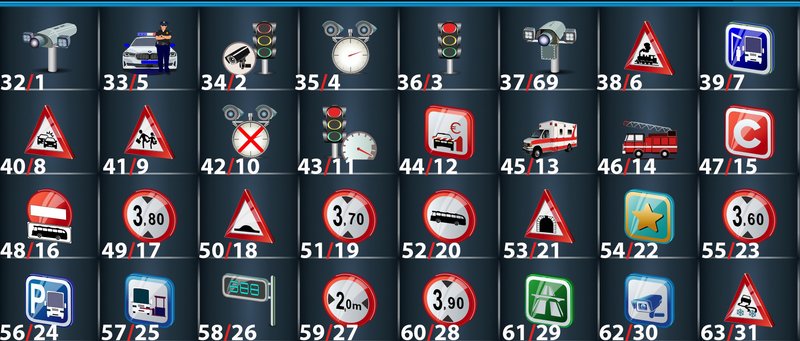

R_LINK-2 speedcam.txt for skin patch v1.2-1.5
OSC base
VB Full
Spoiler: VB Full
R_Link_2_VB Full speedcam.txt
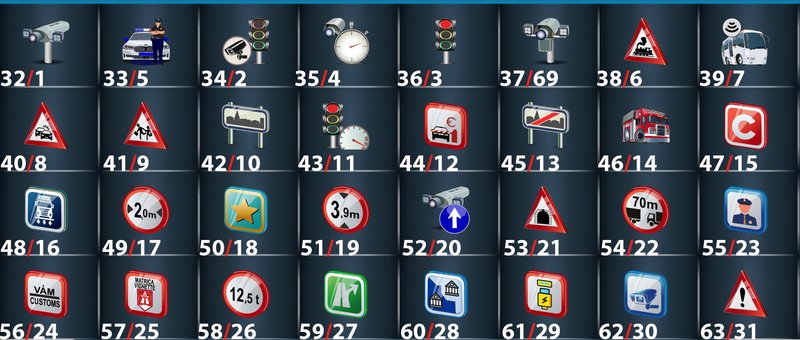
(32 Speed Camera - Speed Camera in the back), (33 Mobile Speed Camera),
(34 Built-in Camera), (37 Speed multi control - Speed multi control in the back),
(36 Red Light), (43 Red Light and Speed Camera),
(54 Average Speed Camera), (46 Average Speed Camera - Finish),
(47 Congestion Charge Zone), (39 Bus Lane Camera - Bus Lane in the back),
(49 Fixed Mobile Camera - Fixed Mobile in the back),
(55 Post police), (56 Stop Control Camera), (62 SC camera and fake),
(38 Railway crossing),
(40 High Accident Zone), (41 School Zone), (42 Town Entry Point),
(44 Toll Booth), (45 Town End), (48 Give way), (50 Speed Breaker),
(51 Bad road), (52 Dangerous turn), (53 Tunnel),
(57 Overtaking is prohibited), (58 Speed limit),
(61 Pedestrian crossing), (63 Dangerous Area),
______________
VB Pro
Spoiler: VB Pro
R_Link_2_VB Pro speedcam.txt
(32 Speed Camera - Speed Camera in the back), (33 Mobile Speed Camera),
(34 Built-in Camera), (37 Speed multi control - Speed multi control in the back),
(36 Red Light), (43 Red Light and Speed Camera),
(54 Average Speed Camera), (46 Average Speed Camera - Finish),
(47 Congestion Charge Zone), (39 Bus Lane Camera - Bus Lane in the back),
(49 Fixed Mobile Camera - Fixed Mobile in the back),
(55 Post police), (56 Stop Control Camera), (62 SC camera and fake),
______________
Full
Spoiler: Full
R_Link_2_Full speedcam.txt (without notifications in the back)
(32 Speed Camera ), (33 Mobile Speed Camera),
(34 Built-in Camera), (37 Speed multi control),
(36 Red Light), (43 Red Light and Speed Camera),
(54 Average Speed Camera), (46 Average Speed Camera - Finish),
(47 Congestion Charge Zone), (39 Bus Lane Camera),
(49 Fixed Mobile Camera),
(55 Post police), (56 Stop Control Camera), (62 SC camera and fake),
(38 Railway crossing),
(40 High Accident Zone), (41 School Zone), (42 Town Entry Point),
(44 Toll Booth), (45 Town End), (48 Give way), (50 Speed Breaker),
(51 Bad road), (52 Dangerous turn), (53 Tunnel),
(57 Overtaking is prohibited), (58 Speed limit),
(61 Pedestrian crossing), (63 Dangerous Area),
[Only registered and activated users can see links. ]
Welcome guest, is this your first visit? Click the "Create Account" button now to join.


Results 11 to 20 of 31
-
27th March 2024, 08:51 AM #11SUPER MODERATOR

![FAQ iGO encodings and speedcam.txt [compatibility]](http://i.imgur.com/93Gle9H.png)
![FAQ iGO encodings and speedcam.txt [compatibility]](https://www.gpspower.net/images/ranks/Medals/52_50377.gif)
![FAQ iGO encodings and speedcam.txt [compatibility]](https://www.gpspower.net/images/ranks/Medals/52_50358.gif)
![FAQ iGO encodings and speedcam.txt [compatibility]](https://www.gpspower.net/images/ranks/Medals/piaoliang12.gif)


- Join Date
- Oct 2019
- Location
- Belarus
- Posts
- 3,923
- Rep Power
- 2815

IT Bus - UX speedcam
Spoiler: IT Bus
IT base
1 - (32 Speed Camera), 5 - (33 Mobile Speed camera),
2 - (34 Built-in Speed Camera), 4 - (35 Average Speed Camera),
3 - (36 Red light Camera), 6 - (38 Railway Crossing),
8 - (40 High Accident Zone), 9 - (41 School Zone),
13 - (45 Hospital, Ambulance), 14 - (46 Fire Station),
15 - (47 Congestion Charge Zone"ZTL"), 18 - (50 Speed Breaker),
21 - (53 Tunnel), 26 - (58 Speed Boards), 29 - (61 Highway TypeA),
30 - (62 SC Camera), 31 - (63 Dangerous Road Winter)
OSC base
iGO Mob speedcam - code 5
5 - (33 Mobile Speed Camera)
iGO 4w speedcam - code 1,2,3,4 NOMob
1 - (32 Speed Camera),
2 - (34 Built-in Camera),
3 - (36 Red Light),
4 - (35 Average Speed Camera + Finish 5 km h)
SCDB base NOMob
1 - (32 Speed Camera),
2 - (34 Built-in Camera),
3 - (36 Red Light),
4 - (35 Average Speed Camera)
SCDB base Code 5
5 - (33 Mobile Speed Camera)
POI base NOMob
1 - (32 Speed Camera),
2 - (34 Built-in Camera),
3 - (36 Red Light),
4 - (35 Average Speed Camera)
POI base Code 5
5 - (33 Mobile Speed Camera)
OSC base OEM, POI base OEM, SCDB base OEM (maximum radar azimuth adaptation is relatively expensive)
1 - (32 Speed Camera),
2 - (34 Built-in Camera),
3 - (36 Red Light),
4 - (35 Average Speed Camera)Last edited by Andrey Form; 19th October 2026 at 02:34 PM.

[Only registered and activated users can see links. ]
[Only registered and activated users can see links. ]
[Only registered and activated users can see links. ]
[Only registered and activated users can see links. ]
[Only registered and activated users can see links. ]
[Only registered and activated users can see links. ]
©AF_2020-26
-
27th March 2024, 09:40 AM #12SUPER MODERATOR
- Join Date
- Oct 2019
- Location
- Belarus
- Posts
- 3,923
- Rep Power
- 2815
Last edited by Andrey Form; 29th March 2024 at 09:16 AM.
[Only registered and activated users can see links. ]
[Only registered and activated users can see links. ]
[Only registered and activated users can see links. ]
[Only registered and activated users can see links. ]
[Only registered and activated users can see links. ]
[Only registered and activated users can see links. ]
©AF_2020-26
-
29th March 2024, 08:59 AM #13SUPER MODERATOR
- Join Date
- Oct 2019
- Location
- Belarus
- Posts
- 3,923
- Rep Power
- 2815
НUN Truck - UX speedcam
Spoiler: НUN Truck
iTruck
OSC base
iGO Mob iTruck speedcam - code 5
5 - (33 Mobile Speed Camera)
iGO 4w iTruck speedcam - code 1,2,3,4 NOMob
1 - (32 Speed Camera),
2 - (34 Built-in Camera),
3 - (36 Red Light),
4 - (35 Average Speed Camera + Finish 5 km h)
SCDB base iTruck NO Mob
1 - (32 Speed Camera),
2 - (34 Built-in Camera),
3 - (36 Red Light),
4 - (35 Average Speed Camera)
SCDB base iTruck Code 5
5 - (33 Mobile Speed Camera)
POI base iTruck NO Mob
1 - (32 Speed Camera),
2 - (34 Built-in Camera),
3 - (36 Red Light),
4 - (35 Average Speed Camera)
POI base iTruck Code 5
5 - (33 Mobile Speed Camera)
OSC base Truck OEM, POI base Truck OEM, SCDB base Truck OEM (maximum radar azimuth adaptation is relatively expensive)
1 - (32 Speed Camera),
2 - (34 Built-in Camera),
3 - (36 Red Light),
4 - (35 Average Speed Camera)Last edited by Andrey Form; 19th October 2026 at 02:35 PM.
[Only registered and activated users can see links. ]
[Only registered and activated users can see links. ]
[Only registered and activated users can see links. ]
[Only registered and activated users can see links. ]
[Only registered and activated users can see links. ]
[Only registered and activated users can see links. ]
©AF_2020-26
-
9th August 2025, 01:19 PM #14SUPER MODERATOR
- Join Date
- Oct 2019
- Location
- Belarus
- Posts
- 3,923
- Rep Power
- 2815
Updated data due to changes in the composition of speedcam.txt published on the gpspower forum
09.08.2025
[Only registered and activated users can see links. ]
[Only registered and activated users can see links. ]
[Only registered and activated users can see links. ]
[Only registered and activated users can see links. ]
[Only registered and activated users can see links. ]
[Only registered and activated users can see links. ]
©AF_2020-26
-
2nd September 2025, 12:59 PM #15SUPER MODERATOR
- Join Date
- Oct 2019
- Location
- Belarus
- Posts
- 3,923
- Rep Power
- 2815

FAQ speedcam for Trucks
This topic is from 26th March 2024 had to decide on the use speedcam.txt, for each UX - speedcam corresponds speedcam.txt (classification by coding), that's why the topic is called
The main point is that the pongo skin in all versions comes with encoding VB this is a post #2, if you downloaded the assembly iGO, on the forum, in social networks with the note assembly with skin pongo, the question must always arise, what kit does the author of the assembly offer?, Let's look at a more common type, with a note: "For Truck".FAQ iGO encodings and speedcam.txt [compatibility]
Look in the folder UX and content/speedcam.
UX speedcam encoding VB skin pongo:
speedcam_mod_vb.zip или speedcam_mod_vb_64.zip
Corresponds to encodingVB
content/speedcam:
Skin32w_Full_VB_HRV.txt
NO corresponds to the encoding VB
content/speedcam:
Skin32w_Truck_NOMob_HRV.txt, Skin32w_iTruck_NOMob_HRV.txt, Skin32w_Truck_HRV.txt, Skin32w_iTruck_HRV.txt
For speedcam Truck or iTruck corresponds to the encoding UX speedcam with abbreviation NC - #4, 5
speedcam_mod_nc.zip или speedcam_mod_nc_64.zip
For all assemblies published on the Internet, Assembly authors, please pay attention to the contents of the folders UX и content/speedcam, files must comply with encoding.
Where to download UX speedcam in encoding NC:
[Only registered and activated users can see links. ] - for nextgen
[Only registered and activated users can see links. ] - for nextgen 64bit
Attention!!! set speedcam.zip - speedcam_mod.zip must be of the same version Mod AF.Last edited by Andrey Form; 2nd September 2025 at 01:04 PM.
[Only registered and activated users can see links. ]
[Only registered and activated users can see links. ]
[Only registered and activated users can see links. ]
[Only registered and activated users can see links. ]
[Only registered and activated users can see links. ]
[Only registered and activated users can see links. ]
©AF_2020-26
-
18th September 2025, 10:08 AM #16SUPER MODERATOR
- Join Date
- Oct 2019
- Location
- Belarus
- Posts
- 3,923
- Rep Power
- 2815
FAQ explanation for the application for iGO nextgen - iGO nextgen Luna
For all countries:
-Learn more about the medium speed cameras
for the correct warning "medium speed control zone" there must be two cameras.:
- the first one (the beginning of the zone) with a measurable limit, for example 70 km/h
- second (end of the zone) with a speed limit of 5 km/h,
both cameras are directed against traffic; in those areas where speed is controlled by both directions, there should be four cameras (two opposite ones);
1. For the UK and other countries with miles iGO nextgen including the version iGO_Israel_9.18.27.955559
-Learn more about the medium speed cameras
for the correct warning "medium speed control zone" there must be two cameras.:
- the first one (the beginning of the zone) with a measurable limit limit, for example 30 mph
- second (end of the zone) with a speed limit of 3 mph,
both cameras are directed against traffic; in areas where speed is controlled by both directions, there should be four cameras (two opposite ones);
Speed speedcam.txt It should be miles away
2. For the UK and other countries with miles iGO nextgen:
iGO_Luna_9.35.2.153810
iGO_Israel(Luna)_9.35.2.263562
iGO_Avic_v9.35.2.227616
iGO_Basar_9.35.2.262743
iGO World v9.35.2.252374
-Learn more about the medium speed cameras
for the correct warning "medium speed control zone" there must be two cameras.:
- the first one (the beginning of the zone) with a measurable speed limit, for example 64 km/h
- second (end of the zone) with a speed limit of 5 km/h,
both cameras are directed against traffic; in those areas where speed is controlled by both directions, there should be four cameras (two opposite ones);
Speed speedcam.txt It should be in kilometers (The program iGO converts it into miles by itself.)
For the UK by по spc:
United_Kingdom_HERE_In_MPH.spc speed in miles (MPH), this means that this file should be used for iGO nextgen including the version iGO_Israel_9.18.27.955559
United_Kingdom_TomTom.spc speed in kilometers, this means that this file should be used for
iGO nextgen:
iGO_Luna_9.35.2.153810
iGO_Israel(Luna)_9.35.2.263562
iGO_Avic_v9.35.2.227616
iGO_Basar_9.35.2.262743
iGO World v9.35.2.252374
(The program iGO converts it into miles by itself.)
[Only registered and activated users can see links. ]Last edited by Andrey Form; 18th September 2025 at 11:36 AM.
[Only registered and activated users can see links. ]
[Only registered and activated users can see links. ]
[Only registered and activated users can see links. ]
[Only registered and activated users can see links. ]
[Only registered and activated users can see links. ]
[Only registered and activated users can see links. ]
©AF_2020-26
-
29th October 2025, 11:06 AM #17SUPER MODERATOR
- Join Date
- Oct 2019
- Location
- Belarus
- Posts
- 3,923
- Rep Power
- 2815
In any Pongo skin, you will find in the content/speedcam/ folder - you will find 2 UK files
you need to choose one of them,Skin32w_Full_VB_GBR.txt - mph
Skin32w_Full_VB_GBR_kmh.txt
For versions
- Skin32w_Full_VB_GBR_kmh.txtiGO_Luna_9.35.2.153810
iGO_Israel(Luna)_9.35.2.263562
iGO_Avic_v9.35.2.227616
iGO_Basar_9.35.2.262743
iGO World v9.35.2.252374
latest version in miles iGO_Israel_9.18.27.955559 - For these versions the file
- Skin32w_Full_VB_GBR.txt
In the next release of speedcam, the file will be called
- Skin32w_Full_VB_GBR_mph.txt
for ease of selection
[Only registered and activated users can see links. ]
[Only registered and activated users can see links. ]
[Only registered and activated users can see links. ]
[Only registered and activated users can see links. ]
[Only registered and activated users can see links. ]
[Only registered and activated users can see links. ]
©AF_2020-26
-
12th November 2025, 09:36 AM #18SUPER MODERATOR
- Join Date
- Oct 2019
- Location
- Belarus
- Posts
- 3,923
- Rep Power
- 2815
FAQ iGO OEM
I'm trying to understand the situation with the first five iGO codes. Let's say the 1.2.3.4.5 encoding is the default for all iGOs since the program's inception. Let's call this phenomenon "iGO OEM." This also applies to all iGO-based programs, such as Becker and other iGO-based ones. If you don't have iGO Primo, which was released in 2010, but an older version of iGO, such as iGO8 or iGO8.3, then your speedcam.txt is iGO OEM. Also, if you iGO OEM, you can't use spc files from HERE or TomTom. Because spc is iGO Primo's encoding, you'll get unreliable notifications.
Now, regarding usage, how many users are still using older hardware? I estimate their number is approximately 0.1% of the total iGO user base, as those using iGO Primo since 2010, newer Android devices, and iGO Primo Nextgen.
Now let's talk about OEM for iGO Primo. So, iGO Primo is a workaround for iGO's bugs, a different approach to route building, and a different coding principle. All radar coding to this day is based on iGO Primo. You can safely use spc, as this is iGO Primo's encoding.
"OEM iGO Primo" has a coding system with a 32-bit repetition rate. [Only registered and activated users can see links. ] and so on up to 992.
Now about my publications: Mod AF, speedcam.txt. All files are created for iGO Primo users. Let's call this OEM iGO Primo. We've covered two concepts: OEM iGO and OEM iGO Primo. If you're an iGO Primo user, you don't need to look for special speedcam.txt files for OEM iGO with encoding 1.2.3.4.5.
Your navigator supports at least 16 notification types, and up to 32 notification types when using a skin. Older iGO Primo skins 24, 25, or 27 notification types, depending on the skin author's efforts. Mod AF - 32 types as in iGO Primo Nextgen.
History of iGO
Spoiler: +++++Last edited by Andrey Form; 12th November 2025 at 09:59 AM.
[Only registered and activated users can see links. ]
[Only registered and activated users can see links. ]
[Only registered and activated users can see links. ]
[Only registered and activated users can see links. ]
[Only registered and activated users can see links. ]
[Only registered and activated users can see links. ]
©AF_2020-26
-
12th November 2025, 12:49 PM #19SUPER MODERATOR
- Join Date
- Oct 2019
- Location
- Belarus
- Posts
- 3,923
- Rep Power
- 2815
Ai
What does "artificial intelligence" think about this?
FAQ Ai - iGO OEM, iGO OEM Primo
Speedcam.txt files in iGO OEM (often corresponding to earlier versions such as iGO 8) and iGO Primo OEM have the same basic format and are generally interchangeable.
Basic Principles and Format
The basic principle of working with the speedcam.txt file in both versions is to use a simple text format with delimiters (usually the pipe symbol |). Each line in the file describes one point of interest (POI) or camera and contains a set of parameters:
X|Y|TYPE|SPEED|DIRECTION|...
Where:
X and Y are the geographic coordinates (longitude and latitude).
TYPE is the type of camera or warning (e.g., fixed camera, dangerous spot, railway crossing).
SPEED is the speed limit for the given point.
DIRECTION is the camera's direction of action (optional).
Differences
The key difference lies not in the file format itself, but in the functionality of the iGO Primo OEM software, which supports a wider range of alert types (categories) compared to older versions of iGO OEM.
iGO OEM (older versions): Supports basic camera and hazard types (e.g., fixed radars).
iGO Primo OEM: Adds support for additional POI categories, such as railway crossings, fire stations, school zones, etc.
Therefore, the speedcam.txt file for iGO Primo OEM may contain lines with new TYPE values that will not be recognized or used in older versions of iGO OEM. However, basic camera types will work in both versions.
It is important for users to ensure that the database they are using is compatible with their region and software versions.

Last edited by Andrey Form; 12th November 2025 at 01:34 PM.
[Only registered and activated users can see links. ]
[Only registered and activated users can see links. ]
[Only registered and activated users can see links. ]
[Only registered and activated users can see links. ]
[Only registered and activated users can see links. ]
[Only registered and activated users can see links. ]
©AF_2020-26
-
16th December 2025, 04:22 PM #20SUPER MODERATOR
- Join Date
- Oct 2019
- Location
- Belarus
- Posts
- 3,923
- Rep Power
- 2815

Autonomous radars in France
Autonomous radars
[Only registered and activated users can see links. ]
Despite the fact that these are mobile trailers, radar databases interpret them differently. Some classify them as stationary radars, others as mobile.
So, what and where?
SCDB - classifies trailers as stationary radars, code 1.
7.246300,43.690970,1,50,0,0
POI Base - classifies trailers as mobile radars, code 5.
7.246661,43.691097,5,50,1,243
OSC - classifies trailers as stationary radars, code 1.
7.246634,43.691053,1,50,1,242
* OSC - In 2026, there will be changes. New classification of trailers - code 5.
info
Radar Classification in France
The main types of radars used in France include:
1. Fixed Radars (Radars Fixes)
These are classic cameras that are permanently installed in specific locations (usually on supports along the side of the road or above the road). They are designed to monitor speed in a specific area or at a point where a high accident rate has been recorded.
Operating Principle: They record the instantaneous speed of a vehicle. If the speed limit is exceeded, a photograph of the license plate is automatically taken.
Notification: Fixed radar locations are usually marked with warning signs.
2. Mobile Radars (Radars Mobiles)
These radars are used by police and gendarmerie while moving or when a patrol car is parked on the side of the road. They are less visible than fixed radars.
"New Generation" Mobile Radars (ETM): These are systems built into unmarked (civilian) vehicles operated by both law enforcement and private companies. They can measure the speed of oncoming and following traffic while the patrol car is moving through traffic, using an invisible infrared flash.
3. Autonomous Trailer-Mounted Radars (Radars Autonomes / Radars Chantiers)
These radars are often called "construction site cameras." They are large, portable units mounted on a trailer that can be quickly moved from one location to another.
Application: They are used temporarily, primarily in roadwork zones or areas with altered traffic patterns, where installing a permanent radar is impractical.
Feature: They can operate autonomously for long periods.
4. Tower Radars (Radars tourelles)
This is one of the latest developments, actively implemented in France since 2018. Visually, they resemble tall cylindrical "towers."
Multifunctionality: These modern cameras, using lidar technology, are capable of monitoring up to ten vehicles simultaneously in multiple lanes and in both directions of travel.
Recorded Violations: In addition to speeding, they can record other violations such as running a red light, failing to keep a safe distance, using a phone while driving, and not wearing a seatbelt.
Additional types by functionality:
Sectional Radars (Radars tronçons / de vitesse moyenne): Measure the average speed of a vehicle on a specific section of road between two points, rather than the instantaneous speed at a single point.
Red Light/Intersection Radars (Radars feux rouges / Radar passage à niveau): Specially designed to record driving through red lights or railroad crossings.
"Pedagogical" radars (Radars pédagogiques): Non-penalizing devices that display the driver's current speed (usually in green or red) to inform and encourage compliance, but do not issue fines.Last edited by Andrey Form; 16th December 2025 at 04:29 PM.
[Only registered and activated users can see links. ]
[Only registered and activated users can see links. ]
[Only registered and activated users can see links. ]
[Only registered and activated users can see links. ]
[Only registered and activated users can see links. ]
[Only registered and activated users can see links. ]
©AF_2020-26



Bookmarks