Welcome guest, is this your first visit? Click the "Create Account" button now to join.



 Likes:
Results 1 to 10 of 12
-
23rd September 2015, 11:01 AM #1Junior Member


- Join Date
- Sep 2015
- Location
- Australia
- Posts
- 6
- Rep Power
- 0
 Purchased a car, it come with aftermarket head unit incl. GPS Navigation System
Hi All,
I just purchased a car second hand, and the previous owner installed a Blaupunkt Head Unit, I believe the model is called 'New York 800'.
I have read through the instruction manual and done an initial post on this forum to work out how to narrow down my search for information, which has lead me to the iGO section of this forum.
I am trying to find a little more about my system, and how to upgrade maps etc (it is currently > 2 years old).
Basically I am looking to see if it is even possible to find an up to date Australian map (without paying the US$120), and a tutorial on how to go about updating.
I have been told I need to switch to a 'fixed' version of the software (not sure what this means).
Any tips appreciated, I keep searching for New York 800 and I believe that is the head unit brand, and not the mapping brand etc. Is there a trick to learning what software is currently installed on the head unit?
Cheers
-
23rd September 2015, 11:26 AM #2Master


- Join Date
- Jun 2010
- Location
- Hell
- Posts
- 1,983
- Rep Power
- 1213
-
23rd September 2015, 11:37 AM #3Junior Member
- Join Date
- Sep 2015
- Location
- Australia
- Posts
- 6
- Rep Power
- 0
Thanks janch, I have just read that thread, seems straight forward, but I am left with some questions.
The other thread says the below:
Rename folder Primo to RTNavi and Primo.exe to mobilenavigator.exe. Proper sys for Blaupunkt NY 830 in attachment..sys.txt
Just to break it down for a n00b like me,
first step - rename the folder on my microSD from the current name 'Primo' to be 'RTNavi'
second step - rename 'Primo.exe' to 'mobilenavigator.exe'
third step - find sys.txt and overwrite with the attached file? ([Only registered and activated users can see links. ])
Does it matter what my current version is?
Where abouts do I download the latest maps from?
Thanks again for the assistance.
-
23rd September 2015, 11:40 AM #4Junior Member
- Join Date
- Sep 2015
- Location
- Australia
- Posts
- 6
- Rep Power
- 0
I just looked on my SD card and noticed that the folder on my SD is already called RTNavi, and the exe is mobilenavigator.exe
Is this OK? Does this just mean I have less work to do in order to update my maps?
-
23rd September 2015, 04:05 PM #5Master
- Join Date
- Jun 2010
- Location
- Hell
- Posts
- 1,983
- Rep Power
- 1213
Not so easy..The thing is you need to completely swap your current original iGO primo version on your SD card with the "fixed" (crac*ed) iGO primo version, otherwise new maps won't work (licence issues). So you need to make a full backup of your original SD card first, than you can format it. Next step is to download iGO primo which will be your new navigation on your SD card and it will accept new maps. To make things easier I have prepared everything for you. It's fully configured for your Blaupunkt New York. You have download link on private. I could share it here in public but it's a private dropbox link so I don't want to risk my dropbox account as I was already warned once..I hope moderators will understand

When you'll have new iGO primo version on your SD card, than just add your preferred maps. You can find it in map section.
-
23rd September 2015, 08:58 PM #6Junior Member
- Join Date
- Sep 2015
- Location
- Australia
- Posts
- 6
- Rep Power
- 0
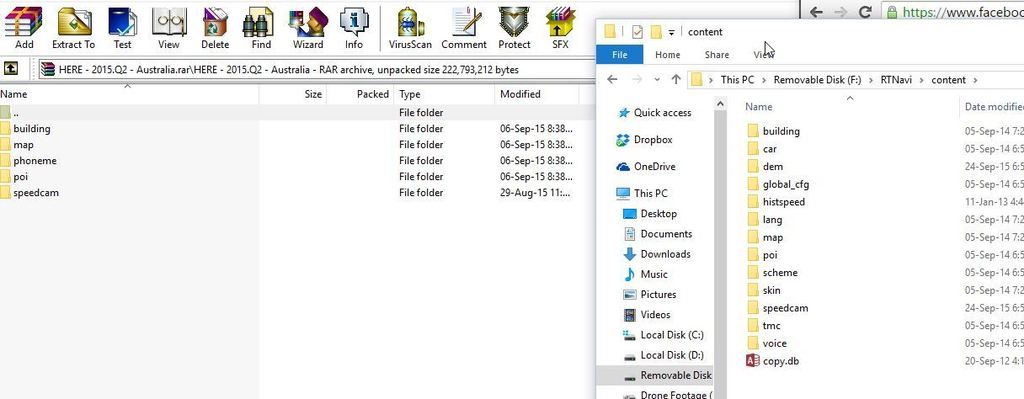
Hi Janch, thanks very much for your help, I have downloaded both the file from your PM, and a HERE map from he maps page. Just one last question I think.
The RAR file which contains the map (seen on left of screenshot) has the same folder names as several folders from the image you supplied. Do i simply extract the files from the HERE map overwriting the folders currently on my SD card?
Thanks
-
23rd September 2015, 09:43 PM #7Junior Member
- Join Date
- Sep 2015
- Location
- Australia
- Posts
- 6
- Rep Power
- 0
Ok I think the above has worked for me, I overwrote the files on the RHS with the files from the RAR file on the LHS of the above screenshot.
I now need to download an Australian voice that is capable of reading street names, as it seems I have lost this functionality now. Is there a trick to this process? A particular file I need to look for?
Thanks for your help once again.
CheersLast edited by someevil; 23rd September 2015 at 09:49 PM.
-
23rd September 2015, 11:46 PM #8Garmin/GPS Systems GMod.


- Join Date
- Aug 2011
- Location
- Oz.
- Posts
- 6,802
- Rep Power
- 2568
Safety is paramount so it's totally understandable. The main aim is to help the OP which is achieved by your PM to him janch, but it's also great if we can achieve that aim and additionally find a way to help others safely as well as someevil. One way is to use an anonymous hoster site [e.g. zippyshare.com, 1fitchier.com, bin.ge] and upload the password-protected files via an free vpn or proxy which is also anonymous [no membership or cc details req'd], uploads will be slow but safe. Post the link behind [Spoiler] and [Hide] tags then share an uncommon password only by PM with users, but not new or low-count post members, at your discretion. Using an unguessable password should then be safe enough i think. But they're your files so it's your call and absolutely no pressure intended. Great work by you either way mate. Originally Posted by janch
 'Thanking Posts' are banned. To thank someone, and/or to see hidden links and content, use the [Only registered and activated users can see links. ] button below left of the helpful post then refresh your browser [F5 key]. 'Thanking Posts' are banned.
Please don't spam. Posts serving no purpose other than to thank or to ask about hidden links are trashed or deleted, it's GPSPower's policy under [Only registered and activated users can see links. ]. Please don't spam.
[Only registered and activated users can see links. ] should make their first post as a new Intro Thread in [Only registered and activated users can see links. ].
-
24th September 2015, 12:53 PM #9Master
- Join Date
- Jun 2010
- Location
- Hell
- Posts
- 1,983
- Rep Power
- 1213
Neil, you really know how to motivate people..That's great
so here is the link for "my" iGO primo Blaupunkt branded version which perfectly fits on a following models:
- New York 800/830/835
- Philadelphia 835
- Chicago 600
- San Diego 530
check the readme file inside!
notes:
- this version is a hybrid of a iGO primo version (9.6.13.405512) combined with the original Blaupunkt ux skins;
- on new models New York 845 and Philadelphia 845 this version doesn't work properly (no sound at all). You need different iGO version
- if you don't like default Blaupunkt skin, you can delete all files inside the UX folder and the result is default iGO primo skin.
- for San Diego 530 you need to change values in [gps] section in the sys.txt file otherwise Primo won't recognise gps hardware. Using "Auto" values also won't help, that's why you need to specify correct port/baud. These are the correct values:
[gps]
port=1
baud=57600
set_messages=0
sent_init_type=0
background_navigation=1
DL link:
[Only registered and activated users can see links. ]
rar pass: naviguru
Lang & voice files
[Only registered and activated users can see links. ]
TTS:
[Only registered and activated users can see links. ]
Maps:
[Only registered and activated users can see links. ]
enjoy
Last edited by janch; 24th September 2015 at 01:10 PM.
-
25th September 2015, 01:51 AM #10Junior Member
- Join Date
- Sep 2015
- Location
- Australia
- Posts
- 6
- Rep Power
- 0
Hi Janch, Originally Posted by janch
I tried to download the english TTS file from your shared hyperlink, but it seems to be a dead link.
So I can understand, what file am I looking for in my instance? Is there a specific version I need to look for? (in English obviously)

 Reply With Quote

Bookmarks