
 Likes:
 ![G7To Win Config]](https://i.postimg.cc/hPdFh5vw/G7To-Win-Config.jpg] "G7To Win Config]")

 Reply With Quote
Hi Neil,
i have a bricked garmin 1350 unit, i downloaded g7towin, set it up to USB com port and tried to connect the unit in preboot mode to get the gps HWID.
I get an error message that says "Failed to get USB handle". Any advice to get over this ?
Thanks
Welcome guest, is this your first visit? Click the "Create Account" button now to join.


Results 1 to 10 of 12
-
4th January 2016, 02:42 AM #1Garmin/GPS Systems GMod.


- Join Date
- Aug 2011
- Location
- Oz.
- Posts
- 6,797
- Rep Power
- 2568
 How to find your Garmin Device's HWID
Why should you know your unit's HWID [Hardware Identification]? Firstly, it enables you to be certain that you are about to flash the correct Unit Software [firmware] to your device. This is particularly important when flashing an RGN file via Updater.exe where an incorrect file may 'brick' the device. So it's essential when undertaking any firmware manipulation such as patching or cross-flashing that the correct HWID firmware be used. Also for any 'modding' that the correct boot.bin be used if it's intended that the existing HWID be unchanged, for example US/EU unit flashed with Asian firmware. It is potentially devastating to use an inappropriate ldr.bin [boot.bin] when flashing via an SD card. The wrong ldr.bin will overwrite regions 5 [the bootloader] and 43 [the 'starting blocks'/X-Loader]. These regions are protected from being 'flashed' [in the way we can freely flash a logo.bin to rgn16 for instance, or restore rgn41/154] therefore the device might be hard-bricked and if it's then not possible to easily write back to them correctly using the proper ldr.bin/boot.bin or rgn there may be no software based situation. It takes but seconds to cross-check your unit's HWID with that of the firmware/bin file you intend using. Use [Only registered and activated users can see links. ], or for newer devices which may not disclose the HWID in RGN Tool (when it just shows "0" instead of the 4 numerals), use [Only registered and activated users can see links. ] to see HWID in hexadecimal then covert it to decimal. Because you can easily check what HWID is written in the firmware file, do it first and maybe save a lot of grief. If the fw intended to be flashed and the recipient device don't have matching HWIDs then don't even attempt a cross-flash unless they are at least the same [Only registered and activated users can see links. ].
Generally, there are two easy methods to find the HWID in a device which isn't 'bricked', and a third method only accessible in preboot mode:
1. (Use a computer)
Connect in Mass Storage Mode and look in the folder named 'Garmin' for the file 'GarminDevice.xml'. Open it in a text reader [Notepad, Wordpad etc] or any web browser. Search for first instance of '006-B' or just look near the start for this entry:
<PartNumber>006-Bxxxx-00</PartNumber>
The 4 numerals following '006-B' represented above by 'xxxx' show your unit's HWID.
If you have a backup [and you should have one] then just look at that for the XML file.
2. (On the device itself)
Press and hold the Battery Symbol on the main page ['Where To?/View Map'] for ~6 seconds to reach a hidden menu [for some units when on charge, the battery symbol doesn't show so just press where it normally displays].
When the 'SW Ver' page shows, press 'Next'/lower RH corner until you reach a page headed 'Version Information' [some units need only one press, newer units need many presses to get there]. When on 'Version Information' page, press 'Start Test' > 'More'. That will reach the 'Inventory' page and its top 3 lines will show the second horizontal entry as 'Bxxx-00' where 'xxxx' is the HWID. [BTW, the third entry also displays the currently loaded firmware version].
Note that some earlier devices such as nuvi 3xx/6xx series need for the time readout next to the battery symbol to be pressed to enter the hidden menu. They also don't show a 'Start Test' button, so just press 'More' to reach 'Inventory' page.
3. (in preboot/Garmin mode)
You can also find the HWID of any unit [even a unit which is 'bricked'] by using [Only registered and activated users can see links. ] but modern units with visible file system must be first put into [Only registered and activated users can see links. ]. Note that devices displaying "System Software Missing" will have defaulted to preboot mode if soft-bricked.
Spoiler: Configuration Settings of G7ToWin
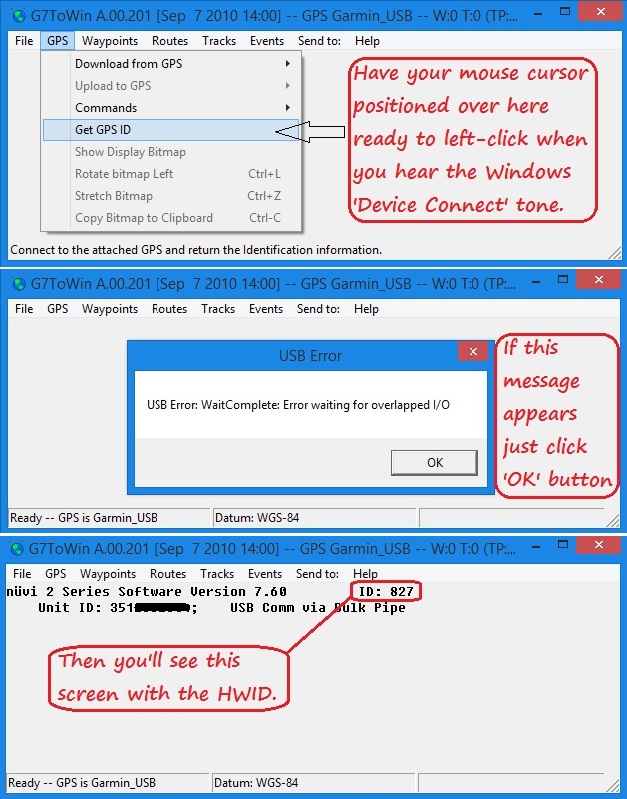
Spoiler: How to get your device information
NOTES:
- Devices such as nuvi 2x5W as shown in the last pic above which have their HWID beginning with "0" (zero) are shown in G7ToWin's GUI as 3-numerals only, i.e. with the leading 0 omitted.
- Legacy units such as older model GPSMAP devices, StreetPilot 27x0/c3x0 etc. which have only flashable regions without a visible file system therefore don't have a GarminDevice.xml file. Specific info on how to reach the hidden menu on many units is here: [Only registered and activated users can see links. ]. Generally for SP 27x0, BMW Navigator III and similar units, pressing the device's 'Menu' button will show the Inventory page once you're reached the hidden menu [you may have to wait a few seconds]. Some early units may not even have an Inventory page, SP 26x0 for instance. Those 'region only' type devices are in a perpetual 'pseudo preboot' or 'Garmin Mode' anyway so the HWID of all of them can very easily be found by connecting to G7ToWin, just like with any other Garmin unit in preboot mode [even if bricked].
'Thanking Posts' are banned. To thank someone, and/or to see hidden links and content, use the [Only registered and activated users can see links. ] button below left of the helpful post then refresh your browser [F5 key]. 'Thanking Posts' are banned.
Please don't spam. Posts serving no purpose other than to thank or to ask about hidden links are trashed or deleted, it's GPSPower's policy under [Only registered and activated users can see links. ]. Please don't spam.
[Only registered and activated users can see links. ] should make their first post as a new Intro Thread in [Only registered and activated users can see links. ].
-
3rd February 2016, 01:08 AM #2Junior Member
- Join Date
- Feb 2016
- Location
- Montreal
- Posts
- 2
- Rep Power
- 0
-
3rd February 2016, 01:24 AM #3Garmin/GPS Systems GMod.
- Join Date
- Aug 2011
- Location
- Oz.
- Posts
- 6,797
- Rep Power
- 2568
Click thru the error message and it'll probably give you the info anyway.
'Thanking Posts' are banned. To thank someone, and/or to see hidden links and content, use the [Only registered and activated users can see links. ] button below left of the helpful post then refresh your browser [F5 key]. 'Thanking Posts' are banned.
Please don't spam. Posts serving no purpose other than to thank or to ask about hidden links are trashed or deleted, it's GPSPower's policy under [Only registered and activated users can see links. ]. Please don't spam.
[Only registered and activated users can see links. ] should make their first post as a new Intro Thread in [Only registered and activated users can see links. ].
-
3rd February 2016, 11:13 AM #4Master


- Join Date
- Feb 2015
- Location
- Europe part
- Posts
- 85
- Rep Power
- 25
lponcelet are you sure you're doing everything right.
1 - Install the Garmin USB driver.
2 - Run g7towin. Clik on "GPS" bar of program and move the cursor to the line "Get GPS ID".
3 - Press and hold upper left corner of the screen.
4 - Insert USB cable in PC then in Nuvi. Still press the corner of the screen.
5 - After 2-4 seconds the Nuvi will connect to PC (you will hear a specific PC sound) and You have to tap on "Enter" on PC. Still press the corner of the screen.
6 - After about 10 seconds you will see an error message. Stop to press the screen and click on "OK". In the program window You will see HWID - "ID=....".Last edited by victor777; 3rd February 2016 at 11:20 AM.
-
1st April 2016, 12:00 AM #5Junior Member
- Join Date
- May 2014
- Location
- The world
- Posts
- 5
- Rep Power
- 0
Hi, I just checked the 'GarminDevice.xml' on my zumo 590 software version 3.20 and the HWID seems to be 1796. I couldn't find any firmware for that code.
I couldn't perform the second method as ater pressing the "next" button twice, the screen shows only colors, no text or buttons.
-
1st April 2016, 01:15 AM #6Garmin/GPS Systems GMod.
- Join Date
- Aug 2011
- Location
- Oz.
- Posts
- 6,797
- Rep Power
- 2568
Right here: [Only registered and activated users can see links. ]
Just keep pressing the lower LH corner, even if 'Next' button is absent pressing the corner will advance to the next page:I couldn't perform the second method as ater pressing the "next" button twice, the screen shows only colors, no text or buttons.
 Originally Posted by Neil
 'Thanking Posts' are banned. To thank someone, and/or to see hidden links and content, use the [Only registered and activated users can see links. ] button below left of the helpful post then refresh your browser [F5 key]. 'Thanking Posts' are banned.
Please don't spam. Posts serving no purpose other than to thank or to ask about hidden links are trashed or deleted, it's GPSPower's policy under [Only registered and activated users can see links. ]. Please don't spam.
[Only registered and activated users can see links. ] should make their first post as a new Intro Thread in [Only registered and activated users can see links. ].
-
1st April 2016, 08:08 AM #7Junior Member
- Join Date
- May 2014
- Location
- The world
- Posts
- 5
- Rep Power
- 0
Hi Neil, thanks for your reply. I kept pressing the low right corner for about ten minutes and nothing happens.
when all the text disappears, the screen becomes red, press the LR corner and then it becomes green, press the LR corner and then blue andthe next click a colour pattern starts moving in the screen. That's all.
No more screens, text or anything, only that pattern moving whatever the number of times I hit the low right corner.
I bought this device two days ago, so, is it possible there's a new "protection"?
I read and checked that unlocked maps don't work on this device. It seems it was from the software version 3.10. So I was trying to get everything sorted out to downgrade it to a lower firmware version or flash the firmware and (as I'm trying to learn how to do it) first step was getting the HWID and back it up. I'm a bit afraid to use a firmware for a different HWID. Does that make any difference?
-
1st April 2016, 10:12 AM #8Garmin/GPS Systems GMod.
- Join Date
- Aug 2011
- Location
- Oz.
- Posts
- 6,797
- Rep Power
- 2568
Don't try to 'guess' the firmware, you'll risk bricking it and that's a 'difference' for sure. Look at the GarminDevice.xml for the unit's HWID or connect in preboot to G7ToWin. Read initial post again..
'Thanking Posts' are banned. To thank someone, and/or to see hidden links and content, use the [Only registered and activated users can see links. ] button below left of the helpful post then refresh your browser [F5 key]. 'Thanking Posts' are banned.
Please don't spam. Posts serving no purpose other than to thank or to ask about hidden links are trashed or deleted, it's GPSPower's policy under [Only registered and activated users can see links. ]. Please don't spam.
[Only registered and activated users can see links. ] should make their first post as a new Intro Thread in [Only registered and activated users can see links. ].
-
3rd April 2017, 12:47 AM #9Member
- Join Date
- Apr 2015
- Location
- México
- Posts
- 15
- Rep Power
- 0
hi when trying to do this in driveluxe 50 when pressing next tab it goes all white and then after touching the screen again it goes so many different colors shapes until it goes to a square colored moving patter and after that it does not stop no mater what I press.
I have to keep pressing power button and it starts normaly. But I do not know if I am doing something incorrect but there is no bootlock, system or any kind of that info
-
4th April 2017, 03:57 AM #10GPSPower Helper


- Join Date
- Apr 2011
- Posts
- 304
- Rep Power
- 305
You have not done anything wrong: DriveLuxe 50 has no inventory. The easiest way to know HWID is through GarminDevice.xml, as explained in post 1 (look in Garmin folder of internal memory).
The standard HWID of this model is 2269, but better check the one of your gps.DriveLuxe50, Nuvi 2689, Etrex 30x, Epix, VivoActive HR.


Bookmarks