
 Likes:

Hmm. I have to first apologize because I've been at this for quite some time and I'm leaving for my vacation early next week and would like to get this sorted out - I just need some extra help, if possible :\
I'll try to quickly go through my situation.
I have a Nuvi 1390T that's stuck on the logo screen
Using file nuvi13xxand14xxseries_GCDFile__630.gcd with GarminCure3 but have the previous versions also downloaded
I've been all over the web and found this forum (thankfully) and have been going through all your steps and resources (currently have 20 tabs open from all the places I've been lol)
I'm at the part were I hold down on the top left corner in updater with my CURE rgn file (quick tip, if you're savvy enough you can associate *.rgn files to updater.exe to be able to open them with a double-click - didn't see that mentioned here anywhere).
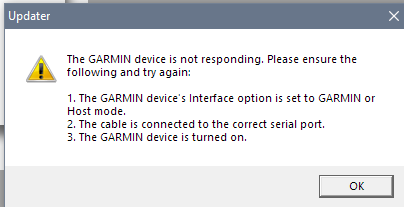
Okay, so I'm holding down and doing the stuff and my device briefly shows up in the USB Port field but when I click on "OK" as instructed, this is what I get:
I've also tried with nuvi13xxand14xxseries_GCDFile__580.gcd thinking it might not work best with the most recent, but still the same thing happens.
Not sure what to do since I'm doing everything as instructed, help?


Welcome guest, is this your first visit? Click the "Create Account" button now to join.


Results 1 to 10 of 124
Threaded View
-
21st June 2018, 06:54 AM #11Junior Member


- Join Date
- Jun 2018
- Location
- Windsor, Ontario, Canada
- Posts
- 2
- Rep Power
- 0


 Reply With Quote

Bookmarks