
 Likes:
 Reply With Quote
Hii All.here my report,
Samsung Galaxy Mega - GT-i9205 ( Not ROOT )
OS - JB 4.2.2
Baseband : I9205XXUCNA3
Locations of Installation :storage/emulated/0/ = ( Internal Devices Storage )
Locations Of APK :storage/emulated/0/ = ( Internal Devices Storage )
Maps :
1. My Navteq / HERE 2014.30 ALL ( Official ) = (Unlocked with Gimg )Working Good Conditions
2. Malfreemap 2014.30 ALL ( Official ) =( Unlocked with Gimg ) Working Good Conditions
3. Malfreemap 141124 - ( Un- Official ) = Not Working @ Applications Crashed - I cant answer this questions,lets the Expert do some experiment
Voice : Stocked - American English = Work ( I do not download the voice yet )
POI : Stocked POI from Malfreemap = Appear but no sound / voice come out,it just display the message at the headline
Junctions View : Navteq / HERE 2014.30 : NOT WORKING - Message Appear " This Model Does Not Support SG/MY JCV Feature " thats meant,other JCV might work
Other Review
=========
1. Applications " HANG " when try to search POI = Cannot go back to Main Menu = Solutions = Forced Close and Restart the Applications
2. Route " Re-Calculate " looks good / Work
3. POI finding - Super Fast
4. User Interface = Very Nice
5. Usability = For me =Not too much confident / Prefer to use Original Garmin Hardware so far
My Curious :
=========
1. How to activate " 1 sec tracklog " by using this applications.Appreciated for any informations because its very usefull for me to record a new track for the Mappers here.
My Conclusions = I want to say many many Thank You for all of you here for share and wasted much hours to teach us about this .
Welcome guest, is this your first visit? Click the "Create Account" button now to join.


Results 111 to 120 of 173
-
2nd December 2014, 04:16 AM #111Junior Member


- Join Date
- Nov 2014
- Location
- arg
- Age
- 56
- Posts
- 9
- Rep Power
- 0

Hi, if i fix it somehow, will post here the solution
 Originally Posted by M109R

-
3rd December 2014, 03:14 PM #112Member +

.jpg "ujang_je's Avatar")
- Join Date
- Dec 2008
- Location
- Malaysia
- Posts
- 39
- Rep Power
- 36
Last edited by ujang_je; 3rd December 2014 at 06:52 PM. Reason: Adding more Information
-
3rd December 2014, 05:07 PM #113Member +

- Join Date
- Oct 2012
- Location
- uk
- Posts
- 92
- Rep Power
- 18
Is it possible to use JCV and 3D files with android version. If so where to place please. Thanks
-
3rd December 2014, 05:57 PM #114Important User


- Join Date
- Nov 2007
- Location
- light side
- Posts
- 15,181
- Rep Power
- 5128
-
3rd December 2014, 06:56 PM #115Member +
- Join Date
- Dec 2008
- Location
- Malaysia
- Posts
- 39
- Rep Power
- 36
Bro Catymag, i'ved tested it with Navteq 2014.30 JCV..message appear " This Model Does Not Support Sg/My JCV Feature ,please contact Garmin Authorised Dealer [Only registered and activated users can see links. ] " ,so others JCV might functions well ,
Tested with Samsung GT-N7100 - Worked Well,others issue same as Samsung Mega GT-i9205
-
3rd December 2014, 07:23 PM #116Important User
- Join Date
- Nov 2007
- Location
- light side
- Posts
- 15,181
- Rep Power
- 5128
-
3rd December 2014, 08:02 PM #117Member +
- Join Date
- Dec 2008
- Location
- Malaysia
- Posts
- 39
- Rep Power
- 36
Sorry Sis...missunderstanding...long time not visit this site...Downloaded ..and will give a try..report soon..TQVM
As i promised.i will tested the JCV with " Garmin Asian JCV Tool " ..so the result is...Its WORKED ...TQ Sis Catymag...
-
3rd December 2014, 08:39 PM #118Member +
- Join Date
- Oct 2012
- Location
- uk
- Posts
- 92
- Rep Power
- 18
Catymag thanks for reply but Im no wiser. Originally Posted by catymag
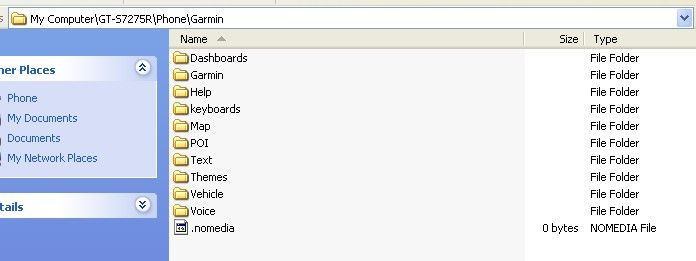
Im using Android 4.2.2. The Garmin folder is installed on root of my phone internal like so.
Spoiler: pic
Now IF jcv will work on my phone I do not know where to place the files. It is a different tree layout to the one you pointed me to.
-
3rd December 2014, 08:50 PM #119Moderator


- Join Date
- Jun 2014
- Location
- Ca
- Posts
- 199
- Rep Power
- 351
Update: Originally Posted by japseye
There should be hidden .System folder with all those folder. If you can't see it, try change Folder Options/View, Show hidden files of Windows Explorer. Inside .System is where I created JCV folder.
Wrong info sorry.
[I]Create a new folder JCV where you see Map, POI, Text...[/I]Last edited by flagmax; 3rd December 2014 at 09:10 PM.
-
3rd December 2014, 08:55 PM #120Member +
- Join Date
- Oct 2012
- Location
- uk
- Posts
- 92
- Rep Power
- 18
Thanks mate. Is there any way of testing these without being mobile - as in driving around.
Can you also please tell me what the G2S file is for and where to place.
Edit:
Thanks for the after info. I see them now. Above display was from PC connected to phone and various folders are hidden.Last edited by japseye; 3rd December 2014 at 09:07 PM.




Bookmarks