
 Likes:

Garmin Street Pilot v.2.33 Android 4.4.x
Street Pilot ported from Asus Padfone 2
[Only registered and activated users can see links. ]Code:Please Login or Register to see the links
Download content:
[Only registered and activated users can see links. ]
Existing bug:
1 Volume Adjustment (adjust volume with phone volume)
2.Battery indicator (solved in modded packages posted below)
To get Address search: You can add a shortcut in menu, go to "Where to" menu and click "add shortcut"
Not retained settings? Get satellites lock and SP will remember settings.
Default map path is / sdcard / Garmin, if you want maps in a different folder, use Hex editor to modify libgarminos.so at 0x13348b8, and change Garmin map path, then with a file manager copy it to / data / data / com.garmin.android.apps.gmobilext / lib / (if this directory is not present create it).
Please copy other .so files to system / lib / and change permissions (as shown in the pic below)
Download:
This post requires you to click the "LIKE this post" button and hit F5 to read this content.
Credits:
wkj25 for this announce [Only registered and activated users can see links. ]
Woodoo, Aven and sosaw forum.
Android 4.3.x version here:
[Only registered and activated users can see links. ]
Originally Posted by lolypop000

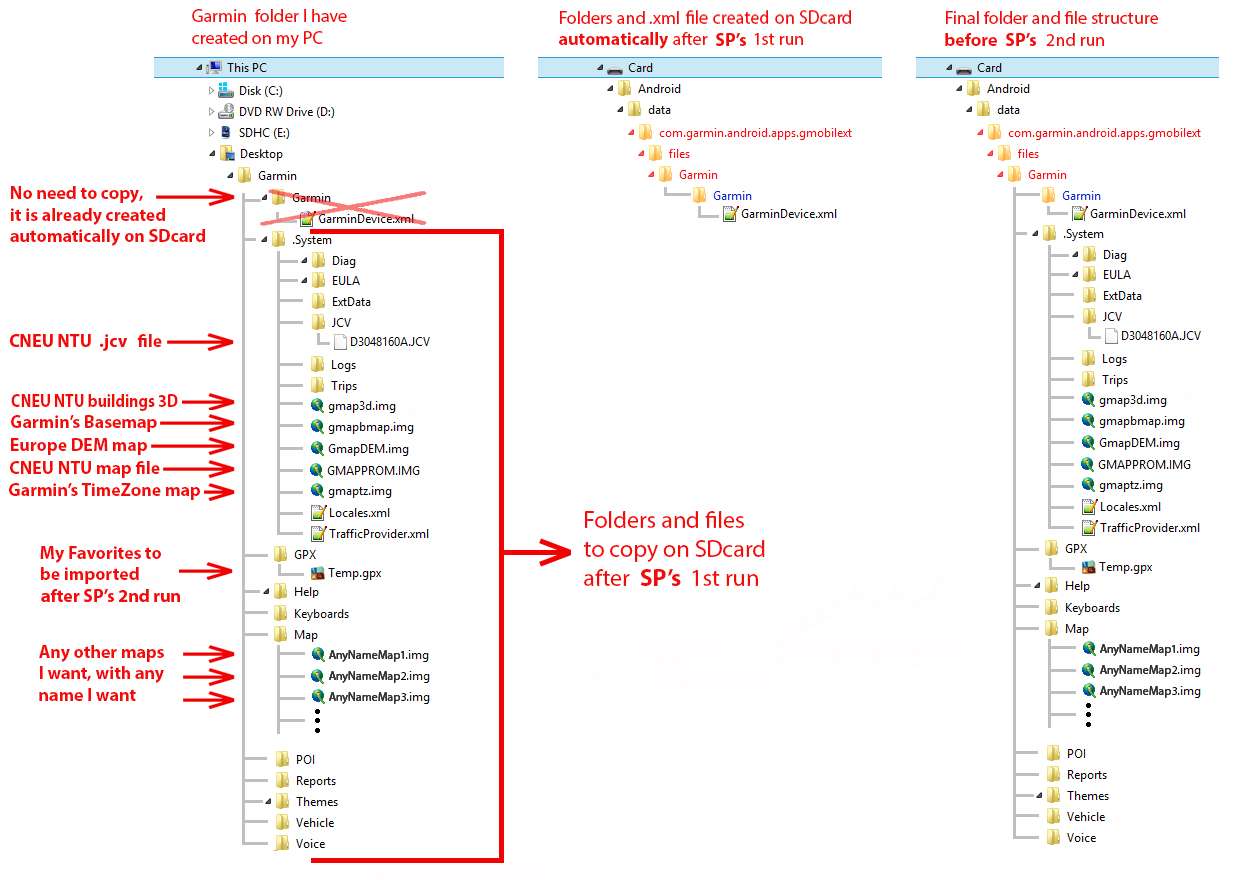
Folders Structure
APK files
NO ROOT version and ROOT version Complete Package
TIPS
"Select a Locale" with Up/Down arrows and NO OPTION (empty) to select from?
Settings -> Navigation -> GPS Simulator
Then select a destination and watch
Path to memory card: 0x13348b8
path to the battery (capacity) icon : 0x1036538
SP version: 0x117e454
IMPORTANT NOTE:
Post please in this thread: [Only registered and activated users can see links. ]
Welcome guest, is this your first visit? Click the "Create Account" button now to join.


Results 351 to 360 of 436
Threaded View
-
8th July 2014, 02:08 PM #1Important User


- Join Date
- Nov 2007
- Location
- light side
- Posts
- 15,182
- Rep Power
- 5127
 Garmin Street Pilot v.2.33 Android 4.4.x

You have to navigate to get to the good.
Galaxy S5 Kitkat 4.4.2 / Nuvi1200->1250 / Nuvi3790T->34xx / Nuvi 2200 / Nuvi 66 / Oregon 600




Bookmarks